

 Add Comment
|
Add Comment
|
 Related Links
|
Related Links
|
 TrackBack
 Related Content
DCR-TRV350 tape wont eject C:32:11
I have a Sony DCR-TRV350 that has stopped working & will not eject the tape. The screen lights up & gives me the 32:11 code but doesn't even make a noise to try ejecting the tape. Sony Customer Service was a joke, he ran me through the same reset routine that I found in the manual & website but still nothing. Now its down to $211 for them to fix it if I send it into them for repair. Any ideas?
Cassandra
Fri, 17 Mar 2006 07:53:43 -0800
I also had this happen, overseas, and a guy fixed it, claiming that I had forced the cover shut to quickly and this breaking something. He fixed it and said it was extremely hard--charged me $60 which is 2-weeks wages here. So American $211 isn't bad comparatively.
David
Sat, 03 Jun 2006 03:25:03 -0700
I had that happen and read to take the battery out then plug it in to the wall and it worked. As soon as I did the tape came out.
Alex
Fri, 07 Jul 2006 20:41:54 -0700
hi
I have C:32:11, casset will not load, tried disconnectin the battery, still no effect..Any ideas please ??
Regards Mike
Mike
Tue, 01 Aug 2006 01:49:32 -0700
I'm getting a similar problem from my TRV130. I put a tape in and it started to go down and about halfway down it stopped and won't come back up, or go down. And the error code C:32:11 appears. I've taken the battery out for a while and put it back in and it did nothing. Any help?
dave
Wed, 23 Aug 2006 21:20:30 -0700
Try these steps:
1. Open the tape cover fully until it clicks open.
2. Turn the camcorder on to "VCR Mode."
3. With the cover still open and the camera in "VCR mode," take out the battery.
4. Put the battery back in--out should pop your tape.
Mike
Mon, 18 Sep 2006 22:35:50 -0700
I finally fixed it!
I had a tape stuck in my DCR-TRV310 Sony Digital8 Camcorder. I removed the fat battery and AC for 3 minutes, re-attached, but that didn't solve the problem. There is a slim "memory" battery that I forgot to remove. So here is some additional information that should help you solve your eject problem (and thus, will fix your C:32:11 and C:32:10 error codes) and will allow you to use your Camcorder again.
I might want to also add that Sony Web Support could not fix the problem over the web, and they wanted me to send it into them for $311.00 to have it repaired (flat rate). With this fix, you should be able to repair your Camcorder yourself in less than 5 minutes with no cost.
1. unplug camcorder AC cord
2. remove fat battery from back of camcorder
3. remove slim battery from under the LCD (it's the size of a nickle coin)
4. wait 2 minutes
5. plug AC into the camcorder
6. flip the camcorder into VTR mode
7. tape should automatically eject
8. viola, drink beer, be merry
If you are successful, send me a friendly email. I'd like to think that this post helps at least one person.
Sincerely,
Toby
camerahacker[atsymbol]tobyfoote.com
Toby Foote
Tue, 17 Oct 2006 21:06:46 -0700
I have the 32:11 error symbol using a TRV-250, it flashes eject but will not eject.
Does anyone know where the "Slim" battery is on this model?
Sony are a bunch of idiots...
Mike
Sun, 03 Dec 2006 11:44:21 -0800
Thanks much. My handycam had C32:11 error, however there was no tape inside and the door would close but the unit would not lower the tape into the camera. So I did a variation of the trick above.
1) Put camera in record more
2) push door shut and hold it shut while removing battery
3) While still holding door shut, reinstall battery.
I had to do it twice, but within 45 seconds it is working fine!
Thanks much and God Bless!
mr e
Tue, 26 Dec 2006 09:55:30 -0800
I tried Dave's approach on my TRV230 and it worked after several tries. But when I place a new tape back in it causes the tape to be pull out of the cassette and becomes twisted. Any clues what's causing this and how to correct the problem?
Nick
Fri, 29 Dec 2006 09:49:51 -0800
Hi , PLEASE help! My camera is a DCR-TRV140 ntsc, and gives me the C.32.11 ERROR and wont eject the tape, now it does not play the video , and apparently does not record over the tape. Thanks
EN757
Tue, 20 Feb 2007 17:28:52 -0800
hey it worked thats insane, I had already bought another camcorder , thanks
RGJ
Wed, 28 Feb 2007 15:32:14 -0800
It worked like a charm!! That's incredible
Saved me a whole lotta searching to get my Sony repaired
C Bennett
Sun, 04 Mar 2007 15:35:16 -0800
Thanks man... u save me.. haha.. thanks a lot!
Eddy
Thu, 08 Mar 2007 00:25:45 -0800
Thanks a lot! Now I can tape my son's birthday party nonetheless!!
Great forum!
Steve
Thu, 08 Mar 2007 22:55:08 -0800
I have the same problem with sony PC-110E (C:32:11)
1. Open the tape cover fully until it clicks open.
2. Turn the camcorder on to "VCR Mode."
3. With the cover still open and the camera in "VCR mode," take out the battery.
4. Put the battery back in--out
It works!
peter
Mon, 12 Mar 2007 17:39:58 -0800
Damn i love you!
you saved my cam! yehaaaaa kikks ass :)
thanx so much
Snakebite
Sat, 24 Mar 2007 05:02:57 -0800
Sony TRV110E cassette got stuck error C:32:?? and battery removal fixed it. Thanks.
tim
Fri, 30 Mar 2007 10:21:14 -0800
I can't believe how easy that was, just took off the battery and plugged it into the wall! Thanks so much!
ray
Wed, 11 Apr 2007 13:36:55 -0700
I have Sony DCR-PC110 Camcoder that tape won't eject with error code C:32:10. It worked just like the way.
1. Open the tape cover fully until it clicks open.
2. Turn the camcorder on to "VCR Mode."
3. With the cover still open and the camera in "VCR mode," take out the battery.
4. Put the battery back in.
5. Turn it off and on.
It works.
Andy
Thu, 12 Apr 2007 00:11:56 -0700
Kindly, I do like to tell you that I bought a SONY HANDYCAM : DCR-HC48E on 31/03/2007. On my first try to operate the camera on, the cassette compartment failed to "come out and open up automatically" as stated in the Operating guide, and a flashing (Eject cassete warning) and error code C:32:11. I cannot figure out the reason for malfunction though it is the first time to use my Handycam, also i did everything per instructions during assembly. The supplied guide tells that these warning messages/ indicators are significant for "Moisture condensation" which I think is not the case, because the camera never placed in humid area, plus I just bought it 10 days ago and the problem exists since that time. Worthy noting that Sony Service Center failed to figure anything out, which I cannot believe it could happen!!
Please can you help me or at least guide me for a way to save my camcorder. I cannot imagine losing my money like so!!
Thanks for your time and efforts if available.
H. Heggo
Thu, 12 Apr 2007 11:36:14 -0700
thanx it works...but thge tape is damaged..i can see only party of the film with no sound.....!!!!
giuseppe
Fri, 13 Apr 2007 20:54:32 -0700
I had the same problem and got the tape to eject. Now I have a new problem! I still have the error message C:32:11 but the compartment door won't stay closed. I repeated off the the above again to no avail. I'm really ticked off because I finally decided to purchase a i.Link cable and now the camcorder won't work.
Nancy
Thu, 26 Apr 2007 12:39:49 -0700
Cannot Close DCR-IP5 tape door
I have a sony DCR-IP5 camcorder. I pressed eject to retrieve the cassette. Now I am not able to close the cassette cover with or without a cassette.
Really appreciated if you have a solution to this.
Thanks,
Anuradha
Anuradha
Sat, 28 Apr 2007 12:08:29 -0700
Hey Mike, Dave, Toby excellent job! You saved my TRV320 cam and a LOT of money for repair. Now that I got the tape door to open I am afraid to load it again. The last time I tried to record or play any tape it made a pretty bad squeeking noise. Does anybody know what the problem might be and how to fix it?
Thank you,
Bob
Bob
Wed, 16 May 2007 18:33:37 -0700
I have a sony dcr trv 340, no error code, will not eject tape. Tried some of the recommendations - still won't eject. Where is the slim battery located on my model; manual is of no help.
Frank
Wed, 23 May 2007 09:57:43 -0700
It works sometimes, thx!
Can anybody suggest with a possible reason why this awful thing happen to the machine?
Chris Hui
Mon, 28 May 2007 01:42:35 -0700
Amazing, I had the error code C:32:11. Following the instructions here, I took out the battery, plugged it into the wall, put camera in VCR mode, and was able to eject the tape.
It makes absolutely no sense why this works, but it did for me. Thanks for posting the tip, you saved me a potential repair bill.
Damon Allison
Fri, 01 Jun 2007 06:30:46 -0700
I got a C:32:00 error on my ancient Video8 handycam. I followed advice on this page - first unplugged my fat battery, then I connected the camera to the mains power supply and I didn't even have to turn it on - the cassette lid (for the tape had unwound a bit and tangled up with the gears inside) sprung itself and righted, then retracted and settled down properly. And saved me a shitload of money which I do not presently have (I had been weeping crocodile tears because I thought I'd wrecked the one camera I had).
Thanks all! Keep up the good work!
Madhu Kopparam
Fri, 08 Jun 2007 03:52:03 -0700
Thanks for the fantastic suggestions! I originally had the problem of regarding the tape being stuck inside, followed your suggestions and they worked to a tee! Out popped the tape; however, I do seem to have a followup problem. Once the tape is back inside the handycam, I am getting a new error code - C31:23. The tape does pop in and out; however, it does not play and record. Any further thoughts would be greatly appreciated. Thanks.
Steve
Fri, 08 Jun 2007 15:50:56 -0700
I seem to have a more unique error, either that or I'm not following the directions properly, hopefully the latter. When I turn the camera [GDigital Handicam Sony Digital8 DRC-TRV250 NTSC] it has the following problems:
1. Will not record in record mode
2. Will not play in the play mode (or fast forward of anything)
3. Steadyshot is WAY messed up. When steadyshpt is ON the picture jigles like crazy all over the place as though its trying to overompesnsate for movement that isn't there. I turned the steadyshot OFF and the picture begcame normal.
4. Zoom does not work, occasionally the zoom DISPLAY will work and occasionally I can hear motors straining but no actual zoom.
The camera gives me the horrid C:32:11 error on my camera and doing the whole batterypack switcheroo doesn't seem to help (unless I'm missing the 'slim' battery? Does anyone know if the 250 has one? The manual doesn't seem to mention it and I can't find it anywhere on the camera). If I take out the battery, turn it to REC mode and then slide the battery back in then it gives me another error message (E:61:10) before comming back to C:32:11
When it was happening I was holding the camera above my head trying to get a shot of a room from a high perpective for a movie im working on. When I took the camera down to review the footage all I got was the error message.
I would be very greatefull if someone could tell me how to fix this thing, I really need it back in action pretty soon!
Dan
Sat, 16 Jun 2007 13:14:07 -0700
Have a TRV318 giving the dreaded C:32:11 code and will not eject the tape. I tried everything* suggested here but to no avail.
* The TRV318 button "memory" battery (the small battery located under the LCD screen) is hard-wired in and therefore not easily removed. Any other suggestions before I cut the little battery free?
PS: What kind of an idiot builds a camera like this.
James
Fri, 29 Jun 2007 21:19:30 -0700
OK, I blew into the camera for a while after I read that the problem might be dust or dirt gettin in the way of the mechanism. Then I turned it on and it gave me another error code [C:21:00 moisture error code] before switching back to the c:32:11 code. I've read that hitting the camera on its base can help with the c:21:00 error as well as the E:61:10 error, so if anyone is REALLY desperate with the C:21:00 error code you could give it a try.
Dan
Sat, 30 Jun 2007 10:39:02 -0700
Thanks for the tips. on the DCR-TRV350. When I eject the tape comes up out of the camera, but the side part(Says "PUSH" on the side)does not pop out to the side exposing the tape. Help.
Brett
Brett
Wed, 04 Jul 2007 09:47:32 -0700
Toby...Thank you VERY much! The steps you mentioned worked for me.
Snake
Thu, 12 Jul 2007 22:25:21 -0500
hi all... I have a C:32:30 error and my tape won't eject...I opened the cam from and tried to manually get the tape out....nothing...I even applied some force on it... but still nothing...
any suggestions?
ana m.
Fri, 20 Jul 2007 13:15:49 +0000
I have a TRV340 and it started the C:32:11 error on the beach while on vacation. I could not eject the tape and did not have the manual or access to internet. I wasn't able to use it the rest of our vacation but at least it is working now after disconnecting the battery and plugging in the AC adapter. I'm just glad I'm not having to fork out a bunch of money to get it fixed!
Jeff
Tue, 24 Jul 2007 23:48:59 +0000
THANK YOU TOBY!!!!!!!
My Sony ejects the tape again. iwas having visions of spending a bunch of money I dont have to get it fixed. I am grateful.
Terry
Wed, 25 Jul 2007 21:04:19 +0000
It worked :D thank u soooooooooooooo much guys :)
It saved me lots of trouble!!!!
Nadia
Fri, 27 Jul 2007 16:52:29 +0000
i have the same problem with the C:32:11 error, however it is occurring on a DCR VX2000. any suggestions?
jack
Sun, 29 Jul 2007 04:43:04 +0000
Thank you so much!!!!!!!!!
richard
Thu, 02 Aug 2007 10:59:22 +0000
Thanks a bunch guys!! I have a DCR-IP5 that wouldn't close with or without a tape in the loading mechanism. I tried the method described above on a long-shot, and it worked flawlessly!
Dan
Mon, 06 Aug 2007 13:34:08 +0000
Have TRV 108. Tape will come partially up when I hit eject button but won't come out completely. Then it will go back down by itself. Have tried everything on here(maybe did some wrong)? Even the slapping didn't help.
Vicki
Sun, 12 Aug 2007 04:53:55 +0000
I have the same problem as a few of the others have,
I'm getting C:31:11.
My tape door will not close.
I press it in and it pops back out at me instead of lowering.
beebeeep beebeeep beebeeep beebeeep.
Tried all combinations including Batt, Power cord and holding door closed
and powering on.
If I hold "eject" and power on with door held closed I get C:32:11 code.
It seems to me that the camera thinks the door is closed, but its open.
Is there a lever inside the door I can use to manually close the door
without a tape in it, maybe turn the motor that lowers the tray?
I've had the camera about a year with no faults until now.
One time when I pressed "Rec" it ejected the tape and gave the error code.
It will not close at all now.
I know there is nothing broken, nothing happened...
The tape I had in it is fine in a friends camera.
Thankyou for reading this.
Toaster.
Toaster
Tue, 14 Aug 2007 15:01:58 +0000
Me again,
1 Min after postin I was looking inside my tape draw,
I held it upside down and looked in there.
A little screw hit me in the face.
This screw is tiny, presicion screwdriver sised screw.
AHA!!!
I should be able to fix this now I know whats up.
So to those who cannot fix their c:31:11, give it a shake and have a listen!
Don't loose the screw whatever you do!
Toaster
Toaster
Tue, 14 Aug 2007 15:11:00 +0000
I have a Sony Handycam DCR-HC15E, and I have been constantly getting the C:32:11 error code.
I try removing the battery, and it seems to work for a few seconds/minutes, then it re-appears with the little eject symbol, the C:32:11 code and the beebeeep beebeeep beebeeep beebeeep sound.
I've tried the steps toby mentioned earlier, (I couldn't get the button battery out though, it's hard wired in), and it keeps coming up with the error.
I just tried ejecting then and it came up with C:31:11, and tried to eject while the case was closed.
Any suggestions?
Craig
Wed, 29 Aug 2007 23:43:53 +0000
Thankss guyss mine popped out using Andy's 5 steps THANKSSS had a Deadline saved my lifee
'I have Sony DCR-PC110 Camcoder that tape won't eject with error code C:32:10. It worked just like the way.
1. Open the tape cover fully until it clicks open.
2. Turn the camcorder on to "VCR Mode."
3. With the cover still open and the camera in "VCR mode," take out the battery.
4. Put the battery back in.
5. Turn it off and on.'
Media guy
Sun, 09 Sep 2007 19:36:37 +0000
Dave and the rest of you!
You rock.
My tape door opened and would not close. The battery had been drained over the last couple of months and I charged it. That is when the door opened and would not close.
Now.. I can keep my camera!
rick
Rick in NC
Sun, 16 Sep 2007 23:31:02 +0000
I've got a TRV-308 with a C31:22 error code. No luck yet with any of the previously mentioned tricks. Tape ejects fine, no recording and no playback. Any suggestions??
michael
Mon, 01 Oct 2007 16:45:50 +0000
Disconnected the battery!It worked! Thanks guys!You saved me!
Wojtek
Wed, 10 Oct 2007 07:56:56 +0000
HELP!! before I take it apart! DCR-PC100 First off, I don't have a power cord, just a brand new battery and charger...I get the 32:11 error and the tape holder part does not open at all or close all the way(sink into it's space). I've tried all the tricks mentioned above, to no avail...... The (outside)door won't shut all the way, either. Any other tricks that I can try, short of tearing it apart? I'm not a camcorder guru, but I can bake ya' a cake lol
Linda
Sat, 13 Oct 2007 00:57:51 +0000
I have the same problem as
Dan
Sat, 16 Jun 2007 13:14:07 -0700
with the E:61:xx code.
I have tried everthing on here but i am still stumped! Any help would be appreciated!! Thankyou!
natasha
Tue, 16 Oct 2007 22:54:06 +0000
Que tal
Mi nombre es Yady, tengo una camara sony, y aparece el error C:32:10
te agradeceria mucho si me puedes ayudar el mod de la camara es
CC-TRV37 NTS
GRACIAS
Yadira Monroy
Sun, 21 Oct 2007 19:18:25 +0000
I'm having difficulty with my Sony DCR TRV250. It was popping a c code before and telling me to eject. Then it stopped and now its not playing any of my tapes. Am I SOL??? any suggestions??
Brandon
Mon, 22 Oct 2007 16:06:45 +0000
My tape got stuck and would not eject. Tried the following mentioned by someone. Worked!!!
Try these steps:
1. Open the tape cover fully until it clicks open.
2. Turn the camcorder on to "VCR Mode."
3. With the cover still open and the camera in "VCR mode," take out the battery.
4. Put the battery back in--out should pop your tape.
Raj
Sat, 03 Nov 2007 12:24:11 +0000
Hi guyz i have a big problem with my Sony video camera model number: DCR-TRV285E. I went on a trip with my friend and i stupidly left the video camera inside my bag alongside a can of fanta... u can imagine wat hapnd nxt.somehow the can exploded and all the liquid inside soaked my bag with the camera!!!!! :( i dried it completely but now i get the error code C:32:11. and also sumtimes c:21:00. the casette tray i manage to open and take out the cassette. but now the cassette tray will not close. i have tried to take out the battery.. hit the camera..nothing seems to work. i have not been to a camera shop yet i dont think i can afford to repair it as it is my parentz cam and i am a student. can any1 help me out plz??? any tipz or suggestionz?
Yusuf
Sun, 04 Nov 2007 21:36:25 +0000
Hey guys, I have a Sony DCR-TRV70 and a few days ago it gave me a c:32:10 error code. I get the menu, but cant see anything through the lens, or playback anything. I've tried the resetting methods mentioned, but i cant seem to get it ejected. after i try the reset method, i hear a little buzz noise, like its trying to spin a gear or something. Please any help or info would be great.
thnx.
ghosthacker
Tue, 06 Nov 2007 08:57:31 +0000
The door to put the tape in will not open or close. It will not play, eject, record. It has a C:31:11 message. I have tried all the tricks of turning it off, taking out the battery and turning the switch on , then replacing the battery, beating the cam corder.....etc it makes a loud clicking noise when trying to close.
Please help. We use this to film our HS basketball games - it is an important learning tool for our players.
rob stewart
Wed, 07 Nov 2007 03:21:43 +0000
Fantastic - Thanks a million guys (and girls).
Tape got stuck in my TRV33E, and just flashed the eject icon with error C:32:11. Major panic as I was in the middle of capturing my honeymoon videos.
'Googled' the error code, and this page was the first result shown - had the tape out in about 3 minutes (and 2 minutes of that was waiting after removing the battery). Switched it to VCR mode; removed the battery; counted to 100; replaced battery - it whizzed and whirred a bit as it wound the tape; opened the cover, and out it popped.... followed by a hugh sigh of releif and a big grin on my face :-)
Thanks again to all.
Chris
Chris
Fri, 09 Nov 2007 22:31:31 +0000
got the same error on dcr-hc23e, and the "connect the power source" message. i'd tried the whole stuff posted in there but nothing happens. wtf. i cannot extract the tape.. know if there is a manual way to get the tape out, that will not involve hammer&/or saw?
ernia
Sat, 10 Nov 2007 11:32:51 +0000
I am getting the C31:30 message was getting C32:10 but did the battery removal and that one went away. The camera works fine with no tape in it but when I try to put a tape in, I can get the metal holder to click shut but it will not retract - just the beeps and error.
Any suggestions? PS I did try whacking it but nothing.
Trophyhunts
Fri, 16 Nov 2007 03:56:09 +0000
I have a TRV250---and getting a c:31:23 error code--tried the batt. thing the tape thing and the smacking thing--what's next
Joe
Fri, 23 Nov 2007 13:24:16 +0000
Thanks, great forum help. my vx2000 was having a c32:10 error and that tip solved it.
it also says that my tapes needs cleaning alot. i've just ran a head cleaner through it so hopefully that will sort it. if it doesn't, what else could be causing this. these are new tapes so an actual dirty tape is out of the question.
Bramley
Sat, 01 Dec 2007 16:31:17 +0000
Thank you everyone!!!! I save at least $200.00. My DCR-TRV320 had C:32:11, I read all your comments and It's working now. I just removed the battery.
perla
Sat, 01 Dec 2007 18:22:13 +0000
Hi
My tape compartment was stuck as well on my DCR IP-55 (dcr ip55), and I followed your instructions and removed the battery in VCR-mode and then replaced it - now it works again!
Thanks a lot from Stockholm!
//Axel
axel bolander
Thu, 06 Dec 2007 19:17:58 +0000
Having the same issue, C:32:11 error code on my DCR IP-55. Tried fix once, it solved the problem, however problem came back (door wont shut). Still trying the fixes reccomended but did come acroos this site from Sony support indicating this and various other error codes.
Sony eSupport - DCR-IP55 - FAQ / Solutiona
kirk
Wed, 12 Dec 2007 03:08:18 +0000
Thanks so much. I followed you advice and the problem was fixed instantly! :)
You saved me 300$ in store repairs. I truly appreciate your excellent help.
God bless!
Joseph
Joseph
Fri, 14 Dec 2007 19:37:31 +0000
My brother-in-laws 40th surprise b-day party was two hours away, and I had this tape stuck problem. I found this site, followed the instructions and BOOM. Tape is out!
God bless the internet! (and of course, Toby!)
Dan
Sun, 16 Dec 2007 01:14:07 +0000
I have an old soney DCR-TRV 130 handycam, ive been doing my own repaird on if for a few years now, and when i got error code C:32:11 tape wont eject, i tried the tip above and still nothing. I also get Code C:30:10... any other ideas or tips? thanks.
Max
Mon, 17 Dec 2007 18:53:24 +0000
Just like to say that I fixed my C:32:11 stuck tape problem due to the steps mentioned below:
Try these steps:
1. Open the tape cover fully until it clicks open.
2. Turn the camcorder on to "VCR Mode."
3. With the cover still open and the camera in "VCR mode," take out the battery.
4. Put the battery back in--out should pop your tape.
To the good samaritan who wrote this, thanks for saving me a bunch of cash. You are a real diamond geezer!
Cheers
Dave
Dave Williams
Sun, 30 Dec 2007 11:54:44 +0000
Some general info. for people with these 32:xx error codes
These error codes indicate failure to fully engage the transport mechanism. Sony consumer and prosumer camcorders share a weakness with all others of their price range, in that producing a very small and light, yet reliable and strong mechanical assembly is harder today than the electronics. Moisture, dust, shock etc. are still mortal enemies to complex mechanical assemblies like a tape drive. servomotors and solenoids are also the most power-hungry components in any electromechanical device, so when power levels are less than optimal, the eject and load mechanism is often the first to fail. Plugging the camera in to its mains power supply will sometimes overcome this problem, even though the unit could perform other, less power-intensive tasks like displaying a picture and even playback.
If you suspect dust or other foreign objects, blow it out, but NOT WITH YOUR BREATH. Humans exhale high levels of water vapor, which can corrode the delicate mechanism, and also cause it to stick. that's why we can breathe on a mirrior and fog it up. Worst of all, magnetic tapes are still (and likely always will be) very susceptible to moisture, which weakens them and causes them to stick to the mechanism-- or even worse, successive layers in the reel will stick to each other, completely ruining the tape. If you don't have access to compressed air, use Dust-Off or another canned air product. Even shaking the open unit in front of a fan is better than blowing into it with your mouth.
These mechanical failures are very serious, and tend to be progressive. If it happened once, it is likely to happen again, and quite possibly worse. After the first such incident you should immediately take steps to safeguard any tapes you have not already captured. If you are not ready to buy a new camcorder and don't have another one to use, the next thing you should do is to capture any remaining tapes to another medium, to avoid loss of irreplaceable footage.
I have cycled power and done the deep reset of removing the keep-alive battery, etc. and resurrected a few camcorders with this type of problem, but these fixes do not guarantee continued good operation. It may last another couple of years, or it may lock up again later the same day, and the next load/eject fault may be the end. Always try the reset, tap the unit if that fails; if you can get it open, blow it out or vacuum it out, BUT DON'T BLOW IN IT WITH YOUR MOUTH, and remember to avoid ruining irreplaceable tapes by putting them back into a failing transport. Capture them ASAP. Goodd luck, and thanks to those offering solutions.
Wayne Slater-Lunsford
Tue, 01 Jan 2008 21:57:25 +0000
My tape got stuck and after it got out it wont play tapes can any one tell me why
Nick
Sun, 06 Jan 2008 15:55:09 +0000
I have a Sony CCDTRV308 the tape won't eject and i get the error C:31:11. I dont have the wall outlet to plug it in and already tried the reset button, any other suggestions?
Perla
Wed, 09 Jan 2008 07:59:35 +0000
I had the c:32:11 error on my sony dcr-trv10e, flashing on the screen. Only took out the battery and put it back. Restarted the cam, and the error was gone :-).
Cam was uprunning smothly again.
Tnx for input
Dan
Sat, 12 Jan 2008 10:06:22 +0000
okay - so I can get the tape out now... but how can this error be corrected permanently. It does the same process with any tape installed. I need to get
a taped video piece off a Hi-8 cassette and don't want to buy or rent another
camera right now. Please, please help if you have any suggestions.
kateyem
Mon, 14 Jan 2008 19:41:21 +0000
what is the solution for the error 31:23 in sony DCR TRV 438 E?
akg
Wed, 23 Jan 2008 17:45:30 +0000
That is very serious problem. This error code means that rack it doesn't want to eject which can be result of variety of problems.
In my case the smal engine which makes the cassette ejecting was blocked, gear-wheels was dirty and dry. I cleaned and greased them then open rack manualy put the cassette into and assemble all the peaces together.
and camera is now ready to work.
My camera is sony vcr-trv240
Mihail
Fri, 25 Jan 2008 19:27:19 +0000
The trick of popping the battery out and back in with the tape door open worked for my PC350. Thanks.
Mike
Mon, 04 Feb 2008 01:07:58 +0000
I have a sony vx2000 and am experiencing a C:32:11 and C:31:98 errors. The tape is a head-cleaning tape and will not eject. I have tried several of the steps outlined here numerous times and have had no progressive. Can anyone help me?
Gaby
Mon, 04 Feb 2008 23:16:09 +0000
everybody please listen...i have a sony dcr-hc21 with an error code c:32:10 i spent 1 hr with a sony rep. when i decided to take action...turn the camera off,take the battery off,plug in the adapter,hit the reset button,slide the open/eject button at this moment the cassette should pop out.but still i got the error code...so you know what i did? I took some "tri flow" it's a high end lubricant for bikes and i GENTLY apply some tiny amount of it on the visible gears,then i reset the camera and guess what my camcorder its fine no errors...
ramon
Tue, 12 Feb 2008 14:05:47 +0000
Thanks so much Toby!!!! I was about to throw away my camcorder.
Zheng
Mon, 25 Feb 2008 05:05:39 +0000
I have an old sony camcorder that worked fine days ago. I took it out of the charger and it started beeping and flashed C:32:11. I pressed eject and the cam didn't respond. So I took out the battery and put it back in and pressed ejecy. The usual eject beep came back, but nothing else happened. Then it continued to flash C:32:11. Please help, Will
Will
Mon, 03 Mar 2008 15:53:53 +0000
Toby's fix for error C:32:10 had my Sony CCD-TRV87 working again immediately. Thanks!
Jeff
Tue, 04 Mar 2008 00:29:16 +0000
Outstanding! This fix worked on my HC3. Thank you.
Peter
Sat, 08 Mar 2008 11:48:03 +0000
I had the same error code c:32:10 on a Sony DCR HC14 and here's what I did to fix it:
1) switch on to video
2) plug in ac power cord
3) take off battery
4) take off ac power cord
then the camcorder reset itself, and then opening the lid made the tape come up like normal again.
Riko van Santen
Wed, 12 Mar 2008 19:34:33 +0000
I have recently had the same issue, Sony wanted to charge me � 176 just to look at it. The man in the Sony dealership said he'd never heard of the problem, so I'm going to show him this solution, maybe I can claim � 176 consultancy fee !! I was just about to claim for replacement under my insurance or purchase another camcorder, so I'm glad I checked this. Took me 30 seconds to fix, with Sony charging � 176 for a 30 second job, I estimate they make �21120 an hour !!
Ian
Thu, 27 Mar 2008 09:43:27 +0000
OK...I am about as frustrated as some of you guys and searching for the miracle-fix. I own a HDR-HC7 and got a condensation error. After I ejected the tape w/o any problems I started getting the C:31:11 and C:32:11. Now I have tried all the above mentioned sequences to be able to load my cassette in the caddy. With and without a cassette the caddy does not close. Remember this is a HDR-HC7 and have not seeing any posting with this model. This camera cost me an arm and a leg so I really want to fix it myself intead of sending it to the sony guys that will probably follow a sequence clear the error and charge me $500+. Any ideas guys>>>>?????
Yonel
Tue, 08 Apr 2008 03:03:35 +0000
HOLA TENGO UNA CAMARA SONY DCR-HC48 QUE ME DA EL ERROR C:32:11 PASO DESPUES DE QUE ABRI LA TAPA PARA REEMPLAZAR EL CASETTE, YA PROBE EN SACAR LA BATERIA MIENTRAS ESTA EN ON Y VOLVERLA A PONER PERO EL PROBLEMA SIGUE, TAMBIEN LA SESETIE DESDE UN BOTONCITO Q TRAE PERO EL PROBLEMA SIGUE, ALGUIEN TIENE UNA SOLUCION PARA ESTO? ...SALUDOS Y MUCHRAS GRACIAS!
PD.: PUEDEN CONTESTAR EN INGLES.
Alejandro demarco
Tue, 22 Apr 2008 13:07:26 +0000
I hae a sony DVR-Trv 340.The tape will not eject. The error message vasselates between
C 32:11 and C 31:23. I have tried all the battery removal except the thin battery. Can anyone tell me where this is located? Also after hitting the side, a black roller (3/8")fell out? I'm handy...can I fix this?
Lucy B
Mon, 28 Apr 2008 19:37:02 +0000
I was transferring a digital 8 tape to VHS, finished the first and was switching to the second - when I encountered the same problem as folks here. Tape 'jammed' halfway into the 'reseating'; after googling the code, I also ended up at this site, and the 'solution' posted here worked, also - at least it let me get the tape mechanism open, and allowed removal of the tape (which had been partially pulled from the housing, and broke).
Unfortunately, the machine no longer works properly. When I click the tape carriage in, the mechanism starts up, chiming all the way, and one of two things happens.
Either the mechanism descends, as normal, into the camera, seats and stops, and then reverses and opens again. Or it seats only partially, stopping perhaps 5 mm from completion, reverses, and opens up again. I've looked inside the mechanism, and nothing obvious is amiss. I've tried removing the battery, running off AC current, etc., no resolution. Any suggestions greatly appreciated. Wish I had transferred all of those Dig 8 tapes to DVD last summer now.....
george jung
Wed, 07 May 2008 23:49:06 +0000
I've come across another site discussing c31:10 code (the second code that came up after I'd successfully removed the tape). Indicates 'tape loading failure'; perhaps something 'bent', or more likely, a stripped/worn gear. Doesn't sound too easy for a DIY to evaluate/fix. Or is it? Anyone know?
george jung
Thu, 08 May 2008 03:00:46 +0000
Thank you so much dave!
that tricked really worked.
my camera started to tweak a little i was regretting trying to fix it
and then it popped out.
thank you again
Luke
Sun, 18 May 2008 00:26:37 +0000
Fanastic fix thanks, has happened before and paid sony a fortune to fix. Very happy now. I love these forums!
Happy bunny
Thu, 22 May 2008 11:49:03 +0000
I have a DCR-TRV10 with the same problem. the tape housing was merely bent. once I (gently!) bent it back with small needle nose pliers, the tape loaded and ejected fine. Hope this helps
Sam
Fri, 30 May 2008 14:55:01 +0000
It worked!!! I unplugged the camera and removed the battery, waited a few minutes and it opened right up. Thank you to all who posted th efix!!!!!
Greatful in California
Sat, 31 May 2008 20:48:59 +0000
I have the Sony DCR-TRV38, which has worked successfully for many years. Lately, I'm getting the C32:10 code. It started with a test tape, but I was able to eject the test tape from the caddy. I wanted to stripe a new tape for a video project coming up. I loaded a brand new Sony tape into the caddy and the C32:10 error returned. This time, however, the mechanism wouldn't eject the tape after rising up (in 2 stages)by opening the caddy. I've read all the suggestions posted here and tried them all and other variants. Does anyone have specific experience with this model? Any help would be greatly appreciated.
Len
Tue, 10 Jun 2008 00:14:26 +0000
Hello, I read the suggestions above for resolving the C32:10 code for DCR-TRV285E. Can someone please help me know how do I set the camera to VCR mode. I downloaded the PDF for DCR-TRV285E but wasn't able to figure it out.
Thanks in advance,
Azara
Azara
Fri, 13 Jun 2008 18:51:16 +0000
I have a TRV12 camera and the tape is stuck. Won"t do anything, record, play or anything and the tape won't open and rise. ANy ideas? Jerry
jerry stevens
Wed, 18 Jun 2008 02:44:52 +0000
These steps worked for me!
voila!
1. Open the tape cover fully until it clicks open.
2. Turn the camcorder on to "VCR Mode."
3. With the cover still open and the camera in "VCR mode," take out the battery.
4. Put the battery back in--out should pop your tape.
dmoney
Thu, 26 Jun 2008 18:18:43 +0000
I have a a SONY DCR-TRV310. Whenever I push the tape in,the error code c32:42 shown and the tape is stuck in the mean time. Is there anyone to be able help?
THnaks!!
Esther Lee
Sat, 28 Jun 2008 17:04:45 +0000
I have a a SONY DCR-TRV310. Whenever I push the tape in,the error code c32:42 shown and the tape is stuck in the mean time. Is there anyone to be able help?
THnaks!!
Esther Lee
Sat, 28 Jun 2008 17:04:55 +0000
Have a HDR-HC3- error C32:11. Door would not close-tried everything, finally hit 3 or 4 times HARD on the bottom of camera with one hand while holding firmly with other hand-that did the trick, apparently a mechanical jam that the blow unstuck...
Chuck
Thu, 03 Jul 2008 02:48:56 +0000
So...great thread...
I have an older trv340 and I don't get any error code, but the cassette will not eject. It plays fine...records fine...compared to a similar model, it looks the same. There is a clicking noise the cover plate makes, which is not as strong as the working camera. I have turned it over, looked for missing screws and everything looks fine.
Is there a way to manually start the ejecting process?
Anyone have a service manual for this model?
Many thanks in advance...
Oh, and I've tried the power trick about 10 times...doesn't seem to do it...
Chad
Fri, 04 Jul 2008 01:14:43 +0000
"There is a clicking noise the cover plate makes, which is not as strong as the working camera."
Sorry...that's not right. The working camera makes a pretty solid click when fully opened..the non working camera does not...
Cheers!
Chad
Fri, 04 Jul 2008 01:17:45 +0000
Sony TRV328 dropped, tape stuck. Loading motor plastic mounting bracket broken. Repaired with RTV silicone. After RTV had dried for 24 hours tape ejected fine with 9V battery and clip leads applied directly to disconnected loading motor. Unit now gives 32:30 or 32:11. All above fixes and slapping on side don't cure the problem.
Any additional advice is appreciated. Possible timing problem.
Steve
Steve
Fri, 18 Jul 2008 16:48:28 +0000
SAVED MY DAY !!!
My son dropped the camera and tape was stuck,
but you guys saved the day.
THANKS A MILLION !
Ge
Sun, 03 Aug 2008 16:54:29 +0000
I gave my daughter my order handycam when I bought a TRV350. She started getting error codes and no operation. E31's and sometimes E34's She found a site that suggested "The Sony Slap." A couple of gentle but not so gentle 'slaps' to the bottom of the case. Camera worked fine after that. Mine 350 gets the error code. The "Sony Slap" has worked for me too. I tried all the battery out, set to VCR, etc..with no success.
Neil Orchard
Mon, 04 Aug 2008 17:24:42 +0000
I have a trv18 and the tape eject by following the instructions. The tape is from Greece and it is damaged in one area does any one know if the tape can be spliced or fixed somehow? I have no idea on how to oil the gears but the tape unit is definately not working. I want to save the tape from my honeymoon in Greeece
linda
Fri, 08 Aug 2008 00:03:26 +0000
Sony Handycam dcr-hc48, door wont close C:32:11
Tried all the tricks mentioned, Battery in & out, ac adaper in and out, slapped it hard, door is still jammed open.
I'm about ready to stomp it, and see if that works.
Please help
Charles W. S.
Mon, 11 Aug 2008 17:40:36 +0000
I have a Sony CCD-TRV37. Facing the tape compartment, lower bottom right, small white drive gear appears to be misaligned with the tape mechanism for it to close. When powering up, that small white drive gear makes a loud clicking noise while that little white gear is spinning. How do I get the drive gear back in lne with the black driven gear behind it?
Thank you in advance with any assistance you may provide.
Rob
Sat, 06 Sep 2008 11:34:56 +0000
c:32:10 error fixed! Can't thank you enough! I was ready to start unscrewing things.
doug
Tue, 09 Sep 2008 17:03:50 +0000
I have a handycam dcr-hc48 for under a year, excelent care, in good condition,but a c:32:11 error came up. Lid door would not close no matter what. I've tried just about every trick to no avail..."some body help ma na"
Robert
Sun, 14 Sep 2008 11:21:20 +0000
Hey guys, I have a sony HDR-HC3. When I try to play the video, a blue scree comes on with no pictures. Any suggestions on the possible simple solution that I cant figure out?
michael
Mon, 20 Oct 2008 00:07:09 +0000
EVERYONE - I AM TRYING TO SPEAK WITH SONY ON THIS ISSUE. CALL THIS PHONE #
866-357-6230
IT IS THE SERVICE CENTER FOR SONY - ASK TO SPEAK WITH JULIO. DO NOT GIVE UP.
TELL HIM YOU HAVE AN ISSUE WITH YOUR CAMERA AS THE DOOR WONT CLOSE.
AND YOU GET THE ERROR C3211.
IF WE ALL COMPLAIN ENOUGH, MAYBE THEY WILL FIX THE CAMERA. THEY WANTED 500 DOLLARS FOR THIS FIX.
IF THAT DOESNT WORK, WE CAN START A RECALL OR A LAWSUIT
Robb
Mon, 20 Oct 2008 19:18:09 +0000
After just seeing a tape of our three young children, popped another tape to see what was on it. Got the error C:32:11 on my Sony DCR-TRV33E. Panicked. Googled the problem, found this site, fiddled with the power and battery and VCR settings, switching off, taking the battery out. Panic over! The tape is out and the camera seems to be working again! Thanks!!!!!
Eric
Thu, 13 Nov 2008 23:32:26 +0000
i have a problem that i can not figure out for the life of me. i have an old sony handycam ccd-trv37 and it ejects the tape by itself! it does it when its off, on player mode, on camera mode, when charging , and with or without tape. i bought a new batt. didnt fix, i tore camera apart and cleaned, didnt fix. other wise works perfect. please help me!
earl
Sat, 29 Nov 2008 14:13:06 +0000
I have a Sony TRV-320 and I STUPIDLY pushed down on the tape mechanism rather than let it load by itself. It became stuck and I got the error code C:32:11 flashing on the LCD. I came to this message board and used someone's tip to just shut it off, remove the battery, plug into AC outlet and turn back on. The tape just popped out! THANK YOU!!!!!!!
Kevin B.
Sun, 30 Nov 2008 13:34:24 +0000
I tried everything on my Sony TRV240 and the tape mechanism still not open. I also found a black roller fell out. Any suggestions? need this fix soon for the holiday.
thanks
Nha
Sun, 30 Nov 2008 17:08:41 +0000
Search for "black roller" on this web site and you'll get your answer. Be sure to read the entire thread.
Chieh Cheng
Mon, 01 Dec 2008 04:06:34 +0000
Daves solution worked for me. Cheers
andy
Fri, 12 Dec 2008 08:01:24 +0000
where is or how do i get to the "slim battery" I have the sony TRV240. After trying the VCR mode/remove battery suggestion, Tape is "trying" to pop up, but won't completely come out/up. HELP!!!
Pattie
Tue, 16 Dec 2008 18:26:33 +0000
I have a Sony DCR-HC22E - accidentally pushed down (slightly!) when inserting a new tape into the mechanism - the whole thing jammed and whirred for 5 secs before the 32:11 and later 32:10 error codes came up - tried resetting, taking the battery out then putting it back in, and connecting the AC adaptor - in the end managed to get things working again with the AC adaptor tip above AND a couple of firm 'sony slaps' as mentioned above too! Thanks a million - looks like a common problem!
Steve
Tue, 30 Dec 2008 15:05:46 +0000
I have DCR-HC21 NTSC. My son dropped it on floor since then tape got locked and got message C:32:11. I removed the battery. Left the camcorder alone for few minutes and then rettached the battery. It started working again.
irfan
Tue, 30 Dec 2008 23:42:30 +0000
Well, I don't know if this helps or makes your lives worse...
Upon buying a new HD camera, I decided to ask a shop in London Tottenham Court Road on some tips about keeping the camera in good condition for the longest time;
here is the what the shop owner told me who was a knowledgable and professional person upon buying the camera:
1) DO NOT USE TDK Tapes WHATSOEVER ( They are aparently KNOWN for causing condensation ) and a LOT of problems. He nearly killed me when I told him that I already do and thinks they are the best tapes!
2) DO NOT KEEP THE Tape in your camcorder when it's not in use for a long time.
3) Best tapes are SONY as for his recommendation (believe me, I am not employed by SONY nor do any work for them, but this is what he mentioned, and you can check by yourself if you want to speak to any shop).
After buying the new camera, I went back home to put it on power-charging for the first time-usage,
Ironically; Whilst waiting for it to charge, I decided to check out my previous camera that I always loved (SOny HCR-DC46E) where I always used TDK tapes in, the camera has been stored in my drawer for almost a month
without any problems whatsoever, since I had a tape placed in there already, I decided to follow the shop's advice and take the tape out of the camera since it's not going to be used, I ejected the TDK tape,
however, the killer problem was that the tape-compartment would not close whatsoever, I almost killed myself as I loved this camera a LOT.
It was the same problem, the same dreadful error message posted earlier in this thread, and door open and wouldn't close.
Before looking at this web page, I took the whole thing apart carefully trying to find if there is a sensor there somewhere as the camera seems to think that the door is close and giving me this error,
I could not fix it and felt quite bad.
Today, I decided to look over the internet and found this web page, where I am posting my incident there hopefully it might help someone.
Key thing: DO NOT LEAVE YOUR TAPE IN YOUR CAMERA IF YOU ARE THINKING ABOUT NOT USING IT FOR SOME TIME, OTHERWISE, YOU WILL HAVE CONDENSATION PROBLEMS ALL OVER THE PLACE NO MATTER WHAT YOUR TAPE OR CAMERA IS...
I will be researching to see where the sensors are located to find out how can this be fixed at some point.
I will keep you updated...
Regards
Heider
Heider Sati
Wed, 31 Dec 2008 13:54:12 +0000
Great thread. I have a DCR-PC330 and the door won't open. I tried the battery steps mentioned in the thread. Problem is I cannot find where the slim clock battery is located. I opened up a litle compartment (1 tiny screw) under the screen but it was just a chip & electronics in there. Can anyone tell me where to find the slim battery?
Thanks & happy new year!!!
Bruce
Wed, 31 Dec 2008 14:42:16 +0000
My PC110 has been showing the error C:31:22 and C:31:23 on and off intermittently for the past 6 months. It is New Year's Eve and the camera did not want to record again! I read the comments on this forum and smacked it 2-3 times as Debbie suggested. I had no luck. If anything, things got worse (or did they?), because after I removed the tape I noticed the small black tape roller or cylinder with black rubber cover (and a light blue insert inside it) was moving about free inside the camera. See Ahmed Jasim's comment with pictures here http://www.camerahacker.com/Forums/DisplayComments.php?file= . . . . I took the roller out and re-inserted the tape. The error now was changed to C:31:11 and some times C:31:42. I then opened the tape's door but the tape did not eject. As explained here (http://www.camerahacker.com/Forums/DisplayComments.php?file=Video%20Camera/Sony/DCR-TRV350_tape_wont_eject_C.32.11), I removed the battery, connected to mains (no waiting in between) and hey presto!. Tape ejected. Thanks for the advise.
I could not do a lot after that. I had to go out to a New Year's Eve get together party, so I just used the camera for taking pictures only.
I got up on New Year's Day (this morning) and after a full English breakfast I had the camera working in less than 1 minute. As explained in the links above, I cut a 3mm long piece from the back of an empty ball point pen (or biro) tube that was 2mm in outer diameter and inserted it in the black roller. Then I placed both on the empty roller and pressed it down gently but firmly to make it fit snugly. The biro piece sticks up by 1mm, but this does not seem to effect the operation. Since then all is working perfect every time.
Like Ahmed, I took some pictures to the PC110 repair in some detail.
I might also make a YouTube video of the cause, effect and repair procedure. My YouTube channel is http://uk.youtube.com/user/Glass0NI0N if you wish to check it out; note the zeros �0” not �O” in �0ni0n”. All my videos have been recorded on my PC110.
Shame onto Sony! Such a bad reliability issue on most their camcorder models! You would think they will fix it in all these years that it has been reported here. All it takes is a 1 minute long repair. Incidentally, I put a very small drop of superglue at the lower end of the 3mm biro locking piece to ensure it does not come off again. Do not do this if you think it will not help your situation.
I would like to thank you all for your comments and advice on this forum, from Debbie's �Smack-a-cam Club” to Ahmed Jasim's pictures and drawing and all of you out there for helping out and saving all of us repair costs.
Wake-up Sony and bring your quality standards to match your prices!
Cheers & Happy New Year to all of you
Stel
Attached Image: 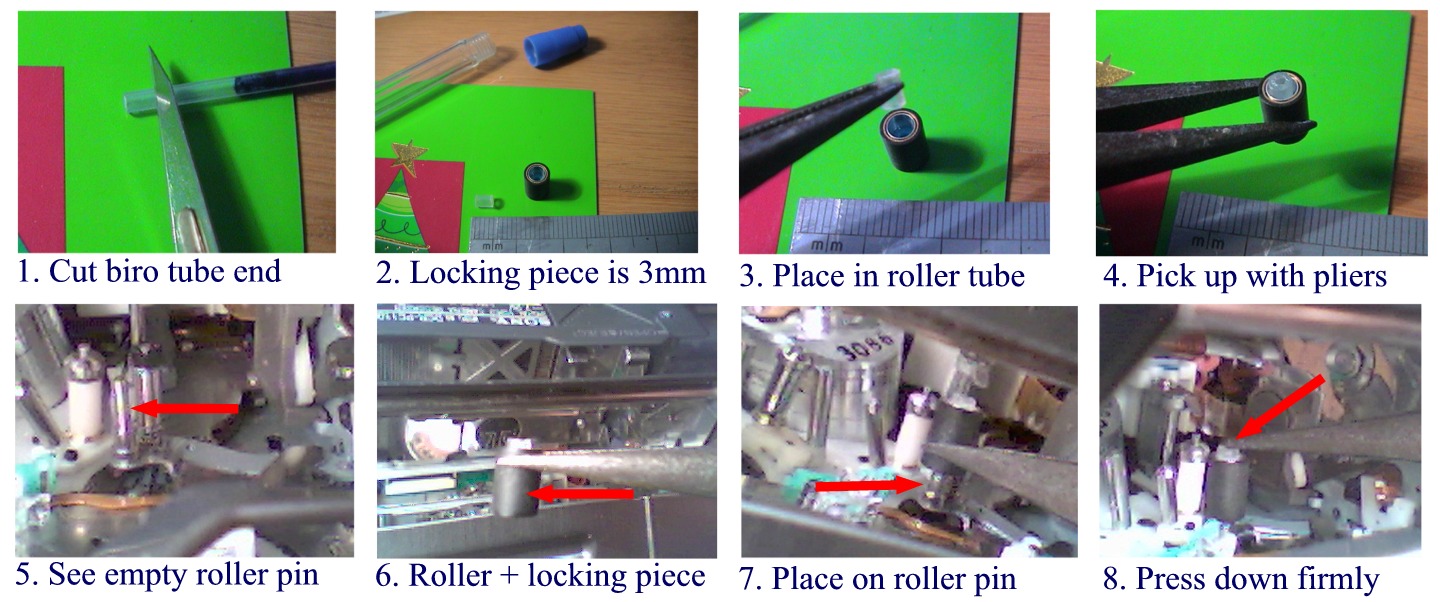
C31-repair.jpg
Stel
Thu, 01 Jan 2009 14:30:27 +0000
I made this video and posted it on my YouTube channel. Here is the link:
http://www.youtube.com/watch?v=VUIN-ygjN_g
I hope it helps.
Cheers and thanks for all your comments and advice.
Stel
Sat, 03 Jan 2009 15:32:10 +0000
GRACIAS DE VERDAD FUERON DE MUCHA AYUDA
THANK�S YOUR�S ANSWERS HELPME
GENARO
Mon, 19 Jan 2009 07:45:14 +0000
removing battery worked for me!
Sean
Sat, 24 Jan 2009 19:00:05 +0000
when u detach the battery dont reattach again for 2-3 minutes to "drain the power" from camera then reattach, hopefully C:32:11 (reattach to power source) issue will be resolved.
irfan
Sun, 01 Feb 2009 03:30:22 +0000
There is no such luck for me:( I have tried the suggestions above and nothing worked. The tape sits there like it is glued in and won't come out no matter what I do. I have Sony HDR HC7. Smeone got lucky and got this working> Please share solutions.. thanks
Cathy
Thu, 05 Feb 2009 18:05:52 +0000
I had the problem of error 31:23 in my DCR PC9E. I tried banging and shaking it hard as advised in various forums.
However I finally gave the same to Sony Service in Bnagaolre. The Engineer changed the Roller ( Black rubber part) and it has become all right. I suggest to all having this error to get it serviced from Sony, as this error is due to wear & tear of the moving parts.
Hope this helps..
AK Vyas
Fri, 20 Feb 2009 02:59:49 +0000
I just watched how my friend performed all that silly tasks with batteries and other recomended stuff... (error 32.10) Nothing really worked. But finally he found a solution. He amost took all camera apart, gave it nice man shake, and when he pluged a power cord in... Oh yeah!! Cassette came out. But you know what?.. He just put everything together, tried to check if it will work now. Ad same damn problem. Its stuck...
My friends - buy digital!
Xenomorph
Sat, 21 Feb 2009 00:17:50 +0000
I have the DCR-PC100. The C:32:10 error message has been on my camera since 12.2005 with a tape stuck inside! I followed the PC110E instructions listed below and it worked! After 3+ years I have my tape back and camera in good working order. Sony wanted $300 just to receive the camera plus parts, shipping and labor.
1. Open the compartment, wait for the click to ensure it is open completely.
2. Set "VTR" mode.
3. Remove battery
4. Place battery back in and wait for tape ejecting mechanism to function releaseing the tape.
NOTE: I had to remove the tape twice before it worked.
george
Mon, 09 Mar 2009 01:51:04 +0000
A quick corection to my earlier comment.
I had to remove the battery twice before it worked.
george
Mon, 09 Mar 2009 01:53:40 +0000
Same Error
Screwed around , battery off, door open. reset button, after 7 sttempts, tape pops out.
Fuji Tape, they mentioned below, are problems, stay away!
Thanx for the help!
Shawn
Sun, 15 Mar 2009 09:29:23 +0000
This actually worked. Thanks to you guys!
stef
Fri, 20 Mar 2009 22:06:24 +0000
My walk away . . . NEVER buy SONY!. I too have the same problem. With 25-30 tapes of my kids when they were young, with family vacations, birthdays, get-together, kids learning to ride bikes, pulling teeth, you know . . . the memories that you want to have forever . . . I'm just amazed, astonished and flabbergasted that Sony is going to try and make money off you, after they have already done so off YOU the customer.
I'm amazed that they will not stand by their products and expect their customers to wallow in their misery. They want to charge from $200-$300 to fix this!!!!!!! . So... after 40 minutes of trying all the different gyrations outlined in this msg board, I got my camera to work. My next step will be to convert all my tapes to DVD, make several copies and then, never use the SONY again. I'll just use my reliable and trustworthy Canon camera that I've been using the past few years. (The one that had to purchase because the Sony C:32:10, and C32:11 problem. ) I will NEVER buy another SONY product. There is a reason they are hurting as a company, it is because they don't care about their customers! So, buy CANON or APPLE products. They make great products and they support them. BOYCOTT SONY!!!!!! Sorry for the rant . . . but thanks to all you kind people who have given your time to provide solutions. One last thing to those of you that are having trouble.... I just kept trying various gyrations of the solutions offered and it finally worked. I've been trying to get my camera to work about 10 times over the three years.
Astonished!!!!
Fri, 27 Mar 2009 16:03:39 +0000
I can't find the backup battery location on a DCR-PC330. Anyone know where to find it?
BGZ
Sun, 29 Mar 2009 18:24:27 +0000
C:32:11 error here too, on a Sony DCR-HC26. My tape is out and won't load. The error message occurs whether I try to load the tape or not. This happened once before, and resolved itself temporarily.
Here's my hypothesis: There is either a short circuit, or a jam in the tape loading/unloading motor and gear setup. This could explain why the same error message occurs for some people when the tape is stuck in and others when it is out. It might also explain the recommendation of removing the battery (or AC adapter) and reinstalling it, since this might get the motor out of it's stalled condition. This might also explain why smacking the camera works for some people.
So now what... Try removing the door to allow more access to the small motor? Check the voltage across the solder points on the motor? Try to gently rock the gears back and forth? Someone can help crack this. There are lot's of bulletin board messages on the internet about this problem on a wide range of Sony cameras... but no real solutions if the battery removal/camera smacking doesn't work. Let's figure this out, if you have any insight please jump in! If I can make sense of it I damn well will post the answer far and wide.
Brad
Sun, 12 Apr 2009 19:08:41 +0000
Error C:32:11 en handycam Sony
Escrito por José Lobos
Me aparecio este error en mi Handycam, fui al representante y el costo de reparacion es muy alto, asi que me di un paseo por Internet para ver si encontraba algo, hay muchos datos que no dan resultados y que no se ajustan al problema. Pues bien como no encontre nada, me puse a reparar mi camara y descubri cual es el problema y la solucion, inmediatamente pense y dije “hay mucha gente que le ocurre lo mismo y tenemos que ayudarnos entre todos”.
Bueno espero que les sirva y aquí les dejo este mensaje.
Bueno espero que les sirva y aquí les dejo este mensaje.
1. En primer lugar el error c:32:11, va acompañado con unos pitos y en el display aparece “conecte la entrada de poder”.
2. El síntoma: al sacar la minidv, la casetera queda abierta siendo imposible cerrarla y siendo imposible incertar una nueva cinta.
Solución
Debes desarmar la camara por completo para poder llegar a la solucion. Retira las partes empezando por las tapas pequeñas laterales, luego saca la parte donde se encuentra el display/pantalla (sale completa al soltar 2 tornillos). Luego desmonta la parte trasera (donde va la bateria), luego la parte delantera donde va la proteccion del lente. Luego saca una pequeña tarjeta que esta adosada a un armazon metalico de la parte de inferior que conlinda con la tapa de cierre (aquí va una pequeña pieza metalica que se suelta y es la que afirma la camara al trípode, fijate en la posición para cuando tengas que armar). Luego desmonta la tapa que cubre la casetera (ojo que tiene tornillos por dentro que es muy difícil sacar. Te aconsejo que utilices un destornillador con iman en la punta. Y recuerda dejar todo bien ordenado las partes y piezas, los tornillos que no son todos del mismo porte ni hilo (rosca) y en el orden que las retiraste, ya que una parte ensambla con la otra. Ten cuidado con los miniconectores planos hay algunos que van con “seguro”, retira primero el seguro sin forzar el conector ya que las pistas son de carbon.
Una vez que retiraste la tapa de la cinta, fijate al lado inferior derecho hay un motor de unos 2 cm de alto por 1 cm de ancho, apuntando hacia abajo, en el bastago del rotor tiene un engranaje pequeño en diagonal. Con una mano fija la casetera de la cinta en su posición de “cerrado” (la que has tratado de cerrar y no lo hace) mantenla presionada o si no se abrira de nuevo, pues bien esta es la parte difícil, debes girar con mucho cuidado con un perillero ultra fino el engranaje en sentido de las agujas del reloj, hasta que sientas un “click”, ojo que junto al engranaje hay un cable plano y son ultra delicados, trata de no pasarlo a llevar cuando estes girando el engranaje, en ese momento la casetera debiera quedar “cerrada” como lista para bajar con la cinta. Si el mecanismo quedo trabado en esta posición, entonces estas en condiciones de armar tu camara, si no repite la operación, hasta que lo logres.
Una vez que hayas logrado que el mecanismo de cierre este trabado, arma completamente tu camara, incerta la bateria y veras lo rapido que solucionaste tu problema.
Espero que esto le sirva a quienes realmente lo necesiten.
Fernando
Wed, 22 Apr 2009 03:25:47 +0000
I fixed my C:32:11 error. I had to disassemble the camera and reassemble it. Nothing else worked for me. I found this service manual for a similar model for 4 dollars downloaded (http://www.e-servicemanuals.com/product-view.php?prod_id=95 . . .) and it was helpful in determining the order of disassembly. It is also really helpful in understanding the error codes. C:32:11 means "Unload direction loading motor time out". C:32:10 is similar but in the loading direction. This means (probably) that even though the tape was ejected on my camera, the camera motor did not move the mechanism to the full end of it's range. The camera was still stuck trying to unload the tape. My guess us that the gears were frozen, perhaps by some debris, as I saw nothing else wrong.
Brad
Wed, 22 Apr 2009 05:53:39 +0000
hi!
my cam is DCR-HC26 i can't find the coin like battery, pls help thanks
xtyano
Sun, 26 Apr 2009 06:52:41 +0000
What great help and suggestions. I have a Sony DCR-IP55 and same thing happened getting the C32:10 warning and a C31 warning as well after I pushed down too hard on tape and it got stuck instead of letting mechanism ease it in itself. Got tape unstuck and the error message left.
Now I cannot close the door, without getting the C32:10 error. I hear ti close, watch the spoolers spin and the one on the left hand side - not with the black spool is not working properly or it seems the motor isnt working properly, any suggestions please!
Does any one have interior shots of what it should look like so I can make sure everything is lined up properly.
I do not want to spend $500 for sony to look at it, which is what was estimated on their web site.
elizabeth Stanton
Wed, 29 Apr 2009 19:05:05 +0000
One more thing is that it makes this horrible clicking noise when i close it and I can hear the motor revving trying to get in place, I'm assuming. . . thanks !
elizabeth Stanton
Wed, 29 Apr 2009 19:08:11 +0000
I have a sony dcr trv350 with 32.10 error. I followed directions, removed battery and plugged in power cord. The cassette ejected right away. Thinking my solution was at hand, I reinserted the cassette. I have tried every combination of removing batteries, power cords, VTR, Record mode and I can not get it to eject. When I give it power (battery or cord) the unit will move slightly (not allowing door to close). When I give it power again, it will go all the way in and door will close. It goes back and forth (slightly) each time I give it power.
A slim battery was mentioned for another unit. Does anyone know if the 350 has a slim battery? Any other suggestions?
Thanks,
john C.
Fri, 08 May 2009 14:46:29 +0000
My cassette was stuck and I had the same problem on a Sony Handycam DCR-HC51....
Removing the battery while the cassette door is open works.
Thank you very much guys...
You helped me to repair my supervisor's camera and saved my a... :D
Jorge Arroyo
Mon, 11 May 2009 14:01:38 +0000
sony dcr-hc22e, had a problem getting the tape out
tried the first tip on this site and it worked
only now, everytime i put the tape in, it ejects it immediately.
help!
lalala
Mon, 18 May 2009 00:57:34 +0000
The information on this board was very helpful for me. I had an 32:11 code on my Sony camcorder DCR-TRV260. The tape would not eject. I followed the instructions and it worked. Thanks Camera Hacker. I will keep your blog as one of my favorite for future problems.
Thanks,
Tony
Tony Tone
Mon, 18 May 2009 15:39:17 +0000
Had C:32:11, alternating with "replace power source". Gave it a few _good_ slaps on the bottom and she's back in business. Hand hurts now, but that's how much force it took.
Sony DCR-HC26
Tue, 02 Jun 2009 01:11:27 +0000
The "putting camera in VCR mode and taking the battery away" did not work for me. But the "hold camera firmly with one hand and bang te bottom with the other hand a couple of times" worked fine:-)
Good for anger management too.
Dala
Sat, 13 Jun 2009 16:28:37 +0000
ITS THE TAPE BEING JAMMED ITSELF, TRY THE ABOVE METHODS BUT THEN TRY A DIFFERENT CASSETTE AND "THAT SHOULD SORT YOUR PROBLEM!!"
WORTH A TRY
LEE
Thu, 18 Jun 2009 16:22:22 +0000
just came across this post. worked like a charm with a sony VX-2000. the service guy was trying to seel me a $285 servicing. thanks so much. the internet is AWESOME!>!>!
d
dean chamberlain
Wed, 24 Jun 2009 23:43:07 +0000
I have a dcr-trv250 with a c 31:22 error and a upward facing underscored arrow in the middle of the screen. The tape ejects and inserts fine but will not play, rwd, ffd, or record. I tried removing the battery pack then resetting and plugging into the wall and 3 different tapes still is not working. Well, it will work momentarily after resetting the unit then the familiar chime and C 31:22 with a fast flashing upward facing underscored arrow in the middle of the screen appears and the vcr functions stop working. The manual has not been any help, and from reading this thread, I see there are a lot of tech savvy individuals who might be able to salvage this unit. Please help...Thanks.
Scot
Tue, 07 Jul 2009 20:00:38 +0000
worked with my TVR20E
many thanks!
Pointless Dav
Mon, 13 Jul 2009 14:57:58 +0000
Hi.
I've got a c:32:11 error on my dcr-hc44. I tried all the tips of this usefull forum, but with no results. Any other idea? I tried to find the little battery (coin dimension) ... where is it?
Thank you for your support.
Roby
Sun, 19 Jul 2009 18:31:06 +0000
Hey, I have a Sony Handycam mini DV model with Carl Zeiss Vario-Tessar lens, which was bought in July 2007. I used this video camera for around 20 tapes in total.
Yesterday I wanted to upload a few of my overseas videos and experienced a problem with the tape and camcorder- the door would not shut and the camera displayed a "c:32:11" flashing error message!!! omg, this is definitely not a good sign. To much avail and web browsing, all efforts were futile.
Today, while browsing the net (nothing to do with fixing this BS problem), I decided to give it another attempt, and NOW IT WORKS!!!!
This is what I did (while the camera is off):
Look inside the system where the tape goes, and gently prod/ poke the silver bit with the grey casing, and the three metal stick-like parts next to it.
Turned it on, and it was working. I think dust must have settled in the metal parts seeing as I haven't used it in over 6 months, and the "prod approach" unsettled the dust/etc... whatever it is, the camcorder is now working.
Good luck to those still trying, I hope yours works soon too as I know how much heartache I had just worying about it.
Bjay
Sat, 25 Jul 2009 10:13:44 +0000
Hi,
I've had the same problem. Tape won't eject and error C:31:11 was displayed. I've got the Sony DCR-TRV15E.
The following solved the problem:
1. Open the tape cover fully until it clicks open.
2. Turn the camcorder on to "VCR Mode."
3. With the cover still open and the camera in "VCR mode," take out the battery.
4. Put the battery back in--out should pop your tape.
Jarno
Sun, 02 Aug 2009 19:36:40 +0000
My one-year-old, rarely used Sony DCR-HC52 gave me the same C:32:11 reading, and would not eject my vacation tape, no matter what I did with regard to taking out and putting in the battery and/or power cord. BUT, lo and behold, sure enough, after smacking the bottom of the camera with my hand (which did not fix the problem), I held it firmly and smacked it down on my desk a few times, flat on it's bottom, and bingo, when I opened up the door, the tape ejected, and everything seems to be fine ever since. Strange, but true. Thanks to all who have helped, or tried to help. Sony, are you listening?
Gerry
Thu, 13 Aug 2009 17:30:15 +0000
Thank you so much!!!!!!!!!!!!!!!!!
Wow!!!! I was so worried about damage my camcorder!
Thanks a lot!
Sun
Fri, 21 Aug 2009 02:29:44 +0000
GOTCHA !!
Bonjour � tous !
Apr�s un code erreur C:32:11 sur mon SONY DCR HC35 je ne pouvais plus fermer la caméra et l'écran affichait "rebrancher alimentation" et indiquait "eject".
Impossible de refermer le camescope ou de remettre une autre cassette.
SOLUTION :
Il suffit de maintenir le "tiroir" motorisé (o� il est écrit DO NOT PUSH)� cassette entre le pousse et l'index et de tirer fermement vers le haut : LE MESSAGE DISPARAIT et il est � nouveau possible d'insérer une cassette et de fermer la caméra.
CIAO !
Thomas
Sat, 22 Aug 2009 16:22:52 +0000
It is quite strange that i had exactly the same problem. As i was watching the casette yesterday on Tv the cam suddenly stopped i thought we didnt make record to the rest of it. I ejected the casette and saw that there was still unwatched tape. I reloaded the casette into the camera but this time didnt work and gave C:32:11 error message. I became mad i screwed out 30 screw then i was afraid to make everything upside down. In the morning i entered your forum and read something. I tried again. I put the battery again and in OFF mode i simply opened the casette deck EJECTED and it automatically worked and gave the casette back to me.
Kerem AVCI
Sun, 23 Aug 2009 05:29:26 +0000
I have two months old,sony DCR-HC53 with C:32.11 error. I have tried every combination of removing batteries, power cords, VTR, Record mode and I can not get it to eject the cassette. Any suggestions?
fragisko
Sun, 30 Aug 2009 20:59:15 +0000
Thanx Toby!!!!!! You are a lifesaver!!!! Much Love!
LT
Wed, 09 Sep 2009 14:00:47 +0000
Why can't we sue for this?
It seems like a wide spread problem.
I have a DCR-Hc28 with stuck open casette door.
This unit is younger than 1 yr and never been outside the house.
Class action!
Deniz
Sat, 19 Sep 2009 22:44:22 +0000
I have a sony DCR-HC27E and the door wouldn't close.
The error is C:32:11 Re attach the Power source.
Can somebody give me some advise or any help please?
Thank in advance
regards
Guno
Helslijnen
Sat, 17 Oct 2009 16:08:33 +0000
i haven't tried the methods yet.. no power cord, but i have a sony trv328..
the tray thing wont open to accept tapes.. it doesn't have a tape stuck in..
would the methods above possibly work for my problem??
i have no idea of error codes or anything..
Hap3niz
Sun, 18 Oct 2009 06:20:42 +0000
wait.. do i need to just charge my battery..
or will i need the cable that plugs into the camcorder??
Hap3niz
Sun, 18 Oct 2009 06:22:07 +0000
Damn i got the same problem here in holland for a few months error C:32:11 tape door wil not close. i got the HDR HC3 for 3 years and just filmed only 4 tapes 60 min,
berny
Tue, 27 Oct 2009 21:28:35 +0000
You guys are gold! Here is is 2009 and I had the 32:11 code on my TRV350. I followed your instructions and got my tape out!
I've been seeing artifacts on playback - the manual says it's time to clean the heads using a special cassette. I'm just happy to have the opportunity to do so!
Thanks again, geniuses!
bimplebean
Wed, 04 Nov 2009 05:41:25 +0000
I read a question posted back in June by someone named Scot. It is exactly identical to my problem. I am just going to paste below what was written. Please help me. I want to use my camera again. Here is original question:
I have a dcr-trv250 with a c 31:22 error and a upward facing underscored arrow in the middle of the screen. The tape ejects and inserts fine but will not play, rwd, ffd, or record. I tried removing the battery pack then resetting and plugging into the wall and 3 different tapes still is not working. Well, it will work momentarily after resetting the unit then the familiar chime and C 31:22 with a fast flashing upward facing underscored arrow in the middle of the screen appears and the vcr functions stop working. The manual has not been any help, and from reading this thread, I see there are a lot of tech savvy individuals who might be able to salvage this unit. Please help...Thanks.
Aaron
Tue, 24 Nov 2009 21:32:09 +0000
I have the TRV37 and everytime i put a tape in and the door closes and slides down, it pops right back up and opens. i cant get it to stay down. any help would be really apreicated!!!!
Derrick
Sat, 28 Nov 2009 02:02:37 +0000
I could not get my tape out of my Sony TRV330. I tried slapping the bottom of the camcorder and it worked. But when I put another tape in it also got stuck. I gave up and disassemble my machine. After digging for a while I finally found the tape eject button. The eject button looked like a little white piece of plastic and it took me a while to figure out it was a button. The eject button was screwed on to the cassette tape door frame, right behind the battery release button. Which likely why hitting the door and messing with the battery caused the tape to eject. There is a little node that protrudes from the door frame that is designed to push the eject button when you open the tape door. Over time the joint got slightly misaligned, just enough to completely miss pushing the eject button. I could see and test that everything else worked fine and when I pushed the eject button with my finger, the tape ejected fine. I realigned the door frame node with some pliers and put my camcorder back together and it is working fine now. Taking it machine apart and putting it back together took a long time and it had some tricky parts.
Dan
Wed, 02 Dec 2009 05:31:56 +0000
Hi all,
I have been reading all your post trying to find a way to solve the issue I have with my Handycam DCR-HR48 that still displaying the same error 'Re-attach the power source' and I am unable to close the tape door. I have tried ALL the suggestion but nothing working until now (battery removal, reset, hit the back and pull the top...all) PLEASE HELP!!!
Nahida
Wed, 02 Dec 2009 11:59:56 +0000
Had also a problem with the tape stuck in my Sony DCR-TRV17E. It gave an error c:32:11, Took out the battery en put it back in and the tape came out. Thanks so much.
Jack
Wed, 02 Dec 2009 12:53:29 +0000
Sony DCR-HC96. Same problem. The tape loading mechanism is in the opened position and wouldn't close/load the tape. The c32:11 error with "Reattach the power source" message is displayed. None of the "simpler" suggestions (unplugging the power, banging, etc) worked so far. Sony had a recall on their previous generation of camcorders, where they had a faulty video sensor connector (or something like that). I still have one of those cams, but was stupid enough to buy another Sony.
Mike
Fri, 04 Dec 2009 14:01:31 +0000
I just got the C:32:11 error on my DCR-HC96 after trying to put in a new tape 20min before heading to the hosptial for the birth of our 2nd child. Nice timing Sony. Missing out on this moment will definetely ensure that I don't buy another Sony. This is extremely upsetting. I tried several of the above solutions, to no avail. Spend money to have Sony fix it.. so it can happen again... I dont think so. With as many people as this that are having this issue, I think Sony needs to issue a recall, and own up and fix this. Time to call the local TV news station, and get some help driving this :)
Hyper10
Sun, 20 Dec 2009 19:59:38 +0000
Guys, I cannot find the "slim" clock battery on my Handicam. Thus, I can't take it out. Where is it??? Thanks.
Eric
Sun, 10 Jan 2010 16:18:24 +0000
Tanks,i follow your derection it work,the tape came out.the problem is evry time i but the tape the CODE COMES BACK.
MY QUESTION IS WHY ? Help
GILLES
Tue, 12 Jan 2010 04:22:14 +0000
i have a sony DCR-HC26 and the door wont close C:32:11 comes on so please give me tips or any thing for i could fix it or send it to any one that know how to fix it thank you very much.
christian
Fri, 29 Jan 2010 03:30:47 +0000
OK, i GOT THIS ERROR MESSAGE AND GOT THE TAPE OUT. NOW IT WON'T GO ALL THE WAY BACK IN. ANY IDEAS?
jOHN
Sun, 07 Feb 2010 02:27:55 +0000
I have had the problem with this and related error codes on my TRV350 and this is what I have discovered. The part of the tape casing that flips open inside the camcorder is not being properly handled. By repeatedly (gently) pushing down on the tape I can get the flip part to finally work and I can take the tape out. However this problem is caused by a faulty Sony part (one of the rollers comes loose and blocks the opening mechanism. Eventually the roller fell out and now the camcorder is toast and no one repairs them anymore. So don't "push" too hard or too much as this apparently only forces the roller out of the way and eventually breaks it off. The same mechanism is in all the Handycams and for all I know every Digital 8 or Hi-8 Sony camera. If it was a Toyota there would be lots of dead people.
Michael Miller
Thu, 11 Feb 2010 22:15:04 +0000
Thanks guys! I fixed my camera with this thread! Greetings, Jaap from the Netherlands.
Jaap
Wed, 17 Feb 2010 10:35:53 +0000
My Sony dcr-trv10, which has worked wonderfully for almost 10 years is now refusing to show a picture in vtr mode and I can't get any of my tapes to import onto my computer. I have imported several tapes via 1394 cable and suddenly it's not working anymore. I still have 5 or 6 miniDV tapes that I can neither watch, nor import and I am getting desperate. Anyone know what I can do?
KHeifrin
Wed, 24 Feb 2010 01:47:30 +0000
Hi:
I followed the instructions (even I skipped step 3)and worked for my DCR-TRV730:
1. unplug camcorder AC cord
2. remove fat battery from back of camcorder
3. remove slim battery from under the LCD (it's the size of a nickle coin)
4. wait 2 minutes
5. plug AC into the camcorder
6. flip the camcorder into VTR mode
7. tape should automatically eject
Thank you!
Roy
Mon, 01 Mar 2010 21:03:59 +0000
Hi. I have a DCR HC 38 mini DV cam with the c:32:11 error message. the tape ejected but won't load again - stuck open.
has anyone been able to fix this?
thanks
steve
Wed, 03 Mar 2010 19:34:51 +0000
Error 32:11 fixed !! Wahoo!!
I only had a few hours use on my Sony DCR-HC28 over the last few years. I recharged the battery and ejected the tape.
When I tried to put a new tape in I got the dreaded 32:11 error. If I held my ear right up to the camera I could hear a very small ticking sound when I tried to put a tape in.
After reading this and other groups I knew Sony would cost to much to fix it. I decided to take the thing apart and see what I could see.
What I found was that the drive gear, on the motor that loads the tape, had shifted up the shaft. It then hits the chassis and won't turn.
I pushed it back down and everything works fine now. You have to take the whole thing apart to get to this gear. It's not an easy fix but it is do able.
Also, several people have asked about the location of the coin cell on this model. It's inside the case below the lenses. You have to take quite a bit of the camera apart to get to it.
It's a rechargeable cell so I'm not sure it will help to replace it. Mine was still at 2.56v. Fully charged it is supposed to be 3.00v.
Marc Davis
Tue, 09 Mar 2010 01:48:36 +0000
03/13/2010 - I had a C32:20 error. The door was open, the tape was in and the lid over the tape was closed. However, the shiny metal tape compartment would not go back into the camera, nor would the shiny metal tape compartment open so that I could remove the tape. The camera was functional, (i.e., it would go into camera or VCR mode and I could see images through the lens). I followed the instructions provided on this page (i.e., put into VCR mode, remove the battery and then reinsert the battery) and it worked like a charm. THANK YOU for your assistance! You saved me alot of money!
Wayne Dachenhausen
Mon, 15 Mar 2010 03:27:42 +0000
Absolutely amazing! I was just about to list a DCR HC 65 on eBay for parts and thought I should just Google it to see what fix might come up. Someone at Sony makes too much money on repairs! Unreal. Thank you so much! Three cheers to ya!
Toby M
Thu, 25 Mar 2010 23:49:37 +0000
Thanks for the info. My cassette deck would not close, but thanks to this forum I do not have to go to a repair store. I turned on my HC23E (do not know which mode), removed battery, re-attached it, and bzzzzz... all worked fine!
THANKS!!!!!!!!!!
Marvin
Sat, 10 Apr 2010 08:40:42 +0000
Removing battery in and out worked with DCR-PC100 stuck tape. Thank you.
SM
Thu, 22 Jul 2010 03:06:29 +0000
An effective last resort technique for C:32:11 error on my Sony DCR-HC52 . . .
After sitting on a shelf for a year with a tape in it, my Sony DCR-HC52 cassette drawer stuck open and I got the dreaded C:32:11 error. I tried the steps on this page with no success. Battery-in-out, play-mode, edit-mode, charge-discharge, several resets, wall-wart attach, detach, let sit overnight upside-down, NONE of it worked. I was about to toss the thing into the trash -- I sure wasn't about to pay big bucks to fix an obsolete toy that wasn't worth $150 even if it worked. Trouble was though that even if I bought a flash memory camcorder to replace it, I still needed something to play back MiniDV tapes and get them into the computer.
Anyways, I read somewhere that the C:32:11 error was a timeout on the load/unload mechanism. I noticed during the various resets and battery in-out sessions that sometimes it would take a few seconds after a reset (or battery/power in-out) before the C:32:11 error would be appear onto the screen and the camera would start beeping. Sometimes during those few seconds before the error code appeared there'd be a very faint whirring for about 1/2 a second. It occurred to me that that whirring could be the brief moment when the camera was attempting to lower the cassette tray that was causing the error.
So I tried
1) Put in a totally fresh Sony brand MiniDV cassette;
2) Slapped on the "push here" (NOT the "do not push here")spot with just a little bit of extra force when closing the cassette and held shut with my finger for a second or so after during the whirring sound; did this a few times.
3) Held my finger on the "push here" spot and also gave just a teeny itsy bitsy bit of pressure downward in the direction of "do not push here" during the whirring sound.
4) Did this a few times, and the cassette started retracting and extending again.
Just to be safe and to shake loose any metal corrosion and to spread any lubricant, after I got the cassette working again, I ran full fast forward and rewind to the end and beginning, and then let the cassette play for a while too -- I wanted to get all the moving parts used to moving again.
Works perfectly again with no errors!
The posts here sure helped, so I thought I'd return the favor and share my success story. If you try it, just be careful as it's a last resort and too much force could damage the mechanism. Better to use insufficient force multiple times than excessive force even once. It's tricky finding that point with just enough force to get things moving without damaging anything.
Chickenhead
Tue, 17 Aug 2010 18:54:01 +0000
http://www.youtube.com/watch?v=RSnyDtJOu6k&NR=1 and your answer is there. REALLY WORKS, It demonstrates repairing 32:11 in a clear video. It is a gear problem. A gear is stuck and you must budge it with a little screwdriver. Better than banging. But be gentle. Cheers.
digitaljerm
Thu, 23 Sep 2010 22:12:58 +0000
Hey, taping the door shut, taping the gear shown in the video, and turning the camera to play/edit mode right after plugging it in (regular fat battery removed) (DCR-HC28) and it suddenly went in. Took a couple of tries, but success! thanks all!
Chris
Sat, 06 Nov 2010 08:17:54 +0000
CORRECTION- TAPPING* NOT TAPING THE GEAR. SORRY
chris
Sat, 06 Nov 2010 08:19:11 +0000
Mine still isn't working :S It happened before and i managed to fix it cant remember how though :S I need it today really cos there is snow and i need it for my xmas video :)
george
Sat, 04 Dec 2010 14:56:49 +0000
Fantastic! Thank you! All fixed in 4 simple steps, GENIUS. And in time for my daughters 1st birthday, I really can't thank you enoguh.
Amy
Mon, 06 Dec 2010 12:36:24 +0000
Advice from
digitaljerm
Thu, 23 Sep 2010 22:12:58 +0000
Works for me!!!
EUgene
Thu, 23 Dec 2010 12:59:03 +0000
Hi. I have a HC 1 mini DV cam with the c:32:11 error message. the tape ejected but won't load again - stuck open.
has anyone been able to fix this?
thanks
hamid
Fri, 07 Jan 2011 05:21:14 +0000
I tried all that stuff an nuttin worked. I took the cover off of the eject carriage(2 mini screws)and cut the DV tape with a normal pair of scissors. There is a little access opportunity right between one of the rollers and the recording head. I turned the camera on and the tape ejected immediately.
How did I repair the cut(broken) DV tape? I cut a thin piece of scotch tape, smaller than the DV tape, overlapped the tape about a half inch and taped both sides back together. I manually rolled the tape about 10 inches back into the reel, well away from the taped zone, and finished editing my project. Old trick for an even older camera.
Rusty
Fri, 25 Feb 2011 11:01:26 +0000
We have just managed to fix this problem on an HDR-HC9 by connecting a 1,5v AA battery directly to the small motor at the bottom of the cassette assembly. This causes the motor to move slightly, you can then reattach the camera battery and insert a tape as normal :)
Stigster
Fri, 18 Mar 2011 12:35:18 +0000
Thanks Toby,
I fixed my camcorder thanks to your instructions!
Within 5 minutes and without costs.
Thanks,
B
bobster
Fri, 01 Apr 2011 09:42:48 +0000
Thanks Toby. Your fixes worked for me with my DCR-TRV250. Much appreciated.
Bo
Sat, 25 Jun 2011 18:16:23 +0000
http://www.youtube.com/watch?v=RSnyDtJOu6k
Sergej
Fri, 15 Jul 2011 11:44:34 +0000
Chieh Cheng
Fri, 15 Jul 2011 21:06:25 +0000
I have the Sony DCR-TRV33 I did I did the above mentioned and it worked, now I have a new problem, all it wants to do is keep the ejecting the tape, if I close the door after a few seconds I get the c:32:10 error because it is still trying to eject the cassette well the main door is closed.
Edward
Tue, 23 Aug 2011 14:47:58 +0000
THANKSSSSSSS!!!!!!!!!!!
It works again!!!!
Alex
Tue, 13 Sep 2011 18:58:04 +0000
Hell yes! My cam works again!
"Try these steps:
1. Open the tape cover fully until it clicks open.
2. Turn the camcorder on to "VCR Mode."
3. With the cover still open and the camera in "VCR mode," take out the battery.
4. Put the battery back in--out should pop your tape.
"
Halld�r
Wed, 05 Oct 2011 18:54:53 +0000
This totally works!!! Awesome. I have 5 years of old video of my children, irreplaceable. Now I don't have to buy a new camcorder or player. I am transferring it all to DVD!! Thanks Thanks Thanks
Jon
Sat, 08 Oct 2011 20:13:05 +0000
OK, *Sighs, after 3hrs trying to fix the damn thing* This thread is GREAT !!!
Issue with the Sony Mini DV DCR-HC26 door not closing, Error message C32:11.
After trying EVERYTHING, I pushed the tape holding closed where it says PUSH... NOT where it says DO NOT PUSH But where it says PUSH, Holding it closed I took a flathead screwdriver (small in size) and located the Gear. Look for a Black colored gear positioned next to the large round silver thingy <--- haha, I know.
Anyway, Once you've this round black spiky edged little gear, you'll notice when you try pushing it around with the 'tool of choice', it won't turn. Take your 'tool of choice' and try nudging it a little.. Turn your camera back on and Wallah !! :) Hope this helps and Thanks to all who posted :)
alana
Tue, 25 Oct 2011 15:08:35 +0000
I have an error code c:30:10....does anyone know how to fix this? I've read all the comments about the batteries but I can't find the slim battery. Do I need to unscrew something to get to it? Please help me I'm missing memoarable moments....1
renee
Sun, 13 Nov 2011 22:33:36 +0000
I'm an idiot the code is c:32:10 not c:30:10
renee
Sun, 13 Nov 2011 22:35:35 +0000
Thanks. Steps worked perfectly and the thread was easy to find. Good job!
JJ
Tue, 15 Nov 2011 00:15:05 +0000
Tape would not eject and error code chirped. Removed batteries, moved power selector to "camera" and plugged in the AC. As soon as power was restored I was able to safely eject the tape (it had pulled out of the tape).
Jeff
Sat, 07 Jan 2012 03:48:29 +0300
In the off-chance that somebody knowledgeable still checks this thread, I'm having issues with my Sony HDR-HC5. Back a couple of years ago, the camera quit pulling the tape down, similar to what's been discussed here already. I ended up putting it on a shelf and forgetting about it until recently. I found this thread and also a video about pushing down on the mode gear, and that did the trick to getting it to accepting tapes again. I just wanted to transfer the few tapes I had left to the computer, so I put in a tape from Christmas 2009 when my daughter was 1 year old. Then I started getting a "moisture condensation. eject cassette" error C:21:00. But now it won't eject the tape. I've tried all of the various solutions above - remove battery and use wall plug, turn to play mode, remove battery, reinsert, smack on bottom, smack on side, try different battery. I just want to get my tape out so I can sell this piece of Sony junk on ebay for parts so I can buy a reliable brand. Any other advice not listed above? Any way to eject manually without destroying camera?
Torrey Weaver
Tue, 07 Feb 2012 09:15:15 +0300
Read the tips given here and all of the C:32:11 issues are easily resolved. My tape wouldn't go back in, I kept getting a message that said something like replace the power supply... I followed the steps at the beginning of this thread, and, voila, problem solved.
DK
Thu, 16 Feb 2012 07:42:41 +0300
SOLUTION!! IS THE LITTLE AND INTERNAL BATTERY.CR 2032. NO MORE.
Marcelo
Fri, 02 Mar 2012 09:13:46 +0300
Mi camara (handycam sony) tenia el mismo problema con el error C:32:11 , es decir no cerraba el compartimento del miniDV.
yo la acabo de arreglar viendo el siguiente v�deo.
http://www.youtube.com/watch?v=RSnyDtJOu6k" target="link">http://www.youtube.com/watch?v=RSnyDtJOu6k
en mi caso no mov� el engrane ya que me di cuenta de que estaba sucio y simplemente lo limpie con el mismo desarmador.
Después de mucho investigar sobre este defecto en la c�mara me di cuenta de que existen distintas causas que provocan esto y las soluciones mas comunes que encontré (aparte de la que puse arriba son)
1.- asegurarse de que el bot�n (eject/open) no esta trabado (es el bot�n con el que abr�an el compartimento del minidv)
2.-reiniciar la c�mara , el bot�n reset se encuentra a un lado de la pantalla , es peque�o y basta con presionarlo con un lapicero o palillo unos 10 o 15 segundos con la c�mara apagada y sin pila (inténtenlo con la c�mara prendida y con pila también).
Si el problema persiste:
1. Apague la videoc�mara.
2. Desconecte el adaptador de corriente eléctrica.
3. Retire la(s) bater�a(s).
4. Mueva el indicador de POWER a la posici�n ON / CAMERA y manténgalo en esa posici�n por 15 segundos.
5. Mueva el indicador de POWER a la posici�n OFF.
6. Inserte la(s) bater�a(s).
7. Encienda la videoc�mara.
Saludos desde México ;)
____
My camera (sony handycam) had the same problem with error C: 32:11, ie not closed compartment miniDV.
I just watch the following video fix.
http://www.youtube.com/watch?v=RSnyDtJOu6k" target="link">http://www.youtube.com/watch?v=RSnyDtJOu6k
in my case I did not move the gear and I realized that I was dirty, simply wipe with the same screwdriver.
After much research on this defect in the camera I realized that there are different causes of this and most common solution I found (other than what I put up are)
A. - Make sure the button (eject / open) is not locked (the button that opened the compartment minidv)
2.-reset the camera, reset button is located on one side of the screen is small enough to press it with a pencil or stick about 10 or 15 seconds with the camera turned off and no battery (try it with the camera turned on and stack as well).
If the problem persists:
1. Turn off the camcorder.
2. Disconnect the power adapter.
3. Remove the (s) battery (s).
4. Move the Power indicator to ON / CAMERA and hold it for 15 seconds.
5. Move the Power indicator to OFF.
6. Insert (s) battery (s).
7. Turn on your camcorder.
Jorge Antonio Gonz�lez Trejo
Fri, 23 Mar 2012 21:05:37 +0300
After Playing around for Hours i read your "manual"... and it worked. Thanks a lot.
This customer fu.... is unbelievable.
Chris
Wed, 02 May 2012 00:25:41 +0400
Dave - you are a legend - still helping people with stuck handycam years later. I have already have a new tiny handycam but can now get the footage off the tape that was stuck! Cheers from Emma in Sydney.
emma
Tue, 24 Jul 2012 07:29:19 +0400
Hello, I have a Sony Handycam DCR-HC28 with the same problem. I fixed it with a 1.5V voltage applied on motor gear (right-down corner). Now is working!
German
Thu, 22 Nov 2012 15:27:39 +0300
Hi, I have a DCR-TRV350. Having the same problem that most people have, tape wont load or eject. But now, I have a white screen, nothing comes on, only white screen. I pulled battery and tried hitting reset buttons, but nothing, help please.
Dan
Dan
Wed, 12 Dec 2012 00:18:15 +0300
Thanks to this post...it helped me close the tape door...:-)
sim
Wed, 04 Sep 2013 13:00:25 +0400
Thank you, Mike and Toby (and all!),
This worked very well! Had a precious tape stuck in our Sony for about a year and it's been really worrying me. This was a real relief. Now to get all those 8mm tapes transferred...
Loretta
Fri, 03 Jan 2014 17:25:09 +0300
Your suggestions above really worked! Thank you!
N
Fri, 30 May 2014 18:02:42 +0400
Sony Handycam DCR TRV355E
My machine wouldn't eject tapes until I came here and read a post that said
unplug your battery and plug the mains lead in
it ejected the tape straight away
well done that man up there ^^^^^^
John Walton
Mon, 23 Mar 2015 23:33:57 +0300
My sony handycamsteps tape would not eject so do these steps
1. press up and left (at the same time) on the thing that goes up and popes out when you eject the tape.
2.keep doing step 1 and at the same time eject the tape
3. the tape should come out
4. put things where they are supposed to go and put missing screws where they go
Ps before doing it reset your camera by pressing the reset button, or taking out the small batery located under the screen and taking out other batterys and wait for a few min. before putting it back
alexander
Sat, 30 Jan 2016 03:56:33 +0300
I had the same problem but fixed it by removing the battery, replacing it and pressing the blue tape eject button.
Richard
Thu, 10 Mar 2016 23:56:56 +0300
Just thought I would share my experience. I have a DCR-TRV280. I recently tried to use this to transfer some old memories to my computer. Sadly I continued to run in to the error that would say "eject the tape" as outlined here. Eventually I could get it out. However, I could never get the tape to play. In total frustration with not having access to my memories I knocked fairly hard on the camera with a tape in it. Surprisingly it allowed me to play that tape. Only one, but at least I saved that memory!
Jonathan Konrad
Fri, 31 Mar 2017 17:08:46 -0700
Add Comment
|
Related Links
|
TrackBack
Related Content
Did your message disappear? Read the Forums FAQ.
TrackBack
TrackBack only accepted from WebSite-X Suite web sites. Do not submit TrackBacks from other sites.
Send Ping |
Spam Control
Title: fix for error code C:32:10
Weblog: Camera Hacker
Excerpt: I have a SONY DCR-TRV310; The steps Toby outlined [in this thread] worked for error code C:32:10. Thanks Toby!
Tracked: Sun, 04 Feb 2007 11:33:29 -0800
Title: can't close tape door on DCR-IP55
Weblog: Camera Hacker
Excerpt: sm1 help i hv sony dcr-ip55 camcorder and after i accidently eject the tape and there was no tape inside and the door would close but the this time i found trouble to close the tape door canot push down n close it and no response to all and the error code always sound n blink in the lcd C32:11 any 1 . . .
Tracked: Sun, 01 Apr 2007 13:26:10 -0700
Title: Tape stuck in Sony CCD-TRV35E
Weblog: Camera Hacker
Excerpt: Hi, I'm new to this internet forum business and I'm desperate for help. I have a Sony Handycam Vision CCD-TRV35E which has a tape stuck in it. And can't get it out. When I switch the camera on it starts making a sort of chiming/beeping noise and gives the error code C:31:00 and a yellow arrow which . . .
Tracked: Thu, 06 Dec 2007 19:23:44 +0000
Title: Sony HDR-HC3 Tape Door Won't Close with C:32:11 Error Code
Weblog: Camera Hacker
Excerpt: I have a one and a half year old Sony HDR-HC3 and I am having similar trouble. I recently ejected a mini DV tape and I now get the infamous error code c:32:11 and am unable to close the tape door (with or without a tape inside). I have tried all combinations of pulling ac power and battery to no ava . . .
Tracked: Fri, 07 Mar 2008 18:48:14 +0000
Title: Black Roller and White retaining cap Sony part number
Weblog: Camera Hacker
Excerpt: If you've lost your black rubber roller and the tiny white retaining cap which generates a C:31:23 or similar error, here's the Sony replacement part number. X39516801 - Arm Assembly, Pinch (O). It is actually the metal arm with the roller attached, but I just gently pulled the roller and cap off . . .
Tracked: Mon, 03 Aug 2009 22:07:37 +0000
Add Comment
Messages, files, and images copyright by respective owners.
594 Users Online
|
Get Our
$10000-above 
$5000-$9999
$2000-$4999
$1000-$1999
$500-$999
$200-$499
$100-$199
$50-$99
$25-$49
$0-$24
Gift Certificate

|
|