
 Add Comment
|
Add Comment
|
 Related Links
|
Related Links
|
 TrackBack
 Related Content
Error Code C:31:23?
Sony_DCR-TRV18 . . . When a DV tape is in the camera, an error message flashes with the code: C:31:23. When there is no tape, the error does not appear. I have cleaned the inside of my camera, tried different tapes, disconnected the battery, etc etc etc. yet this message will not go away and I cannot use my camera. Do you have any suggestions as to what I can do to fix my problem?
S. J.
Tue Jan 25 18:36:12 PST 2005
this prob alwas appear what does it mean C:31:23 and my cam is trv250 ...help please !!!
jackson
Wed Jan 26 13:38:12 PST 2005
Sony is pretty secretive about the :23 code. It can't be found anywhere. However, to service the C:31 code, Sony recommends you do the following:
- Turn off the camcorder.
- Remove the battery or disconnect the AC power adapter for 60 seconds.
- Insert the battery or reconnect the AC adapter.
- Turn on the camcorder.
- If the error message appears, service may be required.
If your camcorder still shows the same error code, then you'll have to send in your camcorder for service.
Chieh Cheng
Wed Jan 26 17:35:05 PST 2005
I had this error message on my TRV16e. It only happened on one tape (mostly) and there was no way this tape would play. Played Ok in another machine though. I get paranoid now every time I put a tape in waiting for the beep beep noise.
Pete
Sun, 19 Jun 2005 15:13:40 -0700
I don't know what the heck it is but is seems to come up when I don't use it for a while then I try to go immedeatly to the VCR function. Then I can't use it at all. I have never had the code when I pick it up and go directly to record mode??? I dunno. I also have the trc250
Ryan
Wed, 10 Aug 2005 12:40:06 -0700
This may seem silly, but it worked for me. I found this on another discussion forum. Try smacking the side of the camera relatively hard with the palm of your hand. Eject the tape and reinsert. You may need to do this a couple of times. Surprisingly it worked for me..
Debbie
Sat, 13 Aug 2005 11:38:25 -0700
I just turned the camcorder on its side and hit rewind. It seemed to go away.
Maybe the gears are getting worn. BTW I have a Sony TRV 510
Good Luck
Jeff
Sun, 14 Aug 2005 23:23:29 -0700
had this problem for couple of days. i tried cleaning it but still nothing would get this error out, but i tried what Debbie said to do "smacking the side of the camera relatively hard with the palm of your hand" and it worked. thanx Debbie
Frank
Fri, 19 Aug 2005 10:02:46 -0700
I have the same Camcoder DCR-trv250 also. The same error message was given to me and I tried the whole owners manual "fix" which didn't work. It is good to know I am not the only one that has a faulty camcorder! I tried Sony cutomer service and they told me to go get it serviced. I think Sony jacked something up on this model!
Ralbano
Thu, 25 Aug 2005 00:05:42 -0700
so what's up with this code? I'm weary of whacking a $500 camera ala Fonzi. Any new insights on how to fix this?
sony makame angry
Sun, 28 Aug 2005 23:51:43 -0700
I have joined the "club" with a DCR-PC120BT but I'm going to experiment more with different tapes before I start playing whack-a-mole with it.
Jim K
Wed, 7 Sep 2005 18:44:43 -0700
I have joined the smack the camcorder club and agree it works! Before you pay someone else to do this try it yourself.
Carlos J
Sat, 17 Sep 2005 08:42:05 -0700
Yes people. Sony have a habit of not giving any secerts away. NO doubt it's a design fault, which will cost you an arm & a leg to get repaired.
The smacking theory seems to be the thing that works. Some methods seem to follow from generation, to generation.
This old trick used to work with 'ye olde televisions. Seems as if Sony wanna carry this tradition into the year 2000, and beyond!
Good luck all!
ChillatWillN17
Sat, 17 Sep 2005 11:23:45 -0700
i have beat my cam tvr18e to death and it did not work forr me
david attewell
Sun, 18 Sep 2005 13:05:09 -0700
I had the same problem c:31:23... did everything recommended by Sony to no avail. Tried Debbie's suggestion to smack it and it worked. I did think it was more of a mechanical issue rather than the electronics.... too much friction somewhere or a gear stuck. Smacking it a couple of times must have set it loose.
hacker
Thu, 22 Sep 2005 19:25:21 -0700
i was having the same error problem with the sony dcr-trv250. tried cleaning it, etc and nothing...but yeah i did the smack club (i kick my computer a few times a day to quiet it down...noisy fan) so i had no problem whacking my camera and it is working now!!! thanks for the help, everyone!!!
alice owens
Sat, 24 Sep 2005 07:40:05 -0700
Ok.. I am the newest member of the "whack-a-cam" club! I have the TRV-250 and had the same problem. Since it was only 300 bucks and I have used it quite a bit, I bought TRV-280 to replace it figuring that its useful lifespan was over.
But after shutting it off and giving it a few open handed slaps on both sides of the unit it works fine! Go figure. I would not have believe it if I didnt try it!
Jack Scotty
Thu, 29 Sep 2005 10:18:16 -0700
I dont freaking believe it ! I was having the exact same problem with the error code coming on C:31:32 and I took Debby's advice and smacked the side of the cam rather smartly and damned if it didn't work the second I turned it on with no error code. Thanks Debby !
Terry
Fri, 30 Sep 2005 03:16:29 -0700
Smack that camcorder! I have a TRV -608 that gave me a C32:23 error conveniently in the middle of my Hawaiian vacation. Paid $100 bucks to get it fixed when I got home. Fix lasted about 4 months. Beat the tar out of it today and back to working fine. Hopefully long enough to transfer old tapes.
Steve Wade
Sat, 8 Oct 2005 07:17:47 -0700
I smack few time. This problem would not go away. Is there a special way to smack it. BTW I have trv-50. Thanks
Snehal Desai
Tue, 11 Oct 2005 06:15:21 -0700
thanks to everyone on this list, even I tried wacking the camera and it worked !!
amr
Sat, 15 Oct 2005 13:55:14 -0700
Thank You GUYS! I have a sony DCR VX2000 that has not been working for months!!! I had tried taking the battery out for several minutes, ejecting the tape...nothing worked..called Sony...they said send it in...and it would be a $400.00 repair...just found this site...had to smack the camcorder several times and insert the tape several times...IT'S WORKING!!!
susan
Mon, 17 Oct 2005 20:00:58 -0700
WhaCKING IT WORKS.. hit the tape side!!! hahahahahahhahaha this is so funny!!
Tommy
Tue, 18 Oct 2005 16:08:02 -0700
I just watched my son hit the side of his camera and it worked LOL. It was hilarious
Liz
Thu, 20 Oct 2005 19:37:38 -0700
I have the Sony DCR TRVII and I thought it deserved a good smack after the VRC mode gave me that C31:23 error message. My problem was a tape-maybe it was too old or had been used too many times. Anyway, I didn't have to whack it, but switching tapes worked!
Carol Wilson-Duffy
Fri, 21 Oct 2005 05:47:47 -0700
Holy Cow !! I can't believe it actually worked.
My 4 year old Sony TRV-17 started showing this C:31:23 error after I had transferred several tapes to the Computer in order to clear them up for an upcoming trip (I live in a real dry place).
Thanks to Debbie for the "fix". I smacked it a few times like it was an electronic thing and it did not work. Then I hit it like I wanted to break it in frustration and wow it worked after that. Eager to see how long this fix remains. Ofcourse I will now go smack-happy on this thing if it misbehaves.
S P
Fri, 21 Oct 2005 13:55:47 -0700
AMAZING! i whacked my trv245e after reading this thread. it works great again. thank you debbie!
pig
Sun, 23 Oct 2005 09:33:55 -0700
Very satisfying debbie, that worked. Now to work on grey lines across the tape.
Muz
Mon, 24 Oct 2005 18:31:44 -0700
Thank you very much Debbie. TRV520 digital 8. Whack-the-cam club. Its working again. Thank you!
Brad
Thu, 27 Oct 2005 19:36:21 -0700
Wow. Add me to the "whack it" club. Took a couple of tries, but it does work now. Who needs an instruction manual? Just Google the error code!
Shannon
Sat, 29 Oct 2005 16:55:25 -0700
Gracias Debbie, mi c�mara Sony PC5 del a�o 1998 ya me ha dado el error otros a�os...y la llev� a arreglar, 180� cada vez.
Hoy, le he dado unos buenos golpes...y funciona.
Cecilia
Sun, 30 Oct 2005 13:14:16 -0800
My TRV16E is still under warranty. It has just come back with this fault supposedly fixed, but the C:31:23 is still there. I even bought new tapes thinking the old ones were worn, but the fault appears on them all. Haven't tried whacking it yet.
Graham Livey
Wed, 2 Nov 2005 04:23:06 -0800
TRIED A SONY BRAND TAPE AND THE PROBLEM IS GONE.
BOB
Thu, 3 Nov 2005 12:58:37 -0800
Wow... I was having the flashing C:31:23 code as well. Slapped that puppy and yup it works. Debbi you're a god send. I use this approach with musical devices for yr.s
If it costs more than 500.00 hit it...
Damned if it's not the same with cameras...lol
mike sato
Mon, 7 Nov 2005 10:16:38 -0800
Well, I don't know where all you guys are from, but the slap abuse method works on Tasmanian TRV250's as well, thanks Deb.
Michael G
Thu, 10 Nov 2005 22:41:15 -0800
Sony DV-110 (I think). Encountered the error using JVC tapes, replaced the tape with another one and cracked the side of the camera - works fine (touch wood).
Joel Rowbottom
Sat, 12 Nov 2005 01:41:52 -0800
Gracias Debbie you're great!!!
No manches, solo unos cuantos golpecito con la palma de la mano y ahi esta! funcionando de nuevo
thanks debbie.
gerardo from Monterrey, Mexico
gerardo CHAVEZ
Wed, 16 Nov 2005 15:56:07 -0800
Hi!
I had this problem too, and the solution was smaking. So the rudeness helped! Funny.
Garborg
Thu, 17 Nov 2005 03:57:03 -0800
Me too. I have the DCR-PC101. Smacked it and its working for now. With this big of an issue I'm suprised there isn't a class action law suit against Sony. I'll be calling a couple lawyer friends of mine.
Chris Chandler
Sat, 19 Nov 2005 02:30:29 -0800
i have the dcr-trv250 and also got the c:31:23 error, tried the whack method and it works now. thanks for the advice
scott m.
Sat, 19 Nov 2005 07:51:09 -0800
ok guys.... i found something interessting for the code FREAKS.
According to the manual, the error code C:31:xx:xx means an error that
>the owner can fix by himself has occured and that by taking out the
>cassette and replacing it or by disconnecting the battery pack and
>fixing it back should solve the problem.
Error "23" means: "S reel emergency during normal rotation",
i.e. the problem is with the tape deck mechanism and specifically
the supply reel.
Greetz
Psycho
Sat, 19 Nov 2005 18:18:15 -0800
AFTER I missed filming my daughters college pageant because of this C:31:23 thing....I read the comments on this site...I hit my camcorder several times and Lo and behold it works! Wish I would have known this trick sooner. Only problem I have now (and have had for awhile) is it makes an awful noise when it is on.
Thanks!!
Terri
Tue, 22 Nov 2005 07:58:35 -0800
It seems to me that the whacking the unit on the tape side unsticks a faulty mechanism. I have been trying for a long time to fix my dcr-trv240 with the same error code and have not been able to solve the problem. The unit has so few miles on it that I tend to believe that this is a common Sony fault. I use only Sony tapes and have not recorded much since purchasing the unit some 3 years ago. I have been handling this so gently, but I will now have to give it a whack and report back with the results. Thanks for the tip!!! Wish me luck.
qpease
Tue, 22 Nov 2005 08:08:41 -0800
it worked!! thanks a lot. you saved me.
daniel h
Tue, 22 Nov 2005 15:21:09 -0800
Have a TVR 230 with 31:22 error message. the whacking trick worked for me. Thank.
Cheryl K
Fri, 25 Nov 2005 15:03:00 -0800
TRV-350, second camera in two weeks to give me this error code. Tried the wacking method, it works!!
Matt
Fri, 25 Nov 2005 20:35:14 -0800
holy crap,
the slap worked! But for how long?
bonne
Mon, 28 Nov 2005 09:46:05 -0800
Blimey Charlie, sister in law and I having same problem with similar model camera, read the give it a whack hint, blow me down, both cameras now working! Well done Debbie, you should be charging for service fees lol
Tracey
Mon, 28 Nov 2005 20:19:25 -0800
The same C:31:22 error message appeared on my Sony Handycam TRV460 after about a year of owning it. Tried varies different things, but nothing worked. I decided to browse the web today in hopes for a solution. I tried Debbie's "Slap Method" and was amazed that it actually worked!!! I can't tell you how greatful I am. Thanks Debbie!
Lisa
Sat, 3 Dec 2005 00:29:04 -0800
Gotta love Sony. Wasted hours, nearly bought a new battery for $99, and missed some good filming opportunities. Tried swapping tapes, sometimes worked, but not always.
Now it all makes sense. Whack it !
Thank you !
Brian
Sun, 4 Dec 2005 10:31:38 -0800
My Sony DCR-TRV480 appears slap happy after several good smacks it's working once again.
--Rob
Robert Trudell
Sun, 4 Dec 2005 20:24:40 -0800
anonymous
Tue, 6 Dec 2005 16:29:27 -0800
I too have the flashing 31:23 error and have contacted sony to no avail.Having been in the electronics service business for 35+ years I was looking for a particular fault, found none.Looking back to my early years in TV broadcasting I remembered hitting the RCA logo on the front of our monitors would correct minor problems, so I guess it still works
Don Plambeck
Tue, 6 Dec 2005 16:39:40 -0800
I tried the smacking theory in my Sony trv-740 but doesn�t work. I tried for several times but nothing happens. Does anyone knows another truck?
Edgardo
Wed, 7 Dec 2005 19:22:44 -0800
Same problem with my TRV250, returned to the sailor, "repaired" in 3 weeks, but still have the C31:23 error.
i returned the camera and witing for result !!
Thanks "SONY" !!!
Hafid
Thu, 8 Dec 2005 07:50:53 -0800
Someone said if it doesn't work after smacking it, you're not hitting it hard enough.
JV
Thu, 8 Dec 2005 08:44:45 -0800
Who says violence and technology don't mix! I was skeptic, but desperate times lead to desperate measures. I smacked the camara with the palm of my hand and to my surprise it worked!! Thanks.
Ian D Bravo
Thu, 8 Dec 2005 20:53:58 -0800
Went out during a crucial time and luckily I was still visibly upset when I read Debbie's fix. I am happy to say that I have now joined the smack the camcorder club and my camera is working fine now. Thanks Debbie
Eddie Perez
Mon, 12 Dec 2005 08:03:36 -0800
I whacked a TRV330 today and it worked. Debbie rocks!
Scott
Tue, 13 Dec 2005 07:59:32 -0800
I have a Sony DCR-TRV350 and I had gotten the C:31:23 error. After trying sony customer no service and being told it was going to cost 269 bucks for them to LOOK at it... I tried Debbie's trick and whacked the camera smartly on the side a couple of times and it works fine now. I can't believe that worked.LOL
Meredith
Tue, 13 Dec 2005 18:23:04 -0800
I have a Sony TRV82 camcorder. It's had good care and light use. When the code 31:23 popped up I Googled it and found I wasn't the only one. I only used Sony tape, so it's not a tape issue. I banged on it several times, to no avail. I'm buying a new camcorder tomorrow, and it will NOT be a Sony!
Steve Hudson
Tue, 13 Dec 2005 18:40:38 -0800
I had a Sony Camcorder around 2001. And that message C31:23 kept coming up. The ba%^&rd was doing it for my uni graduation, and I was going to go to Australia the following year so I was annoyed.
Eventually (believe me after very very hard complaining to the service manager...who at one point said it's "probably because you had taken the camcorder outside and used it"!!!!!!) I got it replaced (TVR 120e). Now this flamin' thing is doing exactly the same...! so i've just been on this forum and tried the kiss kiss bang bang technique.... and after 5mins of banging and poking my fingers in the tape chamber, I can play the tapes, with no noise or flashing...!! whether it will stay like this is doubtful. But doubtful and sometimes working, is better than not working at all.
I have a gig in London tomorrow, so the little critter better not pack in!!!!!!!!!!!!!
I WILL NOT BE BUYING A SONY CAMCORDER EVER AGAIN
Andy Kirk
Thu, 15 Dec 2005 07:07:08 -0800
Sony DCR-HC42, C 31:42 error. Hit several times on tape side, progressively harder until it worked.!!
Thanks for the info.
Jim S.
Fri, 16 Dec 2005 09:21:19 -0800
Yesterday my Sony DCR TRV147E, has the some C:31:23 alarm code and I can't reset it...I use the Debbi's advise and is OK. Many Thanks Debbi.
Kiki
Sat, 17 Dec 2005 01:38:24 -0800
20 December 2005, removed the film, slapped the camera pretty hard, enough for me to hold my breath awaiting the results. IT WORKED! code 31:23 on a 5 year old Sony DCR-TRV520. Thanks! Hope it lasts thru the holidays.
Dave Daniels
Tue, 20 Dec 2005 08:42:38 -0800
Oh Thanks the lord...I'd hid my Sony DCR-PC101E away for over a year as it came up with this error whilst I was playing back a tape of me and an ex(need I say more) and the tape got stuck I couldn't open it or do anything as there was no way I was going to take it in for a service with that in there. It only took a few gentle taps and hey presto I have my camcorder back...an my balls haven't been cut off Thank you!!
Mike
Wed, 21 Dec 2005 15:27:58 -0800
Anyone have this problem with a TRV-27? And did the ol' slap work? HMMM...
Alex
Wed, 21 Dec 2005 16:18:37 -0800
wow thanks, bought this for my mum and dad to video the grandchildren, so glad it will work for christmas. BIG THANKS MY MUM AND DAD LOVED WHACKING IT!!!!
hazel
Thu, 22 Dec 2005 12:38:59 -0800
The message actually means there is a problem with the reels this may be a tape is stuck, or they are out of balance, for my Sony Handycam it meant that the tape had got stuck, took the tape out, manually rolled it back into the hi8 tape and it worked. SMACKED it just for the hell of it as it deserved it. Did it again a few days later and I smacked it and it worked. Who said smacking was no good !
Dave
Sat, 24 Dec 2005 03:32:26 -0800
I am now a member of the smack-a-cam club. I had the 31:28 message, read all of the messages on the web site, hit the crab out of my camera about 7 times, put the tape in and away we go, its working. SONY any comments??
dave
Sat, 24 Dec 2005 18:15:02 -0800
OMG! I can't believe it. I tried doing the taking out the battery and power cord for 60 seconds "fix" and still got the C31:23 error. I have a TRV250 from Sony. Well, after reading all of the posts, I went ahead and tried it and I am the newest member of the whack-a-sony club! LOL. A couple of smacks, then removed the tape, then put it back in and closed the cover and whatever it was is now gone. So, when did we start to have to smack things on the side again to make them work? I thought that went out with the old TVs?
Tony
Sat, 24 Dec 2005 23:44:03 -0800
Well, It is xmas morning 2005 and my camera finally died...SO I THOUGHT! I good whack and I was up and running. HOWEVER, I take this as a sign to get a new $300 mini dv camera. This has served me well for the last 5 years. however, I thought it would last a BIT longer. Bye bye Sony... I guess I gotta get my old tape coverted to DVD quick before this whack a camera trick stops working :)
John
Sun, 25 Dec 2005 06:52:16 -0800
Whacked it 5 times and it just worked!! Thanks!!!
Tried Smacking It
Sun, 25 Dec 2005 15:50:26 -0800
OK add another whacker. At 4:35 in the AM figured why not so I gave the puppy a smack and whatta ya know. Thanks!
DGRIFF20
Mon, 26 Dec 2005 03:04:30 -0800
Murphy's Law of Force: If it doesn't work, get another hammer. Bought my TRV250 in Beirut last year, had moderate use over there, one or two times the error came up, but cleared itself usually. Returned to Oz in Dec, and it jammed on all tapes, even new Sony ones. Debbie's whack-a-cam (she should trademark it!) fixed it, after a few whack/test repetitions. From the number of posts here, it's got to be a design fault! Thanks Debbie
Haggis
Mon, 26 Dec 2005 05:47:44 -0800
OMG!!!!! iT WORKED... IT WORKED THEN EVERYNOW AND THEN I NEED TO SMACK IT AGAIN. ITS MEESED UP THAT IM BITCH SLAPPING MY CAMCORDER BUT HEY WHATEVER DOES THE TRICK....I HAVE A SONY CCDTRV36
NATE
Mon, 26 Dec 2005 15:26:39 -0800
I am the newest member of the Sony Whack-a-Cam club. I have owned this camera for about five years and have always chalked that error code up a bad tape or something. I haven't been able to use the camera now for about 3 months and I was just about to take advantage of the after Christmas sales when I read this post. I just saved a lot of money and I get to take out a little frustration in the process. I would like to try to make a game out of this. Kind of like Whack a mole. by the way, I have a TRV-18.
Mo Grimm
Mon, 26 Dec 2005 17:37:41 -0800
TR517 here. I have been beating my handicam for years before I found this site. I wonder if Sony is aware there are so many people with the same problem / fix?
I also have a camera that ejects tapes for no reason, sometimes repeatedly, for quite a while. I just have to give up, and try again later. Any fixes to this?
Jason
Tue, 27 Dec 2005 00:16:17 -0800
Follow up on the error 31:23 well the slap to the DCR-TRV350. The slap worked but only for a short time. I found out what was causing this problem. If you will open you cam with tape removed you will see a roller on the righthand side toward the lens it is a wide roller with black rubber on it. Inside this roller you will find a small white plastic tube that inserts to hold the roller steady. Mine was cracked. I took a tube from a compressed air can and cut it to the correct size and replaced the broken plastic one. It works now and does not require slapping. You do not have to dismantel the unit to get to this you can do this from the ejection port. Good luck. Mine does have a hum to it that it did not have before but I believe that is from worn heads and is not related to this issue the hum was present before. Hope this is helpful. I still use this thing but I got a new Cannon ZR200 now hopefully it won't need a good smaking.
Meredith
Tue, 27 Dec 2005 21:25:58 -0800
I agree to Meredith.I follow the method of smacking,after that I heard some small sound in my cam.Then I open the door and a small white tube go outside. I put it into the the black rubber roller,then it work! But the white tube is loose and I always check whether it lost! Good luck!
Dave Chow
Thu, 29 Dec 2005 00:05:33 -0800
I don't believe it..smacking it worked! LOL. I took this my Sony Digital Cam with me to Amman, Jordan, hoping to film my voyages there...only to get slammed with this stupid error code in London.
I wish I had known then what I know now. Thanks ALOT debb, you've breathed new life into what had become a very expensive webcam.
Thanks Again!
Suleiman
Thu, 29 Dec 2005 05:44:53 -0800
I had the same problem, and it seems like the cassete sensors had dust in it. I wiped all the sensors, and the problem cleared.
Anil
Thu, 29 Dec 2005 09:28:10 -0800
Hi every one, I had the same problem with my fu*** camera I've had two sony cameras & it's always the same, what I did was what debbie said "just hit it" I couldn't believe it but it works, what I used to do was just take it in its box & wait for the problem gets solved by itself, I know sounds stupid but it works too. bye greetings from M�xico
Albert
Sun, 1 Jan 2006 16:53:42 -0800
Unbelievable! I didn't think it would really work... but it DID!
I had this problem with my Digital8 TRV230 while it was still under warranty. It was free to fix then, but took a week. When I had the same problem again now (out of warranty) I was worried about the cost of fixing it. Wow! Thanks for the tip!
Jeff L..
Mon, 2 Jan 2006 20:59:28 -0800
I just had this error come up on my TRV318. Did a google search and found this thread. Thanks for saving my time! One smack worked great. It may be with all Sony products. My friend just bought a sony dvd player. It would not get off LOADING... he smacked it and it worked too.
Happy Wacker
Wed, 4 Jan 2006 09:02:02 -0800
I seriously thought this was absolutely ridiculous, but I swear to god, my camera had this error message (31:23)for the last week, could not use it and before bringing it in, I tried the unthinkable: smacked it on the side and it works just fine. Incredible. Thanks guys, I was missing filming some major baby's first steps moments and you guys made it work!!! THANK YOU!
Violaine
Sun, 8 Jan 2006 16:29:11 -0800
I have the SONY DCR-PC101E and I have always been very happy with it. Until today that is... After about six months of not being used, it decided to display the beloved 31:23 message. No tape would work. I tried most everything and I was really happy to find this page because after a few good slaps it started working again. Thank you for this page and sign me up if anyone wants to put the squeeze on SONY.
Michael Bjorklund
Tue, 10 Jan 2006 08:48:06 -0800
Have been having the same code C31.22 come up. Thought I was in for a rip off service fee. Took the advice to slap it.
Shes running real SWEET..
Cheers.
jeremy
Thu, 12 Jan 2006 04:23:48 -0800
i know there are a million comments here
but i smacked the side of mine after getting the C:31:23 error and it worked.
heck yeah!
i have a DCR-PC101 mini DV cam from like 2001
ryanne
Fri, 13 Jan 2006 09:31:26 -0800
I TOOK CASSETTE OUT LEAVE THE CASE OPEN AND SMACK 3 TIMES. I REALIZE THAT SOME GEARS WORKING WHILE I SMACK. WHEN YOU HIT CHEST HEART BEGINS BITING SOMETING LIKE THAT. NOW ITS OK.
AHMET
Sat, 14 Jan 2006 00:40:47 -0800
proud new member of "whack a Cam" club. I have a sony dcr-trv250 for about 2 years and it started acting up. Tape didnt come out and get the same error code with that irritating beep sound. Whacked it good a couple of times and it works! Haha! Thnx sony, I always wanted to wack the heck out of a 300 dollar camera.
Ed
Sat, 14 Jan 2006 23:37:50 -0800
I have a Sony TRV-340. Camera functions normally UNTIL you put a tape in. I had the code C:31:23. I tried to look at it see anything wrong, not sure. The big round circle thing that spins when a tape is put in looks like it may have a couple red marks, but I don't know if that effected it. When I put a tape in, you can hear it START UP, but then after five seconds or so it dies down. I tried to smack it a little, but not to full extent, I don't know how hard to do it. Do you do it really hard? Also, do you do it with the tape ejecter open? Please help, thanks to anyone who can offer assistance. Also, besides the C:31:23 code, every once in a while it says C:31:22.
camera guy
Mon, 16 Jan 2006 15:18:26 -0800
Another convert! I have the Sony TRV480 and began getting the reinsert cassette message. Couldn't figure out what was wrong with it. Googled the error message and found this site. Was just about ready to send it in to Sony to fix it. SLAPPED the thing several times and she is working fine now. Thanks for the fix!!!
Scott
Tue, 17 Jan 2006 09:26:33 -0800
My wife was panicking, her sister is going in to have her baby and we're the designated videographers. DCR-TRV330 was giving C:31:41 and Sony's advice was completely worthless. Thanks Debbie. A couple of good whacks and we're up and running!
Tony
Tue, 17 Jan 2006 09:31:16 -0800
i have the DCR-TRV350...i'm gonna wake the **** out of it untill it gets rid of the C31:23 crap!
bingkewl
Thu, 19 Jan 2006 12:00:06 -0800
ok...the ppl who build these camera most b a bunch of fags..
hit the cam, fun, but didn't work. Removed the power cord...Worked. put the power cord back in and a NEW message came up. "C31:40"
*plugs power cable back in*
well what do u know, it works again...thanks to the faggots at sony i have another piece of crap that works only when it feels like it.
thanks 4 the ideas!
bingkewl
Thu, 19 Jan 2006 12:11:49 -0800
Hi... I've had the same error c:31:23.. I have a trv340e and i tried the smacking thing and it WORKED!! actually i think it was because my camera was kept in cold temprature.. i've warmed the the cam too and honestly i don't know wht made it woek the warming or the smacking... Thanx Anyway
Zaid Amman, Jordan
Fri, 20 Jan 2006 11:02:29 -0800
ok, i train people on technology and i thought ..well what the hell...i'll try it. a light tap at first , then more of a smack , then an all out WHACK. and although i would never normally advise this , IT WORKED !
thanks for saving me $$$$$$
chuck
Sat, 21 Jan 2006 08:15:11 -0800
I've got a TRV 250 that gave me the error right when I needed it most....Thought it was condensation at first, tried it today, and did same thing..Brand New sony tape, too.
Gave it the spanking, and it works fine now! Thanks Deb!
John
Sat, 21 Jan 2006 15:18:12 -0800
I have analyzed my TRV-350 and it appears that a gear locking mechanism that prevents tape slack is the source of the problem. This mechanism gets stuck after inserting a tape and smacking the camera unlocks the gears. Debbie's method definitely works! Just be careful to smack it with your open palm to distribute the impact of the blow and avoid damaging the camcorder. Thanks Debbie!
Manuel
Sun, 22 Jan 2006 18:32:49 -0800
We have been tearing our hair out with the C:31:42 error message on our Sony Digital 8 camera -- trying to get the camera to work ever since Christmas so we can test out our new DVD recorder. I was just about to take it to Best Buy and PAY to have them fix it -- then I found this website, hit the camera and IT WORKED!!! Amazing -- thank you!! Can't wait until my husband tells this to his co-workers at SONY!!!!!
Mary
Sat, 28 Jan 2006 16:59:36 -0800
Wow, I can't believe this worked. We've been trying to find an answer to this issue for months. We hated the idea of spending money to have it fixed knowing how expensive it was. WOW, THANKS!!!!!! From one Debbie (and Ed) to another!
Ed and Debbie
Sat, 28 Jan 2006 18:52:35 -0800
Oh My god!
Beating it worked!! First try!
Un-Freaking-believable!
I had that thing taken apart and put back together.....I found this thread on camerahacker...and POW I beat that damn thing into working.
This type of fix works so well for a type A personality.
Arthur Fonzarelli
Sun, 29 Jan 2006 11:32:25 -0800
I've had the same problem with a Sony DCR-PC101E videocamera, with a the C31:22 flashing and beeping error message, the last month. Having read all the previous messages on this page, I tried (what I also would never normally do) just moving the two reels that wind the tape - just around 90� or less, with a thin blunt point (e.g. the plastic point of a Bic pen top, which just gets to the reels - and the camera works straight away. If you find this works, it may be the answer to so much productive violence, but if this method fails, I may have to resort to it like most of you.
Didac from Catalunya
Tue, 31 Jan 2006 04:59:33 -0800
Whoa!! Can't believe the testimonials. So happy to stumble upon this site. It gives me hope for my barely used dcr-trv520. i am going to buy a minidv or dvd recorder, but need cam to work before i convert film to dvd. So, after a few drinks when i get home, it'll be time to open up a can of whoop-as$ on my Sony. Wish me luck.
Jeremy in San Diego
Tue, 31 Jan 2006 15:02:22 -0800
I had the C 31:22 problem with my TRV 330 in the middle of taping. I had around 2 minutes on my panasonic tape and it stopped taping and the error appeared. I tried taking off the battery that didn't work. I tried switching to another tape, maxell brand, and then it worked without further problems. Thankfully. Next time I'll try whacking it if it gives me to much of a problem.
Aleta
Thu, 2 Feb 2006 17:14:25 -0800
My God! you're a genius Debbie!! I'm from Per�, and I tried smack, and It really works. Thanks!
Justo-Peru
Fri, 3 Feb 2006 16:13:13 -0800
I have a Sony DCR-TRV 620 and on the first day of my australia/NZ vacation I got the error code C:31:40. I was (too?) carefully hitting the instrument, but nothing has changed.
Does anybody know what is broken when the C:31:40 code appears and how it can be overcome without sending it to Sony?
1000 thanks for a fast advice!
Holger
Sun, 5 Feb 2006 04:28:40 -0800
This same C:31:22 error occurs with my Sony PC10E Handycam, but only with one of my selection of tapes.
Couldn't believe what I read on this website ..... "wacking???". ok .... so I applied this proven solution, 'I wacked it'. Stil no luck. Hey guys, just how hard do you need to wack this? I woz contemplating asking my cousin who has a black belt in Karate to wack it, but I'm prepared to wait for a forum-reply first.
Cheers!
Michael in Hong Kong.
Michael
Sun, 5 Feb 2006 07:29:39 -0800
Hi from france !
but i wonder how can i smack it ? on the front of the screen ? under the cam or on the other side ?
Thanks
Zakoos
Mon, 6 Feb 2006 11:46:02 -0800
re just i have smacked a little bit but the only thing is that . Listen !
Attached File: VOC001.WAV
Zakoos from france
Mon, 6 Feb 2006 12:41:22 -0800
Smacking the unit delayed the error untill the tape was moving, but fast forwarding and then search rewinding for a min has stopped the error for now.
"Who says violence and technology don't mix?!" Not me Ian D Bravo.
exlex from atomic
Tue, 7 Feb 2006 23:42:36 -0800
I CAN'T BELIEVE IT I HAVEN'T USED MY CAMERA IN OVER 2 YEARS CAUSE OF THIS ERROR I LOOKED ONLINE FOR 20 MIN AND BEAT THE HELL OUT OF THE TAPE SIDE OF THE CAMERA AND VAVOOM IT WORKS!!! THANK YOU THANK YOU THANK YOU
Matt Maxwell
Sat, 11 Feb 2006 13:54:02 -0800
I was JUST about to give up on my 5 year old Sony DCR TRV-11. Worked fine up until just before Christmas, of course. Then I started getting the dreaded C31:23 and all sorts of wacky things with the tape loading not working, etc. Just did the prescribed mild wacking on the tape side of the camera and the dang thing now WORKS FINE! I have a big trip planned in April. I intend to use the camera heavily before then to see how long this no tech fix works. Makes no sense, but I'll take it!
Ed From Carlsbad California
Sat, 11 Feb 2006 19:00:19 -0800
Lets hope more people google this error code! 31:23 on a TRV265 Digital8, couldnt get it to work after lots of power cycles etc but the smack on the side worked. Hopefully Sony will be out of business soon anyway. My next camcorder is a Panasonic.
Darren
Tue, 14 Feb 2006 11:08:06 -0800
I bought a Sony DCR-TRV950 and got the C31-23 error the first time I used it! When I called Sony they said the heads were dirty and to buy a cleaning tape! I asked them how the heads could be dirty on a brand new unit? No answer! I switched tapes; it worked for a little while, but now we're back to the same thing. I haven't used this thing five times yet! I used to buy Sony products, but after this and some very bad experiences with the Sony Mavica cameras, I'll going with someone else the next time! No more Sony for me. (By the way, I'm getting ready to whack!)
Jack
Thu, 16 Feb 2006 07:16:36 -0800
If you smack and it doesn't work, smack harder. It will!
Thanks a million Debbie.
Marcus
Sun, 19 Feb 2006 15:35:41 -0800
this is hilarious. i have not used this camera in so long because of this C:31 business. so then out of the blue i google the error code, tried the battery thing to no avail, then took debbie's advice and SMACKED THAT BAD BOY LIKE IT OWED ME 75 BUCKS. my camara works just fine now. i sent a link of this site to a dear friend who works at Sony, she's gonna dig this. HI SIS!
rb
Mon, 20 Feb 2006 00:36:35 -0800
The smack trick does NOT work for me! I smacked my TRV27 as hard as I can, but the C31:23 error still came out - actually somewhere in the middle it was C31:11 and C31:40 -- I read this thread again. Since some one said "if it doesn't work, smack harder", so I smack it with a magazine. I smack it like it owns me a million $ -- and finally, it BROKE! The tape compartment cannot retract automatically any more...
Any idea how to get it work again? smack it with a bat? :(
Mac
Mon, 20 Feb 2006 20:20:22 -0800
Debbie I love you! And you other guys -to a lesser extent. My TRV245E gave this error message after I accidentally moved the cassette compartment opening slider thingy while the tape was running. In my opinion there is a serious design flaw here.
I took it to Sony who wanted �200 just to look at it. I bought a new (but slightly inferior) camcorder for �180 and stashed the faulty one for a rainy day, when I could dismantle it and hope to find it was just a sticky mechanism.
Today - a year on - was that rainy day. But I decided to look on the net first, just in case someone else had had a similar problem - of course I thought because Sony said they didn't know what the error was, that it must be highly unusual. Then I find this site!
Thinking that smacking it hard would at least give me a better reason to be charged �200 I got stuck in. Smacked it from all angles. Worked for a minute then stopped so I smacked it harder. Ooops too hard - now the tape is stuck inside, won't relase :s
Took the strap off to allow the cover to move more freely, took the battery out, tried again to open it - no joy - put battery back, switched on and off and hey presto, the tape comes out! And so far all seems to be working ok!
I tried many different tapes, and came to the conclusion it was not them at fault. My theory is that the compartment doesn't always open fully because of the strap, and this might put some strain on some of the moving parts when replacing tapes. Sorry for lack of technical lingo. Newer Sony camcorders have a more decisive opening action - a more pronounced click when the flap is fully open. Time will tell if they wear out though.
I'm sure there's a knack to the smacking, and hopefully this will become evident in time! All I know is that from now on, I will take more time and great care when replacing tapes.
I think everyone here should send this thread to Sony and demand an explanation - surely they must know exactly what the problem is? How about an extended warranty too? Personally I like Sony products, but now I sure don't like the people who run the company!
Anyone want to help me campaign for action, feel free to email me. Thanks again for sharing knowledge. What would we do without the internet?!
Happy camming peeps :)
Steve
Fri, 24 Feb 2006 16:25:58 -0800
OMG the smacking theory works.. freakin camera i paid like 200$ to get it fixed and i wacked it on both sides like 6 times and now it works omg omg.. thanks guys
Marz
Fri, 24 Feb 2006 22:43:34 -0800
The whacking trick really works!
This code error has prevented me taping for a week or two now. I was contemplating sending it in for servicing, but decided to first check out whether anyone on the net had experienced the code/error.
But whacking is not an accurate fix. In other machines using gears etc, I find the problems are usually dust in sensors, and grease migrating to where it's not meant to be. A proper clean of these things should work.
Mark
Sat, 25 Feb 2006 02:46:33 -0800
This is absolutely frigging crazy....i have the 250 that i paid $400 for some years ago.....It decides to stop working in the middle of taping....I received the error message.....frantically looked for the manual...could not find it....called sony as many of you have done.....same responses as yall got...
in a nut shell...im a whacker.......thanks deb.....
miss bunche
Sat, 25 Feb 2006 15:33:25 -0800
HI, I have a sony DCR-PC5E and I got 31:22 flashing. Hitting the camera worket for me too! Thanx:)
Steffen
Sun, 26 Feb 2006 03:41:44 -0800
Another convert, error C31:30, TRV320, Good few open handed knocks while rotating it and hey presto. wouldn't have believed it. Thanks.
Greg
Tue, 28 Feb 2006 03:34:31 -0800
i have had the error code c:31:22 for ages now, and i did whack it on the tape side...it worked, however it only works for a little while after smacking it, then starts flashing the error code again. Is there a more perminant solution?
i'm 15, i cant afford a new camcorda or to get it repaired. please help!
Ben
Tue, 28 Feb 2006 03:46:51 -0800
I own the Sony DCR-TRV18. I have had 31:23 problem with 1 specific tape, so I thought the problem was with the tape. Last night after reading the comments on this site, I adopted the wacking method. One guess on what the result was. 1 working tape which contains footage from my 1st child's birth and first moments in life. Now I hope Sony can realise why sometimes it's not as simple as "throw the tape away and get another" - This is the advice I got from Sony.
Actually, here's some advice I received form a sales rep recently when shopping for a Digital Still camera. "Stay away from Sony - They make plastic crap".
So I bought a Panasonic.
Maybe Sony will realise that expensive marketing campaigns will not always sell cameras. Customer Servive an Satisfactions will....
Huss
Tue, 28 Feb 2006 16:43:25 -0800
OOOOOHHHH MYYYYY GOSSHHHHH! Praise the lord because I own the sony trv 250 and it was flashing C:31:23 after I hadn't used it for a while. I looked on the internet to find out what the heck it meant and came to this site. At first I was like wtf I am not going to whack my beautiful camera but as I read on I found that it was either "hit it hard or pay large" I told my dad and he blabbed "it's because you don't treat your camera well" ppffff yeah right. I turned it off gave it a few smacks and it worked again. As for sony..................YOU GO TO HELL, YOU GO TO HELL AND YOU DIE!!!!!! THANK YOU DEBBY YOU ROCK!!
jake
Wed, 1 Mar 2006 18:28:49 -0800
THIS IS FRIGGIN HILARIOUS!!!!!! Dead for a year and now...3 Whacks and 2 droppings on its bottom from shin level...it works like new!!!! Just in time for me to do a big project with no money to fix my camera! I will surely be whacking other electronics soon...everything I own is broken! WHACK AWAY...IT REALLY DOES WORK!!!! Thankx!!!!!!!!
Bonn Bonn
Wed, 1 Mar 2006 21:35:54 -0800
Thank you our fine consumers for your input on this site. We have decided to include the unpatented "whack-a-cam" method in our documentation for entire camcorder product line. Henceforth all of our service technicians will be trained in this procedure as well. Thank you again.
Regards,
Bob Sony, VP Camera Whacking Service Division
SONY CORPORATION
Fri, 3 Mar 2006 07:00:13 -0800
Thanks Bob, so how much will you be charging to whack my cam? I'll whack anybody's cam for a tenner (thats �10 to you non-Brits!) so get in touch peeps. Thanks Sony, for the business opportunity of a lifetime :))
Steve
Fri, 3 Mar 2006 20:48:52 -0800
C:31:40 on my TRV315 - one hard whack worked. So sad I did not read this a month ago when I *needed* my camera.
THANK YOU FOR THE TIP!!
AJ
Mon, 6 Mar 2006 22:05:47 -0800
Thanks Debbie,
Few hard slaps made my 3 year old camcorder TRV18E work perfectly.
Ganesh Devle
Tue, 7 Mar 2006 09:41:09 -0800
I was skeptical even with all the comments, but I did a light tap on the tape side and it worked... hilarious and sad at the same time.
Ed
Wed, 8 Mar 2006 12:28:12 -0800
I had the same problem for 6 months now, and i wacked it, didn't work. So i took out the tape and the battery, read more replies and after a while i put the battery and tape back in and it worked.
Guus
Wed, 8 Mar 2006 13:59:56 -0800
Hey all yea im a member of the wack your cam club lol (didnt work for me) i did find a rubber coated roller that had fallen off and was wedged in the botton of the tape area (looked like it belonged there ) it didnt i fount thr metal stude it went on and now WOW it works again just fine and i didnt have to pay sony a dime now if i could figure why it just shuts down all the time id be in fat city lol dcr-trv80
Marque
Wed, 8 Mar 2006 22:56:47 -0800
I am buggered. After many attemps at the slap on my dcr-pc5e i finally tried a harder slap on the bottom and it seems to have some life....
Thanks,
fish
Sun, 12 Mar 2006 04:05:52 -0800
Actually I find that I can now fast forward and rewind tapes but cannot play them. As soon as I try I now get a 31:30 error.
Any ideas?
fish
Sun, 12 Mar 2006 04:07:53 -0800
Thanks to all for the "wack-a-cam" suggestion. I have a Sony TRV-460 and I inserted a damaged tape from a relative, of course I didn't know it then, into the camcorder and it did not work for days. I saw the C: 31:23 error code and I took it to a repair shop and they quoted me a total price for repair around $300.00. I tried to hit it with palm of my hand and that was not working so I gave up. I woke up Sunday morning and said, "what the heck, it broken anyway", so I hit it on the carpeted floor twice and IT WORKED!!! All I can say is thank you all.
Keith
Sun, 12 Mar 2006 12:30:23 -0800
Sony DCR-TRV20 error code: C:31:23
I'll be dog goned! Smacking my Sony did the trick. Try taking the tape out and whacking it but good on the side.
The engineers at Sony should be ashamed of themselves... and their customer service likewise for not finding some diplomaticaly correct way of adding this 'fix' to their owners manual.
Gregg
Sun, 12 Mar 2006 15:14:38 -0800
Thanks for the tip! The whack worked. Is that why they call it a HANDYcam? FYI, our 27" Zenith Color TV didn't work after a smack on the concrete floor...go figure.
paul in Missouri
Tue, 14 Mar 2006 20:20:18 -0800
WOW, it's really the best solution. Let's SMACKING your DV, you will get unbelievable result. Thanks!! Debbie
Gary Chan
Sat, 18 Mar 2006 22:37:23 -0800
I had similiar issues with a Canon. See www.camcorderinfo.com in the Canon section. They have this problem even worse and smacking only sometimes works. Their whole line has back mechanisms.
Lars
Sun, 19 Mar 2006 11:46:37 -0800
Thanks for the good hint! My TRV245E hand the same problem and after joining the "sony-smack-club" it works perfectly well!
Juha Koivisto
Mon, 20 Mar 2006 01:09:30 -0800
Wow! Worked with two of our faulty loan TRV250E camcorders! Amazing! And to think what we were paying to get them serviced...
Andy
Mon, 20 Mar 2006 22:21:54 -0800
I just had this fault come up on my Camera. TRV 330E. I have found that the fault C31:23 only appears when the cassette is fully rewound. I stumbled upon this after trying another cassette that was half-way through. After this i manually wound (not easy)the new cassette on a few revolutions and 'presto' no fault. but i must remeber not to fully rewind the cassetes from now on.
Mr moo
Tue, 21 Mar 2006 00:59:36 -0800
I was very skeptical when reading all of these comments regarding whacking the camera, got myself to try it, worked perfect. No more Reinsert Cassette message!!
THANKS SO MUCH!!!
Scott
Wed, 22 Mar 2006 12:48:56 -0800
Yeh,
It works also for mine Sony DCR-TRV11E, thanks.
oTTo
oTTo
Thu, 23 Mar 2006 11:32:00 -0800
I am certainly in the whack-a-mole club! i had the damn thing apart to pieces and screws and springs.....to no avail. put it back together after i read this site and beat the tar out of it....and it works like a charm.
Matt
Fri, 24 Mar 2006 21:03:33 -0800
Thanks to Debbie. I wacked the camera on the side and the code C 31 23 has gone. We should all send a check to Debbie for saving us a leg and arm in repair cost.
Jean-Christophe Huttepain
Sat, 25 Mar 2006 11:08:54 -0800
Thanks to all! Also DCR-TRV355E with C:31:22 needs hard smacks. 2 years worked fine but after attempting to insert non Sony tape the problem occured. Now I'm affraid because in the past when I had started to smack my CCD-FX400E the real end came soon...
Josip Krajnc
Sun, 26 Mar 2006 11:32:05 -0800
That is the stupidist thing I have every heard... but it worked :)
Thanks guys.
UzGuys
Sun, 26 Mar 2006 12:55:09 -0800
Continuation of the previous comment: The error occured again. The smacking results only in pain in my palm. But after precise and soft insertion of the tape as near as possible to the back wall of the compartment it began to work ok. Hope for the best...Sony.
Josip Krajnc
Sun, 26 Mar 2006 12:56:43 -0800
I turned a hairdrier on cold and let it blow into the tape deck for about 2 mins and that seemed to do the trick
skyblue
Sun, 26 Mar 2006 13:21:23 -0800
I can confirm, whack the thing, it worked for me, it also fixed the sound wich hadnt been working for a year now!
Biscutty
Mon, 27 Mar 2006 06:17:56 -0800
Whack!Whack!Whack! My hands a little sore after three blows to the cassette side of the 250. Still no fix. Then took tape out and reinserted and it works now after half a year. Wow! what a fix. I have a fickle panasonic palmcorder. Can't wait to whack it a good one after my hand recovers.
Jim Gale
Tue, 28 Mar 2006 23:52:23 -0800
Wow! I've tried this solution for several times on my DCV-TRV940E (1600$ !!!), but it worked in approx. a half of them. So, I'll try to smack it harder next time.
BTW, f**k Sony! They produce real shit, cause so many people suffering from their "products". The problem is not in one camcorder model, but in the variety of them. So, I realize I bought shit for 1600 bucks. *(( I'll buy Panasonic camcorder next time.
Alex
Fri, 31 Mar 2006 16:23:13 -0800
worked for me too except now i get an e:61:00 error code, and sony wants to charge me 311.00 to fix it
lauren
Mon, 3 Apr 2006 11:43:27 -0700
It seems that this fix works in the UK as weell
TRV120e
And there was me bout to spend monety on ebay
Thanks
Ron
Tue, 4 Apr 2006 13:09:29 -0700
I have no results with hard smacking for Sony DCR-TRV355E with C:31:23.
In my case helps: turn the videocassette (on the desk), release the blocade in the bottom hole with screw-driver, then rewind the right wheel for a half turn (not more!) with the pincette and insert it again into camera.
It seems Sony have too sensible sensor for the tape tension in the videocassette and it results in error C:31:23. This trick is successful regardless of the cassette producer (Sony, Maxell, Fuji, Polaroid). There are also the cassettes which don�t provoke the C:31:23 error.
Josip Krajnc
Sat, 8 Apr 2006 04:33:58 -0700
my camera is 31-22 error.I want dcr-trv50e vc-283 board schema.could you help me please
ahmet
Sat, 8 Apr 2006 12:05:08 -0700
Hi, a lot of mentioned above is nonsense!
DO NOT SMACK your camera (again)!
my Sony DCR PC-101 also had Error C:31:23 It really is a malfunction so let it repair. because the inside tape devices are very sensitive after using the camera a period of time this devices MUST BE ADJUSTED by a professional (the smack did help a my camra too but the malfunction returned). Smacking can cause permanent damage. I let it repair NOT at SONY or at the shop where a purchaised the camera. MUCH TOO EXPENSIVE! look for a local camcorder service specialist. In my country is a ideal little company. Minimal costs � 30,- ONLY. Look at
www.camcorderservice.nl
and sent your camera to it. It is ALWAYS cheaper that let it repair at a big company (even including shipping costs!). Good luck!
Arthur
Sat, 8 Apr 2006 19:04:28 -0700
Whacking method worked for me tooo!
George
Sat, 8 Apr 2006 20:21:02 -0700
Whacking worked for me as well. I don't know if I did not hit it hard enough but I took the tape out and tried again and then it worked. I was considering sending in for repair for flat rate of $211.
Don
Don
Sun, 9 Apr 2006 12:09:09 -0700
my sony tr 517 give me an error code of 32.20 any suggestions?
Wayne
Wed, 12 Apr 2006 17:43:15 -0700
Sony CCDTRV138 THIS CAMERA ALSO GAVE ME A REINSERT TAPE MESSAGE SO AFTER READING EVRY ONE ELSES SMACKING STORY... GUESS WHAT IT WORKS ON THIS AS WELL. SONY JUST LIKES GETTING SMACKED AROUND?
Stacy
Wed, 12 Apr 2006 21:21:24 -0700
we gave it a couple little taps on the side and it works now
Mike and Jesse
Thu, 13 Apr 2006 08:54:32 -0700
I changed the tape and the error stopped
shauna
Thu, 13 Apr 2006 17:50:05 -0700
I have a Sony DCR-PC101, 3 years old, haven't used it in a year because of C:31.23. Saw this post, and the whack worked. If it lasts, I'll be more than amazed.
Thank you!!!
eric liftin
Fri, 14 Apr 2006 21:07:16 -0700
Sony DCR-PC101E... I also had the C:31:22 error... tried the "slap" trick and it worked!! Thanks a lot!!
Ralph
Sat, 15 Apr 2006 10:25:40 -0700
I have a Sony VX2000, a 2000 dollar camera, had the same problem and smacked it from the side and I couldn't beilive it either, it woookred!!
Coolman
Sat, 15 Apr 2006 11:02:41 -0700
I have TRV-480. I also 'bit' the camera. It works, I do not know how long it will work though.
Thank you for the information.
Sony is getting worse for sure. I have TRV-62, it have been working for 9 years whithout any problem. the new model had such issue in less than one year. I can not believe this is Sony.
Jun
Sun, 16 Apr 2006 07:12:33 -0700
Just brought a sony trv318 off this guy. Guy said it was broke had a c:31:23 error that kept coming up so for the price of $10 I took it home tried everything to get it to go away but nothing would work until I found this site thanks to debbie, and the rest of you I have not had a problem since I smake the side of it . Thanks again all
Travis
Sun, 16 Apr 2006 19:57:26 -0700
I have a SONY DCR TRV 120 and had the same error code C:31:23.I read Debbie's advice and I smacked it on the tape side. Now the camera works fine!! Thank you Debbie!!!
Petros
Mon, 17 Apr 2006 05:29:30 -0700
Count me in as another member of the "Wack-a-Sony" club. 2 year old TRV250 responded to the flat of my hand after C:31:23ing me halfway through a download!!
John
Mon, 17 Apr 2006 12:08:03 -0700
I have the Sony DCR-TRV27. I got the dreaded C:31:23 error. I smacked it, banged it, whacked it but to no avail. Still wouldn't work. Changing tapes worked for a brief time, but the error code came back. I've stumbled onto something that has worked that is a bit different than Debbie's solution. Take the battery out and turn selection switch to camera and then turn it off. Put the battery back in and its working again. I watched about 20 minutes of video with the vcr selection without failure. I then recorded about 10 minutes of video and rewound the tape and watched it without failure. Hopefully it works while I'm turkey hunting tomorrow morning.
Gene
Mon, 17 Apr 2006 18:57:30 -0700
My Sony TRV 25 stopped working right in the middle of my kids' Easter egg hunt. Grrr.... After lamenting the potential repair bill, I came across this site and I'll be damned. Smacking the camera FIXED it!
I had to whack the thing about 30 times...and I hit it pretty hard on both sides.
I also stuck my finger in and rotated two of the white reels. The links on this page said it was a spool error, so maybe one was jammed.
either way, I'm done buying Sony products. Never again...
Zeke
Tue, 18 Apr 2006 20:15:58 -0700
I have a DSR-PC5E and a whacked it and it works perfectly now. Thanks so much for the advice!
kevin batcho
Wed, 19 Apr 2006 03:24:59 -0700
I have a TRV330 and sure enough - whacking it a couple of times on the tape side fixed the problem. I should have known to do this since this is the standard "fix" for electronic gear when it breaks. Thanks for the advice!
Steve
Wed, 19 Apr 2006 05:38:29 -0700
Tengo que decir que llegue a esta pagina colocando en google el error C31:23... lei las recomendaciones... hasta llegar a la parte en que todos golpean la camara y funciona... le dimos unos peque�os golpes por el lado en que esta la cinta, la apagamos, la prendimos y la maldita camara funciona!! Me ahorre el servicio tecnico... Muchas gracias a todos!!! (camara TRV 250)
PamelaX
Wed, 19 Apr 2006 17:59:20 -0700
I have to say that I found this site looking for the C31:23 in google... I read all recomendations... until I got to the part where everybody says that smacked the camara and it worked... so we smacked it in the side where the tape is inserted, turned it on and the damned camara worked!!!... Thanks for saving me the technical support!! Thanks to all!! (camara TRV 250)
PamelaX
Wed, 19 Apr 2006 18:04:20 -0700
Debbie I love you! I'm a high school teacher and can't afford big repair bills so I smacked not 1 but 2 of my dead tr517's and sure enough it worked! My hand is sore but I'm back with 2 more cameras!
God your good, Debbie
[email protected]
Sir Oliver Mowat C.I.
Tornoto, Ontario
mike
Thu, 20 Apr 2006 07:05:03 -0700
I was skeptical that a blow to the camera would fix the problem and resolve the error code - but tried it last night and amazingly it worked! Be careful on the tape housing side, so that the internal parts that hold the door don't get bent and damaged. (TRV310)
Ed from Lake Forest, IL
Ed
Fri, 21 Apr 2006 09:07:49 -0700
Got C31:40 error on my Sony DCR-TRV330E. Used Debby's smacking technique described below and it works perfect.
Thanks!
Goofy
Sat, 22 Apr 2006 12:35:48 -0700
Thanks Debbie ,worked for MY TRV18
MEMBER OF WHACK A CAM,HAY GUYS
WHAT ABOUT CREATING A WEB SITE
WWW.WHACK A SONY CAM.COM?
G.KAY
Wed, 26 Apr 2006 09:07:56 -0700
I am the newest member in the Smack The Sony club. Incredible! Smacked 3 times, removed the tape, closed the "hatch" without the tape. Smacked 3 times. Inserted the tape. Voil�.
Christer Magi
Tue, 2 May 2006 11:48:41 -0700
I tried smacking it and dropping it on the ground... didnt work. Then i opened up the tape bay and started spinning the cogs where the tape goes and one of them made a click noise then spun... so i turned it on and then it worked
mike jones
Tue, 2 May 2006 13:53:57 -0700
Thanks Debbie!!! lol Sony suck arse!!! =D
Samantha Soto
Tue, 2 May 2006 20:15:54 -0700
I KNEW I'd find the answer to my problem -- but I can't believe it was this easy! I figured I had nothing to lose so I gave it a few stiff whacks and the cassette holder purred like a kitten. We haven't used this camera for ages because of this jam, and I'm forever indebted to Debbie, and my daughter is thrilled she can now take it to Disney World.
Susan Taylor
Wed, 3 May 2006 18:59:50 -0700
Hitting my dcr-trv720 didn't clear the problem, but removing the battery while the power switch was in the "camera" position and reinserting it without changing the switch worked. Previously, I switched the camera off and replaced the battery with no effect, but when I left the switch in the "camera" position, it cleared.
Ron
Fri, 5 May 2006 19:36:19 -0700
Soy Ing. en Electronica y creanme que el "tortazo" o llamado en el argot "golpe tecnico" funciona en muchos casos...resuelve el problema pero a corto plazo...sin embargo gracias Debbie...por que en este caso a mi me libro del problema..jajaja
Edgar Mtz
Sat, 6 May 2006 10:32:32 -0700
I cannot believe it, but a few smacks worked for me also! The error code was C:31:40 and I've been messing with it for weeks, trying different tapes,etc.
Deb
Sat, 6 May 2006 13:27:19 -0700
The SONY SLAP worked for me too!!
Im now proud to say that I am a "HAPPY SLAPPER" CODE NAME C:31:23 SONY TVR218E ready for slapping
How can this be happening to so many different Models, guess those Sony designers might need a bit of a SLAP to sort their act out !!!
Kev
Sat, 6 May 2006 17:48:43 -0700
I was looking for info on Sony camera
codes...and I found a lawsuit against
Sony...with a long list of camcorders
and digital still cameras.
CHECK IT OUT:
NOTICE TO CLASS OF PROPOSED SETTLEMENT
Vivian
Sun, 7 May 2006 18:02:44 -0700
everybody who whacked it stupid, the problem is where you take out the tape there is a something there that is very easy to break and if that sign comes up and you whack it again, it will come back when you put it down lightly so everybody who di that is j00 �re 1237412d3d damn n00bs.
sean
Sun, 7 May 2006 18:48:28 -0700
Re: Sony DCR-TRV280 with C:31:22 error
If you're scared to smack the camera hard, start by smacking it gently.
After trying every sane-sounding solution I took the battery out for a while, smacked it 5 times gently on the right side with a tape inside it, and it worked!
Thanks to whoever figured this trick out, and I humbly admit that I thought it was a stupid idea until I tried it out of desperation!
David Kallum
Sun, 7 May 2006 19:00:35 -0700
I cant believe it!! smacking the side of the camera actually worked!!!!
Ed
Tue, 9 May 2006 07:16:34 -0700
Well I have a sony trv 285E... I bought it in april 2005 and I recorded with it a maximum of 9 hours. Then, when I was in vacation the well-known error C:31:22 appeared on my screen! I didn;t hav any manuals so i tried to do what i thought it would work. But nothing... the error still appeared. I was very nervous and i went directly to the shop from were i bought the camera! they told me that service is needed (on free). i accepted so i sent it to the service. they told me that there ware no destroyed components, just a dirty video head (!!!) it seemed strange to me but it was true becuase the next day on the lcd appeared again the error message. They told me that another service operation mey cost me about 200$... DAMN... now i was searching the internet for any solutions and i discovered that this is a very strange and well-known error for sony camcoders... i tried what the others said so i "SMACKED IT" a few times very gently... then i reattached the power source and the tape and as a miracle my camera "WORKS!!!". Now i want to know if anyone can explain this "miracle"... because i can't find any logical explications... and about SONY CORPORATION... a little advice for all... DO NOT F******* BUY any cameras from them even if it is said that they are the best...
Manu_R
Wed, 10 May 2006 05:30:40 -0700
You know i was going to go and buy another camcorder, but i read up in debbies site and i put my fingers around inside where the tape goes and wacked it a few times ( hurting my hand!) but it works ? Thank You!
Jesse Trujillo
Thu, 11 May 2006 07:07:57 -0700
LOL, I got the C:31:23, tried unplugging my camcorder for 60 seconds which didn't work, so I performed a couple of "slight pneumatic adjustments" on my camcorder (I smacked it on the side) and it is working now. I think the hypothesis that smacking it frees up something that was stuck is a likely explanation.
MAK
Thu, 11 May 2006 09:28:01 -0700
I don't bilieve! I'm from brazil and have the same problem with my TRV87E. After some days trying to resolve i found this site and... working!!!
Debbie rocks... your new method is really good.
Thanks Debbie and friends.
wellington
Fri, 12 May 2006 18:41:49 -0700
Yes, the smacking of the side of the camera works!! Oddly enough, I thought there was something wrong with the tape drive, so I bought the memory stick for my TRV480 and got the same problem but now "reinsert memory stick"....and smacking it worked!
Alan Richards
Sat, 13 May 2006 17:33:43 -0700
yes smack it, works on my DCR-PC5E.
Sam
Sun, 14 May 2006 06:20:44 -0700
Smack has worked on time more: thanks
nicolas
Sun, 14 May 2006 07:51:42 -0700
Add one more to the whack column!
Jon
Sun, 14 May 2006 16:50:07 -0700
I got the DCR-TVR900 and got this error today and fixed it by pulling the tape out and realized that it was dirty on the bottom part of the magnetic tape. I advanced it with my fingers until I got a clear tape top to bottom. Put the tape back in and the error went away.
Alex A
Mon, 15 May 2006 11:47:00 -0700
Lol add me to the smack column
Chris
Mon, 15 May 2006 15:16:03 -0700
holy crap. it actually works. i have a red palm now, but at least it works :)
matt
Mon, 15 May 2006 20:08:59 -0700
WOWWWWWWWWWWWWW! THANKS SO MUCH, DEBBIE! i gave my camera a good smacking on both sides & now it works, just on time for my son's kindergarden dance performance tomorrow night! sooooo amazed!
farah
Tue, 16 May 2006 20:54:18 -0700
it worked for me too! now i can finally put all that wacking practice to good use!
carlton
Wed, 17 May 2006 10:09:07 -0700
Well, unfortunately, I can't be added to the "whack list", as I've tried whacking mine several times. This really bums me out because the camera just went out of the one year warranty period. Any other tricks that you know of that might work? I've whacked the hell out of this thing...lol
Reguarding that lawsuit:
I think Sony should be taken to court over this issue too! There are way to many people that have this problem...what is something that I could do to get started in this? I'm dead serious...give me a call on my cell if you are interested: (707) 616-9209. I'd like to get my problem fixed...
Matt Davis
Thu, 18 May 2006 01:06:30 -0700
The error refers to one of the gears that the tape cassette rides on. The reason it works when you smack it is because it sometimes knocks the wheel free. If you remove your take then try to gently twist both wheels you will find that one is stuck in an engaged position. If you gently twist it it will pop up and the error should go away. (This was just trial and error)
Shaman
Thu, 18 May 2006 10:18:46 -0700
Fantastic... I like it... I like it alot
FREDO!
Thu, 18 May 2006 13:14:38 -0700
Chalk one more up for the whack hack attack.....now I'm back in Action...
thanx for sharing.
Brad
Fri, 19 May 2006 08:19:22 -0700
I will be trying this tonight, wish me luck. Looking at the responses dont think I need any luck!
Debbie is a legend already :P
Kash
Fri, 19 May 2006 09:08:40 -0700
I TRYED YOUR ADVISE ON THE FIX FOR ERROR 31:23 ON SONY DCR-TRV120. IT WORKS.... FIRST, I TOOK THE BATTERY OUT, THEN THE TAPE. I SLAPPED THE CAMERA ON THE LEFT SIDE AND IT DIDN'T HELP. THEN I HIT ON THE CASSETTE SIDE, TWICE. THE ERROR MESSAGE WENT AWAY AND IT WORKS PERFECTLY. THIS IS A 5 YR OLD CAMCORDER. WANTED TO WAIT FOR THE HD FORMAT TO DROP BEFORE REPLACING. THANKS
RANDALL B.
Sun, 21 May 2006 06:43:11 -0700
I'm so glad I found this site. Debbie's nearly year old advice of cam slapping worked! :-) I have a TRV520 and I slapped it firmly 3 times against the tape side with the palm of my hand. I think Shaman's analysis of why slapping it works is right on.
Thanks Debbie! :-)
Emil
Sun, 21 May 2006 16:34:05 -0700
Tried slapping a SONY DCR PC110. When I opened the camera to eject the tape, I noticed a small rubber "pinch roller" had come loose - it prevented closing the camera. It fell out when shaking the open camera. Now I need help to find out where it goes. Can someone please send me a photo of the inside of their camera? A DCR PC 110 service manual? Repair bills are 311.00 at Sony.
Brewer
Mon, 22 May 2006 10:18:59 -0700
This is without a doubt the best (and funniest) site I have seen that addresses a problem solving technique made so simple! Been having trouble with my TRV11 and after reading Debbie's suggestion, I gave the camcorder a good WHACK!!! Lo and Behold....IT WORKED! I move that the host of this site present a special spot on this website in her honor! hahahahah
Jason
Mon, 22 May 2006 16:50:24 -0700
Lucky wackers all !!!
Again does anyone have a clue about where a rubber roller goes from inside the tape bay? It came loose in my SONY DCRPC110 after I wacked it. Now I really get the C3123 code blues.
Brewer
Mon, 22 May 2006 23:55:22 -0700
Wow the smack the camera trick realy worked, lol, its awsom, i was getting so worried that i would have to buy a new one! Thanx!
Dan
Tue, 23 May 2006 02:59:41 -0700
minha camera sony apresenta o erro C:31:23 DCR_TRV18
DANILO
Tue, 23 May 2006 11:21:54 -0700
One more sony back in action !!!!!!
Thanks a million everyone ! A few short sharp smacks did the trick. Trv 325e.
leon
Wed, 24 May 2006 13:34:14 -0700
Sony TRV-530, started with a C31.20, fixed that then C31.40n a few mintues later. Read the post and smacked it after taking the battery out and the tape. Works fine now. Still a great little cam, 6 years old now. Thanks Deb.
Gary
Wed, 24 May 2006 20:43:03 -0700
ok ya im about to get into my camera and fix this stupid problem. wish me luck!!!!
ceskutz
Wed, 24 May 2006 22:34:10 -0700
Read in another forum here, that the pin goes on the RIGHT side. I looked at my own camera and having the same pblm, used surgical forceps (my late father's) to carefully place the roller on the only thin pin that made sense. It works. Amazed. The roller slipped onto the pin and seems to work fine.
Don't WACK IT HARD. Your roller might pop off. If so it can be put back.
FF /RW / Play /REC work GREAT!!!!!!!!!!
Brewer
Thu, 25 May 2006 23:51:31 -0700
I simply cannot believe that smacking my TRV-460 actually worked! That's really amazing. I'm so glad I searched and found this web page!
smac71
Sat, 27 May 2006 19:29:03 -0700
Wow!Wow!Wow!
The slapping thing really works!!!!!
I can't belive!
Thanks guys!!!!
Tanya Beall
Sun, 28 May 2006 22:50:29 -0700
If you're not crazy about whacking your camera ( I'm not) try this:
Eject your tape and gently turn the little white spindles on the tape that winds the tape, to take up any possible slack. just a 1/8 of a turn should be enough. Worked for me. I believe the C:31:23 error code is a "crinkle" error message where the tape tension is not 100%, so it thinks the tape has jammed. probably a design problem with Sony where the tolerance setting is too exact.
My TRV 510 still rocks!
boxhead
Mon, 29 May 2006 10:39:14 -0700
Yay! Hit it a couple of times on both sides and voilá! The cam is working fine!
It's a Sony DCR-HC42 and I had the C:31:42 error.
Marcos Moreira
Mon, 29 May 2006 15:56:09 -0700
i slapped my trv 250 on the tape side...and wow it works again! fantastic!
Rob Clark
Tue, 30 May 2006 11:47:43 -0700
Add me to the Whack! success story. Brought my five year old TRV330 back, we'll see for how long...
MP
Tue, 30 May 2006 15:33:07 -0700
Freaking crazy but yup...whackin it worked.
Tone
Tue, 30 May 2006 16:37:38 -0700
My wife was wondering where that whacking noise was coming from.
"Don't worry", I said. "You're not going to believe this, but ...I'm just getting the Handycam (TRV330) working again!"
Thanks for the tip!
TonyK
Wed, 31 May 2006 04:47:30 -0700
Yeah hit the battery section WORKED! Thanks guys.
anonymous
Thu, 01 Jun 2006 17:18:18 -0700
Sign me up in the club! My wife and I are laughing our butts off at this.
DCR TRV20 stopped right as my son was to run his first mile at Jr. High track meet. Not only did I get the now famous error code, I couldn't remove the tape from the carrier, as it would not fully open to eject, then wouldn't close either.
Just by trial and error, I took the battery off and put it back on....and the carrier went back inside the unit. Still had error code, however, and nothing would operate....until I found this gem of a site through Google.
Two firm slaps with my palm against the bottom of the unit...and presto, all systems are go. Tapes go in, tapes come back out and the unit records and plays back perfectly! Thanks a million...you certainly saved me a $300+ repair bill.
I'll still probably buy a new "non-Sony" camcorder soon...as I can't stand another lost moment...but this will hold us (hopefully) until that purchase. Who'd a thunk it?!
Kurt
Mon, 05 Jun 2006 19:24:52 -0700
Smacking method working! Woo-hoo, you saved me!!
Owen
Tue, 06 Jun 2006 13:28:38 -0700
I've tried wacking my TRV240, but no luck. Next I beat the crap out of it, still no luck.
Any other suggestions???
My next purchase will be a "non-Sony" camcorder, but I'm locked into this Digital8 format with all my tapes.
I need at least a functional player in order to burn my videos to DVD, and then I'll drop kick this piece of $#@$% into a lake.
I'm looking on eBay for a cheap used "functional" Digital8 unit.
CraigA
Wed, 07 Jun 2006 10:11:26 -0700
C 04 00 Non-standard battery is used. Use the info LITHIUM battery.
C 21 00 Condensation. Remove the cassette, and insert it again after one hour.
C 22 00 Video head is dirty. Clean with the optional cleaning cassette.
C 31 10 LOAD direction. Loading does not complete within specified time Load the tape again, and perform operations from the beginning.
C 31 11 UNLOAD direction. Loading does not complete within specified time Load the tape again, and perform operations from the beginning.
C 31 20 T reel side tape slacking when unloading. Load the tape again, and perform operations from the beginning.
C 31 21 Winding S reel fault when counting the rest of tape. Load the tape again, and perform operations from the beginning.
C 31 22 T reel fault. Load the tape again, and perform operations from the beginning.
C 31 23 S reel fault. Load the tape again, and perform operations from the beginning.
C 31 24 T reel fault. Load the tape again, and perform operations from the beginning.
C 31 30 FG fault when starting capstan. Load the tape again, and perform operations from the beginning.
C 31 40 FG fault when starting drum. Load the tape again, and perform operations from the beginning.
C 31 42 FG fault during normal drum operations. Load the tape again, and perform operations from the beginning.
C 32 20 T reel side tape slacking when unloading. Remove the battery or power cable, connect, and perform operations from the beginning.
C 32 21 Winding S reel fault when counting the rest of tape. Remove the battery or power cable, connect, and perform operations from the beginning.
C 32 22 T reel fault. Remove the battery or power cable, connect, and perform operations from the beginning.
C 32 23 S reel fault. Remove the battery or power cable, connect, and perform operations from the beginning.
C 32 24 T reel fault. Remove the battery or power cable, connect, and perform operations from the beginning.
C 32 30 FG fault when starting capstan. Remove the battery or power cable, connect, and perform operations from the beginning.
C 32 40 FG fault when starting drum Remove the battery or power cable, connect, and perform operations from the beginning.
C 32 42 FG fault during normal drum operations Remove the battery or power cable, connect, and perform operations from the beginning.
E 61 00 Difficult to adjust focus Inspect the lens block focus reset sensor
E 61 10 Zoom operations fault Inspect the lens block zoom reset sensor
E 62 00 Steadyshot function does not work well. Inspect pitch angular velocity sensor
E 62 01 Steadyshot function does not work well. Inspect yaw angular velocity sensor
CraigA
Wed, 07 Jun 2006 11:35:56 -0700
Fixed the C:31:23, but the wacking is not what fixed it but it did point me in the right direction.
The rubber roller had fallen off! The whacking only dislodged it from where it got stuck inside the unit.
I took off the cover (removed 5 little screws), retrieved the loose roller, and reinstalled.
Error gone, problem solved.
I can reproduce the exact error message by removing the roller.
Also, to see an error log. Hold the STOP button while Power ON. You can scroll throught the error codes with the thumb wheel.
Question: How is the roller supposed to stay attached? Looks like it could easily fall off again...
CraigA
Thu, 08 Jun 2006 13:36:45 -0700
I've been emailed by several people that indeed the rubber roller is the issue for the C:31:32 error. The roller may not have fallen completely but the it does get pulled out of place.
So stop the "whacking" and start "fixing" the roller. I'm afraid that the "Whacking" may create other issues such as alignment problems.
CraigA
Thu, 08 Jun 2006 20:33:52 -0700
Looking inside my camera where the tape goes, there is a cluster of vertical pins on both the left and right.
The right cluster should have a rubber roller on the middle pin. The roller is ~1/4� in diameter and ~ ½� in height.
It is very obvious if it is installed or not. If it isn’t there, then you have a problem. This roller goes against the tape once the tape is installed and provides tension for the tape.
CraigA
Fri, 09 Jun 2006 09:05:08 -0700
My message is, **** SONY!
**** the tricks, **** the fixes... if I decide to not use my camera and it decides to get emotional and not work for me..... then we have bigger fish to fry then stupid lame fixes. What about Sony's predictable inability to leave a rashional explaination? I'll tell you why, they ****ed up and don't want to admit it! Any of you that know people that work at Sony or infact, do yourself... relay this message for me... I will forever shun Sony Products, perhaps even the Playstation 3, in fear that I might purchase something that will break down from... non-use of the product! I will also tell anyone, ANYONE, that I come into contact with, Sony produces bugged products and releases them regardless with no, NO concern for the end user.
My fix?
Stay away from Sony, period.
I smashed my camera out back, I feel much much better.
Pissed in Detroit
Fri, 09 Jun 2006 09:14:45 -0700
Hey guys
thanks SO much for this :) i thought my Handycam was a TOTAL DEAD END...but i took the door off...i messed arround with looking at the spool...seems it was not only stuck...but also missing the little white piece that fits over the spool.... i put it on and that seemed to fix the problem a bit....but then it started again....SOOOO i picked the cam up...and yes you all know the story...*LOL* i DROPED it 4 times on teh floor from about 8inches in the air.....the last one was pretty hard....but it seemed to unstick the wheel.... and the roller seems to also be working GREAT thanks for the INFO!!!!
Aaron
Sat, 10 Jun 2006 19:57:24 -0700
i love you wack a mole
it worked great
wacked it hard with tape out.
stephen
Mon, 12 Jun 2006 08:34:42 -0700
Smacking the camera worked for me. Just in time as my daughter is graduating from College this week and I did not want to buy a new camera. Thanks for the advice!
Tim
Mon, 12 Jun 2006 20:01:48 -0700
the "smacking" method has had a supurb influence outside of simple home use!
.
Gigglebox Productions, a video production team can now continue to produce it's product, thanks to the advice given here.
.
Now........you all can breathe
gigglebox productions
Tue, 13 Jun 2006 19:55:06 -0700
Congratulations.
I hit my Sony DCR-PC4E several times. At least i let him fall on the ground -
and it works again.
Is this a new philosophy of repairing
camcorders?
Frank Krueger, Germany
Wed, 14 Jun 2006 14:50:06 -0700
The SONY "SMACK DOWN" club for error codes: 33:22 and 33:23 and similar errors is growing. I used the old smack it on the tape side method and that corrected it, but it came back. Once I got the camera tape area to open, I went in with a can of pressurized air on a thin nozzle and blew all the loose dirt and debris out. This corrected the problem and the camcorder has been working perfectly for several days now. About 4 cents worth of air is much better than $200.00 or more for SONY Service center repairs.
Good luck::: Smack and Blow works fine.
M Lutz
Fri, 16 Jun 2006 09:28:43 -0700
I just joined the Smack and blow club. Tried this on my Sony trv330 camcorder after a c:31:42 error code and it started working fine. I didn't use it for a while and something must have stuck. Thanks Debbie.
Earl
Fri, 16 Jun 2006 15:12:48 -0700
Hi, everybody. I come from Taiwan, a wonderful island.
Do you get your car serviced every 5000km? I do.
Do you get your Sony camcorder serviced every, say, 3 years? I don't. ^^
I got my TRV20 in 2000.
I first time encountered the C31:30 in 2004. I lubricated the gears, it worked for 1 year. When it happened again in 2005, I did the same thing. It works till yesterday.
Now, I got a C31:23, the same problem as you described... When I put a cleaning cassette in, everything went ok. But, when I put a normal tape in, I got C31:23 again. Finally, I fixed it by cleaning the drum by alcohol. try it.
Rex Lin
Fri, 16 Jun 2006 17:13:51 -0700
Hi, again.
I'd like to add one more thing.
Try to make the cassette tightly holded in the cassette holder.
This also helps the reels and capstan operating smoothly.
Rex Lin
Sat, 17 Jun 2006 00:27:43 -0700
Against my better judgement I gave mine a whack. Hoo-haw!! IT WORKS!
tom
Mon, 19 Jun 2006 13:30:25 -0700
Save time, whack it now! Old TRV11 I was transferring tapes to DVD. I red the manual. Followed instructions till I got to "get it serviced". Tried different tapes. Took the hinged door off the tape. Took the black plastic door off the tape carrier. Tried all the on/off load/unload sequences. Went to the web, to Sony site - no help. Went to ebay to see if I could find an 8mm analog replacement cheap - No. Came here. Never did find Debbie but I see she is held in high regard here. It worked and I'm back to transferring memories. Thanks Debbie!
Tom B
Tue, 20 Jun 2006 20:02:49 -0700
I haven't seen any posts in awhile and I have to say that the smacking the camera idea still suprisingly works. Thanks!
Kellie
Wed, 21 Jun 2006 15:29:43 -0700
Hahahahhaha! Us over here at six bucks short (www.sixbucksshort.com) were just making a movie one day, when suddenly MY CAMERA STOPPED WORKING!! After trying many things we found this website and decided to just start whackin' it. I dont know what was more fun, reading other people's comments about whacking it or doing the whacking myself. Thanks again!
Six Bucks Short
Wed, 21 Jun 2006 15:39:39 -0700
Wacking the camera worked for me. I got the error 2 days after my warranty expired on my HC-42.
Robin
Thu, 22 Jun 2006 15:00:26 -0700
when i got that c:31:23 and it wouldnt work i thought i was doomed forever because i was going to make this little show with mi friends but then mi dad tried this and thank god---- it worked thanks so much debbie!!!!!
jenz
Sat, 24 Jun 2006 08:16:44 -0700
I have a Sony DCR-TRV280 that gave me a C:31:22 error after it fell loose on a tripod. It wouldn't record or play tapes for more than a second or two.
Smacked it two or three times on the tape side (right), and it works fine again.
Ryan
Sat, 24 Jun 2006 10:11:27 -0700
Smack Sony works!!! Excellent Debbie
Muhammad Siddiqui
Sat, 24 Jun 2006 14:55:02 -0700
Tried whacking it and hey presto it worked. many thanks
anonymous
Sat, 24 Jun 2006 15:16:38 -0700
My Sony TRV830E had been showing a 31.40 error message, which was also solved (so far) by whacking the side. I did not like doing this one little bit, but felt I had little to lose. I'm glad I did it! I would suggest just one or two slaps for a start. No sense in beating the beast into a pulp unecessarily.
Brian
B Holden
Sat, 24 Jun 2006 22:02:18 -0700
I got the error message c:31:23 and was about to give up on my camcorder when I came across this site. I gave 1 slap to the side and low and behold the camera started working. I could not believe it the camera hasn't worked since christmas. I was near demented trying to work out how it wasn't working. A great big thanks to this site.
norma
Sun, 25 Jun 2006 14:08:10 -0700
Just a word of caution: On my Sony TRV17 I was also getting this C:31 or C:32:something error message (not always the same last two digits, but usually 22, 23 or 16). I read about the smack-it theorem on a couple forum sites and decided this must be the solution. I smacked the camcorder tape-side first lightly, then progressively harder (as suggested if to no avail) until I hit it with approximately equal to the force of dropping it on the carpet from 2 feet or so – stern force, but nothing extreme. Well, two pieces came out from the tape compartment when I ejected the tape next: First, a chrome-colored metal bushing with a black rubber outer coating (about 5/16 inch long and 3/16 inch wide. Second a white plastic tubular spacer, about as thick as a pencil lead and 1/8 inch long. I removed some screws on the flip-side of the tap housing to gain access to the inner tape mechanism and found a little prong that the bushing fit on nicely and the spacer fit on it snuggly, so I installed the bushing and pushed the spacer on over that to hold it in place (I don’t know if I put it together correctly, but now it does work. So – if you have this C:31 or C32 error, check out the prong inside the tape compartment that I describe next (you can see this without any disassembly). There are seven items protruding from the center of the tape widget, if you count from the lens side of the camera, it will be the second prong, kind-of situated up and between the two others – the first prong will be metal, the second (the important one) should have a black rubber bushing and the third a white bushing or spacer. Also, the prong, if pressed with a pencil or something, should glide back and forth (this prong pulls the tape down around the heads). If your Sony doesn’t have this black bushing, or if it is loose or not lined up with the other prongs correctly, this may be your problem. Also, if you do anything inside the compartment, be sure to run a cleaning tape to clean the heads from any debris or oil you may have introduced into the compartment.
Joshua
Sun, 25 Jun 2006 14:25:51 -0700
The DV Show for May 20th has an excellent explanation on this error message:
The DV Show
Mon, 26 Jun 2006 20:43:21 -0700
On the premise that I wouldn't have learnt anything about this unless someone else had offered the solution, I think it's only fair to take the trouble to comment! I have a Sony Digital Video Walkman, GV-D800E, that I bought used so that I could transfer all my Hi8 tapes to DVD. I had exactly the same problem/fault code and decided to google it. I discovered this thumping solution here and decided that I may as well try it. It worked!! So - maybe the mechanism inside is pretty much the same as for the camcorders here in this thread.
Ian Webster
Thu, 29 Jun 2006 06:48:14 -0700
Hi Tengo problemas con mi Trv250 que me reporta el error C 31:22 y he probado las instrucciones del manual,pero me vale hongo ademas probe la solucion de Debbie "Golpes certeros" pero la verdad es aun estoy pegado con el mismo error...
alguien conoce otra forma de sacarme ese error...
Jose
Thu, 29 Jun 2006 12:15:51 -0700
Greetings from Austria!
My 2 years old Schwanzenstock Sony TRV255E Cam had the same scheiss problem. But after smacking it lightly it worked just like before. i hope this will stay as it is at the moment. I read all the comments looking for a better solution than "Schlag die Scheisse aus dem Ding!!!", but finally I tried and it works now. Dankeschön Debbie!
AL
Fri, 30 Jun 2006 12:12:40 -0700
Just tried the "whack-a-mole" approach suggested with my TRV250. It worked. Geezus, I thought the whole smacking-electronics-into-submission thing was something of the past...obviously not. haha
Doug
Fri, 30 Jun 2006 16:16:46 -0700
took my dads pc10 and was going to attemt to fix it and woa
the solution
bang on it until it is destroyed or working took a lot of hits but now ive got a working mini dv camcordr
brian
Sat, 01 Jul 2006 18:16:12 -0700
Whacking works. I don't believe it. Hooray for technology.
Chris
Mon, 03 Jul 2006 19:44:10 -0700
Hi all,
it´s almost unbelievable but the smack-my-cam hint worked for me too. I had the error "C:31:23" on the display of my Sony DCR-TRV120E some days ago. The removal of all batteries didn´t fix the problem. Then I smacked the cam some times on both sides and the error code disappeared.
But then I had 3 big grey stripes on the video during playback. After usage of a cleaning tape everything was fine.
Thanks a lot for this wounderful hint.
buzzo
buzzo
Wed, 05 Jul 2006 05:13:23 -0700
I am not a fan of bumping or even hitting my electronics especially my nice lil handycam, that was nice until I bumped it a lil bit. Then I started to recieve an error code to re-insert tape. After switching all my tapes including a new one, turning off all the power letting the battery die, I came to this forum, and and they suggested to bump it, NOT slam it, NOT drop it, just bump it. Better bet your ass it worked. Although keep in mind, its usually NOT a good idea to bump eletronics.
~Ase
www.aseXcreations.com
Ase
Wed, 05 Jul 2006 11:20:12 -0700
debbie's method works perfect!You don't have to throw "the sony" off the 50th floor window, just few jabs and an uppercut.Again happy, owner TRV 318.
Thanks Debb!
Marian
Wed, 05 Jul 2006 19:49:36 -0700
Thanks guys. It seemed silly first but but when I tried it a bit gently, whacking worked with my camcorder as well. I think these types of camcorders understand only this kind of treatment, nothing else.
recep
Thu, 06 Jul 2006 03:56:29 -0700
Hello, I Have problem with Sony CCD-TRV318 C:31:23 I buy new tape but the problem always repet, any suggest ?
Giani Maldaner
Thu, 06 Jul 2006 08:26:16 -0700
I tried following the manual's troubleshooting instructions for this error code ... you know the taking out of the battery and power cord for 60 seconds, etc and still got the error. After reading all of the posts I figured there was nothing to lose by smacking it as I was so frustrated anyway, I went ahead and I must say I am the newest member of the whack-a-sony club!. A couple of smacks and a sore hand later, I replaced the tape and the error is gone. Thanks a bunch Debbie
Moni
Thu, 06 Jul 2006 20:41:36 -0700
I Whacked it against my couch and it worked fine. I just got mad at it and hit it like 20 times on my couch when it said C:31:23 and i put a tape in and it started working. thx debbie
I never thought it was this much fun o play whack a camera but now i know thanks to an error ive had on my camera for a year
usama
Fri, 07 Jul 2006 11:07:53 -0700
Smacking worked for me too.
Sai
Fri, 07 Jul 2006 14:06:26 -0700
Another member of the smack club! Worked for me too - the wonders of the internet
Wish I'd tried the camera out before my daughter's school concert though...
louise
Sat, 08 Jul 2006 04:24:24 -0700
I HAVE A PILE OF TRV'S THAT DO THE ERROR CODE 31-23....EVERYNOW AND THEN ONE WILL WORK FOR A WHILE....BUT I AM ABOUT TO JOIN YOUR WHACK EM OR STACK EM CLUB...THANKS FOR THE ADVICE HERE.....I AM SO GLAD TO HAVE FOUND THIS SITE!
MAKING VIDS WITH STUDIO IS HOW I "MAKE A LIVING' SO THIS IS GREAT!
RESULTS TO FOLLOW
wahoonbox
Sat, 08 Jul 2006 17:12:57 -0700
hey u guys i came on here to fix mycamera but i noticed it works for a lot of other things. for example muy refrigetatnoir wasnt workin so I gave it a little clop to tha chop, works like a charm. god bless yall, god bless texas. im gonna go see if this can fix my babies momma as well. hope that shut that noise up
Carl
Sun, 09 Jul 2006 19:40:25 -0700
As if the whacking method needs more praise; My Sony DCR-HC42 had the C 31:42 error. 2 strongish whacks did it for me. Thank You!
Patrick
Mon, 10 Jul 2006 16:42:01 -0700
I have tried the whacking and all others methods suggested here on my sony TRV-25 to no avail. Join me in a class action against them!!!!
Iwekani
Wed, 12 Jul 2006 16:16:19 -0700
Two years w/out my recorder, many phone calls to tech support and all it took to fix the endless annoying problem was a good whack. Go Figure.
Thanks.
Patty
Thu, 13 Jul 2006 13:47:09 -0700
well smacked my dcr-trv245e and it works fine. thanx Debbie.
Anthony very happy
Sat, 15 Jul 2006 10:51:23 -0700
Newest member of the "Whack-A-Cam"! Even with all the success stories here, I was a bit apprehensive. However a few whacks cleared the problem. Thanks Deb!
AJ
Sat, 15 Jul 2006 18:15:27 -0700
This is almost comic; like the old "my TV doesn't work"-joke. But my camcorder (TVR-330E) is working againg now, thanks to the "Smack the Camera Club"! Anyone in for a SCC T-shirt?
Stein Åge Sørlie
Sun, 16 Jul 2006 01:30:40 -0700
My Sony TRV-250E stopped working with a C:31:22 error (at the end of my holiday). Tried all the usual stuff, but one clean whack with the palm of my hand on the motor side cleared up the fault. Thanks Debbie. Has someone informed Sony, or is this their secret "repair"?
Ron H
Sun, 16 Jul 2006 07:09:07 -0700
The whacking didn't work for my TRV17... perhaps I need to get really pissed for it to work... :-(
Joel Ruiz
Mon, 17 Jul 2006 12:56:45 -0700
I have joined the thousands on this list... amazing.. SONY $ucks.. I spent 2 hrs on the phone with them.. why can't they read this board.. the estimate to fix was 220.00.. I could buy a new one at Circuit City for that much... Panasonic here I come...
Robb
Mon, 17 Jul 2006 15:58:46 -0700
The whack works for C31:22 error and pinging sound but it must be hard on the cassette side. My camera is a DCR- TRV something Sony Digtal 8.
robr
Wed, 19 Jul 2006 06:25:28 -0700
I'm using DCR-PC9E. I just did the whack method. Unfortunately it did more harm because now I can't load the tape in anymore. The mechanism seems stuck. Well, it goes to show, whack at your own peril!
Andy Hun
Thu, 20 Jul 2006 00:02:23 -0700
My camera spewed this error message today at my kids soccer game, changed batteries, tapes, opened and closed it a bunch of times (missed 2 goals) My sony DCR-TRV350 is right next to me. I read the board..all the way back to "Slammin' Debbie" I turned on my camera anticipating that I would have to slap the piss from it.....no error message, it records fine. I think that the slap has transcended the physical. Sorry to see that I'm not alone with the tortuous error code. I've sent it for repair (Sears repair center) 3x...works for a week, errors again. Now I'm prepared...thank you...thank you all.
Brad
Thu, 20 Jul 2006 22:05:51 -0700
My camera spewed this error message today at my kids soccer game, changed batteries, tapes, opened and closed it a bunch of times (missed 2 goals) My sony DCR-TRV350 is right next to me. I read the board..all the way back to "Slammin' Debbie" I turned on my camera anticipating that I would have to slap the piss from it.....no error message, it records fine. I think that the slap has transcended the physical. Sorry to see that I'm not alone with the tortuous error code. I've sent it for repair (Sears repair center) 3x...works for a week, errors again. Now I'm prepared...thank you...thank you all.
Brad
Fri, 21 Jul 2006 08:05:03 -0700
I didn't even have to hit it too hard and only once. A good swift smack on the side did the trick and no problems since
Dan Garcia
Sat, 22 Jul 2006 13:21:22 -0700
I guess I've just joined the "wack-a-cam" club! My TRV11 would not eject the tape and then gave me the C:31:23 in VTR mode. Just for yucks used the wack approach. Worked perfectly. Gotta love it...
Arthur J
Sat, 22 Jul 2006 14:03:50 -0700
Thanks Debbie. I had not smacked any elctronics since I was a kid and it really did the trick back then. I will listen to my inner child more frequently now. Thanks to you. Now, if I can just take my foot out of the big screen t.v. ;)
favbal
Sat, 22 Jul 2006 15:39:50 -0700
Thanks Debbie. I had not smacked any elctronics since I was a kid and it really did the trick back then. I will listen to my inner child more frequently now. Thanks to you. Now, if I can just take my foot out of the big screen t.v. ;)
favbal
Sat, 22 Jul 2006 15:40:36 -0700
Good news! It works for C:32:11 too. I think Debbie should set up a business - "Smack My Sony".
Phil
Sun, 23 Jul 2006 11:25:02 -0700
As soon as I bought a dvd recorder to burn all of my old hi-8 tapes i got the c:31:22. I was ready to buy another unit but I stumbled on this site and now my freshly-wacked camera is back in action. Thanks!
Tor
Sun, 23 Jul 2006 19:34:43 -0700
I read Debbie's comment saying that she hit her camera, i thought this sounded a bit odd considering i took my camera to a specialist and they said i would have to pay a large amount of money to get my camera fixed, so i opted for a new camera, but i decided to sort the problem out with my old camera, so i hit it, then took the tape out and put it back in, and to my suprise my camera is working again!!! Good simple but effective advice Debbie!
Alex
Mon, 24 Jul 2006 14:56:55 -0700
I was a bit suspicous about this whacking story at first so i did not hit too hard but... I ended up upset and whacked once and for all, and...yes...it worked. Just whack it hard.
Basti
Tue, 25 Jul 2006 16:37:53 -0700
Tried the smacking technique and it was not working. I have a DCR-PC5. What I found out was that the camera did not like a tape fully rewound. When I inserted a tape that was not rewound completely(in the middle) it worked fine. So, I manually fast forwarded my tape with a screw driver and it successfully tricked the camcorder - and it works fine.
to manually fast-forward a tape: Place the tape down on a table. hold down the release lock on the bottom of the tape. Use a screwdriver on the left hand wheel and turn counter clock-wise for a few turns. When you turn the camera back on try to fast forward a bit more.
hopefully this works for some of you - and you don't have to whack it.
eric
Thu, 27 Jul 2006 13:47:12 -0700
Can it really be as easy as this?? I tried everything just as everyone else did prior to beating the hell out of the thing and guess what...it worked!! Who knows...
John
Fri, 28 Jul 2006 04:57:11 -0700
I am also expieriencing this problem.
How Hard do i have to beat my camera to fix it up?
Pepijn
Sun, 30 Jul 2006 16:36:52 -0700
After speaking with a "technical support" he quickly informed me that the camera needed to be sent to Laredo for Sony to service. The cost would only be $219.00 and you have to send it off. I am so glad I found this website, because all it took was a pop on its side and it WORKS!!
Darla
Mon, 31 Jul 2006 19:23:26 -0700
Bought a jammed-up Sony DCR-TRV340, on the cheap, with a bad "trap door"... Whacking Works!!! Temporary Wonders??? My Hand Hurts!!! It appears that "Consumer Reports" doesn't know what "Hell Hath Sony Wrought On The Camcorder Consumer" with these "bottom loader - trap door - tape traps"... Sony's contraption is a "CON-TRAP-SHUN"!!! Sony Support is in the Baloney Business!!! Sony: Fix the Fuckers for Free!!! Mark...08/01/06
Mark Bertneski
Tue, 01 Aug 2006 17:40:50 -0700
Yep...I cannot believe it but the smacking thing works. Unbelievable. Thank you so much. Customer support (overseas) told me I had to have it serviced for $150. I told her I would rather throw it out the window and that I will NEVER buy Sony again!!
Hettie Weber
Wed, 02 Aug 2006 09:58:23 -0700
I can't believe I actually beat it. Well uh ya Error code gone tvr330 Stunned.
Mark
Wed, 02 Aug 2006 21:07:43 -0700
I am using the sony dcr-trv240 and that c:31:23 error came up, then went away, but now the digital playback skips a beat every second, yet the hi8 playback works absolutely fine. Any suggestions?
Mark
Thu, 03 Aug 2006 06:16:21 -0700
Now I have a "smacked", perfectly well running TRV-255E. Technology from Stone Age...
sim
Thu, 03 Aug 2006 09:54:36 -0700
Okay, fine. Slapping the camera works for some.
This implies a mechanical problem.
So WHAT is CAUSING this mechanical problem?
If someone can figure this out, then we don't have to go banging on our units.
Mike
Fri, 04 Aug 2006 09:43:23 -0700
I got the C:31:23 error too, and I gave it a good smack and it worked! Thanks to everyone, especially Debbie who posted the fix!
Jack
Fri, 04 Aug 2006 11:25:15 -0700
I've beat the crap out of mine and it's still being an ass!
Muchas gracias para nada, everyone
Kaylee
Fri, 04 Aug 2006 18:01:31 -0700
Because of Sony's attitude to this problem I will never buy Sony again (except maybe a PSP!).
Never Buy Sony Again
Sat, 05 Aug 2006 13:22:39 -0700
I reckon from reading how many cameras have been fixed just by hitting it and even hitting my own camera to fix it which worked, that i am a proud member of the 'Hit the Sony Club' :D haha
give sony a bash, that'll straighten them out :P haha
Azza
Sun, 06 Aug 2006 03:58:46 -0700
Thank you, it really worked even for my old CCD-TRV95E, and that thing is really old:p
Bregt
Tue, 08 Aug 2006 11:14:52 -0700
Thanx for all the advice......im at work right now...fun...but i will not be afraid to give my cam a good whackin when i get home........with my luck the error occured on a trip that i have been waitin for.....a yellowstone trip and it happened when Old Faithful erupted....SONY SUX! GRRRRR! given the fact that im 17 and really into film making you can tell im pissed.........THANX DEBBIE I WILL TRY YOUR IDEA TONITE!!! my cam deserves a good strong smack!!
cold fry
Wed, 09 Aug 2006 10:11:46 -0700
I ran across Debbies "whack a camera" solution several months ago and it worked for me...my company has half a dozen D-8 and mini DV sonys...recently had a trv 350 throwing C31:42 EC's (it would not take a tape in) GUESS WHAT? yep, I suggest hitting the bottom of the camcorder for this problem....
Bruce
Wed, 09 Aug 2006 13:34:29 -0700
OMG IT WORKED!!!!!!!!!!!!HOLY COW!!!!!!!!!!!!!!!DEBBIE YOU ARE MY HERO!!!!!!!!!!!!!!!! YAYAYAYAYAYAYAYAY!!!!!!!!!!!!!!WHOO HOO!!!!!!!!!OMG IF YOU CAM IS MISBEHAVING SMACK THE CRAP OUT OF IT IT TRULY TRULY UNBELIVEABLY WORKS!!!
SRRY IM JUST SOOOOOOO HAPPY
cold fry
Thu, 10 Aug 2006 21:39:47 -0700
Thanks everyone. I've got a DCR - PC5E and whacking it really hard on the base solved the error message problem. Hilarious but true!
Adam Robertson
Fri, 11 Aug 2006 14:23:39 -0700
Thanks everybody for these comments. I gave my camcorder a couple of punches in the side, and the error message dissapeared and it works perfect once again. Probably saved a lot of bucks, thanks again everybody.
Stian, Norway
Fri, 11 Aug 2006 15:06:15 -0700
hey guys i just relized DON'T do this with a ccd-trv308 because it worked for two days and then i got bombarded by error messages please help if u have suggestions
cold fry
Fri, 11 Aug 2006 20:05:50 -0700
People you wont believe it But the Smacking theory its true it WORKS!!! I Had the error C31:22 I tried different brands of cassettes, nothing appearead to work. I did not want to buy another camera to finish transfer my video8 cassettes so I decided to use the smack method recommended. Yes I am another satisfied person!!!
Smack it Once again It works!!!
Mon, 14 Aug 2006 10:33:58 -0700
In case you haven't read it enough - it worked for me to.
1) shut it off (leave the tape in)
2) whack the tape side as if you were loosening a jar of pickles
3) remove tape
4) re-in sert tape
voila! error gone
Chris
Mon, 14 Aug 2006 16:38:05 -0700
i have a sony 330e and had the error code c:31:40 and nothing i did worked thanks to everyone who suggested hitting the thing... it worked for me too!
davnor1
Wed, 16 Aug 2006 04:14:31 -0700
a Solid 2 years of posts and everyone slaps, wacks, punches, slaps, or womps their pricey camcorders.... i did it too and now my TRV250 is working fine....watched video from the last time i used it.... 1 and 1/2 years old...
FearTheReaper21
Thu, 17 Aug 2006 02:01:27 -0700
I really can not believe. But i whacked the cam that had the error C::31:xx. And it worked well..Thanks so much..
Tebesir
Thu, 17 Aug 2006 09:59:48 -0700
Hooooooooooly shi*
looked for ages on net for a solution to this problem, c31, 23 dvr245e
came across this page, removed strap from side of camera, opened tape insert mechanism, twisted the two wheels, closed mechanism, smacked lightly with open palm, and perfection :-)
According to the manual a C 31 code means you can fix the problem yourself.
the 23 obviously means JUST GIVE IT A HIT :-)
starman
Fri, 18 Aug 2006 23:46:23 -0700
P.S Thanks to all for the advice, especially debbie who came up with such a hilarious fix.
starman
Fri, 18 Aug 2006 23:48:05 -0700
yup, 2 slaps did the trick for me. Here I was thinking I will need to buy a new camcorder.
Thanks for advice
hks
Sat, 19 Aug 2006 17:39:16 -0700
DCR-TRV 285E
1 good firm smack. Don't be wimpish and it will save loads of time and cash with Sony Inc- May they rest in peace.
Hayden
Sun, 20 Aug 2006 04:55:15 -0700
I have successfully joined the whacking club... I really wouldnt be surprised if sony designed it that way.
dcr-pc9e
Sun, 20 Aug 2006 10:17:13 -0700
WOW! You really can find anything on the internet. I found a web site that told me I might need to clean the heads, so I started to take it apart and realized I had no clue what the hell I was doing...so while looking up how to clean the heads, I found this web site and three good whacks and I am officially in the club...Thank god I only took out three screws:) I only paid $150 for mine over a year ago, someone put the wrong price on it and there was no way I was paying $240 to fix it. THANK YOU SOOOOO MUCH
Raymond
Sun, 20 Aug 2006 21:08:56 -0700
Just bought used Sony TRV340 on eBay. Rewind and Fast Forward wouldn't work, resulting in C:31:31 error code. Almost sent back to seller with bad feedback, but then tried spanking it, and it corrected the problem!
Hope CPS (Camcorder Protective Services) doesn't hear of this!!
C.D., Texas
Mon, 21 Aug 2006 09:27:27 -0700
Great. I hit my camera TRV120 and magically the C:31:23 disappear. I think that would be a great idea post the place where the hit works, i my case I hit several times in the tape site wihtout good results, When I hit harder in the bottom tape site, everything works!
Thank you again!
Charlie, Costa Rica
Mon, 21 Aug 2006 14:21:59 -0700
I have a trv 250 about 1 1/2 years old . Started getiing
31 : 23 crap but before reading any boards I sprayed the entire inside with contact cleaner for elecrical boards etc. Then dried it by a fan ( that stuff evaporates quickly ) Reinserted tape and got a new error ! 31 : 40 ! I then started reading blogs etc and decided to give something a try I'm pretty familiar with . Whacking . I whacked the shit out of that thing front and side . All tapes exept the one I first encountered the problem with now work ! Beat your sony till its dead then never buy another one !
Glenn
Mon, 21 Aug 2006 17:09:47 -0700
I use this camera (TRV250) to film some of our gigs and was heartbroken when it stopped working and I had that annoying little message. I was about to throw it against the wall when i read "Debbie's" post at the beginning of this thread. I whacked the sh*t out of both sides of the camera and when I turned it back on it worked with no problems whatsoever! I was laughing so hard I started crying...this is brilliant!!!!! I would like to give my undying thanks to DEBBIE for posting this....if ever you are in Philadelphia, drop me an email and you will have dinner and drinks on me and the rest of After The Fall!!!!
John Madeley of After The Fall
Mon, 21 Aug 2006 22:25:31 -0700
I suggest that since Debbie was the first one to post the whack-a-camera fix and basically saved us all hundreds of dollars....and since there seem to be hundreds of people who were saved thanks to her suggestion....we should all mail her a card or even better, have everyone here send her a dollar or something....it would turn out to be a ton of money for her!!!!
John Madeley of After The Fall
Mon, 21 Aug 2006 22:46:06 -0700
Worked for me too. 3 good whacks then replaced the tape. I had another sony camera that stoped working three years ago - maybe I should have whacked that one too.
Terry C
Tue, 22 Aug 2006 10:18:15 -0700
Will someone help me? I have smacked, kicked, chucked, and punched my annoying piece of junk and the stupid message won't go away. If u have any suggestions please post them or email me @ [email protected]
cold fry
Tue, 22 Aug 2006 10:31:12 -0700
C:31:23 and C:31:40!!! Googled my error and here I am. First tried whacking the C:31:23 error out my 3 year old VX2000 and then it gave me a C:31:40. Tape wouldn't eject...I became frightened! (Wedding this weekend!) Powered down, waited and prayed. Took the battery off and gave it AC. Powered up, ejected the tape and looked inside. Took a swab and poked around to find what looked like something you'd find wrapped around the bottom of a vacuum roller on a little spindle toward the rear side of cam and got the tweezers out to remove it. Looked like cocoon webbing or something! I recently switched to a different brand tape because I was in a hurry one day and couldn't find the Panasonic brand I normally use. (I actually bought a sony brand tape.) I've read that switching brands is bad and I've only used Panasonic for 3 years. When I opened up the cassete on the sony tape it looked all scratched up and weird. Camera works fine again and learned a big lesson...DON"T SWITCH BRANDS!!!
Nicholette
Tue, 22 Aug 2006 10:42:19 -0700
The camera spanking works but I did also put a cleaning tape in for the first spanking and a regular tape for the second. I suppose it was a stuck gear like someone else said. Guess what I just saved myself $150 by researching the internet and avoiding the repair bandits but perhaps this is just a bandaid. I don't know but time will tell. Thank you a billion times. I am getting ready to film a special family gathering.
Donna N.
Wed, 23 Aug 2006 20:34:39 -0700
I can't believe it my trv-250 has been broke for months. In desperation I went looking for a fix one last time on the internet. Here I am. I had the c31:23 error, smacked it good, and now i have a fully functioning camcorder. Thanks to everyone.. Its soo amazing..
Marcus
Thu, 24 Aug 2006 17:29:29 -0700
Trv240 - I did hit the machine and the door did finally open. The roller had fallen off but now will not stay on. Moral - do not buy anything except TV's from Sony. They have become too big and arrogant. They think they can sell us anything with their name on it. I have so many consumer items from Sony that have broken down that I should have my head examined.
mm
Sat, 26 Aug 2006 13:51:59 -0700
WOW, TRV350, borrowed it from my cousin to transfer some video to my computer and got the infamous C:31:42 code. Called Sony, $211.00 flat rate to fix... Read this thread and figured I have nothing to lose. Sure enough, smacked it a few times and it is working perfectly!!!! Unbelieveable!
Art
Sat, 26 Aug 2006 15:16:11 -0700
Piano recital, first day of school...missed taping both...so frustrated...FOUND THIS THREAD...
Whacked my TRV-480... ONCE...Wacked it TWICE...LEFT SIDE...RIGHT SIDE...ONCE on the BOTTOM...(all with tape engaged and with camera ON)...It's BACK IN BUSINESS! Works for DISHWASHERS too! Also KODAK EasyShare 4900 Zoom... (this one needed to be dropped 4 feet a couple of times on a carpeted surface.
Sherwin Williams could develop a "sideline"...you know those paint mixing machines? Shake it up baby!
Thanx for the idea!
-Barry
Barry
Mon, 28 Aug 2006 05:59:53 -0700
So, smacked my camera progressively harder, which didnt work, and now the eject mechanism's jammed, too.
Argh!
Chris
Mon, 28 Aug 2006 07:08:05 -0700
Actually, I take it back. It's since worked!
It's nice to see how nothing changes with technology...!
Thank you so much!
Chris
Mon, 28 Aug 2006 07:21:09 -0700
Having C:21:23 error, I tried replacing the tape with a new one. he error message gone, and even when I returned the first one, the problem didn't showed up again.
David
David
Thu, 31 Aug 2006 01:02:15 -0700
The problem with these C:32:? codes is usually a bad solder joint associated with the tape slackness sensor. Whacking your camera re-establishes a contact on the solder joint temporarily but to really cure the problem the joint needs to be repaired which requires quite a lot of work. Whack it too hard and you may cause other faults to appear.
Dave
Fri, 01 Sep 2006 09:20:37 -0700
This whack job sounded wack BUT! It just worked for me after several weeks down I tried everything on the Sony site and went to the Net and tried this site. Wham smack Bam! It's working now a couple of whacks on the cassette side and one along the top put in the tape no more error!
Thanks Debbie!!!! You saved me bucks a long hold times DCR TRV480
James
Fri, 01 Sep 2006 18:44:15 -0700
Thank You. I have a Sony TRV235 which showed C31:42. After reading your advices and done a little beating on the tape side (without the tape inside)it start working.
Dragos
Sun, 03 Sep 2006 14:07:11 -0700
I had the same error code: C:31:23 on DCR-PC120. I tried to rewind and it worked perfectly, showing time counter, remaining time etc. Then I tried to forward it and had the same error which I got when I tried to play. All cassettes gave the same results. This made me imagine that there might be something wrong with a tape path in this camcorder.
When I looked at the inside of the camcoder, I found that one black rubber roller was not in the right position. I pushed it back to the right position and then it started working well again. I dislocated the roller by a forceps to see what will happen and the same error message came back.
For unknown reason, this roller is not fixed/held by , for example, a screw. So, if you hold the camera without loading a tape, the roller dislocates easily, resulting in C:31:23. This is a reason why smacking sometimes help to fix the problem.
Try to look inside to find if the roller is in correct position. It will be find near a head drum.
Hope it work!!
Gen
Sun, 03 Sep 2006 15:34:46 -0700
P.S.
The roller can come off from the spindle. I hope the roller is still there.
Gen
Sun, 03 Sep 2006 15:48:35 -0700
Hi...I remember I tried this a few years ago with my old TRV310...used to work for pixelation out of firewire port and for the C: error messages...tried it again tonight and whacked the holy crap out of it... hit it so hard it wouldn't receive an electric current...took it apart to retrieve the tape that had been in there for two years and tore through some connections in the process, took a rubber mallet to it after I retrievd my tape...
...resisted the temptation to list it as a parts camera on ebay and threw it the trash all smashed up and such...
...gonna head to Costco or Wal-mart to get a new digital 8 camera to finish the same transfers, have a feeling I'm gonna get that error message down the road so I'll return the new camera when I'm finished transferring for a complete refund and stick to my newer hd cameras from here on in...
Tino
Sun, 03 Sep 2006 23:12:41 -0700
Unbelievable. I tried for several days to clear two erros; 32:11 and 31:11 without success. I bought a new battery - no change. I smacked the side of the camera (hard) and the tape ejected on command and the camera works. Time will tell if this was a good long term correction, but thanks nonethelesss.
Gasper Gulotta
Mon, 04 Sep 2006 16:20:47 -0700
I have a TRV280 and the error code 31:23 came up and I was mad. I use the cam daily for my work and got on here looking for help. I am now a member of wack a cam and it WORKS ......
Thanks Debbie
Eric
Mon, 04 Sep 2006 17:20:31 -0700
I have a TRV330 and after removing a tape the camera would not pull a new tape in after closing the inner compartment. With no tape, the compartment will motor in. I tried using other tapes and the original tape pulled with no success. After three good wacks to the bottom, I inserted a tape noticing that the head this time spun up fast instead of just twithing and then VOILA it WORKS.
Thanks
Greg
Wed, 06 Sep 2006 15:16:03 -0700
works pretty good:0 thanx dudes!
joab
Sat, 09 Sep 2006 04:09:49 -0700
Today I had Problem with my sony cam TRV250 with error c:31:22 then I search problem in internat and found salpping Smack solution. then I tryed and Belive me its work for me
Iftikhar
Sat, 09 Sep 2006 19:50:04 -0700
i did not believe it would work for one second...i've had this problem numerous times before and it seems like it just randomly chooses when to work again...but looks like its about time i joined the club...i just smacked my camera back into its senses, and its working now... ITS A FREAKIN MIRACLE! thank you all!
Ty
Mon, 11 Sep 2006 16:49:50 -0700
I had the problem with the error c:31:40 and was reluctant to smack my TRV315 so I took a different approach. I took the outer cover off the cassette bay (two small phillips head screws) and cycled the camera through power on/off and insert/eject. To my suprise, It now works. Amazing!
Frank
Tue, 12 Sep 2006 09:27:53 -0700
I have a ccd-trv308 hi8 analog camcorder and i did smack it and i worked for like two days then i got bombarded by error messages. So took a rubber mallet to it and it wouldn't turn on. SO i hit the reset button and to my surprise it worked. But the error message is still there, does somebody have a blowtorch?? lol SONY SUX
Cold Fry
Wed, 13 Sep 2006 01:05:50 -0700
Yep... smacking the camcorder worked for me too. Thank goodness. You saved me a bundle!
Puzzle
Wed, 13 Sep 2006 20:11:10 -0700
TRV25 same problem C31:23
Solution: take out the tape, look for a black rubber thingy in the tape deck, push the rubber thingy back down in to its proper position, reinsert tape...and voila, eveything works. :)
No smacking and abusing camera needed.
Swinada
Wed, 13 Sep 2006 22:40:37 -0700
I could not believe it, but I also had the 31:23 code and smacking it on the side fixed it. Thanks a lot !!!!
Larry
Sat, 16 Sep 2006 13:48:44 -0700
We cant believe it,We tried some diferents things such cleanning de tape, insert and re insert de casette, disconnecting the battery pack, etc but only the "Slap Method" worked, tnx,
Maria & Cesar
Sat, 16 Sep 2006 14:03:48 -0700
I think I know why smacking works: I have a sony camcorder that felt down from my shoulder accidently. First I did not see any problem in recording and VCR but later I got that beep-beep and nasty C 31:23 code over and over.
Last night I tooke the tape out and closed the door with out tape, then when I opend it again, one smal white plastic thing jumped out and I found that this small part was the source of problem.
Thus, like when you have a small stone in your shoes, it bothers camera's gears, thus by smacking, it goes some where that there is no gear.
I recommend you to open the camera door and smack it smootly to see if any UFO (unidentified Foreign Object) exists or not!!
Hamid Agha
Sun, 17 Sep 2006 00:39:51 -0700
Hey thanks--this just worked for me too. I love the 'smack solution' to technology.
Stephen
Mon, 18 Sep 2006 13:54:46 -0700
I smacked the crap out of my camera but still i get that nasty C:31:22 error! Im cameraless Help!!!
Victor
Tue, 19 Sep 2006 10:53:58 -0700
C:31:23 Sony Camera.
SMACK IT ON TAPE SIDE WITH PALM VERY HARD 10 TIMES THEN REWIND, and THEN TURN OFF AND ON!
IT WILL WORK 99%!
Yan Krupnik
Tue, 19 Sep 2006 22:02:13 -0700
I have a DCR-TRV39 and just smacked it around awhile and finally it started working again. Some of my abuse didn't seem to be successful at getting rid of the error but made me feel better.
It did work though when I smacked it a bit then ejected the tape and then took the battery off, turned the camera on and pressed record ( still without battery). This puts a charge on the camera and gets rid of any residual power, resetting the camera. Then you can turn the camera back on and reinsert the battery and it should work.
Scott Crawford
Thu, 21 Sep 2006 13:45:40 -0700
my trv320 doesn't respond to smacking, actually it was tumbling down the hill with me that over smacked it. it definatly needs to be accessed from the back of the transport. somebody able to point me to some disassemble directions. i get stuck after removeing the outer case.
joeoski
Sat, 23 Sep 2006 08:39:04 -0700
trv480, reinsert cassette, whack the side, and it works??? Sure it does. BRB, gonna go beat my camera. . . . . .
hahahah, it works fine now, how lame is that? I was ready to go get a new camera, now I can transfer all my old stuff and finally get a decent new camera. hanks for the ridiculous repair tip!
Allan
Sat, 23 Sep 2006 10:43:27 -0700
The smaking worked here in Norway as well ;)
Linda
Sun, 24 Sep 2006 08:43:32 -0700
I had the same error code, resetting didn't work, smacking it didn't either. Took the tape out and manualy wound the tape to about the middle and then it worked. Thanks to everyone's comments! If not for this forum I probably would have just given up..
Deanna
Sun, 24 Sep 2006 13:08:17 -0700
Used my DCR-TRV 530 for a week at the beach, and when back at home, got C:31:23 error message.
Tried reset, tried ventilation to get rid of moisture. Sony's Manual only said I could fix it by myself.
Finally followed Debbie's advice and smaked it a couple of times on the tape side... and guess what:
Spanking also works in Brazil!!!
Thanks for the money I saved!
jimito
Sun, 24 Sep 2006 16:05:36 -0700
I also have a Sony TRV250E and have been pissed off for over a year with this error C31-23! I've been using the smack it hard and hope technique for a while but after looking into the problem for a few hours today I really believe I have solved it!!!!!!
When you open the cassette door and eject the tape look at the left hand side reel drive and you will see a small white dog which engages with the gear on the reel drive. On my Cam this was locked into place, if you move the reel driver a little with your finger it will spring away.. Reinsert the cassette and the problem went away!!!!
I reckon that when the cam is smacked that this frees this little dog.
Maybe there is a design fault with this part of the mechanism. I'm not sure..
Anyway this fix has worked for me up to now(fingers crossed) lol
The attached pic shows what I mean. The green arrrow point to the thing which I reckon is causing us all this hassle.
CHRIS (UK)
Let me know how it goes.. Do I become famous for this fix. lol
Attached Image:
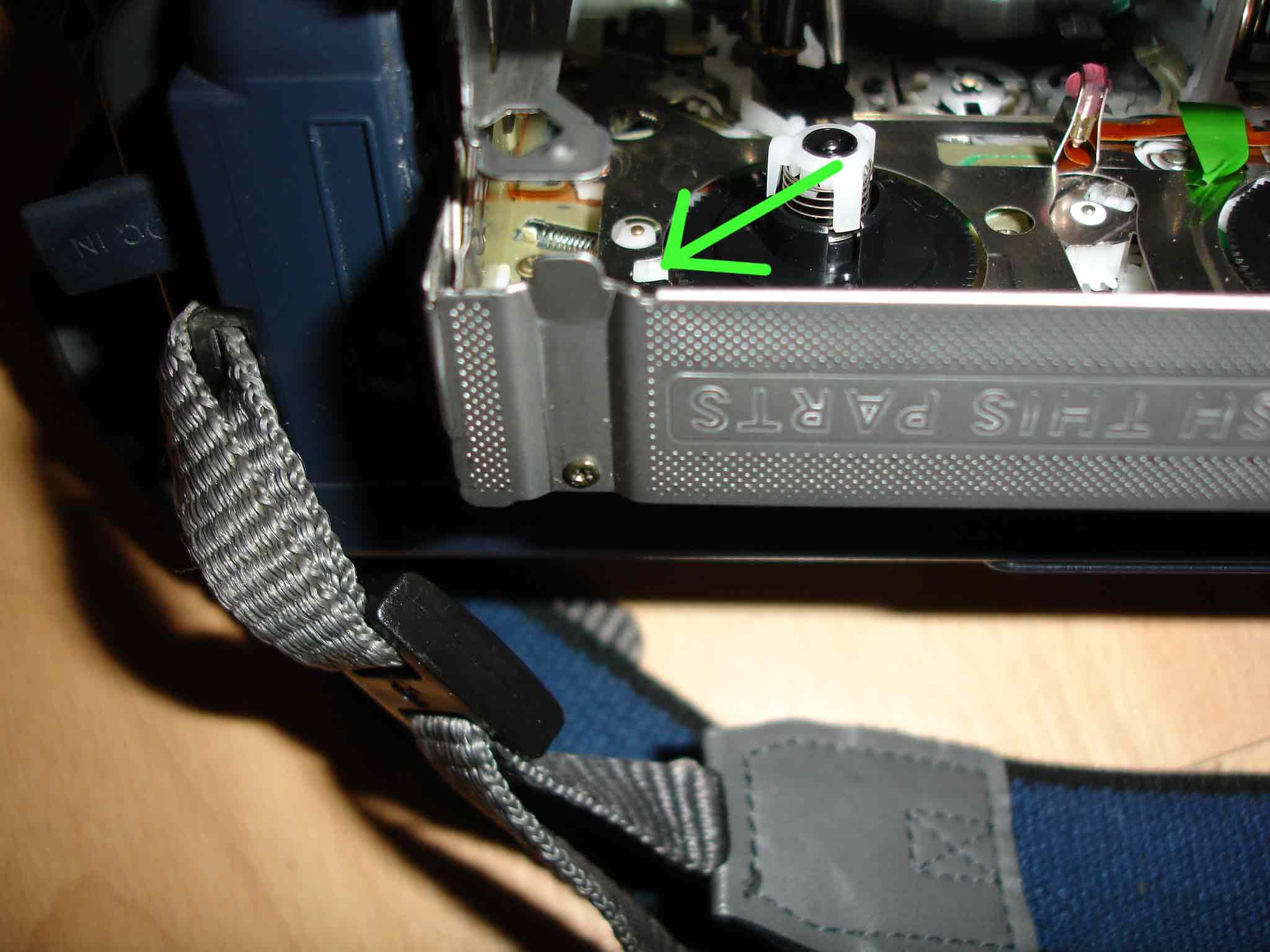
SonyTRV250Eforforum.jpg
Chris
Sun, 24 Sep 2006 16:09:38 -0700
WOW! I LOVE DEBBIE! I hit it now it works no more c:31 crap! vx2000
Thanks!
Sean
Mon, 25 Sep 2006 00:23:32 -0700
I have a VX2000. Tried whacking a little bit, but a little nervous because the camera was so expensive. Didn't work. For me it seems to be just a particular tape that I have left in the machine. Maybe I'm crazy, but perhaps the camera writes the code to the tape. I put another tape in and it is fine. I took the problem tape and manually wound it some, put it back in and it's fine.
Marc
Marc
Thu, 28 Sep 2006 22:08:07 -0700
Had the same problem with mine while at a Temptations concert tonight. Five minutes into the concert.Wish I had read this site earlier. Just slapped my Sony TR517 and the error code went away and now it plays fine.
glen
Fri, 29 Sep 2006 21:39:00 -0700
wow. i hope Debbie comes back and reads these comments. Was close to scrapping my dcr when i did the ol' whack and now it works fine. Thanks.
Han
Sat, 30 Sep 2006 19:53:21 -0700
Can't believe it! I was getting the same "reinsert cassette" on my Sony DCR-HC42. I always complained that my husband was too "heavy-handed," because he'd break everything he touched! This time, his heavy handed whacking did the trick! Unbelievable!!! I guess I'll stop complaining! THANK YOU so much for the suggestion.
Chaka
Sun, 01 Oct 2006 11:10:27 -0700
I took mines to the local electronics shop ( a Sony dcr-trv280) and they say its the Tape Transport...fuck sony! They are real silent about the 22 error...
Rico
Tue, 03 Oct 2006 08:34:58 -0700
i sent this email to Sony!
Recently I discussed the option of repairing my digital8 camcorder. I purchased my camcorder not too long ago and therefore my warranty is void. I can't afford to put $141.00 dollars worth of work into this camcorder I already spent money on. So I decided to go online and find some information on the error codes c31:23 and I discovered a thread of unhappy customers of Sony camcorders. I believe you corporation owes more to its customers than a product that has an infamous problem. The website that exposes the camcorders is
I dont feel obligated to send in more money to Sony to have my camcorder fixed. Wow, i wonder how the technichians feel reapiring camcorder after camcorder with the same problem. please contact me after 6:30 PM monday- friday to discussa better option, I can't see myself spending more money on this product. I know Sony is the best for electronics, but now i question that. I question my $550 dollar televison i have from sony; I question my $200 dollar stereo system from Sony; and I question my Playstation2, and now wonder if I'll get the Playstation3. My camcorder repair should fall on your budget, not mines...
Rico
Tue, 03 Oct 2006 08:59:28 -0700
Yes! We did the ol' "smack" method and now she works just fine...we were about to throw the thing away before we found this thread! Thanks for letting us joing the smack club and for the secret trick!
Heidi
Tue, 03 Oct 2006 14:16:40 -0700
MISSED MY SON'S GAME R/T ERROR C:31 I SMACKED THE HELL OUT OF IT AND IT WORKS!!
GABE
Fri, 06 Oct 2006 15:08:42 -0700
Saturday breakfast and I'm reading the thread in disbelief. my wife and sister-in-law are debating the wisdom of smacking our little annoying video wonder. We love Sony....But I'm from South Philly and Tony Soprano would be proud. I've smacked it and whacked it....and IT'S WORKING. The TRV 103 is part of the family again.
Joey from South Philly
Sat, 07 Oct 2006 07:15:58 -0700
Sony DCR TRV 480
slap happy over here
same problem and the smack worked anyone have how long this lasts for???
Stealth
Sat, 07 Oct 2006 23:10:29 -0700
Success for me too by giving a slap to each side of the camera.
Thanks !!!!
Philip
Sun, 08 Oct 2006 07:06:20 -0700
thanks for the tip chris u rule!!! we move the white lock with a paper clip and it work!!!!!!!!!!!!!!!!!!! lol btw we hit it didnt work but it felt good!
Sonoran trils middle school
Wed, 11 Oct 2006 10:30:22 -0700
Yet another convert to the smack. This is disconcerting to me as I am an avowed pacifist, electronic afficionado and Boys and Girls Club staff person. As such I have ALWAYS preached that violence never solves anything. HOWEVER, I now have my TRV240 back. Debbie needs to be elevated to some sort of cult status on this, with a vigorous nod to Chris with his dog. (I didn't get far enough on this post to find his pic before I tried the smack). I even tried it on my truck. It worked! Now I can't wait to get to the club and the Teenagers.....!
Zodama
Wed, 11 Oct 2006 11:31:43 -0700
Originally paid $850 for this POS? Is it worth paying someone $150-200 just to take at look at it? I think not. This "smack talk" not only extends to sony camcorders but any electrical device that seems to have crapped out. If you are leary of hitting an expensive camera what is your alternative? Go ahead, raise that hand, and think about how those SOB's jipped you on your camera and give it a good hit. You will feel much better and your camera will work for at least another day!
todd
Wed, 11 Oct 2006 19:26:31 -0700
Camera "battery" worked for me. I have a SONY DRV-330 with very low miles and a constant display of C:31:42. What a piece of expensive junk this has been.
I did all of the remove battery etc, etc. I thought hitting the camera was a joke, but after slapping the camera around (on the tape side) it has once again become operational. Remarkable! I don't think SONY Customer Support would dare dispense this kind of advise.
Alan Kolsky
Fri, 13 Oct 2006 11:05:47 -0700
I too was searching for help with me error code. A 1300 cam thats been in a bag all its life. treated like a baby, one dayu POOF error.. Took me about 15 posts of reading before I too became a part of this unground elite Smack-O-Cam club.. With that said. I would love to know what exactly it would take to fix.
Lou
Lou
Sat, 14 Oct 2006 13:48:23 -0700
Yup, after 7 smacks it worked for my DCR-HC42 that had error "C:31:40". I have 4 year extended service. Sent it to Geek Squad twice, works awhile then same thing. Now I need it to fail again so I can send it in again to fix right. Smacking it worked, bad thing for me.
Andy Anderson
Sat, 14 Oct 2006 14:00:23 -0700
Couldn't believe it myself. Without a tape inside the cassette compartment was going in and out without any problem but with a tape I was getting a 31:30 and sometimes a 32:30. After going through the posts I hesitantly smacked couple of times. Did not work. Before giving up I tried hitting little hard and closed the tape compartment with tape inside with a hard smack. And it started working like new. Thanks Debbie.
Dhruba
Sun, 15 Oct 2006 08:35:58 -0700
The fix (2 posts above) did not last long. DCR-HC42 again had "C:31:40" and "Reinsert the cassette". Brought to store to repair under extended service plan. Store tech person took out my memory card (I never do). Using same tape and battery, camera worked fine. Put same memory card back, still worked fine. Store would not repair a camera that works fine. COULD IT BE RE-SEATING THE MEMORY CARD IS THE FIX? If so it is gentler than smacking.
Andy Anderson
Sun, 15 Oct 2006 19:45:30 -0700
I know it's been said time and again, but wow, crap in a hat, i dont believe it. Im a college student, my parents took me to alaska as a graduation present over the summer, the second day, my sony DCR-TRV350 breaks...no explanation...just that &#$^(!! C:31:30 message, last time it took $200 to fix this camera, it was only $500 brand new. i found this site, and learned the love of beating my camera sensless...now it works, just hope you wont have to do this with the ps3, thank you all.
p.s. at first i couldnt get it to work, you have to smack it pretty hard!
David D
Mon, 16 Oct 2006 04:28:22 -0700
Hey everyone. I had the C:31:23 error too on my beloved dcr-trv17 camera that is about 6 years old. I thought my little camera was a goner and was absolutely distraught and then I tried hitting the camera too. I hit it twice rather hard, ejected the tape, and put the tape back in. The error was gone. Thank you thank you Debbie and everyone here!!!!!
Amy A.
Mon, 16 Oct 2006 16:39:36 -0700
I have a DCR-TRV520e and Being a computer tech, the slapping method was the first thing i tried, I mean after all who doesn't hit their pc?
But i needed a more indepth answer to this issue.
I tried your dog thing chris, still nothing, but i think, as a few have mentioned, the tape may be more than part of the problem.
I found the issue usually occurs when i rewind the tape to the start or close to the start.
I manually wound the tape forward slightly and gave it the old "wackamole" on the desk (ever so gently of course) reinsert the tape and off it goes, every time.
I must confess, I only have one tape, so I haven't thouroughly tested this theory, but i'm happy, it werks, for another week anyways.
Thanx Sony, U rock, NOT!!!!!!!
Cheers,
Snitch.
Snitch
Tue, 17 Oct 2006 03:14:27 -0700
Thank you guys you saved my life! desesperately I was searching on internet the error c:31:23 and thanks God found this page. First, I tried the "whack-a-mole" technique but doesn't work for me. Then, I could see the loose rubber coated roller that some people did talk here, and I tried to put in the place that seem the right place... and work!!! THANK YOU!!!! you saved me $250 dlls (or more) with Sony Techical help...... HAVE A NICE, NICE DAY!!!!!! NICE YEAR!!!
Elizabeth
Tue, 17 Oct 2006 13:06:38 -0700
Can't wait to try violence on my 230. Thanks for the tip. I've run my cameras hard, 12& 24 hrs a day due to my job as a P.I., recording picket lines as well as other all manner of crappy conditions. Always had problems with Sony. Bought a second hand Canon cheap, INDESTRUCTABLE!!. Nine weeks, 24x7, two shifts daily at CBC in Toronto last summer. Worked perfectly. Should be in a commercial, eh? Cheers.
ZZ
Thu, 19 Oct 2006 04:59:54 -0700
One year later and I have no memories for a year. Smacked the hell out of it and it worked.
TRY Making sure all the rollers work first. I will try that instead of smacking it next time.
I will keep you all up to date as I try to fix this piece of @#$& again.
Tony
Sat, 21 Oct 2006 15:18:10 -0700
Have Sony Handycam Vision SteadyShot CCD-TRV318 NTSC video Hi8. Could not believe the whacking it would make the 32:11 go away but one goot smack and it's gone. Picked this baby up from a pawn shop and without an owner's manual I figured it was hopeless. Thanks, for all your help.
Tara
Sat, 21 Oct 2006 18:46:54 -0700
Thanks for the advice.
I smacked my TRV-82 with no effect at first, but I kept smacking it harder, envisioning that the final smack would be with a sledgehammer. ;)
Eventually I resorted to varying where it was hit. Finally, I hit near the Zoom toggle switch at the back on the tape side, and now it has been working fine for several hours.
This is cool. Beating the crap out of the camera also helped alleviate the frustration!
Ryan
Ryan
Mon, 23 Oct 2006 08:08:59 -0700
I was a little bit scary with the smashing advices beforehand, but I did it gently and it really worked! Thanks a lot all of you!
(DCR PC101, 2001, error code C31:23
Ronald
Mon, 23 Oct 2006 14:06:33 -0700
i tried whacking it as well and it worked!
it needed a few strong whaks till it worked but it still works. well that means i have also joined the wack the cam club
haka
Thu, 26 Oct 2006 10:41:36 -0700
I have been trying, in vain, to find out HOW to get the drum hours on the DCR-VX2000. sony is of NO help, and I've just about given up.
Anyone out there know how to find the drum hours?
Matt
Fri, 27 Oct 2006 11:47:21 -0700
I was really worried when I got this error code and eject symbol on this borrowed Sony DCR-PC5E (this is not the first time I had used this camcorder) as I thought I had broken something. I tried the smacking method and I got it working on the third try!!! What can I say other than thanking Debbie for posting the original suggestion!
AhChu
Sat, 28 Oct 2006 07:33:30 -0700
Yes smacking the tape side worked for me ,it's VOODOO!
Next time if this doesn't work I'll try dropping it from the top of the Empire State Building!
John
Sat, 28 Oct 2006 11:06:48 -0700
I am getting the same error code C:31:23 after dropping my Sony DCR-TRV27 digital video camera recorder. I bought a digital video head cleaning and this seem to work until I put a different tape in. Also, if you open the cassette compartment & push the reset button before the lid opens up to remove the cassette, this works sometimes. These 2 tricks work sometimes & sometimes not. My final finale that seems to work even better is once you get the code off, leave the compartment door open while you are fast forwarding, rewinding & playing is working the best for me. Haven't tried smacking or wacking it a good one yet, but this is pretty funny reading all the forum comments about everyone hitting their camcorder a few times. Never knew a technical problem solution could be so funny!
Cynthia Downs
Tue, 31 Oct 2006 00:04:51 -0800
Still having problems off/on with techical code flashing. I resulted to finally whacking it a few times hard, opening the cassette compartment and moving little mechanisms back & forth, up/down very gently, leaving the compartment still open while in fast forward, rewind and play mode, but this time turning it upside down and I can't believe it, now it is working fine with absolutely no error code tape after tape after tape. I am not sure if it is turning it upside down on the counter & leaving the compartment open while operating it or the few good wacks I gave it! After all this comments, I would have to say it was the few good whacks myself! Thanks everyone!
Cynthia Downs
Tue, 31 Oct 2006 00:56:03 -0800
I can't beleave it my sony TRV-208E had the same problem I tried evry thing left it for 2 years read this page tried Debs solution and now it plays and works just fine nice one Deb 'if you can't beat em join em'
chalie don\'t surf
Tue, 31 Oct 2006 16:48:42 -0800
It's just amazing! If I would be Debby I would patent this... She would make a fortune. For the first read I was holding my head saying "Not another blond"... Now I have to excuse myself. I have the same storry with a TRV8100. Have spent it's price already for service. Thinking of throwing it away. Not it works fine... My kids just have been taped in their Halloween.
Thanks Deb!
Peter from Hungary
peter
Wed, 01 Nov 2006 09:02:15 -0800
WOW!!! The first time I read Debbie's give it a smack technique I was skeptical - but as I scrolled down it only after got through 6-7 "thanks Debbie" comments before I too had to give it a try. I mean what is there to loose the damn thing doesn't work currently anyway!!!???!! As Jack detailed I gave it a few open handed smacks on each side of the camera, then I removed the battery and replaced it and presto the C:31:40 error on my DCR-TRV730E was gone! What a relief as I just filmed my brothers wedding in Australia on the weekend and now I am back in the states and it wouldn't even play!! I tried several different tapes and removing battery many times to no avail before reading this site - THANKS DEBBIE!!!!!!! :)
Corina
Wed, 01 Nov 2006 23:39:13 -0800
I work at a college computer help desk where we sign out camcorders. We had a reinsert cassette message that wouldn't go away. I found this site and we smacked that bad boy 5 times, and now it works!!
Jason
Thu, 02 Nov 2006 07:35:43 -0800
I don't know if this is related to this problem but maybe someone has a similar miracle solution. The only thing my TRV-310 does is ejects, the door will not close with o without a tape.
Thanks
Ivan
Thu, 02 Nov 2006 14:08:23 -0800
I have a DCR-PC101 with the C:31:23 error code. I gave it a smack upside the head, and the damn thing works now. I can't believe it! After a frigg'en YEAR of sitting on the bookshelf, the camcorder works again! THANK YOU DEBBIE!
Ryan
Sat, 04 Nov 2006 16:35:42 -0800
i just can't believe. the hitting way just worked.
just thanks to everyone which found this way.
my cam turned back to life =)
aytek
Sun, 05 Nov 2006 08:02:12 -0800
I thought to myself "these people are all crazy", but you're not. Smacking the side of the camera worked. Not only for the problem with the camera, but it worked for my ire WITH the camera as well. Thanks!
Levi
Sun, 05 Nov 2006 12:43:29 -0800
Sorry Debbie, smacked the s**t through it and it doesnt work!
Davo
Sun, 05 Nov 2006 19:03:20 -0800
Well for those that had the unfortunate expiriance of the cam smacking not work...heres what happened to my camera...
Attached Image:
pics 053.jpg
moe
Sun, 05 Nov 2006 19:12:01 -0800
C31:31 means capstan stall durring normal operation.
Jesse
Mon, 06 Nov 2006 00:26:07 -0800
smaked cam worked
fingerking
Mon, 06 Nov 2006 19:57:51 -0800
I smacked my camera a few good times and this worked for me. ?? What the hekc wrong with this camera? The fonz would have love to have seen that one!! Heyyyyyyy
I watching video!!
Thanks for alll the help!!!
Kenny
Kenny From SC
Wed, 08 Nov 2006 06:59:35 -0800
My goodness. WHACK!!! it worked. You seem to have many new friends Debbie, including me.
runningshoes
Wed, 08 Nov 2006 11:46:56 -0800
I have the handyman DCR-TRV27 pile of crap...I have been beating the poop out of it, cleaning the insides with a cotton swab...wiggling the parts...nothing seems to be missing, the black rubber roller is still mounted..along with a cluster of other parts.
I have tried everything on the whole page so far...turning on and off while singing kumbiya..in the rain..lol just kidding. but seriously.. what else is there?
Attached File: cam.bmp (900 KB)
Molly
Wed, 08 Nov 2006 15:22:56 -0800
holy shit smacking the camera seriously worked. i practically shitted myself when it worked. sony always has to hide something...
ricky
Wed, 08 Nov 2006 19:31:51 -0800
trv530 c:31:23
smack it hard. it worked for me!
TRV530 C:23:33
Fri, 10 Nov 2006 04:23:56 -0800
me too! thanks for Debbie.
trifler
Fri, 10 Nov 2006 21:17:02 -0800
Thank you Jesus.
I called Sony, they wanted $500 to fix the C:32:23 error code.
The whack on the side fixed it.
The internet is wonderful.
Bill
Bill Moore
Sat, 11 Nov 2006 00:12:45 -0800
hahaha... Debbie's suggestion works on the TRV-11E too.! thx Debbie for smacking solution on the C:31:23 problem.
Hansen Wong
Sat, 11 Nov 2006 01:21:09 -0800
LOOK HERE 1st FOR SOLUTION!!!! In order to solve the problem of the c32:10 error, All you need to do is 1.take out tape 2. Manually fastword it for about 5 revolutions of the real. 3. insert the tape back in. and that's it PROBLEM SOLVED!!!
WORKS EVERYTIME!!!!!!!!!!!
your welcome
Evhen
Sat, 11 Nov 2006 07:49:22 -0800
Gracias!!!!, hace tiempo que mi TVR-250 no funcionaba, continuamente salia el error c:31:22, hasta que encontre este sitio, le saque la bateria, le pegue un par de palmadas y ahora funciona. Escribo en castellano porque en mi idioma no encontre nada sobre este tema en la web y tal vez esto le ayude a otros que no sepan ingles.
Chelo
Sat, 11 Nov 2006 14:32:40 -0800
I've also had this problem for a year with my TRV66. After reading this forum I tried smacking the tape side several times but it didn't help. Then I smacked the top of the case where the STOP, REW, PLAY buttons are. Bingo! It works perfectly now. It must be a seating switch on the cassette door.
It's evident from this column that so many people have had this same problem. The fact that Sony hasn't performed a recall makes me lose faith in them as a company. My next camcorder will not be a Sony.
Bob
Sun, 12 Nov 2006 15:13:47 -0800
Removing the memory card and slapping it around a bit fixed my problem
scott
Mon, 13 Nov 2006 19:00:46 -0800
I was getting desperate with the TRV27E C:32:11 error and I was ready to try anything, good few smacks on different sides of the camera and it worked.
Your a legend Debbie, you have another fan.
Pekka
Tue, 14 Nov 2006 01:52:29 -0800
I don't think that you need another Praiser Debbie for the smacking thing, but it saved me a flat rate of $211 for the fix, or $500+ for a new camera.
John Kneisl
Wed, 15 Nov 2006 18:17:53 -0800
Ihave asony TRV118. I have been having the same error message c:31:23 for the past couple weeks. I decided to google the error message....Low & behold I got your great website.....then I saw Debbie's thread...I did not hesistate to give my Handy Cam a good "HAND JOB".....wow it worked..after the whacking it made a funny sound as if some gears got back into alignment.....then Voila...make sure you hit the cassette part of the camera.....Thanks
Duane
Wed, 15 Nov 2006 19:47:47 -0800
Slapping it slightly worked for my DSR-PD150 at least for five minutes, than it appeared and disappeared after slapping again. I'm worried this error c:31:23 will show up continuously, and slapping it again and again would make possible loose parts looser. Does anyone has experience with fixing it in a shop? Is the error really gone for ever after fixing or is it just an expensive try?
Sylke
Thu, 16 Nov 2006 08:08:00 -0800
I had the same C31:23 problem with some more side effects like picture was mosaiced, no sound, sometimes the stripe in the tape was creased. So I had the mood to punch it really hard and I did it and now the camera works perfectly!
Thanks Debbie!
Rick
Sun, 19 Nov 2006 02:29:23 -0800
I have the Sony TRV330, error code C:31:23, about 5-6 years old. No problems ever, then BAM! error codes galore and not able to put any of my tapes onto my Mac to make my imovies! Mine took about 4-6 smacks, some on the side, some on the bottom, and now it is working! Sure love saving that $300 to repair!
However, with D8 going out, I better transfer all my tapes soon!
Michelle Seguin
Sun, 19 Nov 2006 06:19:58 -0800
I stopped using my sony camcorder back in 2004 due to the same code everyone else is mentioning, went on to this web site gave my camcorder a couple of slaps and it now works,i can now watch my daughters first couple of years.The best part is i hav'nt had to pay sony.
vicky
Sun, 19 Nov 2006 12:29:47 -0800
Well, I have a Sony DCR-TRV240. I was getting a error code C:31:42. I also changed the tape and battery and even found a hint that it might be condensation. So I let it sit open for a few hours. That didn't help. So my wife repeatedly slapped it. It still didn't work. So I hit it a little harder. Then the image came back with all kinds of distortion. Then the error came back. So I left it alone for about 2 hours. Then I took the tape out, set it on its side with the LCD side in the palm of my hand, took the strap off and wacked the tape side really hard. It worked! One good hard slap. I was sure I was going to break it, but hey it was already broken. So now we'll have to see how long it last. I think I am still going to get a new Canon anyway.
Matt
Thu, 23 Nov 2006 18:47:35 -0800
Smaking the camcorder works.
thanks,
aw
Thu, 23 Nov 2006 19:54:27 -0800
Hit it on the bottom gently but firmly (like your swatting a pet). It has to do with the tape door. Don't send it back to Sony. All it is a little tiny defect that Sony puts in. All they do is pull it out of the UPS box, smack it a few times and send it back.
coricaman
Fri, 24 Nov 2006 12:35:34 -0800
O_O....O_O
I can't believe this....
I whacked it "relatively hard" four times and it started working again....
I LOVE YOU ALL!1 THANK YOU GUUYS SO MUCH!!
anonymous
Fri, 24 Nov 2006 13:20:18 -0800
I love you Debbie! My backup TRV320 has been doing that error code for over a year. I love having a spare camcorder for a dive trip. Off to Bonaire next - with a workable spare. Woohoo!
Frogman
Sat, 25 Nov 2006 09:09:39 -0800
I have quit trying to get this Sony camera to work and have tried everything and I mean everything. I swear I will never buy another Sony ...anything ever again. The one thing that worked ,,,amazingly is the SMAK method. There is a way to SMAK it though. Hold it on the left hand palm, holding the LCD (closed) in your palm. The video tape house is closed with a video tape in it. Then open palm, right hand SMAK like the face or something on the closed video house. I swear I thought BS, but the dang thing began working after a whole year.
David re: SONY HandyCam
Sat, 25 Nov 2006 19:33:16 -0800
I just knocked the stuffing out of my camera and the error code went away. Works like that on kids too:)
Jay F
Sun, 26 Nov 2006 12:12:20 -0800
We were just about to upload our children's baby videos and got this error. Found this page and we were falling off our chairs laughing that for almost a year people were writing stories about smacking their sony cam. We looked at each other and said, well why not. My husband tried it and was just too gentle. I gave it a whack and first time, it came back on in good order. I think this is enough documentation now for their manual.
Nordbergs
Sun, 26 Nov 2006 14:27:01 -0800
I was so glad to find this website. I love my Sony DCR TRV250. Yesterday I got the error code 31:23 with the flashin underlined arrow. I followed the instructions for condensation and after a full 24 hours it did not work. I opened every door and panel to make sure that all tiny vent opportunities would help -- No avail. I put in new tapes same thing. Then today I get the error C:32:21 I googled that and found this site. I had already smacked (not very hard) the camera out of frustration. I followed Debbie's advice, put in a tape, smacked it hard a couple of times, tried to play (but it still beep and blinked) when I took the tape out the mechanisims seemed to jump into gear and voila! Inserted tape and all seems to be working..now for how long! I have the camera for 3 years and this is the first trouble I have ever had with it. Glad there is someone out there with a 'fix'. I even went to Wal-Mart yesterday and purchaced the Sony DCR-TRV280 just so I could transfer all my tapes (was planning to return it afterwards, with a few extra dollars, for the DVD model. Thank you so much!!!
Happy again!
Sharre
Sun, 26 Nov 2006 17:21:05 -0800
Graccias(TNKZ)Debbie!!
Rustico pero funciona, me paso con una DSR-PD150P. Error C:31:23. Hasta creo haber escuchado un sonido muy bajo como de un resorte o algo similar. Suerte y gracias.
Fede
Sun, 26 Nov 2006 19:15:35 -0800
My name is Susan ... and I'm a handycam whacker. I read Debbie's comment and I figured, "It's already broken, so what could it hurt?" I'm happy to say that I am now ready for my sons' upcoming holiday programs. It just wouldn't be the same if Mama Suess wasn't at every show with her camcorder. Debbie, we SHOULD all get together and send you a nice Christmas present. (Perhaps a video of all of our kids!!!! :-) You're a lifesaver! It also made for some entertaining reading for the evening!
Susan
Tue, 28 Nov 2006 17:34:34 -0800
I have a tvr318, had the C:31:22 code, tried everything sony suggested, nothing worked. They said it would cost about $200 to fix. I found this site and followed the detailed directions of "smack the tape side of the camera". To my surprise, IT WORKED!! Thanks
Javier
Wed, 29 Nov 2006 20:50:12 -0800
Found the problem. While shaking the camera i heard like something loose inside. So i removed the tape leaving the door open, turned the camera upside down and tapped. A black roller fell out!
i put the tape back in same c:31:23.
i looked inside the via the open tape door to see if i could see where the roller came from. After looking around i found a stem that could fit the roller that used my finger to place the roller over the stem. Holding the camera on its side, i reinserted the tape and pressed play - it Worked!
the problem now is how to keep the roller from falling off again.
i hope this helps someone.
Mark
www.mytruetech.com
www.mytruebiz.com
Mark McDonald
Sat, 02 Dec 2006 11:37:12 -0800
From Spain- My Sny works again.
Simply amazing!!
Donpelayo
Sat, 02 Dec 2006 13:59:43 -0800
Just tried it on my Sony DCR-TRV250 (had error c:31:22) and it worked! If this doesn't deserve a law suit, I don't know what does... Sony told me to "buy a new camcorder" when this would have left me locked in to the Digital 8 format... I WILL NEVER BUY ANOTHER SONY!
Steven Woolley
Sat, 02 Dec 2006 18:25:06 -0800
C:31:23 error I have a Sony DCR-VX2100 and wanted to use it today.....but.... got that stupit error. I tried the recommeded fix for it. Did not work and Sony solutions was not help. I saw notes that hitting it would work. My first thought was "What the F**K" are they crazy or what. Now let me tell you.....it works. I gave mine a "STERN" beating on the bottom and behold it was fixed. I was laughing so hard that I choked. So I told my friend about my fix and I though he would piss his pants when I told him that beating the camera worked. THANK DEBBIE whoever you are.
Dino B
Sun, 03 Dec 2006 13:29:16 -0800
I have a Sony DCR-TRV280 and open palm smacking that bad boy from all different angles and shaking it like a snow globe while watching Love Actually worked for me. Thanks for the tip. I'm going to download all 50 of my tapes as fast as possible and get a tapeless video recorder.
Edgar Blunt
Sun, 03 Dec 2006 22:58:37 -0800
I also had a C:31:22 error on my TRV320E, and was desesparate to get it fixed. I can confirm: the smacking method works fine ! Many thanks (to Debbie and all you guys...)
Eric
Mon, 04 Dec 2006 00:43:29 -0800
I just wanted to add my experience of the 'smack and whack' approach to curing the 31:23 error message. Having had an incredibly unhelpful converstation with Sony who told me that they no longer made parts for my DCR Handycam (which is 6 years old) I found this site and the advice has solved the problem. THanks so much as servicing costs a fortune. I agree that this particular breed of handycams has some serious flaws but if smacking it a bit keeps it going for a few more years I'll be pretty happy.
sarah Chapman
Mon, 04 Dec 2006 03:49:05 -0800
Cannot believe smacking a piece of fragile equipment fixes it but it did. Removed the battery and put it back in, gave it a good smack on the tape side and we are back in business.
Thank you
Sean Keenan
Mon, 04 Dec 2006 22:55:19 -0800
After getting the same code on my trv 950 and trying to find a repiable repair center, I came across this list from a Google search. I don't believe the number of responses to exactly the same code thats causing my cameras not to play a tape.
So...read the comments from everyone and whacked it pretty good two or three times. (Theres something about whacking a $1000 camera that goes against my grain).
Aahhhh...it now works just fine. Unreal!
Pete
Mon, 04 Dec 2006 23:07:20 -0800
Went on a mission trip to thailand and video taped the entire thing and i got the error message right after I got home... I tried most of the ideas they did ie: took the batt out for a min and hit the side the best i could make it as it was $1500 usd and looked inside at the rubber wheel and the white wheel was bent paralel to the rubber one. so i bent it back and it worked, not sure what did it tho...
Concerned Missionary
Tue, 05 Dec 2006 19:18:37 -0800
Smacking worked !!!
Perry
Wed, 06 Dec 2006 11:46:50 -0800
My camera has been broke for over 3 years! I read about smacking the side of the camera & IT WORKS!!!!!! SMACK IT BABY!
BROMER
Wed, 06 Dec 2006 17:17:51 -0800
Smacking the camera works!!!
I have a handycam pc1 and I let a buddy of mine borrow it. He brought it back with the C:31:42 error. Once playing back the footage it would look 'pixelated' on the screen (I guess that's what C:31:42 means) and then it would stop.
It was out for more than a year. I missed so many good memories: the birth of my daughter, her first steps, Christmas, etc. because of that stupid message!
I contacted Sony, but they want $300 (flat rate) for the camera to get fixed.
Until I read this page...
Lo' and behold!
I smack the camera, and it works fine!
...with permission of my wife i can say this: DEBBY, I LOVE YOU!!!!!!!!
Thanks a million.
Eddie NYC
Thu, 07 Dec 2006 12:03:28 -0800
add me to the whack club! LOLOLOL! I can't believe it! So much for technical prowess
Rachael
Fri, 08 Dec 2006 10:41:06 -0800
I had the same problem, only I was getting this message for one particular tape. I suspect it was a problem with the tape (i.e. I bumped the camera while shutting it off). I fixed my problem rewinding the tape for 2 turns (to get past the bad spot) at that fixed my problem. I like this solution much better than smacking around my camera.
To manually rewind the tape
1. Remove the tape from your machine and place it face down on a flat surface
2. Using a toothpick (of anything of similar size), push back the tape stop mechanism. Look for a 1/8 x 1/4 inch rectangular hole on the underside of the tape near the center of the tape. Push the button back towards the back edge.
3. Rewind the tape about 2 turns. Repeat
Mike in Tampa
Fri, 08 Dec 2006 11:00:15 -0800
shakinig with a palm is unglublich, it works, just be patient if it doesn`t works the first time, keep on beating it with love!
ws
Fri, 08 Dec 2006 14:39:04 -0800
ittttt worksssssssss !!! whack it,whack it,whack it.
I didt it only once and it worked fine. I´m so happy! (i have a trv250)
seb
Sat, 09 Dec 2006 12:02:47 -0800
Like most everyone else the idea of beating my $1000 plus DCR-TRV510 didn't set well. I read the 1st 30 or so success stories and went ahead and tried it. My problem had been that after putting a tape in the unit would not close the tape door so I manually pushed pushed the door closed and held it while I smacked it. Several good open hand smacks on the tape side. Sure enough after putting the battery back on and sticking a tape in the door closed properly. Debbie, you are a genius. Thanks. We all owe you at least a lunch. From the looks of it you would never have to buy another meal if we all could pay up. My son and wife and I have been busting up laughing reading the rest of the comments. Who would have thought?
Mark
Sat, 09 Dec 2006 13:57:08 -0800
I got the C:31 error on my TRV99 and whacked it, tape side up, while it was one and rewinding. It worked! Thanks, Debbie. Your 10 cents is on the way. : )
Christian
Sun, 10 Dec 2006 17:49:33 -0800
Smacking the cassette side made a TRV20 work again. Code 31:30 with many power down attempts which did not work. This should be in Ripley's Believe It or Not....
Mike Rrrrrr
Sun, 10 Dec 2006 21:21:09 -0800
It was quite impressive to see how many people on here got their cameras working by smacking them!
Of course, it worked for me too. Thanks for the tip =)
MuffinTheGeek
Mon, 11 Dec 2006 09:45:27 -0800
The Black Roller Solution.
I have the TRV-140, and I tried whacking it a lot! So much that a screw fell out. No help. In desperation I took the cover off of the tape side so that I could look directly at the gears and fiddle with them. I fiddled with most of them to no avail.
Finally, I shook the camera gently and out popped a black roller that I hadn't seen before. It must have been stuck somewhere in the body of the camera. It was pretty easy to determine where it had come from (a silver spindle). I put it on the spindle and sure enough the problem is solved. A couple of other folks mentioned this worked for them as well.
Seems the C:31:23 error can be caused by a number of different things. So, if the whacking solution doesn't work for you look to see if the black roller has fallen off.
Aaron
Mon, 11 Dec 2006 21:02:07 -0800
It worked, two whacks on each side and viola! Thanks!!
rlp
Mon, 11 Dec 2006 21:08:27 -0800
ok... i know this thread has gone on forever... but smaking it does work!!! (i took the battery out for a few seconds also)
joe
Tue, 12 Dec 2006 00:09:18 -0800
Wow. WOW. It worked!!! I can't believe it! I thought Sony was better than this, but at least I know the solution now! Ha! Too funny. Mine was a C:31:42 error, but it seems to be the same thing.
Unbelievable! I'm so happy!
Albert
Tue, 12 Dec 2006 05:35:24 -0800
Tried the battery romal thing. The only thing thatworked was smacking it on the side. I took great pleasure in this technique. Maybe a bit too much.
Eric
Tue, 12 Dec 2006 20:42:16 -0800
Boy is this funny. And a good kicking sorted out my DCR-PC5E in two minutes. Welcome to Smack Club. Thanks Debbie!
Chris
Wed, 13 Dec 2006 15:43:35 -0800
Thanks so much for the advice. Out of complete frustration my husband starting wacking the darn camera with a book while I was reading him other people's comments. When I got to the one that stated that you need to bitch slap the camera the camera began to work again!
Thank you!!
so thankful
Wed, 13 Dec 2006 19:28:33 -0800
Was looking up the manual to find the error and tripped up on this forum with the error!!! couldnt believe people would hit there camara's to solve the error
Rude not to try it though, and IT WORKS
We couldnt hit it hard for laughting but after we had carmed down 2 hits later and we are now dedicated members of the "spank the sony" club thanks debbie
c & pie
Thu, 14 Dec 2006 15:25:46 -0800
Debbie thanks for your Redneck Solution! I had wacked mine earlier but very softly. Your solution gave me ability to release my anger. :)
Rich
Thu, 14 Dec 2006 18:02:01 -0800
I should spray some WD40 on it and slap a piece of DuckTape on it just for good measure!
Rich
Thu, 14 Dec 2006 18:07:48 -0800
Sign me up for the whacking it on the side of the head club. I have a Sony Digital 8 Walkman VCR...giving me some code attitude. I found this site, whacked the deck several times for not only offending me recently but also in the past...and whatta you know! It works!
Thanks to all!
cmills
Fri, 15 Dec 2006 09:19:28 -0800
Whoever suggested taking a look at the rubber pinch roller was right on the money. Unfortunately I whacked the camera a couple of times first before reading the post that suggested the pinch roller. The whacking didn't fixt the problem because loe and behold there was a little black cylinder lying on the floor next to the camera (a DCR-TRV25). Without even having to remove the door I was able to put the roller back on its pin witha a pair of pliers. Saved much time and $$. For anyone trying to do this, you need to look at the group of pins closest to the lens of the camera, and it's the thin metal pin that is between a larger black one on the right and a white one on the left side. Thanks for the help@
needle nosed pliers
Fri, 15 Dec 2006 16:33:11 -0800
i went out last night to a chanuka party and took my trv250 thinking i will tape the whole party for memories. low and behold when i get my cam out of the bag and turn it on it shows me that stupid error. i tried all possible options but to no avail. the cam wouldnt work. my brother suggested to go on the internet but i wasnt going to spend the evening fiddling with it , so i put it back in the bag. this morning i read this page and did what debbie said. good lord , it works. i thought i'll have to take it for repair and spend money for something that can be done at home. thanks debbie. will you marry me?
simcha
Sat, 16 Dec 2006 07:35:58 -0800
Thanks alot Debbie! I turn it on the side and gave it a couple of smacks, then try it and to my surprize it works now. Really thanks alot again.
John Maxwell
Sat, 16 Dec 2006 07:46:49 -0800
I bought this sony camcorder to replace another faulty one. Just about to give up after the C3130 code error and tried the good smack method. It worked instantly, Thanks! Don't know how often I'll have to smack it, but better than trashing it. Won't buy sony again!
gabe
Sat, 16 Dec 2006 19:36:56 -0800
From Austria
Sony DCR TRV120E c:31:23
smack it hard. it worked for me!
Christian Berger
Sun, 17 Dec 2006 03:00:48 -0800
Ok. It works. One solid whack and we're back in business. - Paul
Paul
Sun, 17 Dec 2006 10:29:24 -0800
Debbie!
YOU ROCKKKKKKKKKKKKKKKKKKKKKKKKKKKKKKKKKKKK
I WAS SO MADDDDDD
AND I HIT THAT THING SO HARD
AND PUT IT ON AND IT WORKED OMG
I CANT BELIEVE IT
YOUR THE BEST DUDE
kevin
Sun, 17 Dec 2006 13:38:54 -0800
yo,
on the real, the black roller solution is on point. Shook my camcorder like some other dude said and out came the roller. Put the roller on and the camera worked.
My camera hasn't worked in 8 mths.
Thank you very much
cachoeira
Sun, 17 Dec 2006 17:58:54 -0800
I cant belive it,there is nothing (are so i thought,that i hadnt tried to get my sony back up and running)THEN icame across this site today. Hit the recorder a few slaps and hey presto!!!! Its amazing,and just in time for the kids school concert.HAPPY SLAPPING GUYS. KIM DUBLIN
kim
Mon, 18 Dec 2006 03:41:25 -0800
THANK U DEBBIE!!!!
Just one more to confirm that "smacking the side of the cam" is the solution!!!
erika
Mon, 18 Dec 2006 06:12:56 -0800
no freakin way!!!!!
I WHACKED MY dcr-trv280 on the tape side (near the top) and IT WORKS!!!!!!
\THANKS!!!!
Justin Suazo
Mon, 18 Dec 2006 07:14:59 -0800
Welcome to whack-a-mole land! I had exactly the same problem as several on this blog. I couldn't stop laughing when I read the whack-a-amole post. After seeing that it worked for so many, of course I tried it, what I had to lose? The damn thing worked immediately. After smacking it I ejected the tape, put it back on and worked like a beauty. THank GOd for sites like this one.
Another Wacker
Mon, 18 Dec 2006 18:43:38 -0800
would you adam and eve it, three smacks each side of my ccd-tr515e and fault code C31-23 has gone. thanks for the tip.
Trev
Tue, 19 Dec 2006 09:39:10 -0800
Tuve el error C31:23 en mi videocamara sony. Lei en la web que se arreglaba con unos golpes fuertes.. saque el cassett, le di un par de golpes con la palma de la mano en la base de la camara, meti el casset y ya el problema resuelto.. ya lo he arreglado en dos ocasiones de esa manera.. no se porque, pero funciona
Alfonso Linares
Tue, 19 Dec 2006 20:31:54 -0800
Thanks do Debbie. Smacking did worked for me.
It is amazing.
Venkat
Wed, 20 Dec 2006 00:04:39 -0800
I AM ABOUT TO FILM MY CAMERA REPAIRS....THATS RIGHT....REPAIRS AS IN PLURAL....FIRST.....I WANT SOMEONE TO WHACK ME ABOUT 15 TIMES FOR CONTINUING TO BUY SONY PRODUCTS....I AM ON CAMERA NUMBER FIVE ...FOUR OF WHICH HAVE THE ERROR CODE..........I HAVE WENT ROUND AND ROUND WITH SONY AND THEIR TELLING ME TO SEND TO TO SOME RPAIR LOCATION HLF WAY BETWEEN GREENLAND AND CAROLINA
I HAVE SLAPPED...DROPPED...BANGED ....TIL I'M BLUE IN THE FACE....
SONY....YOU HAVE REALLY PISSED ME OFF THIS TIME
COMING SOON TO A MONITOR NEAR YOU....THE FILMING OF MY REPAIR TECHNIQUE OF MY BROKEN SONY CRAPOLA CAMERAS
CHECK OUT HOW I REPAIRED ONE OF MY COMPUTER MONITORS A WHILE BACK
www.wahoonbox.com/videos/computer.wmv
jJUST WAIT SONY.....PAYBACK WILL BE HELL ....
WAHOONBOX
Wed, 20 Dec 2006 04:07:49 -0800
hI EVERYONE - MY MOM CAM HAS THE SAME PROLBEM UNFORTUNATELY IT HAPPEN WHEN I USED IT LAST so she say i broke it. tonight i was reading you coments and took the cam out and bang the shit out of it. my parents woke up and i got the shit bang out of me. (smack) still have to try cam when i get my hand on it to see if it work. hope it was worth the smack. im only 15 so they think i lost the plot.
Bood
Wed, 20 Dec 2006 05:02:42 -0800
It works! I cant believe that beating it senseless actually did the trick!
nice!
Robin
Wed, 20 Dec 2006 17:22:58 -0800
Called Sony and after they offered to service my Daughter's Handycam for $150+ I found this web page and had her give it a good ole smack - and yes it worked! Thank you!
Lori
Wed, 20 Dec 2006 18:59:38 -0800
I`ve bought myself also a Sony Camera DCR-TRV14SE, and i had the same error. I smacked it twice, and it worked after that just fine. I hope i`ll finish to rip my old tapes, i wasn`t using the camera for a long time.
This choice of buying Sony handy cameras, was a bad choice for me... No more Sony ...
Elis
Thu, 21 Dec 2006 07:58:15 -0800
Forgot to tell, if i was a Sony representative, i would have said to my customer "Whack that camera till it gets working" i would have been more happy than wasting 200 $ and a month of service. Old Sony comunism appreciation is not dead. They still rip off the customers, so i`m goin` to sat away from this brand.
Elis
Thu, 21 Dec 2006 08:09:09 -0800
I just had the same error, same tape, 2 different camera's. Turned out the brand new sony tape had problems opening it's "flap" (where the tape is under). I forced it open, opened and closed it a few times, inserted tape back into camera, problem solved.
Saskia
Thu, 21 Dec 2006 10:58:22 -0800
Oh, yes, it likes the rough stuff... Smacking the camera worked for us here and it was essential that the camera was working. Tried it gibgerly, still fairly ginger with the whacking, but ejected and reinserted tape a few times as well as tilting it on its side, so... Never hurts to try it before shelling out money.
Gait Lab
Thu, 21 Dec 2006 13:00:04 -0800
Yes Debbie...you are the camera Godess....Whak-a-cam works and works and works....
Vineeta
Thu, 21 Dec 2006 15:04:42 -0800
This is hilarious! I laughed when I first read this then I tried it with my DCR-HC42 and it worked!!! Whoever Debbie is she should get paid millions by Sony for all her repairs!!!!!!!!!!!!
Shannon
Thu, 21 Dec 2006 19:24:32 -0800
I encountered the C:31:22 message this morning at the start of my 10 day vacation. Luckily for me, I found this solution on-line. The whack-a-camera solution works...at least for now. Hopefully it will continue to work. Thanks Debbie and everyone else for this unbelievble solution.
David
Fri, 22 Dec 2006 05:15:14 -0800
Dad took it to S.America to fix for 50 bucks what would have cost here over 300, a piece had broken inside, got it back worked fine and then error C:31:22 flashes telling me to eject tape. I read the board and then gave it swift whack and it is working again, thank GOD, it is Dec. 23rd, need I say more, now I can record my kids and their xmas morning THANKS TO ALL
Jennifer
Sat, 23 Dec 2006 08:57:32 -0800
missed my sons birthday. Got ready to use a five iron - clearlz on the right track, but this way the camera actually works. Now, if anyone has experience with the unrealiable trv66 fold-out monitor...it plays back ok, but to only works during recording when it is rotated out away from me.
Yes, thanks to the Debbie, but thanks also to the hundreds of apostles that affirmd the message.
rubberdubber
Sun, 24 Dec 2006 03:22:54 -0800
Sony trv-950 wouldn't playback this weekend. The camera was left overnight inside a vehicle and temps got down below
freezing. Knew I should warm unit up gradually before use. Would not playback at all from a tape that I knew had video recorded.Rewound tape & played with it for a while & picture appeared but was pixelated with grey horizonatal stripes.
Got home.... same thing. Used cleaning tape & cleaned tape head with alcohol... same problem. Just did what other users said to do..... remove battery for a couple of minutes & give it
a good "wack" an I'll be damned..... no more grey stripes & no error code! Thanks!
radioman
Sun, 24 Dec 2006 13:24:22 -0800
Error code C:31:23 is "S reel fault". Sony advises to load the tape again to correct this. These things happen with moving parts just like the tread on your car's tires. Overtime, things go out of alignment, parts wear out and you end up with a tape mechanism that doesn't ALWAYS load the tape right.
Adam
Sun, 24 Dec 2006 22:45:51 -0800
OK this is sick!!!!! My TRV230 has been out of wack withe error code C:31:42 for a year! I was about to get anothere one when I found this thread. I took the tape out. Smacked it about 10 times on the tape side. Put the tape back in ...and MAGIC!!! it works!!!. Now I can download my video from last year. Before you dismiss this .... TRY IT!!!!
ScorpioOne
Mon, 25 Dec 2006 22:14:46 -0800
YES! YES! YES! Googled the error code, found this forum, WHACKED the varmint, and IT WORKS! WHOOPEE!
Jesse
Tue, 26 Dec 2006 13:46:53 -0800
BW, instead of "Camera Hacker", maybe this section should be called "Camera Whacker".
Jesse
Tue, 26 Dec 2006 13:47:53 -0800
i dropped my camera tonite ,it worked,but i went to switch tapes,and when i put the new tape in,i got this c31:23 error code and heard some weird noise when the tape loaded,tried to play with it but no luck,so i found this forum,and tried to smack it around,but no luck,after hours of smacks,lol,i read the comments about the 'black' roller,and started to see if i could find it,i looked down at the floor,and saw a lil roller! i put it back on the lil skinny black 'pole' ,put a tape in,and yess! it worked!
thanks!
shawn
Tue, 26 Dec 2006 19:45:42 -0800
I picked my camera up to record today after not using it for a month or so only to find it wouldn't work. I got the C:31:23 error and found this website hoping to fix the problem. Nothing worked except using a Sony tape. I smacked, I layed it over on it's side, I disconnected, reconnected everything..nothing but a Sony tape will make the thing work. Not a problem really except that more than 75% of all the tapes we've recorded on AREN'T Sony! Does this mean I'll never see what's on those tapes again?
Kim
Wed, 27 Dec 2006 13:11:42 -0800
LOL, I cant belive how easy that was, I've got the Sony Handycam DCR - TRV270 or DCR - TRV270E depending on what you wish to call it, I had a little look through this forum because I have just bought the camera tonight, I got home and it said "re-insert cassette", tryed everything and didnt work, came on here for some advice and thought what the hell £80, i'll whack it and the damn thing worked, thanks debb really greatful :-)
Craig
Wed, 27 Dec 2006 16:43:39 -0800
Great, it works but the problem persist. i not find the real problem, a litle soldering, the black piece ?????.
israel
Thu, 28 Dec 2006 04:49:06 -0800
I am amazed!!! I thought it was a joke. I have a CCD-TRV318. Three sharp smacks and it works just fine now. I'm gonna try this on my kids. lol, and maybe even my husband.
Tracy
Thu, 28 Dec 2006 19:43:45 -0800
I have a Sony TR330e. the tape is stuck inside and no amount of prodding, poking or pulling has managed to remove it. I decided after doing a search and coming up with this site to try the Whack method in the hope that it might free the mechanism and loosen the tape. I gave it several hard whacks and Guess what? yes that's right nothing happened......... except I got an error message C:31.
so for your info the whacking method also works in reverse!
Tape still stuck any other ideas for me?
Alex
Fri, 29 Dec 2006 03:30:29 -0800
I have a DCR-TRV250 and got the dreaded C:31:23 error message. Was able to get the tape out, it appeared OK, but when I reseated the tape the motorized door wouldn't close. I found that disconnecting the battery and/or AC for a few mins got the door to close again on its own, but I still had the error message. I tried Debbie's whacking process (on the camera ;-) and at first it didn't work. Then I removed the tape again and whacked the tape itself a few times before reinserting it. That did the trick! Although it was suggested above that the error code has to do with the camcorder and not the tape, it might be safer to try taking out the tape and whacking it separately, before subjecting the camera to that shock...
Ed
Fri, 29 Dec 2006 08:04:03 -0800
Deb you ARE a genius. Thank god for this thread, Thanks to all the whackers out there!!
Jennifer
Fri, 29 Dec 2006 13:24:52 -0800
Dudes, how the hell can i get the tape out of the cam?Tried smackin it, and nope, it doesn't work(( it pisses me off, the tape is still in....c31......rrrrrgh....Help me, plzzz!
SOK
Fri, 29 Dec 2006 17:35:11 -0800
My TRV103 with many hard miles on it pulled the
31:22. Whacking fixed the jam but not until I
hit the tape compartment when open (not too hard).
Thanks Debbie.
Conrad
Sat, 30 Dec 2006 15:08:28 -0800
aanapor la chita funciooooonaaaaaaaa!!!!!!
gracias debbie!! : D!
dani y marce
Sun, 31 Dec 2006 11:01:29 -0800
This 'technical' solution also worked on my DCR-HC39E which has been showing a C:31:40 error code for the past few months. Thanks Debbie!
Dave (UK)
Mon, 01 Jan 2007 01:30:58 -0800
PS Happy New Year to everyone!
Dave (UK)
Mon, 01 Jan 2007 01:32:12 -0800
I have the model number trv-480 and i hit it with the palm of my hade like all of you suggested and it solved the problem .Wow that is so weird.
scott
Mon, 01 Jan 2007 08:37:50 -0800
Yep - my TRV-270E responded to a measured whack - thank you for saving me a service. A note of caution though - that method worked on my jamming leica for a bit - but I did have to get it serviced in the end.
Jon
Tue, 02 Jan 2007 02:43:28 -0800
Whacking my camcorder with the palm of my hand with the force of a clap when code 31:30 would not go away and viola! Working camcorder! Amazing!
Scott
Tue, 02 Jan 2007 05:46:18 -0800
SMACK THAT!!! haha... it works!!!!!
sure saved me some money
THANKS DEBB!!!
roger lee
Tue, 02 Jan 2007 11:51:35 -0800
Holly Molly, Rolly polly, it worked!!! I cant believe this. I was proudly telling everyone I fixed the cam and no one could believe that I found the solution of "whacking" on the net!!
Ajith
Thu, 04 Jan 2007 20:22:30 -0800
Worked here in Puerto Rico with a TVR318!! 1-4-07
DAVID Delgado
Fri, 05 Jan 2007 15:07:44 -0800
i have a sony trv17, its a great camera until code C:31:23 woudnt go away. Sony wil not tell me what that means or how to fix it, they told me to get it serviced.
Gary
Sat, 06 Jan 2007 18:25:30 -0800
I bought a Sony DCR-HC42 today, kept getting the "reinsert tape" with a c:31:42 message. After hours of frustration I took the advice near the top of the page and just smacked it. I don't know if I should be happy it works or pissed that I spent this much of my energy into something that just needed a good smacking. Thank all of you for your help.
JR
Sat, 06 Jan 2007 23:36:47 -0800
DCR-TRV120E:
WhaCKING IT WORKS.. hit the tape side!!!
thx to all of you for the great hint!
MOMO
MOMO
Sun, 07 Jan 2007 14:23:54 -0800
I had the DCR-TRV280 for over a year on about two days ago it starting saying reinsert cassette. I work on it for about a day and 1/2 then start searching the internet for a answer. Saw the idea of smacking it and though it was a joke and would hurt my camera but i did it anyway and IT WORKED!!!!!!!!!. Thank you Debbie very much. I still cant belive it work. Everyone should try it before sending it in to get service.
Danny
Sun, 07 Jan 2007 20:43:49 -0800
Last year when I went to film my daughters 1st Christmas my TRV250e had a CCD Chip Fault which Sony Admitted was their fault and replaced for me. A Year later after not usin the camera I went to film her 1st trip to the family back home.....Lo and Behold C31:23 error
I would like to say thank you to sony for producing such a reliable piece of crap....
The slapping worked by the way. Once all my tapes are off im going to slap it till it falls appart and will never ever buy another sony device again, PC ,Camera, CamCorder, PSP, PS3 or any other crap they produce. I hope they go bust.
Michael Reed
Mon, 08 Jan 2007 15:23:42 -0800
HI All
I have the Error c:32:23 and C:31:22
I reviewd almost all comments tall about smachin the camera it'a not sound only a mechincal problem, this why i try to check the Mechanics as u can see In Pictures attached the back ruber wheel is not in the prober place and the white plastic lock is not there when I flplet the camera upside down it's come out the white palsic lock then I place it BACK so the error is gone that grate no more C:32:23
I wish this will help others
Regards
Ahmed Jasim
Iraq
Attached Image:
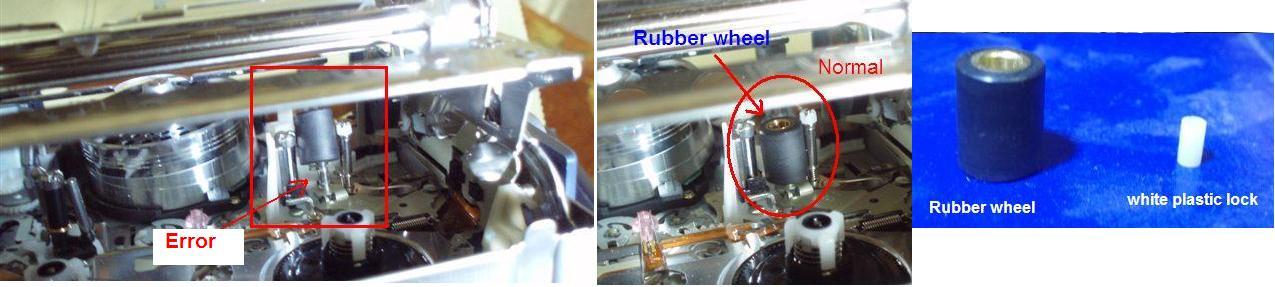
handy.JPG
Ahmed Jasim
Tue, 09 Jan 2007 12:24:32 -0800
Desde colombia encuentro esta pagina, SOMETO LA CCD-TVR318 Al golpe que recomiendan y al parecer esta funcionando muchas gracias......
CARLOS CASTRO
Tue, 09 Jan 2007 15:24:12 -0800
Hey, thks people. I was about to send my old PC5E for repairs for C:31:23 errors - they quoted me about US$180 equivalent servicing charge. But lo and behold, I read abt the slaps in the earlier postings & it worked!!! Oh, my goodness ... thnks a lot!!!!
Andrew Lee
Tue, 09 Jan 2007 19:14:33 -0800
Well Ahmed Jasim-Iraq, u are a true thinker, and i didn't see ur post until after i did the smack attempt 5 times... was sooooooooooooooooooooo glad when it finally worked! Thanx guys
Kimberly Nesbeth, Jamaica
Wed, 10 Jan 2007 13:09:45 -0800
Just 3 days before I'm off for a much needed change of scenery (Bali!) my hitherto reliable Sony TRV 250E comes up with this cockermamie C:31:21 message and as all of you now know- the bloody thing won't work. I do admit to seeing the slap-happy method of bringing the camera back to life (on another forum) but thought better of it because only that one person actually admitted to getting it to work. In the interim I contacted Sony customer service (Melbourne, Australia)whereby I was asked "does it have any hesitation ejecting and loading?"- yes, I noticed this becoming prevalent and resorted to unloading/reloading the battery to jog it along. He then told me "it's probably a tape transport stick-up...put a head cleaner through it". The fellow was unable to tell me what the codes actually meant but now I'm staring to think that Sony knows absolutely all about this code and reaps good bikkies from it. So on falling upon this forums' hallelujia chorus of "it works!" I gave the camera 4 smart slaps both sides with the tape out and then welcomed it back from sick leave and put into my duffel bag bound for Bali- another successful operation eh, Sony?
Cause- I'll bet its from infrequent cleaning: the problem being is that you've got to violently free it all up in the first instance. C:31:23 probably infers high frictional loads within the transport mechanism...What say you Sony?
Steve W
Thu, 11 Jan 2007 20:30:48 -0800
Had a Sony TRV250 FOR 2 YEARS,HARDLY USED.
CODE 31;23 WAS SHOWING, TOOK IN FOR SERVICE.WAS CHARGED $150 FOR A NEW SENSOR BUT ONLY LASTED 2 WEEKS.
TOOK IT BACK, THEY HAD IT FOR A WEEK AND SAID IT WAS ANOTHER PROBLEM AND WOULD BE ANOTHER $150.I TOOK IT HOME WITHOUT THEM DOING THE OTHER REPAIR.
I SAW THIS THREAD AND SMACKED IT HOLY S*%T IT WORKS FINE NOW.
THANK YOU SO MUCH
Peter Neal
Thu, 11 Jan 2007 21:08:39 -0800
After several weeks of pure frustration with the "code"/camera not working, missing precious video moments and searching ebay for a replacement camera so I could transfer my zillion tapes to dvd I came across this site. I know it's been said before but let me say it again! The wack-a-sony trick works! Thanks you Debbie and all those before me that tried it and revived their cameras which gave me the courage to wack mine!!
Tina K
Fri, 12 Jan 2007 12:29:21 -0800
WHACKING WORKS! I have a Sony DCR-TRV840 camcorder which has worked faultlessy for 4 years - just back from a Carribean cruise and when last used on board, I had bought it up to deck from a cool airconditioned room. The warm humid air quickly caused both my digital cameras to fog up, and the camcorder understandably went into Moisture Alert mode and refused to work, despite 1 hour of aclimatizing. It later restarted and worked fine.
When I got home, the camera refused to load any cassette, although it would close without a cassette. Error code C:31:23? I beleive. After reading all instructions and much cajoling, without effect, I tried WHACKING THE SIDES 3-4 times and PRESTO - it now works! Sony should make this simple fix widely known.
Sony Lover
Sat, 13 Jan 2007 09:11:17 -0800
Soccer game this morning, but no video allowed due to "C:31:23" on my TRV250. Got home, whacked it twice on the tape side, and now it works. This site saved me from buying a new camera. Thanks Debbie, and everyone else for validating her solution.
Chris R
Sat, 13 Jan 2007 10:24:04 -0800
I agree! Smacked the camcorder (TRV-530) which has shown the C:31:23 error for 6+ months and now it works perfectly!
Eric
Sat, 13 Jan 2007 10:58:26 -0800
I slapped my DCR HC42 twice and it started working. The mistake I did is not disconnecting the battery, and by the time slapping is over, the batter broke.
Sony_Cam_User
Sat, 13 Jan 2007 14:42:26 -0800
The tape was stuck in my SONY TRV-11 and I was getting error code C:31:30 (unlike most others on this forum who were getting C:31:23) but I smacked the side and amazingly, it works!! Thanks to all for sharing this info.
Jeff
Sun, 14 Jan 2007 15:47:48 -0800
i was getting the infuriating C:31:23 message (sometimes C:31:22) on my TRV18E and after looking through this forum, decided the problem most probably lay with the pinch roller (the thick black rubber roller inside the camcorder tape mechanism). I opened the mechanism and used a pair of long nose pliers to gently tease the black rubber roller off its metal rod (spigot), and then CAREFULLY put it back on it's metal spigot. Voila, no more problems! Yes i did try the whacking approach but unfortunately it didn't work for me. Perhaps the roller gets slightly dislodged, or a piece of dirt gets in it and whacking generally knocks it back into place. Either way, it looks like the pinch roller is at the heart of the problem.
Barry P
Mon, 15 Jan 2007 16:06:20 -0800
An email I sent to Debbie
Just wanted to drop a line on site Error Code C:31:23? which is still ongoing over two years. My video camera is 3 years old was beeping and shutting down on me and I did the two hard whacks and WOW! It worked. A big hug and thanks to you Debbie.
William Fisher
William Fisher
Wed, 17 Jan 2007 15:42:39 -0800
Have a four-year-old Sony Hi8 camera that recently developed a C:31:22 error. Had me freaked because I couldn't fix it and we need this camera to tape for our basketball team. After no help from Sony on-line tech support, I found this website. . .
WHACK-A-CAM is still going strong! It worked like a charm!
Thanks to Debbie and everyone else! You saved the day!
Mike
Wed, 17 Jan 2007 17:13:32 -0800
I have discovered a slightly different slap method that worked for me when the direct Debbie approach did not work on my Sony DCR TRV-280. I tried the original slap method several times to the extent I was afraid I would do more damage than good. This is method that worked on my very stubborn Sony.
I inserted the cassette in the camcorder and soon as I heard the tape begin to move and before the “reinsert the cassette� message had time to appear I began to slap rapidly on the cassette side of the camcorder with the palm of my hand. Low an behold the tape kept advancing and I was able to get the camcorder working again.
It appears to me that having the tape in motion at the time the slapping begins helped give the mechanics a push start. You will need to have the tape door closed quickly so you will be ready to “slap� the moment tape movement begins. If you are a little shy of hitting too hard this rapid slapping may be the ticket for you. I had to repeat this method three or four times to get it working again.
Hope this will help with those stubborn ones like mine.
Ben
Wed, 17 Jan 2007 19:00:20 -0800
I can't believe it! My video camera (TRV 740) showed me about 5 different errors, the main one being C:31:23. It turns out that the whole problem was that a black rubber wheel had fallen off it's pole and jammed the tape ejector from opening. Amazingly, smacking it works. The smacking dislodges the jammed wheel from jamming the slot. Once it is relocated, the slot can open. Then you can use twesers to place the wheel back onto its pole. Done! Probably saved me at least 120 bucks. Hint: After it's fixed, to avoid future problems, don't throw it around. BTW, I'm 12 years old. Just goes to show how simple this website makes repairing a video camera! Thanks Debbie!!! =D
Matthew Cotton
Thu, 18 Jan 2007 11:53:23 -0800
Had the camera for about a year. Gave me this re-insert cassette error. Smacked it once and WOW its working again. Sony has been making very unreliable products lateley.
George
Fri, 19 Jan 2007 04:19:49 -0800
I can't belive it! I have a TRV280, and well the whole thing about smacking it, it works!. Save me some bucks there, and well if we are in the 21th Century it funny that the old ways still endure after all.... War is good, peace is dull, smak it in order to work it!!
Carlos
Fri, 19 Jan 2007 20:31:12 -0800
Thank you so very much for the amazing solution!!!! I have been so angry about this problem. That 'beep' always seems to come when I need it the most! I finally found this site and WOW the hitting the works! I read one comment that I would have to agree with.....light hitting does not work....hitting like you want to break it works! Thank you for the solution. I didn't find this solution in the owners manual!!!!!! Thank you!!
Missy
Sat, 20 Jan 2007 10:46:57 -0800
Unreal. I just bought a used Sony digital camcorder and was receiving the C:31:23 error code. I read all of the "whack it" comments above and assumed this was an instance of folks pulling a prank on newbies. Yeah, sure, just hit it and it will work. But, as I read more, I started to consider it. Finally, I gave both sides a few solid bumps. I didn't exactly 'hit' it, but just gave it a couple jolts. Powered it back up, put in a tape; problem solved. I agree this must be a design flaw, but I was frankly amazed that this simple fix worked.
Joe
Sat, 20 Jan 2007 22:56:39 -0800
one more smacker.....
Anil
Sun, 21 Jan 2007 20:38:50 -0800
I also have the c31:21 error message on my trv330e. I asked Sony service Netherlands for information on this message and what to do. (the camera is about 5 - 6 years old, so hundreds of dollars for repair is not an option)
No answer sofar. Until now I was a satisfied sony camcorder user.
I think I join the Sony-smacker club tonight and beat the hell out of my sony.
rene
Mon, 22 Jan 2007 06:52:23 -0800
Before you break your hand... or the camera, try this...
Open the camera and remove the cassette. Reach in and find the spindle that is toward the front of the camera. This is one of the spindles that moves the tape. Try turning it. It should turn freely. If it doesn't, then twist it back and forth a couple of times until it frees up. Bingo. Its fixed without the banging.
Alex
Mon, 22 Jan 2007 18:24:05 -0800
Alex -
I tried what you said, it didn't work.
I slapped it, it worked.
Slap that mutha! It really works.
T
Tyrell
Mon, 22 Jan 2007 20:04:23 -0800
fixed my camera yesterday: smacking does the job
rene
Tue, 23 Jan 2007 03:05:43 -0800
GV-D800E Digital 8 Video Walkman.
Same 31:23 error as all these other people, but expected with the high milage on this machine.
Delighted that a quick whack or two brought it back!
Whack a Sony today and feel better......
Thanks Debbie!
Reg -
Wed, 24 Jan 2007 10:41:21 -0800
The black and white roller was my problem. When trying to replace I have lost the white roller. Any suggestion on where to find a replacement.
Norman
Wed, 24 Jan 2007 12:27:15 -0800
Thank you all so much for the good advice and the highly visual descriptions. Ahmed's approach is the one that worked for us - Thank you once more to Ahmed! The roller he pictured had indeed fallen out of our BT120 and we would not even have noticed it if his photos hadn't prompted us to look at the mechanism and then search for what appeared to be missing. We put it back in with a tweezer and are up and running.
What an truly excellent site! Many thanks.
A & R
Wed, 24 Jan 2007 22:38:13 -0800
Ahh, smacking it worked. I hadn't had any problems in 4 years with the camera, 36 states, in all weather. I abuse this camera. Then, I get this error when I needed to use it. I found this site, tried the battery removal trick to no avail. I then smacked it once on each side and it worked great. Thanks
Dave Edwards
Fri, 26 Jan 2007 15:35:13 -0800
The whack worked like a charm!! I had this problem on my older one and wound up buying a new one a year or two ago - wish I had seen this post so I could have whacked the old one instead of buying new. But at least I don't have to buy another. Great thanks Debbie and everyone else who said this worked!
KJE
Sat, 27 Jan 2007 21:14:09 -0800
The slapping the side of the deck method also worked for my Sony GV-D1000 clam shell tape deck. It took a couple of slaps, as I didn't want to destroy the thing with a wallop, but escalated force to a mini-wallop until it worked. I see it as corporal punishment for the stupid thing!
Thanks for posting your solution here....and thanks to Google for telling me it was here!
RoknRic
Sun, 28 Jan 2007 01:03:10 -0800
My Dad, who is next door to a genius compared to me, said that if whacking the camera is solving the issue, then it means that the contact between the battery and the unit is not adequate. To cure the problem, vigourously engage and disengage the battery in its slot to clean the contacts. I did this about 50 times and started my camera back up and it now works fine. My Dad thinks that whacking equipment shows a basic lack of ingenuity and will probably cause other problems, especially if carried over into child rearing.
Aaron Fiedler
Sun, 28 Jan 2007 11:54:19 -0800
I thought you people were crazy, saying that smacking my DCR-TRV480 camcorder would fix my C:31:22 error problem. I almost fell on my back...when i tried it and it worked. Thanks gang,,,it saved me at least 100 dollars or more..that's how much Sony wanted to charge me to fix it.
And as for you Sony,,I've always trusted you and your Electronics,,you're doing your best to screw us up. Now I'm going to try my best to screw you up. News travels fast
Guy
Sun, 28 Jan 2007 19:02:48 -0800
i wacked it alright!!! think i wacked it too hard 8) lol
doesnt work anymore!!!!!!!!! hahahahahahah did give me a good feeling ;)
trippie
Mon, 29 Jan 2007 10:17:57 -0800
i was having trouble with my trv 608 model. just today i dug it out of storage to insert the new cleaning tape i got in the mail from ebay to see if that would fix the problem, which the last time i checked the camcorder, the video showed 'snow'. so i figured a cleaning was needed. this is when the C:31:23 code came on and that was new.
works fine now...why? i SMACKED it a few times, just like you guys said, without the tape first, then with it and its fine now. THANKS!!!
toby
Tue, 30 Jan 2007 13:05:08 -0800
wow add me to the club.... i have a 315 and i whacked the side for about 10 times and it worked
t
Tue, 30 Jan 2007 18:32:30 -0800
i got the Sony DCR-TRV285E PAL, and i had the same error code "C31:23", and i tried to clean it and with no look. so i started looking through forums and i founds this! I tried the good old hitting it method and guess what.......... it worked perfectly after hitting a few times on the tape side!!!!!!!!!
dtcapener
Thu, 01 Feb 2007 09:25:50 -0800
i cant believe it, i imagined all these people who said clout it one to be sat at home chuckling to themselves at the thought of people around the world sitting at work,home etc smacking there cameras.!!
i even suspected it was a ploy by sony to get you to slap your camera to bits so that you have to go out and buy a new one.!!
but it wasnt and it really really works although my hand is still ringing as the first few slaps obviously werent hard enough.!!!
ukexpat
Thu, 01 Feb 2007 10:14:20 -0800
I'm so happy!!! The slaping really worked!
Marie
Thu, 01 Feb 2007 19:26:23 -0800
OMG WE ARE SO HAPPY DEREK JUST SLAPPED THE CAMERA AND IT WORKED TOO THIS IS AMAZING UP YOURS SONY
Derek and Michelle
Sun, 04 Feb 2007 14:21:11 -0800
Did not work - sony minidv dcr-hc14e... =( =( =( Not much used, dunno what to do...
LadyTango93
Mon, 05 Feb 2007 02:01:20 -0800
I smacked the side of my Sony handycam just like you said, surprisingly it worked! The reinsert cassette error doesn't record, and it is perfect. THANK YOU. BRUTE FORCE DOES WORK. That goes along the lines of "licking your ninteno cartridge to make it work". Weird but efficient. DO THE SAME, IT WILL WORK.
Roccoooo
Mon, 05 Feb 2007 08:28:31 -0800
After sending my DCRTRV 480 with the same problem per DHL to SONY from Zambia (no Sony service) to South Africa, I spent a fortune. After a short while it happened again. Before I wanted to throw away the camcorder I checked the internet and could not believe it: whacking worked!!!!!! However, during my holiday I had to smack it 4 times. How long can it continue like that???????? Is there nobody having considered legal action with so many cheated customers and which alternative with hi8 tape cameras is available?
Horst
Horst Wendorf
Tue, 06 Feb 2007 01:53:14 -0800
Worked 4 me 2!!! What an embarressment!
Robbie
Tue, 06 Feb 2007 08:34:00 -0800
Worked again here too! Just gently bang the base...
Augusta-Louise
Thu, 08 Feb 2007 07:10:31 -0800
LOOK NO FURTHER BECAUSE THIS IS THE REAL FIX. It was from our FRIEND from IRAQ. It was mentioned above with the pictures. Scroll up to Tues, January 9 and you will see AHMED JASIMs exerpt with 3 pictures. He's the one that got it right. NOW I'M WILLING TO BET THAT ALL OF YOU THAT HAVE THIS PROBLEM, have NO LOCK in your rubber roller. NOT SURE? Just look at the rubber roller wheel inside your camera (as seen in his pic) and lift up SLIGHTLY on it with your finger (if you can) or with something very thin like an eyeglass repair screwdriver, needle, coffee stirrer or such. DOES IT MOVE UP? IF SO, you lost your lock and/or it has broken off and it is causing your wheel to ride up during recording or playback thus causing the camera to produce the code. SMACKING it just TEMPORARILY puts it back into its normal position again. However it WILL happen again if the lock is not replaced. Thanks AHMED for taking the time to find the LOGICAL solution to the problem. You just saved me a half day's work. SO STOP SMACKING and GET THE PROBLEM SOLVED FOR GOOD!
MALO
Thu, 08 Feb 2007 19:00:02 -0800
Does anybody know how to adjust the tape tension on these cameras? I've tried everything here, and the banging did work for me too, at first, but now it doesn't. I thought Chris's idea of the sticking white dog was the solution, but having freed mine by the judicious application of a tiny amount of vaseline, I still had the problem. Ahmed's solution also sounded spot on but my roller is firmly in place. When I get the warning, my tape is sometimes ejected with a loop of the tape outside the cassette. This all points to the friction on the trailing cassette spool not being adequate. I've managed to fix this problem on full sized VHS recoders in the past, as there are adjustments that increase or decrease the tension on a sort of tiny brake around the base of the spools. I've managed to completely disassemble my TRV250E down to just the tape transport chassis but the only form of adjustment on the left spool (as viewed from the same angle as Chris and Ahmed's pics) is a tiny silver spring that has the option of being attached to one of four hooks to its left. I've tried all four positions to no avail. That leaves the right hand spool that has a tiny rubber belt that drives the capstan that Ahmed's rubber wheel holds the tape against. The friction between that black pinch roller and the capstan puls the tape through the machine, and back pressure on the left hand roller ensures that the tape is kept tight. It's a bit like the tow rope between two cars, if you let it go slack you're in all sorts of problems and if it's too tight then it slows things down.
So, my question is, does anybody know how to adjust or synchronise these two spools ? If anybody else has taken one of these apart, they know that the tiny plastic wiring tapes that join the various sections together are not designed to be removed more than a few times and I reckon after Five goes at this I'm pretty near the limit. There is one layer of metal beneath all the cogs and cams that is probably hiding the answer, but if I remove it and all the cogs and cams fall out, that's it as they all mesh in an illogical fashion as I found out when I took my first VHS player apart. It took me a week to figure it out. Thanks to everybody for their advice so far.
Fred
Fred
Thu, 08 Feb 2007 21:57:45 -0800
I've just dug out the chassis of my previous camcorder, A Canon UCX-45. (I bought the Sony as it was cheap and I needed a camera in a hurry on Xmas Eve). As you can see from this shot, the Canon has a small felt belt around the trailing spool and there is a small plastic Philips screw on a cam that can be turned to increase or decrease the back pressure on the spool. The Sony doesn't have one, only the aforementioned spring which has to be moved to a higher or lower hook to increase or decrease pressure. Pretty crude and cheapskate. As I said I've tried all four hooks without success, so I have to assume that it's the other spool that is the problem, but the belt that drives it is hidden under a thin sheet of metal that I fear holds all the cogs and cams in place and if I remove it to see if the belt is too slack (it drives capstan that the large rubber roller holds the tape against) they will probably all fall out in a heap.
Fred
Attached Image:
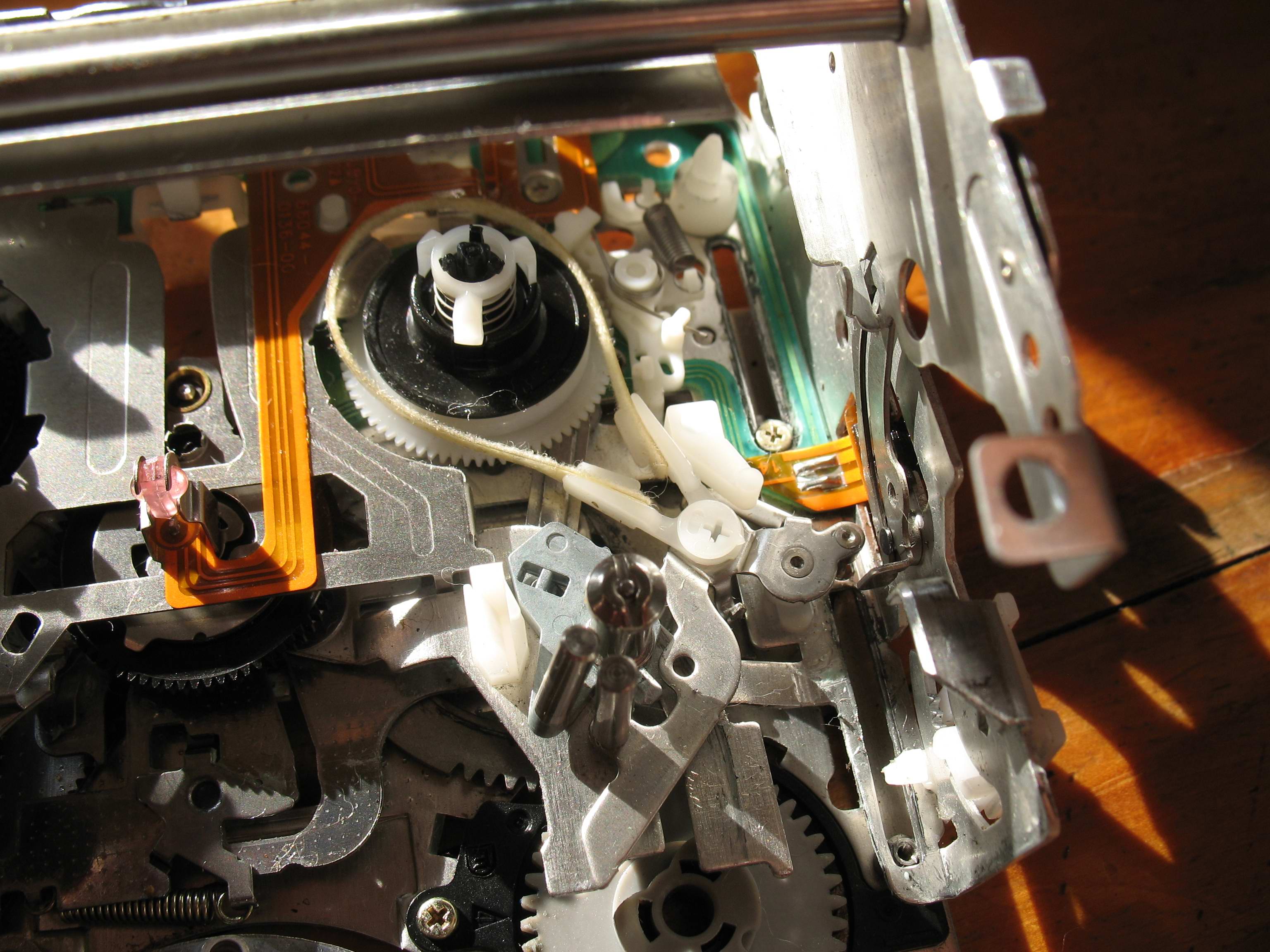
IMG_0710.jpg
Fred
Thu, 08 Feb 2007 23:17:47 -0800
To Horst Wendorf.
Horst, Do what I am going to do. Forget Hi8 or any camera with a tape transport system. Buy a camcorder with a Hard drive, but obviously not a Sony. This will alleviate all these problems. Looking at that Canon referred to in my previous posts reminds me that I had similar problems with them too. Now I know that hard drives can fail, but having looked inside a few, and having looked inside these tape transports, it's a miracle that they work at all. By comparison, a hard drive has a spinning platter and a moving head and that's about it. Everybody reading this Forum has had a camcorder failure but I'll bet that most of us have not had a hard drive failure. I've had five since 1998 but everyone has been changed for a bigger one, not for a failure. I'm going to pull this TRV250 apart one more time and then it's going in the bin. I'll save all the screws and the springs but that's it.
Fred
Fred
Fri, 09 Feb 2007 03:56:45 -0800
Ahmed Jasim thank you! I looked for the little rubber thing and it wasn't even there. I looked inside and it was wedged in the back, probably from wacking it so many times. I took my needle noze plyers and got it out then replaced it and it works just fine. Thanks a bunch!!!
Jayme Baker
Fri, 09 Feb 2007 20:22:40 -0800
Slapped my trv82....and it WORKED! Tape wouldnt load....does now!
Geo
Fri, 09 Feb 2007 21:50:30 -0800
My DCR-TRV140 had the same problem! I can't believe hitting once it fixed the problem! Force fixes WAY too many problems..
Ray
Sat, 10 Feb 2007 09:13:05 -0800
I had the same error C31 23 and did as directed by Debbie. It worked. Thanks a lot.
Now does anyone know how to get the touch screen re-aligned mines out to the left by about 0.5cm.
Vicky
Sat, 10 Feb 2007 11:44:35 -0800
Mrs Debbie,
My Dad searched the question you answered so ingeniously: his T:RV:318 also had an C31 trouble. What an unorthodox idea! When I first saw your writeup, I thought it was crazy. Well it might be crazy but it works!
What an smashing idea!
-soumya
Soumya
Sat, 10 Feb 2007 15:33:06 -0800
Hola a todos. He tenido el mismo error C:31:23 y le di varios golpes a la tapa de la cinta y se arregló. Gracias a Debbie y a todos los que contestaron. Es realmente sorprendente.
Jose Fernandez
Mon, 12 Feb 2007 06:49:14 -0800
debbie is the man, smack the crap out of that thing, it works.
gabe
Mon, 12 Feb 2007 12:43:09 -0800
Debbie you have worked miricales with my cam. I got my mate to smack it and she is all good. Who needs sony.
MIX
Tue, 13 Feb 2007 05:16:23 -0800
It works! I whacked it once with the battery and tape removed, not too hard, but harder then you would normally whack something like a camcorder. C31:22 is now gone. It works nicely. Thanx!
Mirco
Thu, 15 Feb 2007 09:20:26 -0800
hitting w/the hammer once it fix the problem is now gone forever
carlos
Thu, 15 Feb 2007 11:23:40 -0800
Hi All,
I have sony DCR-TRV 80. My friend borrowed it to transfer some of the his mini dv cassetes to his computer. I guess he over used the camera. Now my camera doesn't record at all. No error codes are displayed. I called up Sony and they recommended service which will cost me $400+. I will appreciate if someone can share the solution to this issue.
sanjay
Sat, 17 Feb 2007 10:06:46 -0800
Folks, I've been whacking all day till my hands hurt! I even tried a rubber mallet on my TRV20 to no avail (error C32:11). I had it 75% disassembled trying to get the tape out, but got stuck and couldn't go any further. Does anyone know where I can find disassembly instructions for these older Sonys? If not, I'll see if I can get Debbie to whack it for me...
Steve Adams
Sat, 17 Feb 2007 12:25:36 -0800
i have tried every way you can slapp it i have been to sony and they know about the code but want to charge me 40 quid to look at it i am at my wits end helpppppppppppppppp
louisescott1@gmail .com
Sat, 17 Feb 2007 15:44:00 -0800
I had long given up on my TRV-120 but after reading this thread, the bugger came back to life! I just can't believe how stupidly simple the solution is. Thanks Debby!
javier
Sat, 17 Feb 2007 22:18:02 -0800
Hi Debbie
Thanks a million for your C31 thread. You have just saved me a labour charge of £60 UK sterling plus parts. I agree with others who say it must be a Sony scam. But I would not change my TRV11E for the world... such good picture quality. Thanks again.
Malcolm Donald
Sun, 18 Feb 2007 12:22:42 -0800
Hah! i can't believe it worked but that "reinsert cassette" message has been appearing alot so i smacked the side and it went away. Pretty awesome.
Tom Denno
Mon, 19 Feb 2007 19:17:09 -0800
HI have a Sony DCR-PC101 that has been giving me c:31:22 errors (when a tape is NOT loaded) and c:31:23 error (when a tape is loaded). I find I can circumvent these errors by manually advancing a tape before inserting it, but this is obviously a less-than-ideal solution. I also have a pinch roller that comes off its spindle rather easily - the white/blue plastic inside the roller seems to be broken(?), and I don't seem to have any plastic lock pience, at least not anymore.
After these errors started, I found this thread, and then tried the whack-a-Sony method, which didn't help, although it did make me feel better. I also tried cleaning the roller, capstan pin, etc. - no dice.
My questions are about the pinch roller, since it seems that's where the problem is. Should the roller fit tightly on its spindle, so it can't spin independently? Right now my roller spins independently of the spindle. Also, does the roller fit all the way down on the spindle, so the top of the spindle is visible above the roller (that's how mine currently sits)? Or should there be a spacer at the bottom of the spindle that the roller sits on?
Brad U
Tue, 20 Feb 2007 05:47:19 -0800
you're all very lucky my 22E still not working after a fair few bashes now... Grumble
Lee
Wed, 21 Feb 2007 05:43:59 -0800
Thnks a lot Debbie My husband found your accurate instruction about smacking the camera and it worked out!!!
Claudia Rocio
Wed, 21 Feb 2007 11:35:46 -0800
i have joined the club of pimp slapping the camera, and it got some get right,and doing what it suppose to do. thanks to all for the fix.
chadrick thomasson
Thu, 22 Feb 2007 16:58:50 -0800
Well Debbie, after nearly 2 years your advice is still getting distraught users out of trouble!-thanks. I slapped my handycam and bingo! it's back to life If it happens again though I will give the cassette a bit of a slapping first. There is only so much rough stuff a video camera or soccer player can take. I wonder what Sony's official response to this obvious design flaw is?
Dave W
Fri, 23 Feb 2007 13:20:00 -0800
Hi Debbie
tengo a problem. i slepeed my camera trv 250 and ..
loose piece, now i need a photo to this piece and the place
in the camera.
thank Debbie
Slapped one, slapped two and loose piece...
Attached Image:
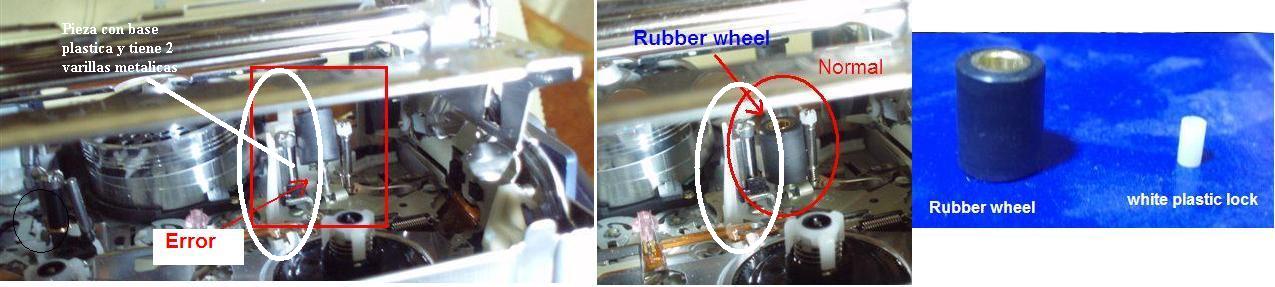
handy.jpg
josenk
Sat, 24 Feb 2007 05:54:27 -0800
Well done Debbie. You've solved it for me too. Thanks.
Mohammed
Sun, 25 Feb 2007 04:40:09 -0800
Wow! I gave it a good whack! Sure enough, that did the trick. Amazing!
Aubdoggg
Sun, 25 Feb 2007 12:43:34 -0800
SMACKIN' WORKS! At least it did for me.
I have a GV-D800 Walkman
Ron Frederick
Sun, 25 Feb 2007 13:54:29 -0800
Just missed taping my daughters band concert tonight because of the error and came home and found the smacking club. Sure enough, it worked on my TRV480 so I got the old TRV530 off the shelf that it replaced because of some tape error, sure enough C31:22. Tried the smacking on it, didn't work. Checked the tension on the back spool and it's locked up. Loading a tape pulls tape out of the cartridge so C31:22 can also mean more than just the rubber roller coming out of place. I'll go through all the posts here before I even consider getting the older TRV530 fixed. Probably will just begin transitioning out of the Sony products all together.
Smacking worked for me on 1 of 2 cameras. At least one of them is still working.
JCP
Tue, 27 Feb 2007 19:13:24 -0800
hitting the camera really worked! try it first then doubt this strategy
miriam
Tue, 27 Feb 2007 21:39:40 -0800
Just whacked my DCRTRV20 and it cleared a c:31:30. I am guessing it is the beginning of the end. Any recommendations for a replacement?
Sam
Wed, 28 Feb 2007 03:45:06 -0800
After having the C31:23 problem for 15 months, and having it "repaired" twice and brought back to the repair shop 4 times after the second time it was repaired, I gave it a whack, and its fixed. Originally, I thought the problem was the camera. Now what troubles me is that the problem was confined to only a few video tapes, so I thought the problem was the video tapes. When those "damaged" tapes were placed into another camcorder, they would not function either. It was always the reverse and playback functions on my SONY DCR-TRV27, but not the record function that would generate the error message. Once generated, I could no longer go back to recording. So I thought at this point I had a defective tape. Hitting the reset button would sometimes help. However, after I put in a tape that was recorded on 2 years before the problem began, and it started "pinging" I knew it had to be the camcorder, not defective tapes. I wrote last night to avrepair.com, email address "[email protected]" and told him about my problem (before I did the whack), and then wrote him this morning how I don't have a problem anymore. His response was:
Hi,
As mentioned, the problem will completely disappear once repaired- by us of course. There are three parts that get replaced, and Sony is aware of the problem, though you'll never get them to admit it.
Let me know when your ready, and remember.. don't trust if for special events, because it WILL fail, only a matter of time... (smacking it all the time ISN'T good...)
Thanks again,
Cameron
AVRepair.com
So, my question to you "slap happy whackers" out there is, once you "sucker whacked" your camera into working again, has it stayed fixed, or do you periodically have problems with it.
Regardless, I take my lens cap off to Debbie.
RICHARD FRIEDMAN
Thu, 01 Mar 2007 11:34:02 -0800
YES! SMACK YOUR CAMERA HARD AND IT GETS FIXED, THANK YOU DEBBIE!
kyle
Fri, 02 Mar 2007 16:05:01 -0800
I have a Sony PC-101 MiniDV Camcorder - it, and its predecessor, produce the C31:23 error from time to time. It can be solved, at least on my camcorders, by removing the tape and rewinding or forward winding it (hold white unlock slot with round end of standard paper clip whilst rewinding); after re-insertion, I can play or record again. I suspect that a spot on the tape gets dirty or corrupted but cannot confirm. In any event, I can fix the problem on my machines provided that I have 2 paper clips to hand.
If this doesn't work, I'm happy to resort to camwhacking.
GN Ortsmrad
Fri, 02 Mar 2007 20:09:55 -0800
Unbelieveable. I WACKED the tape side on my DCR-P5 and it WORKED! Took 10 wackings but it worked!!! Thanks Deb!!! You should consider setting up a donation site. I'm good for $5.00
Jason in California
Sat, 03 Mar 2007 11:52:10 -0800
Yes it works... I wacked the camera..but I also checked the rubber pins. but he's allright: the little white pin is on top, so I hope the error will not appear again!
Thanks for all the suggestions!
harriet
Mon, 05 Mar 2007 08:27:43 -0800
Such a fun site!!! My camera was working but it seemed like everybody was having so much fun that I went ahead and took mine out and whacked it anyways, kind of like a kid being punished for associating with the wrong croud.... Just kidding, but needed the camera tonight and the quick fix worked. Thanks and now I'll check the tech fixes too just in case, but I think I may just stick with the cave-man method.
scott
Tue, 06 Mar 2007 20:21:14 -0800
I just bought a used AS-IS Sony CCD-TRV62 on ebay and I received the C code also. Was just about to complain, when I found this post. It worked for me too. Thanks so much.
Jules
Fri, 09 Mar 2007 04:22:55 -0800
Smacking works!!! after reading the first 15 posts from back 2005 I said to myself: "let's try it, I don't have anything else to loose..".
Thanks.
Memo Ortiz
Sun, 11 Mar 2007 07:09:28 -0800
It actually works, I mean the Whacking of the camera.
FEA
Sun, 11 Mar 2007 18:10:57 -0800
yep, it works!!! hehe
Fer
Mon, 12 Mar 2007 14:30:35 -0800
Just bought new dvd cam after no joy in trying to repair problem. Found this post, smack smack smack, and now I have two working cams. Thanks Debbie
axel
Tue, 13 Mar 2007 11:25:11 -0800
I have the error code C:31:42 on my Sony DCR-HC42e . I had this fault repaired under warranty in the UK before i left to sail around the world. Sony sent me a message back to clean the camera ... it was only 2 hours of use old!
THIS IS A REPLACEMENT CAMERA ... IST REPLACED COMPLETELY UNDER WARRANTY
2 weeks into my trip ( 3 weeks after Warranty repair)the error message came up again and i have been tearing my hair out about it as i can't get it serviced anywhere on my travels. Now I am across the Atlantic 4 months on and I just took the battery off, the tape out and the strap off. I hit it a couple of times and it did not work ... I read the post a little more and with more confidence i hit it harder!
F**k me it works ... tried a couple of tapes in it ... will report back in a while to let you know if it is still working.
Andrew
Tue, 13 Mar 2007 14:03:51 -0800
OH MY FREAKIN GOD! IT F**KIN' WORKED! I WHACKED IT LIKE 6 TIMES TODAY! I FEEL GREAT! THANK YOU DEBBIE "THE WHACK MASTER"!
brent vaughn
Tue, 13 Mar 2007 17:06:36 -0800
My TRV-103 (Hi8/Digital) stopped playing anything and was driving me crazy. I searched and found this page and - since my camera is 8 yrs old and not really worth anything - decided to go with the "whack it" advice. It didn't work for a while but I finished up giving it some real abuse and eventually it started working again. I whacked it with a tape in, without, running and stopped.
Not only did this seem to cure the problem (until next time), it was very cathartic.
OK, I'm off to kick the crap out of an old TV downstairs. It may or may not work, but it's going to get a hell of a thrashing in the process and I'm going to feel better ;o)
KevFirst
Wed, 14 Mar 2007 08:48:42 -0800
After hitting my DCR-TRV280 with the c1:31:22 error code, I'm a believer too. Let's hope it lasts.
Jamie
Fri, 16 Mar 2007 07:11:02 -0800
I had the error code c:31:22 on my sony digital camera its about 4 years old with no prior sercving. Looked through the forum on sony error messages and heard about the slap on the side. Well I was amazed, gave it one swift hit on the tape site and it did the trick, now have a working cam again.
Many thanks!
Dave
Fri, 16 Mar 2007 11:49:05 -0800
Well at first I thought this site was someone's crazy idea of a joke and that it was just one person who'd been posting every other day for years about this slap trick...but indeed it really does work, a couple smacks to my trv280 and no more error! Thanks everyone hahahahhaha!
Paul Welsh
Fri, 16 Mar 2007 23:48:42 -0800
I didn't use the slap method but I did depress the tape spindles (the white gears that the tape fit into) and spin them both directions. Then I moved the and then I moved the rockering gear just behind the pink clear post and before the head. I'm not sure which thing fixed it but it must have been one of those thing, abracadabra.
Corey
Sun, 18 Mar 2007 13:38:48 -0800
I have a TRV18 that started displaying the C31:23 error code a few days ago. It happened when I repeatedly pressed the play button in VCR mode. I decided (I am ashamed to say, as I have a background in electronic repair) to give the smack-the sony trick a try, to no avail. I tried several times. Then, assuming it was a stuck gear, a la David Atwell, I opened the cassette chamber and rotated the 2 tape spindles a few times with a small screwdriver. It worked fine when I turned it back on. I would alternately suggest this action prior to the smack fix. Good luck.
Ron Haley
Mon, 19 Mar 2007 18:23:03 -0800
I tried everything and still have the same 31:23 error. Does anyone know of a reputable service center other than sony. Please reply to [email protected]
nate b
Mon, 19 Mar 2007 18:51:09 -0800
hola de verdad que sà funciona lo del golpe a la cámara de video cuando te pone error
c 31:23 yo lo hice como dicen los amigos arriba y sà resultó gracias amigos saludos, solo unos cuantos golpes a la cámara del lado derecho donde está el casette y listo
enrique
Tue, 20 Mar 2007 20:34:22 -0800
I own an old TRV130 and smacking it works! Thanx!
Justin
Wed, 21 Mar 2007 16:24:04 -0800
Wow.....I was skeptical...but as did many, I smacked it on the side and sure enough...the error went away. Thanks so much you guys....I was ready to cry!
Jason Johnson
Wed, 21 Mar 2007 21:30:25 -0800
Hard to believe. I have the TRV250 and have taken great care of it. Got the 31:23 message and tried everything I could. Absolutely discouraged and ticked off. Read Debbie's advice on smacking the camera and thought at first...maybe it's a joke or something or a coincidence it worked. Then I read on and found so many others that beat up their camera. So, I decided violence was the answer and smacked the side of the camera with the palm of my hand pretty hard. My wife was laughing at me and telling me I was nuts. Turned the camera on and immediately starting watching video...IT WORKED! I don't know for how long, but I'm glad for Debbie and the rest of you and also happy I didn't smash it to pieces like I was originally going to out of frustration. I've only used the thing 10 times or so...SONY Boloney! They suck!!!
Dino
Sun, 25 Mar 2007 14:51:48 -0800
I'm happy to say that after following the advice to give my old TVR310 a bit of a whack, it is again working reliably on old and new tapes. I can't begin to explain the frustration that his error has caused me over the last couple of years. Thanks
Chris (Australia)
Sun, 25 Mar 2007 22:07:36 -0800
I have a DCR PC101e which I had for about 2years now.... I havent used it for a while and today when it gives me the C:31:23 error.. I found this forum and after reading a few posts, I joined the Whack-A-Sony Camcorder Club. When i switched the camcorder on, it worked but after a frew minutes of watching an old tape, it gave me the error again... it gives me the error on a specific time of the tape so I tried pulling the reel and found out that the tape was stuck.. i tried a different tape and it works, put back the old tape and it didnt work... so I think the problem comes from the tape itself rather than the camcorder...(I am using original sony miniDV tapes- another sony crap). Now i tried a new tape for recording and my camcorder works fine...
Has someone had the same circumstances???
I will get a new Mini DVD camcorder soon and
I will never buy a sony again... hello Panasonic!
Richie Magsano
Mon, 26 Mar 2007 01:54:44 -0800
I also had error code C 31 23 tried everything (except wacking the camera) and still no luck.. So I gave it a try. Now works like new...thanks Debbie maybe I can smack the side of my car might make that check engine light go off...lol
Jerry
Mon, 26 Mar 2007 07:12:06 -0800
Smacking it worked for me. Thanks Debbie!
Owen
Mon, 26 Mar 2007 08:56:30 -0800
It seems as if this is a tape problem for most people. I wasn't about to whack the camera, so I put the tape into a console capture device instead of the camera. Once I rewound the tape in the console it worked fine in the camera.
If you have a console available I would suggest trying to rewind it in the machine before whacking your camera.
~Chalz
Chalz
Tue, 27 Mar 2007 11:51:57 -0800
My name is Ryan and I am a sales rep for radioshack. I had a customer come in and ask about this code on their sony camera I didn't know how to fix it so I pulled up this page. We laughed about smacking the camera and then she decided to try it. Much to our suprise it seemed to fix the problem. She was so happy she almost started crying. She made me promise to write into this forum and tell her story. Thanks from all of us.
Ryan Hall
Wed, 28 Mar 2007 13:06:54 -0800
It is hilarious. I didnt want to smack my $4000 camera. But i did, and it works fine. I thought it was the tape, or something. Man, im so glad i dont have to send this in for service. Thanks Debbie. If there is a hall of fame of repairs, or video, debbie should be in it. Thanks!
[email protected]
Wed, 28 Mar 2007 17:28:39 -0800
I wanted to say thanks to all you guys who swore that slapping the camera would work. I didnt believe it but thought what the hell, its already broke. Sure enough, I smacked it with me hand and banged it on my knee and sure enough, the c:31:22 is gone and the damn thing is working again. THANK YOU!!!
Shane
Thu, 29 Mar 2007 08:18:53 -0800
Unbeliiieeevable!!! I was about to spend $100 to get my Sony camcorder HC42 fixed when I came upon this website. So I gave it a good whack, and it worked!! Thanks so much, Debbie! Was it kind of like Polk discovering penicillin or were you really trying to fix the thing when you gave it a good whack? I agree with the person who said you should be collecting a small fee for this. I'm sure everyone would gladly give you five bucks, and judging from the number of hits, you'd be rich!!
Wendy
Fri, 30 Mar 2007 08:26:48 -0800
Chris has a the eureka type solution for me on this one..post sun 24sept 2006.
check his comment/pic before you beat youre camera to death. Its like flicking a switch. Simple. Worked for me
andy
Sat, 31 Mar 2007 11:41:59 -0800
My TRV240 stopped working so I gave it a smack with my baseball bat out in the yard.
Sent that sucker sailing!
Believe it or not, no more error...BECAUSE IT'S IN A MILLION PIECES!
Death
Sun, 01 Apr 2007 10:29:02 -0700
Desperate about "C:31:22", I just gave my Sony TRV140 3 motivated whacks with the palm of my hand.
It works!
Thsnks, so much!!!
R
Wed, 04 Apr 2007 09:12:36 -0700
I am getting C:31:23 because one roller on tape path is loose. A small parts which keeps the roller in the right position was worn-out. So everytime when I got C:31:23, I need to eject a tape and to push the roller back to the right place. This works 100% but I am tired of doing this. I went to http://www.partstore.com/ but could not find which I need, because of huge list. Does anyone know a parts number of this roller (or a small parts inside the roller, just like O-ring) ?
Thank you.
G
Wed, 04 Apr 2007 09:37:34 -0700
Again,
Actually, Debbie has uploaded the image of the parts I want. "white plasic lock".
Could you tell me the parts number ? Probably costs only a fewe bucks.
Thanks.
G
Wed, 04 Apr 2007 09:45:34 -0700
I just read your forum--got an error message like yours after some condensation from underwater housing. I smacked my VX200 and whoooaaaa DUDE it works! You guys rock!
Nikki Hoier
Thu, 05 Apr 2007 09:30:45 -0700
Don´t smack, don´t change any roller. It´s very easy! Do you remember it?
"I have a Sony PC-101 MiniDV Camcorder - it, and its predecessor, produce the C31:23 error from time to time. It can be solved, at least on my camcorders, by removing the tape and rewinding or forward winding it (hold white unlock slot with round end of standard paper clip whilst rewinding); after re-insertion, I can play or record again. I suspect that a spot on the tape gets dirty or corrupted but cannot confirm. In any event, I can fix the problem on my machines provided that I have 2 paper clips to hand.
If this doesn't work, I'm happy to resort to camwhacking."
I´m absolutely accord on it. It really works.
Vicente
Sat, 07 Apr 2007 03:28:17 -0700
Folks, anyone with common sense will know that 'whacking' a piece of electronics can only be detrimental to the unit in the long run. Clearly the old school 'whack' of the TV would work only because there was a loose connection, be it a tube in the 60's or a loose solder joint since then.
Based on the error code, one can only assume that the C has something to do with the cassette, NOT the unit, therefore, Vicente was correct in focusing on the removable variable of the equation. After further investigation, I found the following error codes and causes:
C:31:10 Tape loading failure. Unit cannot complete the load cycle.
C:31:20 Take-up reel side tape slacking when unloading.
C:31:21 Supply reel side tape slacking when unloading.
C:31:22 Take-up reel fault.
C:31:23 Supply reel fault.
I had the recurring C:31:23 fault, then followed Vicente's steps, and forwarded the tape, and voila, it loads and works fine.
ALWAYS focus on the media before the hardware, and give Sony the benefit of the doubt.
Just because my Ferrari is not driveable with a flat, I will not vow never to buy another Ferrari, rather, I fix the flat and enjoy the technology. Sony is not a Joe Blow company, they are a multi-million dollar corporation, and if folks are going to stop buying Sony Camcorders because of tape malfunctions, maybe they should just go ahead and leave the Sony's for those who TRULY enjoy technology at it's finest!! Good luck all, and STOP WHACKING THOSE SONY'S!!!
Dan
Mon, 09 Apr 2007 18:04:52 -0700
Now my cam is in trouble. when I get home I will give it the beating of his life. I hope it comes back yo its senses.
charles
Wed, 11 Apr 2007 07:23:28 -0700
i have just git my sony trv725e megapixel 8mm camera out of storage for its for use of the year. Got the error message C31;42..........Tried ringing sony........automated message after messgae.press 1 then press 2 then press 5 then back to the beginning.....''have to use the website for all repairs and customer services etc'' I was starting to consider spending loads of cash getting it repaired....then found this website........hit the camera with a training shoe several times all over it ( the therapy is working )!!! and it now works fine !!!!!! Ihave had nothing but bother with sony products.the laptop i am using at the moment had to go to france from the uk via DHL to get a small plastic clip replaced on warranty.a 2 minute job.but sony would not send me the clip. They even wanted my passwords to the computer to check my software ( go bollox i said) talk about Big Brother. Keep smiling
simon
Thu, 12 Apr 2007 05:17:02 -0700
I Have the brand new sony dsr-250 dvcam,BUT NEED SERVICE:)))
But i think the smaking good on daily bases, but if you shoot wedding ceremony think in front of the ceremony
it happens the error , if you smack the Camera the BRIDE GONE GETS MADD:))) I THINK THE SERVICE IS BETTER
ONLY "SONY" SERVICE,and after they fix try to have the part you see they change,
HAPPY SMAKING hahahahaha
kurtul
Fri, 13 Apr 2007 03:48:41 -0700
Hot Damn, banging on the side of the camera really works. I have a Sony DCR-PC5 that had the C:32:21 code and took it into wolf camera and they wanted $375.00 deposit to take alook at it. Since I had paid $1500.0 and had purchased lots of accessories for the camera that were perticular to that camera, aswell as the batteries do not work on any other camera except a PC-1. Some of the older tapes that I had still did not like the Camera so I tossed them out. new tape work fine. Thanks Camera hacker
Chris in Knoxville
Sun, 15 Apr 2007 08:27:59 -0700
Two movies scenes come to mind after Debby's solution revived, as least for the moment, my DCR-TRV25. Scene 1: "It's Alive, It's Alive"--Dr. Frankenstein in "Young Frankenstein" and Scene 2: "Russian components, American Components, all made in Taiwan!"--Russian astronaut in "Armageddon" Thank you hackers, who says American ingenuity is dead!
\n
John W.
Tue, 17 Apr 2007 16:13:47 -0700
OMG! I am still using this old Sony Handycam Vision CCDTRV308 NTSC Video Hi8 and yesterday and today it had error code C:31:23
I removed the battery for 20 min, slapped it a few times and at last it records and plays. No more error code! Oh also I kept repeating "no bad code no bad things no bad things no bad codes". Happiness! Praise Be!!!
Kari
Wed, 18 Apr 2007 17:41:50 -0700
Thanks for the advice all ! I have a sony TRV 280 that was giving me the reinsert cassette error over and over, swapped batteries, tried different tapes to no avail. So I closed my eyes and smacked my camcorder like a redheaded step child and what do you know its fixed!!! Mine had also sat for awhile in the closet.
andrew
Wed, 18 Apr 2007 20:25:10 -0700
I have a TRV 270E - Has worked fine for 3 years and now I get the 31:23 code and the tape refuses to load. Have used brand new tapes to no avail. What's worse is that digital 8 seems to be on the way out so it's hard to get a replacement. For £60 more i can get a JVC HD cam which is what I will be doing. BUT I still have 4 tapes that need to be transferred To dvd or be lost forever......Enter Debbies solution - Whack a cam wins again, just as it was about to be bounced off a wall in any case a good hard whack to the side has enabled me to finish my transfers before it goes to the great camerabag in the sky.....Debbie deserves a medal - and probably a job at Sony, (unless that's just what they do when you send them in for repair lol.)
Dave
Thu, 19 Apr 2007 16:29:39 -0700
OMG IT WORKED!!!! CAMERA IS LIKE NORMAL I SWEAR
i have a TRV-285E, OMG THANKS SO MUCH DEB
and just in time too.
sqitnocx
Sat, 21 Apr 2007 08:24:31 -0700
Thank You! I was ready to buy a new camcorder, since my TRC517 started beeping at me and wouldn't eject the tape. I found your site, smacked the camcorder a couple of times, and now it works great! Thank you for saving me $$$$.
Steve
Sat, 21 Apr 2007 16:43:02 -0700
I just can't resist adding my own comment to this looooong list. I looooove the internet. You can find anything on here. Yep, I have officially joined the whack your camcorder club and it actually works!!!!!!!!!It knocked the little spool free and I put it back on and voila!
fraun flerchingert
Sat, 21 Apr 2007 20:33:50 -0700
...yep, the smacking works with errorcode C:31:22 - on my Sony DCR-HC17E.
Tobias Mikkelsen
Sat, 21 Apr 2007 21:43:48 -0700
I was just about to give my father the bad news before I gave it one more firm whack on the tape side. And it worked holy Sh*#!!! Thanks and I hope this will be the last time but at least I know where to go now. Thanks people. Sony TRV-350
Jose
Sun, 22 Apr 2007 17:10:32 -0700
Unbelieavable, my wife will hate me know. Went on a wonderful holiday and she was very upset that the camera didn't work! So I'd given it up, UNTIL I DID THE WACKING THING.... WOOW IT WORKED! Camera CCD-TRV228 - missed all those memorable times :-(
I have had this problem once soon after buying the camera and the company said they "replaced" the tape mechanism.... I suppose that was a lie! They probably whack the thing.... Will need to pay them a visit and whack them too (on the side as well as top and bottom!!)
ati
Mon, 23 Apr 2007 11:48:49 -0700
I have a Sony TRV-120 and I've been getting a C:31:10 error. It'll show on the screen everytime I close the tape compartment, and eject the compartment. However I tried the smacking it on the side (tape side) and it doesn't have the error anymore! So if you have problems in the future, JUST SMACK THAT B*TCH!!!!
Sam Lee
Tue, 24 Apr 2007 15:46:46 -0700
Debbie ROCKS. I've tried to fix my trv-250 for years. I found this website and Debbie's advice and it worked. This is great. Thanks
SAM
Tue, 24 Apr 2007 21:03:03 -0700
seriously, thank you all SO MUCH for the whack (literally and figuratively) advice. i graduate from college in a few weeks, and i had hours of footage from freshmen year that i promised to show all my friends. i hadn't used my camcorder in almost 3 years, so i freaked when the c: 31:22 error popped up. but i gave it three or for whacks (wimpy girl ones) and now it's in perfect shape! we can screen my freshmen year debauchery without a glitch.
jen
Tue, 24 Apr 2007 22:17:13 -0700
I'm the proud whacker of a PC 1010E. I took it to a Sony Repair Shop twice and all I had to do is whack it? I guess I got whacked by Sony. I guess I'll buy a Canon next time.
J
Jennifer
Thu, 26 Apr 2007 07:41:57 -0700
I followed the Jan 09, 2007, comment and found the black roller jammed at the bottom of where you insert the tape. It took some time to find it, but apparently "fell off." After dislodging it with a crochet hook I put it back on where it showed in the picture and the camera is working fine with no C:31:23 code flashing. Thanks for the picture, Ahmed. I couldn't have done it without it.
bri
Thu, 26 Apr 2007 18:00:04 -0700
I have a DCR-TRV140, with this problem, I saw the pictures of the black rubber roller that came off so I took a look inside and sure enough it had fallen off completely. I'm assuming that the 'white lock' keeps this roller in place but its no where to be found in my cam. Should I take the body off the cam and hope it falls out or just find something else to hold it, assuming that it does.
Ferrari
Fri, 27 Apr 2007 15:49:31 -0700
Whackin' it works! Thanks for the tip!
Don & Suz
Sat, 28 Apr 2007 07:25:02 -0700
Yes, after trying to fix the problem reading Sony instructions... I finaly hit the tape side... and it worked again! thanks from France Debbie!
Clo
Mon, 30 Apr 2007 00:28:17 -0700
I have a Sony TRV-480 that gave me the same error code. I was a little skeptical after I read the first suggestion about beating the side of the camcorder but after so many posts said it worked I figured I might as well try it (after all, what more can you do? make it not work even more than it's not working already?). So for anyone with the same questions I had (do you have a tape in or out? door open or shut? which side do you hit? is it on or off when you hit it?) I'll be specific:
1. Camera off
2. Tape in, door shut
3. Whack tape door side 3-4 times FIRMLY (I'm 5'11", 200 so firmly for me is relative to your sex/size I suppose)
And it worked. So go figure. Thanks Deb.
Paul
Tue, 01 May 2007 11:11:13 -0700
Yes... Hit the tape side. It works.
I can't believe SONY still has it's head up it's ass and refuses to help out customers which shell out money for their faulty units. I actually read in a board somewhere than an ex-employee that worked at SONY received the camcorders for repair and stacked them for two weeks, and moments before returning the camcorder to the customer, he whacked the tape side, tested a tape and kept doing so until it worked. So... SONY knows about the whacking and still charges 200-400 dollars to get this "fixed".
I have probably saved thousands of dollars with all the whacking I've done. And the camera still responds with whacking, I am however, not buying anymore SONY products, it's just too much hassle.
Alec
Wed, 02 May 2007 02:26:57 -0700
After reading all these comments I was gonna smack my piece of crap camcorder.
But coming home from work I realized that was kind of silly and might cause damage to my unit.
So I went home and gingerly opened the casette door. I poked around looking for loose gears or
broken plastic locks. Everything spun and looked good. I put a brand new tape in and it worked!
But only for 5-10 seconds then the 31:23 error came back.
I have a DCR-TRV280 Sony cam. Sometimes it has given me a 31:21 error.
So I was secretly happy cuz I really wanted to smack my camera to see if the above posts are true or pranks.
With the tape in the unit (because it would not eject as it was stuck)..I closed the casette door and
just as the tape began to wind into the machine I smacked the tape door side (NOT VERY HARD) with my palm 3-4 times.
The thing worked like a charm after that. Downloaded stuff to my computer. Ran it for a good 15 minutes last night
with no problems whatsoever. Sony site said they would charge $141 to fix before taxes and I must mail my camera to them since they are over 75 miles away it could be gone along time.
Greg
Wed, 02 May 2007 05:44:14 -0700
SMACK UR CAM AND IT WILL WORK!!! PERFECT!!! but still sometimes needs more smacka lol. . .
sk8xnick
Wed, 02 May 2007 10:15:07 -0700
I think i can safely say that you can now add me to the "Whack-A-Sony" Club now too. Have had my DCR-P101 hidden in a drawer up untill now. Have tried giving it a slap before but it never worked, Maybe i was hard enough on the little thing. Couple of rather firm slaps today and hey presto!!! Half hour runnin so far and not a problem... WOOHOO
Chris
Thu, 03 May 2007 07:33:58 -0700
Any Sony DCR or DSR series has the same problem. Only thing to resolve this issue is to USE SONY MINI DVS EXELENCE no premiums higher than premium. all cameras will work properly. It is different type of ubrication in the tapes. all other tape manufacturers had not same lubrication as EXELENCE TAPES. even Panasonic and JVC also recomended for sony EX. tapes. SO do not spend any money on repair or buy cheap tapes will ruined your tape loading mechanism wich is more costly than tapes. try it it works. i spent more thank $1000 on my camera but that did not worth a penny. then i try the higher quality tapes it resolve all problems.
Manjinder
Thu, 03 May 2007 17:30:02 -0700
Just found this forum. Had a problem with my Sony TRV245E digital8 camera every time i tryed to record or play any tape i got the error code C:31:22.
Sent it to a repair shop and paid £15 for the inspection. The report back was tape drive clutch worn out. Would cost me £130 to have it replaced :o .
I could buy a new one for £180. So read this forum and thought what the hell, got nothing to loose. Hit the underside of the camera twice powered it back up and whayhay working perfectly.
If it packs up again i will repost.
But for now, thanks every one for the posts. :)
Andrew
Fri, 04 May 2007 09:13:50 -0700
I MUST HAVE SMACKED IT 200,000 times and im gettin no progress...helP!
Howard
Sat, 05 May 2007 19:20:09 -0700
In case people don't want to whack their cameras: The thing that is jarring is the black and white tape loading spool ( black rubber covering a white rod about 1cm in length), part of the camera's tape loading mechanism, which basically gets itself out of place. It just takes slight pressure with a finger or a tweezer to push it back into place - people like Ahmed Jasim have posted pictures of this spool above.
SteveL
Sat, 05 May 2007 19:34:27 -0700
I LOVE YOU DEBBIE!!!!! I was extremely angry at my TRV250, so whacking it wasn't a problem. I whacked it once and the problem was gone. Thanks so much!!!
D to the Rizzle
Sun, 06 May 2007 16:32:01 -0700
I have the sony DCR-TRV280...it had the 31 something code flashing and said to "re-insert" tape. I think its sony's way of making an easy 160 bucks because I just smacked the side of it and now it works like new :) Thanks Debbie!
Yeah just smack it
Mon, 07 May 2007 23:40:57 -0700
I smacked it a bunch of times while it was playing and it worked for a little bit, but it still won't play more than a few seconds before the error code pops up again
I think Im just going to bring it back to BestBuy
I wonder how much they'll charge me to fix it.
Fatdude and Sealboy
Tue, 08 May 2007 16:39:13 -0700
Smack-a-cam worked for me too! Error code C:31:22. Tried different tapes, ejecting tape & replacing, removing power supply etc. Nothing worked. One good smack on the right (tape) side, ejected the tape and replaced with the same tape, then all is fine. And given the amount of time I've spent on the problem, smacking the DCR-TRV250 felt pretty good too. Thanks all!
Lisa
Tue, 08 May 2007 23:21:27 -0700
how to smack it?? and what part where im going to smack? i have dcr-hc42 where my lcd have a blank screen no view. but i has a view when u switch it in viewfinder. what the hell is going on?
kristian
Tue, 15 May 2007 18:04:06 -0700
Unbelievable!! A smack, a new tape, and another smack later it's working. Hmmm Maybe it was the new tape?
Seth
Wed, 16 May 2007 19:17:49 -0700
A more apt name for this forum is CameraWackers. I had not used my Sony DCR-TRV250 for some time. When the severe weather came through that leveled the city of Greensburg, Kansas - as a spotter, I took every camera with me that I had. I am glad I didn't need to video tape anything as I got the C:31:23 error. I couldn't set the clock or date or any features due to the error. Well, I made sure the camera was off, wacked it 3 times with my hand, removed the Sony Hi-8 tape, wacked it on my desk 5 times on the top and windowed side of the tape. WHAM!. No more errors!!
Kent
Thu, 17 May 2007 11:54:28 -0700
Thanks Debbie, It worked for me DCR TRV 330. I got this problem and followed your commnts, Now it works
Upendra
Thu, 17 May 2007 14:03:59 -0700
HIT THE DOG NOT THE CAMERA CODEC3123 RE ALIGN BACK TENSION ARM
Bill grey
Fri, 18 May 2007 08:09:43 -0700
Well while on a camping trip with my fiance my camera unexpectendly gave me this message. It would only record for about five seconds. I tried to play the tape and it would rewind the tape with no incident, but when I played it, again I got the message.
I came home and looked for a cheap camera online. I only need one to play my 8mms tapes (about twenty or so) I've recorded. Then I found this site, whacked that mother 3 or 4 times and it worked. So far it's working with no faults.
It was odd because while camping I took a q tip with alcohal and tried to clean the inside, pushing on all the gears. After that it let me play my video, but when I tried to record the message came back.
I'm happing to be a member of the whacking club. Usualy Sony Handicams have always worked for me in the past. I do thinks it's time for me to go digital though.
Thanks for the help guys!
James
Sat, 19 May 2007 10:51:55 -0700
'SLAPPING' NOT JUST FOR ERROR CODES!!!! I have an old TRV 120, and it stopped accepting tapes, always ejecting them when it was connected to the battery or charging cable. AFTER I SENT MY TRV 250 IN THE SHOP FOR THE C31:23 CODE TWO DAYS AGO!!!(it's still under an extended warranty), I started tinkering around with the 120 to see if I could get it to work(after collecting dust for 4 years!)
After reading the messages, I thought 'why not?'. I smacked it three good time on the tape door while it was hooked up to the charging wire. It popped up twice. I hit it two more times(not really hard, but enough to jar it. Then it stopped! I brought out a tape and inserted, recorded and ejected multiple times. No hangups!
I will, however, use Vincente's recommendation to correct the codes, though. No sense in damaging something now that I know. Best news of all is now I'll have two working digital camcorders! Thanks Debbie and Vincente! (and you too, Dan, for finding all the codes for us, and reminding us to take it easy on those things!)
John
Sat, 19 May 2007 22:17:59 -0700
Thanks Deb!
I got my Sony from a pawn shop. So it didn't suprise me when I got that beep and got the C31:23. I figured I might as well sell it and cut my losses. One rap on the side and it worked! Now I am smacking everything in sight! Would like to smack Sony too for this piece of !@%& boat anchor. You should open your own shop Deb!
Rog the smacker
Sun, 20 May 2007 18:19:14 -0700
As a last resort with the error code C:21:22, I gave my DCR-TRV480 digital 8mm a FIRM smack on the tape side, only once. Ejected the tape, then replaced. Works fine now. Many thanks to this forum.
dr.boose
Mon, 21 May 2007 18:59:18 -0700
*i meant to say error code C31:23
dr.boose
Mon, 21 May 2007 19:00:56 -0700
I smacked the side of my Sony CCD TV118...AND it worked! Thank you!!! God Bless!
Rin
Wed, 23 May 2007 04:41:50 -0700
Description
C 04:00 Non-standard battery is used.
C 21:00 Condensation.
C 22:00 Video head is dirty.
C 31:10 LOAD direction. Loading does not complete within specified time
Mechanism related fault
C 31:11 UNLOAD direction. Loading does not complete within specified time
C 31:20 T reel side tape slacking when unloading.
C 31:21 Winding S reel fault when counting the rest of tape.
C 31:22 T reel fault.
C 31:23 S reel fault.
C 31:24 T reel fault.
C 31:30 FG fault when starting capstan.
C 31:40 FG fault when starting drum.
C 31:42 FG fault during normal drum operations.
C 31:43 FG fault during normal drum operations.
C 31:44 Phase fault during normal drum operations.
C 32:10 LOAD direction loading motor timeout.
Electrical Fault
C 32:11 UNLOAD direction loading motor time-out
C 32:20 T reel side tape slacking when unloading.
C 32:21 Winding S reel fault when counting the rest of tape.
C 32:22 T reel fault.
C 32:23 S reel fault.
C 32:24 T reel fault.
C 32:30 FG fault when starting capstan.
C 32:40 FG fault when starting drum
C 32:42 FG fault during normal drum operations.
C 32:43 FG fault during normal drum operations.
C 32:44 Phase fault during normal drum operations.
E 61:00 Difficult to adjust focus (Cannot initialize focus.) Lens or board Related Fault
E 61:10 Zoom operations fault (Cannot initialize zoom lens.)
E 62:00 Steadyshot function does not work well.
E 62:01 Steadyshot function does not work well.
E 91:01 Charging the flash does not complete witin the specified time.
C 31:42 veut dire qu'il y a un défaut des signaux générés par la rotation du tambour de têtes.
Diagnostic Idem que st65...
Pas de doc non plus, c'est réservé aux SAV agréés Sony...
Michel...
satyan
Fri, 25 May 2007 04:41:04 -0700
Same thing is happening to my trc 355e, im getting c:30;31 and another, Camera has not had much work either!! please everybody do not buy sony cameras, they wont support us with there fault products buy another brand
GREAT FORUM
JAMIE
jamie
Sun, 27 May 2007 05:12:26 -0700
wow hitting the side really works Awsome
cam
Sun, 27 May 2007 20:07:03 -0700
Nobody has mentioned this lately but my recorder has been giving the error code 31.23 and I too have
been reading all the smaking theory's I was down to my last thing to try before I took it in, and my goodness
it work I smacked it twice and wow it now works, amazing.
john thompson
Wed, 30 May 2007 05:06:52 -0700
I've been whackin away like a good'un (TRV25E)!
I've been whacking that long and hard my hand hurts.
My wife just came into the room to see what the noise was about.
I showed her this page.
She had a whack and a wiggle too.
It worked for her first time!
Confused and bruised, but happy the piece of **** is now running, so I can get the film of my new baby saved!
Haggis
Thu, 31 May 2007 08:38:43 -0700
I own a TR7000E bought 9 years ago. I had the same problem a few years ago, I've sent it for repair, it worked for a few months then i had the same problem again. I didn't used it for a lot of time but i have some tapes that i couldn't see. Now with this cool fix... it works again. THANKSSSSSSSSSSSSSSSSSSSSSSSSSSSSSS
Lion
Sat, 02 Jun 2007 02:24:02 -0700
Oh my friggn gosh it worked!!!
Paora
Sat, 02 Jun 2007 03:39:29 -0700
I had the c:31:23 problem on my Sony DCR-TRV730 camcorder. I was going to replace it when I tried this solution. Smack it three times with the palm of your hand with the battery off on the bottom of the camera. It seems to have worked. Try this at your own risk. :)
Rick
Sat, 02 Jun 2007 08:24:28 -0700
WHAT THE WOW! I tried to be gentle hitting my TRV27 a few times until I got pissed and really hit the tape side a few more times like I was going to break it and IT WORKED! My palm is sore, but heck I got my old camcorder back. BTW, I love using this camcorder for my webcam needs. Thanks! Note: My 4-year old daughter was scratching her head when I was doing the smacking thing! =) I hope she doesn't do it to my 60" Pioneer Plasma HDTV! =)
WOZ
Sat, 02 Jun 2007 22:54:45 -0700
I don't belive it!!!!
My camcorder worked.
Thanks
nicu from romania
Sun, 03 Jun 2007 04:04:55 -0700
SMACK IT! Thanks so much. Worked right away. Fixed the 'please reinsert cassette' error. This is a machine that had been dormant for months - we had bought it to transfer old tapes.
Chris Adams
Sun, 03 Jun 2007 10:42:41 -0700
Nu-mi vine sa cred!!!! Am un DCR-TRV 285E si acum chiar merge.
Dupa ce i-am dat cateva "capace" a luat-o din loc.
Am desfacut-o, am curatat-o, mergea ce mergea, apoi aparea...beep,beep,beep
M-am chinuit o luna sa o repar, chiar vroiam sa o duc la service.
Aseara la o nunta, mi-a aparut iar eroarea,abia am scos-o a capat.
Sper sa mearga in continuare.
Hai ROMANIA!!!
nicu din romania
Sun, 03 Jun 2007 13:48:30 -0700
No Joke! I kept reading all these people talking about just smacking the side of the camera, so I tried it. I smacked the thing a couple times with no results, then on like the third try (out of sheer frustration and anger) I had a shameful little venting session which I took out on the camera. Works fine now!!!!
Brandon
Sun, 03 Jun 2007 16:51:07 -0700
Good job Ashmed Jasim. THANK YOU ! ! Just got my dcr-trv 340 for a last repair before end of extended warranty. Warranty's done now, and guess what? Yep, error 32. Tried Debby's trick, no go. Rubber was missing. Shook it out and re-installed it, O.K.! ! ! ! No locking tab, but I'm sure I can come up with something.
Rollie
Sun, 03 Jun 2007 19:03:40 -0700
Me Too. It worked. We will see how long it keeps working. Ain't the Internet great !!!! Thanks everyone.
Dale Bowman
Mon, 04 Jun 2007 14:00:32 -0700
I have an older TRV 140. I gave it a slight whack, and the error code disappeared. But now, when I view my tapes, the playback is sluggish. The video and audio are erratic. Any idea? By the way, the black roller is in place, but I do not see a white plastic lock. Where should the lock be? Should it be on the very top of the roller? The roller spins freely on its spindle. I tried pulling it to see if it is loose, it is not. But I can wiggle it side to side. Does the lock prevent the wobbling too?
erik
Tue, 05 Jun 2007 02:10:44 -0700
Hi again (long time )
Am really happy to see my self helped to make all this number of people feel happy to fix their hand cam thanks for all nice comments
If you see the rubber wheel in place try to push it up by your finger to make sure that that the plastic lock in the place, if loss it you can just cut a piece of the inner tube of a ball point pin and used it as a
Please find the picture below to clear any ambiguity regarding the roller wheel placement
Regards
Ahmed Jasim
IRAQ
Attached Image: 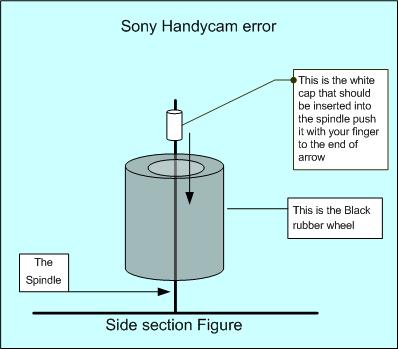
hanycam Error.jpg
Ahmed Jasim
Wed, 06 Jun 2007 10:27:52 -0700
I have a SONY TRV250 and got the error code 31:23 for a while. Very frustated by it. I have been thinking of buying a new Camcorder since the reparing cost of $150 is not worth it. At any rate, I found your web-page today and whacked it twice from the tap-side. It works! Amazing! Thank you very much for the advice.
Frank
Thu, 07 Jun 2007 18:22:31 -0700
thare is same problam in my handy dcr trv 174 its displayed c 31:23
in mostly raine sesone
pls sujjest me its solutoin
thanks
siddhu
Sat, 09 Jun 2007 05:08:43 -0700
had the same error on a 3yo TRV27E. Smacking didn't work but trying different tapes did. Sony tapes didn't work but JVC did (who knows??).
Julian
Sat, 09 Jun 2007 19:47:53 -0700
Had the same issue on my DCR PC5e
But i can't see any white cap, i only hae a black one
I slapped it and it worked
Thanks!!!
Nils
Sun, 10 Jun 2007 06:08:20 -0700
Wacked it and now working fine! Amazing. It's nice to have the internet world to figure out a problem.
Paul
Sun, 10 Jun 2007 10:11:10 -0700
I was doubtful..............................
I was wrong!!!!!!! Smacking it works for me too!!!!! I was all ready to go buy another camcorder!!!!!
Pam
Sun, 10 Jun 2007 11:14:39 -0700
I'm getting the same error messages. I also noticed that the black rubber roller was off of its spindle. I have't secured it with a plastic lock, yet. However, I'm testing it with the camera on its side, so that the roller will not come off. I know I need to secure it. I'm trying to find something that fits securely without glueing it.
I'm also resetting the white tab from the lock position on the spindle that "drives" the tape wheel that collects or winds up the tape, as mentioned above.
I'm not getting the error messages, but I'm having a problem with the tape itself coming out of the cartridge into the camera. It seems to be wrapping around the rubber roller. Is it possible that the roller is moving up and down too much, since it is not secured? Any other ideas? Thanks ...
rs
Sun, 10 Jun 2007 13:34:22 -0700
I am a member of the whack it club. Fantastic. DCR-TRV460 was going into HI mode on all tapes. Tried the open palm smack and the camera is working fine now. I looked at the spindle w/ pictures in the Jan 09 post and my locking ring is still in place. Thanks to this site, wedding video is saved......Thanks Debbie
Ciff
Sun, 10 Jun 2007 19:32:37 -0700
I was having the same problem with the tape getting stuck and the camera beeping. I think I found an easier way rather than smacking it. When ejecting the tape, there are the two posts that fit in the tape, these are the posts that turn the tape. Reach your finger in there are spin the posts in the camera. The post on the right hand side should freely, the post on the left is the drive post and mine was stuck. I turned it counter-clockwise and it made a few light clicking sounds. Put the tape in and it worked fine. I think when people are smacking it they are unjamming this drive post. Just spin it with your finger counter-clockwise and it should fix it without having to beat on it.
Andrew
Thu, 14 Jun 2007 05:53:09 -0700
after two weeks of the same tape drive error c32:c22, i found this website and thanks put me into the whacking club list. i didn't have to send it to sony for a costly repair. nice to have the net for these kind of troubles. cheers!
eric m
Thu, 14 Jun 2007 14:16:23 -0700
Good Job, Debbie. Whacking the camera fairly hard from the right side with the palm of my hand, ejecting, and reinserting worked great. Had to try 6 or 7 times, hitting a little harder each time :)
Daniel
Sun, 17 Jun 2007 13:04:46 -0700
This past weekend I ran into this crazy C31:23 problem. I had been taping earlier in the morning and everything was fine. I changed locations where I was taping and taped a little bit more and than the problem started, right out of nowhere. After I finally got home last night I checked the owners manual and tonight I decided to look on the net. I found this forum and have tried quite a few of the ideas with no luck whatsoever.
One thing I am noticing, since I have an older Sony TRV615 is that the newer TRV350 seems like it doesn't want to roll up the tape when I insert the tape, the supply side is "frozen". The motor doesn't run any kind of time at all, it shuts down quite quickly.
Like I said I have tried the smacking/whacking the camera and that hasn't provided any help. It appears that the spindle/bumper configiration is correct. I stumped, what else can I try.
Ryan
Mon, 18 Jun 2007 19:30:29 -0700
Well, we missed our daughter's frigging birth, and her first three months on the planet, and all because we wouldn't just hit the damn thing. Hell. So glad to be able to record now, though. Sheesh.
Jenn
Mon, 18 Jun 2007 22:29:35 -0700
I also have the TRV250 and could not get this thing working for the life of me, I gave it a few good whacks, surprisingly, it started working. Pretty amazing.
A.C.P.
Tue, 19 Jun 2007 01:41:46 -0700
Ya it worked, beat it like a wicked ___.
Mark John
Wed, 20 Jun 2007 06:42:36 -0700
hi every one. I just see that IO'm not only the person who lost money .I have a DCRTRV-460 model which I bought around 2.5 years ago. I rearly use my camcorder and made only 2 -3 hours recording till today. I play around 6 hours and always use sony cassette but withen a 12 month the same code C31:23 appers with msg " re insert cassett" I tried sevral times I called sony service but nothing.
I have decided never buy again this stupid SONY CAMERA any model . soon I will throw it.I lost my 500 dollars.
I'm so upset Becouse sony disappointed me lots.
Sal
Wed, 20 Jun 2007 18:25:07 -0700
I just whacked a $3500 Sony HDV cam...and guess what? IT WORKED!! The camera isn't mine (so, don't tell), but I need to capture this video so I can give it back. With 30+ hours left to capture I couldn't handle a malfunctioning camera. I have an old JVC DV Cam that's given the same "Remove and reattach the battery" message for years. I also have a can of dust-off compressed air that I've been spraying in the tape carriage area. It seems to gently jiggle things around. It worked the first time I got the error message but not the second. Whacking it worked the second time...after unplugging twice and trying four different tapes, plus a head cleaning tape. And you know what? Whacking it FELT GOOD! Screw Sony. I get the guy that says he won't stop buying a Ferrari because it has a flat...but dude this $3500 camera came with an 86 page manual the size of a Reader's Digest and the bastards won't tell you what the freakin error code means or how to fix it. If you had to search around online to find out why your Ferrari wouldn't drive, maybe you'd feel differently about buying another. With all the damn technology they're so good at, why aren't there step-by-step instructions on how to fix this in the manual, in the camera, or on Sony's own website? Why? Because they're greedy pigs who think most folks will bring it in for a $400 repair that will really take a tech two seconds to fix cuz, what's he gonna do? That's right, he's gonna whack it for you. But I guess that guy would pay Ferrari a thousand bux to tow his car and change his flat for him.
Flynn
Wed, 20 Jun 2007 19:42:49 -0700
Well, I got my TRV 250 out of the shop three days ago. They replaced a door hinge, and some electric board. After 2 five minute recording sessions, guess what appeared? C:31:23! I simply ejected, gave it a few taps on the tape door to get the pin in place(thank you Amed Jasim!), and popped the tape back in. Presto! Works fine again. Fortunately, I did not have to pay for the repairs(as it didn't fix squat!) but the next time it appears, I have the option to get a new comporable camcorder. On a side note: if you own your Sony camcorder less than 7 years, you can get an extended policy for about $125 from Sears, even if you bought it somewhere else. If you have the item in the shop for the same issue 3 times within 90 days of each repair, they will replace it with a comporable model. I'll keep you posted if I have to use it...
John
Wed, 20 Jun 2007 21:04:06 -0700
Yikes! My son graduates from Senior Kindergarten in five hours! Fired up my Sony 360X Digital Handycam to get ready for the big event and got the famous C:31:23 code! Seems like the tape is jammed. Even old tapes don't play or record! What am I going to do? Googled on "Sony Error Codes" and landed at this site. Couldn't really believe all this stuff was serious until I saw the large number of testimonials on the site! So upstairs I go, Whackamo on the camera! Now it works and I have the graduation captured!!!!!! I am forever grateful to those who discovered this!!!
Big Mac
Big Mac
Thu, 21 Jun 2007 12:47:20 -0700
It's WORKS, Smacking it a few times ....OK
Joseph
Sat, 23 Jun 2007 14:53:31 -0700
Unbeleivable.....i was looking to buy a sony dcr trv-355 but on the web site (e-bay) the seller admitted that the camera was faulty showing error code C:31:23 after finding this forum i now have no qualms about buying this camera, and all for a very good price (£50) many many thanks.....here's looking at you Debbie (bloody marvalous)
Chris Russell
Sun, 24 Jun 2007 07:35:15 -0700
Debby...you have saved me another few hundred dollars. I have the Sony DCR-TRV740. Previously, I sent the camera to Sony and paid the $250 service fee because I was getting the error code C:31:23 also. Only a few weeks after the camera returned, I got the same message. Vowed NOT to pay the service again, I went on the internet and found this site. Thanks to Debby and a couple of TAPS on the top right side of the camera, I have a functioning camera without the expense and time wasted. We are all gratefull...thank you...
M.Larson
Sun, 24 Jun 2007 12:47:27 -0700
YUP. Read the forum, thought about the advice.
Removed the battery, WHACKED IT with an open hand three times pretty hard...
WORKS LIKE CHAMP NOW!
Thank guys.
Great advice.
Mark Michaelsen
Sun, 24 Jun 2007 14:26:35 -0700
Slapping the cam worked for me too!!! I'd like to thank Debbie,all the other guys and their comments, as well as this forum administrator and google for finding it.
Kleber
Mon, 25 Jun 2007 07:06:28 -0700
I have a Sony TRV330 and it also keeps beeping a number but my number is C:31:42 ? What does that mean? Should I smack it on the side as well?
Michelle
Mon, 25 Jun 2007 10:37:52 -0700
Well, I bought a Sony DCR-TRV17 some 5 years ago. It quit working with C:31:30 error when I was on vacation in 2006, the first real vacation in years. It worked for 2 days and the rest of the 2 weeks vacation was limited to snapshots on my camera. After I got home, it started working again, no real reason. Then I pulled it out this week end after a few months, removed and recharged the battery, and got that error again. Turn it on, the DV cassette would spin and that was it. Open the case, it spun again, slid out, spun again, never popped up and could not be pried up and slid in again and spun again. Each time, that was all it would do. Removed and finished charging the battery and tried it again. Still that error code.
Found this site today, came home, removed the battery, slapped it around some, and now it works! Amazing! (I'll remove the tape after I record some more...)
Mark A
Mon, 25 Jun 2007 20:44:12 -0700
I whacked my TRV280 like Tony Soprano and it started working again. During the day it went out again with the C:31:42 error so I whacked it like it was Phil Leotardo and it worked again.
Frank Z
Mon, 25 Jun 2007 23:57:42 -0700
Whow we just fixed a 5000 euro SONY HDV camcorder using the whacking method!! hahaha. That's amazing.
Miky
Tue, 26 Jun 2007 02:50:00 -0700
I just had it this second!!! I changed the tape, and its working fine :)
Deedee Harris
Wed, 27 Jun 2007 05:04:19 -0700
Just whacked my TRV120!! Work just fine now!!! AWESOME!!! Debbie for president!
Gabe
Wed, 27 Jun 2007 11:15:14 -0700
thanks a lot Debbie!!!!!!!!!!!!!!!!!!!!!!!!!!!!!!!!!!!!!!!
Citroonz
Wed, 27 Jun 2007 12:06:36 -0700
ok, thanks a lot, i was really pissed but smacking it worked, but make sure you hhit it hard
matt
Thu, 28 Jun 2007 15:49:41 -0700
Holy cow! I was about at my wits end so it felt pretty good to give my TRV250 a good slap. AND NOW IT WORKS AGAIN!!! God bless you Debbie!
Wayne
Thu, 28 Jun 2007 20:43:49 -0700
whacked the shit of my trv950....it worked..thanx debbie!!!
pett
Sun, 01 Jul 2007 04:14:23 -0700
Just talking about whacking it seems to have worked!
Felix
Sun, 01 Jul 2007 06:17:40 -0700
A whacked and I whacked and I whacked... still nothing! It all started when I inserted a JVC tape for the first time. I was using Sony tapes up until then. I can't believe it! Sony have really buggered this design up... I've been whacking with the camera off, on, tape in, out, etc... trying all the options here. Still not working.
Filip
Sun, 01 Jul 2007 16:24:42 -0700
Looks like I might be making a little progress toward getting my TRV350 to work again. The whacking hasn't really helped much, but maybe a little. I've whacked the thing now probably over a 100 times and it still wants to give me the lovely error code, a new twist though...
I saw here on the board about taking the battery off and whacking it on the upper right side. I had been whacking it with the battery on and I had pretty much been whacking it all over the right side. I decided to give it a shot with the new idea. Well, it seemed to work, at first.
When I turned on the camera it wasn't giving me the error code and the beeping right off the bat. I went to fast forward the tape and then it started the beeping and flashing. I turned it off and tried the same procedure again...same results. I tried the same procedure again with the twist of reversing the tape instead of going fast forward. No problem at all whatsoever. Next I went to play the tape. I ended up getting the error code. I tried more whacking and then went to play mode and immediately went into reverse as well so I would be watching the tape but in reverse. It was working fine.
I let my finger off the reverse button and the picture froze, no motion to the video at all. Then after 2-3 seconds the error code popped up again. After a few more tries and some more experimentation I come to realize that it is working now okay as long as it isn't trying to advance the tape. Whenever I go to advance the tape, whether by playing it or by pushing fast forward, the tape won't advance and I get the error code.
It does seem like everything inside is fine, in terms of the bushing. I do question how tight the "wheel" should be on the opposite side of the bushing, aka the same part of the camera as the bushing but on the opposite side of the tape. That "wheel" seems like it is lose but I haven't found any way of being able to tighten it up. I have double checked all the screws that I can reach.
What else should I do to get this camera to work again?
Ryan
Sun, 01 Jul 2007 17:21:51 -0700
I have the TRV250 and it has not been used much but we kept getting the C31:23 code. Tried resetting, cleaning, new tapes, didnt work. Found this site and thought whacking it what the hell ........ and it works!!!
Tammy
Tue, 03 Jul 2007 22:31:09 -0700
Another satisfied TRV-530 whacker! Was ready to drop $500 on a new one and all it needed was percussive maintenance! Thanks to all who here post!
John B.
Wed, 04 Jul 2007 12:41:39 -0700
TRV11E- The damn thing has been giving me trouble for years. I was going to buy a new camera rather than waste hundreds on repairs. Guess what? the thrashing worked. Had Grey bars until I ran the tape for a few minutes but now it works fine.
John LC
Wed, 04 Jul 2007 17:05:21 -0700
omg! I can't believe this worked! I have a rental TRV 900 (my job lends high priced equipment to employees at no cost) and I am shooting this project that is two years in the making. I went to put it on the charger and then use it and got that 31:40 error code. Read the postings and, while being paranoid beyond belief about breaking a camera I could not afford... Smacked it once, nothing. Again, harder, nothing still. Smacked it :: hard :: on the cassette side and the bottom and it worked! You guys are a life saver!
jackie
Thu, 05 Jul 2007 18:34:04 -0700
Yep. Worked on our friends camera. Can't believe how many Sony cameras this has worked on. Hopefully someone at Sony will put their hands up and do something about it! SONY ARE YOU LISTENING?
Ally S.
Fri, 06 Jul 2007 08:49:22 -0700
At first the smacking thing didnt work. I would just smack it and the Re insert cassette message dissapeared but the error code and eject arrow still showed. But then i saw the illistraion from ahmad and so i opened the camera and used tweezers to try to push it in and also my finger. Put the tape back in and it works! Thanks!!!!!!!!!!
Michael
Sat, 07 Jul 2007 16:41:02 -0700
IT WORKED!!! WOOHOO!!
Sony Whacker
Sun, 08 Jul 2007 14:08:10 -0700
Ahahaha its funny but it works!!
Thanks a lot Debbie!!
Smacking the cam'corder 3 times when the tape it's recently inserted works for me
[EsTeWroK]
Sun, 08 Jul 2007 14:15:30 -0700
Another whack-a-cam success! Just a rather light smack on the tape side of a DCR-TVR480 made the C:31:22 error go away! Thanks!
mackey
Thu, 12 Jul 2007 13:26:49 -0500
thank you Deb!!!!!.....I just join smack the cam club....error code c:31:40 sony cam. DCR-PC100 I have not use this cam. over 2.5 years due to this problem. Thanks Deb.
smack it
Fri, 13 Jul 2007 22:09:26 -0500
Deb, thanks, hit the camera gently...
WORKS...!!!!
Thanks again... (HandyCam CCD-TRV138)
Jorge
Sat, 14 Jul 2007 01:33:03 -0500
I have one question for the folks who tried to follow Ahmed's suggestion. Did you unassemble your camcorder to reach the black rubber wheel. I tried to move the wheel with a long tweezer and I just cannot move it. This makes me believe that the lock is in place. I could not move the rubber wheel on the spindle and I could not get the error go away. In my camera DCR-TRV-11 the rubber wheel is sitting all the way at the bottom of the spindel. I cannot make it go up or down the spindle. So it's pretty tight around the spindle.
Naveen.
Naveen
Sat, 14 Jul 2007 01:36:13 -0500
Okay, I too was not so sure about smacking the camcorder. We just taped a families wedding and started having this problem the next day at home. Came here and saw how many people were part of the smack-it club. The tape was stuck in it, but thought couldn't hurt it anymore. Smacked it a couple times and turned it on and MAGIC...it worked. Thanks everyone. You might have just kept the peace in the family.
Dayna
Mon, 16 Jul 2007 00:57:07 -0500
WOW, the Debbra camera wack worked for me too
Thanks
Smoothwind
smoothwind
Mon, 16 Jul 2007 19:18:09 -0500
I was getting ready to take my DCR-TRV18E in to service because of the C:31:23 Error Code. After a search I bumped into this discussion. I tried the smacking and it works! Thanks!!!
George
Thu, 19 Jul 2007 07:34:13 +0000
Fantastic, i couldn't believe my eyes, it really works. my problem was that the tape would stop loading in the middle of way. Mine is DCR-HC42.
thank you Debbie.
Naira
Thu, 19 Jul 2007 21:44:34 +0000
Have a DCR-TRV25. Missed all kinds of moments due to C:31:23. I thought the battery trick was it, but no. I then started using only sony tapes, no. In the end, beating it worked, as I read here and tried it myself. Sure it works now, but it doesn't make me much happier, and this should never have heppened in the first place. I recommend that everyone tell everyone NEVER to buy a sony Camera. I guess next step is one with a build in hard drive, so the whole tape thing will be behind us...
Shawn
Fri, 20 Jul 2007 23:37:31 +0000
Nothing seems to works for my cam. I hit the cam a couple of times, eject the cassette, put a new one and NOTHING WORKS! :( What can I do?
Arepa88
Sat, 21 Jul 2007 19:41:32 +0000
'G'day'Awsome it worked that is amazing dude thnaks soo much i thought i was goin to have to pay for some other dude to wack it LMAO!! Debz your the man(woman) thanks i owe u big style :D
The Whacker man WOW
Sun, 22 Jul 2007 09:39:39 +0000
Several months ago I joined the "Whack-A_Cam" club and all the problems disappeared, and I posted my success story here. The honeymoon lasted several months but it did end. While I could reset the camera, the error codes kept on popping up. Time for another "whack job" I reasoned. Gave it a whack and I broke it this time! It could playback video, but the viewfinder image was all ajar. Paid one last time to get it repaired (the repair was for my whack only), but the camera worked fine in recording, though I am always afraid to review what I have recorded since that will sometimes precipitate the error codes popping up. I've chosen the Canon HV-20 as my next camcorder. Never again a SONY. The image stabilization never worked and I sent it back to SONY, under warranty, and they sent it back to me saying it was fine. They did nothing.
Richard
Sun, 22 Jul 2007 20:37:26 +0000
Amazing! I had this problem and I tried both soultions mentioned here. Removed the battery for 60secs thin I smacked it with my palm like 3x. It Worked!! trv480
ali
Mon, 23 Jul 2007 01:01:30 +0000
Thank you Debbie!!!! I followed your 'whack a Sony camcorder' directions and it worked like a charm. I have a Sony DCR-TRV250 and when the Error Code C:31:23 along with its annoying beeping sound appeared, I followed the directions in the owner's manual numerous times and it didn't work. I was feeling quite depressed. So thanks for helping my mental outlook dramatically improve!
Priscilla
Mon, 23 Jul 2007 20:58:41 +0000
i have a camera dcr-pc101e,he give me c3123 error
sony fix it for me changing the flexible wire,this is what they did.
for me this is the wire that moving by ejecting the tape.
don,t smack,this result in damage,
van vredendaal
Mon, 23 Jul 2007 21:07:01 +0000
man you guyz are damb smart.... this tricks worked for me.... go look at that picture and follow the picture and it will work for you
mitul
Fri, 27 Jul 2007 00:28:25 +0000
Thank you Debbie! The C:31:23 error and beeping led to multiple trials of various brands of mini-DVs and the eventual purchase of a Canon Hi-def gadget. Then I discovered Debbie's remedy of over two years ago. She suggested wacking the side of the camcorder. Tonight I proudly join the Debbie-whack-the-cam fan club.
kotra
Fri, 27 Jul 2007 04:50:05 +0000
I Have CCD TRV 118 Sony Handycam, I have the same problem and really pissed off. few times I open it and gave a warm air with my hair dryer its worked for a while. next time it was again same problem.. then i checked its pully and try to rotate it with my finger it was a bit stuck, i spin it with a little force it started spin, then my camera was playing video and there was no error for few days.
After few days i try to d o some work with camera again same error annoyed me alot.
This time i did everything i did before dosent worked at all. Then atlast I put another tape inside, which was at the starting point, and it start playing without any problem.
I think some belt inside get loose or weak then it dont have good enough strength to play a video tape which is on its end with a little bit more load on pullies.
Tauseef Bukhari
Fri, 27 Jul 2007 11:38:12 +0000
wow didn't believe it but hit the camera around a few times and bam like new thanx
Edward
Sun, 29 Jul 2007 22:11:49 +0000
I have used my sony cam camcorder maybe three times over a period of a year, then all of I sudden on the fourth time of use I am getting constant error of reinsert tape, even when there was no tape in the deck, I was upset to say the least, I googled the error and came to this site and it advised whacking the tape side of the camcorder and viola it worked, thanks! No joke it really worked!
[email protected]
Mon, 30 Jul 2007 04:40:50 +0000
I had the same message on three of my Sony GVD800 clamshell recorders. Every once in a while "Sony Lithium Info" would pop up on the screen during initial boot up too. I decided that this was a battery contact problem. I sprayed the unit's battery contacts with WD40 and I gave the unit a whack up the side and bottom. Actually I dropped it from 4" off the floor with the battery off the unit, the tape was out, and the tape door was open. It worked! Now I wasn't sure which action worked, so I experimented with the second unit. I took the tape out, left the door open, took off the battery, whacked it several times, and tried to operate it again. It didn't work. I tried this several times and it didn't work. I decided it was time to spray the battery contacts with WD40. That worked! I was going to do the same test to the third unit but it worked for some reason. I think it saw me beating up the other two so it decided to cough up what I wanted. I hope this helps out all you frustrated clamshell operators out there.
Charlie Westfall
Tue, 31 Jul 2007 21:31:00 +0000
my TRV-480E gave me the C:31:23 error then ejected tape and the tray was stuck in the open position, was getting frustrated and came across this site , took battery off for 60 seconds , camera works again now , but will remember to batter camera next time :D ..... Thank You
Mick
Wed, 01 Aug 2007 10:59:31 +0000
i think i have figured out exactly what causes this fault as i baught my sony hdr hc5 yesterday and already have this fault normally i would of taken it back and exchanged it but i need it for the minute and that would take too long and after reading what someone else wrote about the error code i checked the tape and found it has a section between the two reels where as you push the cassette in it pushes that bit up to allow the reels to spin so i jammed it up and sure enough every tape i put in worked everytime just thought it might be an alternative to smacking the camcorder if your scared of damage
Craig
Wed, 01 Aug 2007 21:25:09 +0000
I didnt think it would work!! I tried it a few times and it wasnt working so i triedd it again and it worked!!!
hhhh
Thu, 02 Aug 2007 20:44:33 +0000
I've got a Sony PC350 that just started giving me the "Reinsert" error, just as I was inserting my newly bought head cleaner tape. Followed the advice online, to take off battery, remove tape and give it a few whacks. After reinserting, it actually worked, couldn't believe it!
Now, to wait for my MiniDV rewinder to arrive in the post. That definitely was a much-needed purchase, given how fiddly these mechanical parts are. I suggest you consider buying one to save wear and tear on your camcorders motor and tape mechanisms.
Thai
Mon, 06 Aug 2007 17:12:39 +0000
i had to use this machine. and saw this kind of error. "smack it with your hand hard".. come on, do it..
halil
Tue, 07 Aug 2007 13:05:03 +0000
You guys saved me $$$$$$$$$$$! My 5-year old pc101e works again!
bb
Wed, 08 Aug 2007 08:41:12 +0000
ANOTHER GREATFULL PERSON, I CAN'T BELIVE IT !!!! I BEAT THE SH.... OUT OF MY CAM AND ITS PERFECT NOW!!!!!!
Carlos Oblitas
Wed, 08 Aug 2007 22:35:19 +0000
Thank you so much, Debbie. My TRV20(Japanese Model) was suffered C:31:30 error in my summer vacation in Hurghada, Egypt, but I can quickly resume it with Debbie's advice. Hopefully my vacation will continue smoothly with it. Great Debbie's job!!
kenken
Sat, 11 Aug 2007 12:23:28 +0000
Hey, I have a Sony Handycam Digital 8 TRV330 that was giving the C:31:23 error. I saw some of the messages from 2005 where they said wacking it oon the side and replacing the tape helped - well I'll be - that fixed it. |4 or 5 good wacks to the side and I am operational again.
Thanks
curtis
Curtis C
Sat, 11 Aug 2007 17:35:50 +0000
hi ppl,
i just kicked the ass out of mz trv250 and at first nothing happened, but then i ejected the tape and put it back, ow it works....wow who would say...thanx
iva
Sat, 11 Aug 2007 18:02:46 +0000
I have 8 years of family video tapes from my ccd-trv56e and for 2 years its sat with the 32:22 fault. it has done this intemitently since new which pissed me off as it cost $2500. and the fault would not show up when i took it back. so after finaly reading this forum i had great delight whacking it . it worked, it beeped when i did it (forgot to turn it off first) turned it off and then on again and its as good as new. i was a sony man to the bone but not anymore everthing i have of sony has given me trouble just out of warranty. thankyou very much for your help debbie. i will back up the tapes to dvd then whackit out the door like all the other sony products i used to own.
sony should be ashamed to have so many camera's with the same faults over so many years. head down, look at your feet sony
Robert goodwin
Sun, 12 Aug 2007 12:49:47 +0000
Amazing - the camcorder whack did the trick. got a trv480 that\'s had a c:32:11 error code for 2 months, it started acting up at during a beach trip and i could not get the c:32:11 error code to go away nor the tape to eject. Throwing the camera did not work by the way (nor did Sony support), but the whack referenced so many times here did. Now i can get those old tapes copied to disk and dump this POS camcorder... Thanks, Debbie, you may have saved me some time, money and lots of frustration.
Tony Schroyer
Mon, 13 Aug 2007 20:46:25 +0000
Wow, Sony engineering in it's greatest form. This obviously has been going on for quite some time, 2 years of comments. I too felt frustration with the "re-insert tape: c:32:22 error", and thank god for Debbie and her hi-tech solution. The others who either paid to fix ($140 flat fee, what?) or threw out their cams, wow, shame on Sony. Two good smacks and back up and running for now. Need to transfer home video fast, or who knows. Good Luck all. TVR-280
Mike Krcma
Mon, 13 Aug 2007 21:49:43 +0000
uggh i slapped liek prolly 100 times and.... its not workin for me........can some1 PLEASE tell me da exact steps.......dis is wat i did
i put it on vcr mode and then i slap it on the tape side for like 3-5 times and then i eject the cassette and then i put it back on and then it goes away but then i press play and then it plays for like 5 seconds and then message shows....can some1 pleaseee tell me the exacts steps thank u!!!!!
Rohan
Tue, 14 Aug 2007 02:01:10 +0000
Thought I had to buy a new camcorder. Whack and it works :-)
Thanks Debbie !
Gary
Wed, 15 Aug 2007 08:34:32 +0000
************** STOP ************
Take a deep breath, breath slowly and do NOT whack the camera...at least just yet !
I was receiving a C:31:23 error message on a few different tapes, including a cleaning tape. It turns out one of the kids spilled some soda on one of the tapes and a few drips the camera. After ejecting I removed the plastic door cover (two screws). This allowed me access to get in there and clean the unit with some Q-tips and alcohol. I cleaned the big round head and all the points of travel very well. I tried very carefully not to leave any cotton or residue in the unit. At first it didn't work...but eventually it did. It needed a VERY good cleaning. And NO the dry cleaning tape would NOT do the job. After a couple of cleanings SUCCESS ! On the big round head there are a couple of holes that I had to put a wet Q-tip on, and then it seemed to work. Not sure if soda residue had accumulated there, or it there is some sensitive electronics in the hole. Using a new tape I was finally able to get the camera to record and play right.
So as they say, curiosity killed the cat, and I just had to know what was on the soda stained tape. Against better judgment I decided to put the soda stained tape back in the unit after trying to clean the first few inches tape with alcohol. The good news...I couldn't find any video on the soda stained tape. The bad news is, it again messed up the camcorder and the C:31:21 error returned. But after another cleaning...the message went away, and I don't feel as bad throwing out the soda stained tape.
And yes I confess at first before I knew what the problem was, I tried to whack it. Now I know better. Sure a hard whack might knock off some dust or wiggle a loose connection, but cleaning might be a better first step.
And just maybe this secret C:31:23 error message is "Sony speak" for "we don't know", or "it could one of many problems" Either way try a cleaning first.
Good luck and God Bless ! I'll be able to capture the little guys first day of school next week ! And no, he's not allowed to drink soda. His poor teacher, doesn't have a clue of what she's up against. :-)
Sony CCD-TR416
Thu, 16 Aug 2007 16:21:20 +0000
thanks so much, debbie!!! Whacking the camera worked for us! unfortunately, my camera worked perfectly until the minute it was supposed to film a WEDDING. we had brand new tapes, too. i think the impact of trying to hook it up to the tripod must have done something to it. my cousin was to be the videographer, which she'd done several times, and she'd never had a problem like this before. it's a shame that we couldn't immediately find this cure! one happy couple will never have a wedding video due to this stupid problem. too bad they can't sue.
mary
Fri, 17 Aug 2007 17:11:36 +0000
Thanks Deb & Others. seems cliched but meet the newest inductee into the Whak-a-cam club.
My Whak-a-cam situation revolves around my HDV HDR-A1P something we payed plenty of hard earned for. The thing is it's only in the last few weeks that we have been starting the use tapes, because normally we Stream straight to a Firestore Hard drive -80gb High-def. The first time I put a tape in a couple of months back it wouldn't recognise it (Cam is nearly 2yrs old now.) Ran the cleaning tape through a few times then it recorded and played back fine. But recently I have recorded right to the end of a couple of tapes and as such when you place them back in the Cam it comes straight up with C:31:22 not allowing to even rewind. Yet another tape from the same pack of five only recorded to half way through the tape - no problems.
N E Ways...nothing ventured nothing gained. Gave a little whack on the tape insert side, then a little whack on the bottom. Fully used tape inserted and allows rewinding.
I'll tell you though I gave myself a fright, after the first whack I put in a tape I thought had been recorded to the end as you could see no tape left through the little window. I put it in, saw no error and thought fantastic. I started to rewind but no time-code was coming up on the top. I thought I had Whacked the heads clean out of line, fortunately it was just that the tape I put in had played 15 minutes past the end of the recorded area. Pheeewwwww!
Leigh
Sat, 18 Aug 2007 08:22:50 +0000
I love forums like this! I would have tried a moon chant at Stonehenge before I tried smacking my DCR-TRV250. Glad I found this forum and smacked my camcorder before I made any travel arrangements. It's working great now!
Mostly Dead
Sun, 19 Aug 2007 16:51:29 +0000
Hey Debbie
As silly as it looks. It work form me too.
Thanks a lot.
Victor
From Puerto Rico
Victor O. Detres Collazo
Tue, 21 Aug 2007 21:35:49 +0000
Yes smacking works.
About as much as praying when you are about to die. Most of the time you die anyway. Sometime something else causes the dying process to abort and all of a sudden, praying has worked. Random.
Folks. When you stop associating random facts with random results, you will become human again.
Smacking CAN SOMETIMES reset the black rubber roller. But the locking mechanism is gone and this WILL reoccur. Get it fixed properly and stop being sheep.
Michael
Thu, 23 Aug 2007 22:33:07 +0000
Okay, I used to own a sony handycam repair shop, and thanks to this forum I am out of business. Used to charge $115 just to whack someone's camera and send it back to a happy paying customer a week later. I can't believe you people RUINED me like this! Guess I'll have to go into Iraqi government.
JUST KIDDING! Didn't even have to **whack** my 250 that hard and she's up and running, amazing! I was about to buy a new JVC Everio HDD, probably still will anyways, they are the shikkety.
Whack tastic!
Fri, 24 Aug 2007 19:16:35 +0000
I just became a proud member of the "Whack-the-cam" club. I figured I wasn't about to pay a ton of money to have some "Technician" to "have a look" at my 6 year old camera. I figured I had nothing to lose so I smacked it a few times and voila...tape came out.
Thanks Debbie!!!!
P.S. Debbie, you should set up a web site for donations! Start selling T-Shirts etc... This could make you RICH!!!!
Lorraine
Fri, 24 Aug 2007 20:15:06 +0000
Okay, smaking didn't work for me.
I tried recording with the cassette lid open and it worked.
JoeJoe
Sat, 25 Aug 2007 10:23:20 +0000
Ok,this is too weird but 2 small whacks and my camcorder (tr600) works after a year. I kept it because I have many, many hi8 tapes that need to be transfered onto dvds.I had just bid on one earlier and missed getting it. Now I am glad I did not win!
msshylo
Mon, 27 Aug 2007 21:06:44 +0000
Oh my God it worked! I was sitting here thinking everybody was insane, but a few gentle whacks on my TRV460 and it's working perfectly again!!! Thanks everyone.
In my case I hadn't used the camera in a while, and the first tape I put in got eaten and would not come out. I probably did something to it in the process of trying to remove the tape. I guess the secret of getting the tape mechanism to release is removing all power to the camera briefly.
As has been said many times, always always always clean out the inside of the camera when these tape issues creep up. I've had to do that more times than I can count. And to avoid all the frustration I had the first time around, remember that the tape you had in there is probably now gunky as well, which will yuck up your newly-cleaned camera the second you put it back in.
core
Tue, 28 Aug 2007 08:25:51 +0000
I just sent the following message to [email protected] Perhaps he will help. Perhaps if every one of you ask him or some other ombudsman for action we can get past the iron cutain at Sony.
Hi,
My Sony digital 8 dcr trv 350 camcorder started flashing error codes for no apparent reason. C:31:XX
Searching online I found that many digital 8 users of various models have the same problem. The solution in the camera manual doesn�t work. The Sony help line refuses to answer any tech questions but is eager to have one send in the camera for expensive repairs.
If you search or check out the discussion thread at Error Code C:31:23?
You will see what I mean. The humorous part of the story is that the preferred solution on line is to whack the camera a few times.
I buy the theory that this seems pretty obviously to be a manufacturing defect that Sony should step up and recall or pay to fix.
I am looking for someone with the power of a public forum, to act as an ombudsman for this class of users, to embarrass Sony into taking care of their customers. Sounds to me like the threat of a class action lawsuit if not publicity through Ziff Davis publications might get their attention. I would love to read about your discussion with them on CNET or PCMAG. I know that you would make a lot of people happy by taking up this challenge.
So what do you think?
The users (your readers and potential readers) are frustrated and wondering what to do.
Thanks
Jeff Lubow
Jeff
Tue, 28 Aug 2007 18:14:07 +0000
After days of being frustrated with my Sony Handy CCD-TRV308 because of the error C:31:xx, I too whacked it a few times and it actually works. Thanks everyone!!
jamie
Wed, 29 Aug 2007 01:53:25 +0000
I'VE BEEN HAVING PROBLEMS WITH MY SONY TRV-250. I KEEP GETTING BEEP-BEEP-BEEP AND THE CODE C:31:23. MY FAMILY AND I WERE ON A CRUISE AND THE SAME THING HAPPENED. DIDN'T GET ANY VIDEO OF OUR CRUISE. CAME HOME, WENT TO THIS SITE AND SAW DEBBIE'S SOLUTION. OUT OF FRUSTRATION I WHACKED MY CAMERA, HARD, ON THE SIDE WHERE THE TAPE OPENS AND IT WORKS NOW. I WAS GETTING READY TO BUY ANOTHER CAMCORDER. THANKS DEBBIE!!!!!!!
RICHARD
Wed, 29 Aug 2007 23:59:53 +0000
I have a CCD-TRV37 and suddenly got a c:31:30 error when trying to rewind or play the 8mm tape. Tape was not stuck at all. After reading the threads and tried just removing the battery and ejecting the tape but that did not work. I re-read the threads and took a desperate the suggestion of smacking it around a couple of times and sure enough it worked like a charm!! I've done this to a dead Hard Drive at work in the past and got it to start working again...never thought it would work the same on a camera...weird how that works??
Christian
Thu, 30 Aug 2007 05:06:35 +0000
OMG I had the C:31:22 CODE so I did when everyone else here reccomended.... I smacked the hell out of my Sony Handycam TRV138 camera and its working!!!!!!!!!!!!!! felt good too, because of this stupid pos I missed my babys birth (well I was there haha but I missed it on tape)and her baptism and other such events like crawling. I wasn't about to go buy a new camera when I have one I only used a handful of times.
well thanks everyone for your bravery.
Jessica
Thu, 30 Aug 2007 17:46:52 +0000
Smack-that-Cam! This technique works fine in London too!!! My Sony DCR-TRV140E has been showing C:31:23 fault for some months now. My husband opened & cleaned the rollers, pins etc and still no joy. Searched Manual and Google and tried switching off, disconnecting power, removing tape, changing tape (ALL models), changed batteries, etc etc. On seeing this site and Debbie's advice and incidentally the advice on another forum of a former Sony repairer who worked for Sony and charged customers loads for servicing their camera when all they did was secretly smack the camera hard when customer was gone, we decided we had nothing to lose and gave it one almighty smack to the bottom. Hey presto! It works! Unfortunately, the camera regularly goes into this error mode and we have slapped it so many times I am afraid for its life. On the bright side we have figured out during this abusive time that the smacks are most effective if planted on the cassette side, short and sharp! The camera has served us well for over 5 years and in the meantime I have had a good giggle at the comments of surprise on this site!
GT
Sat, 01 Sep 2007 10:40:40 +0000
HI ! sorry for my bad English))))
I have Sony hdr-FX1e - Im getting error C:31:22 and when i opened the camera, the little "metal string" has entangle cassete Wheel . After I removed metal string from Wheel where it needs and error 31:22 has disapeared. Can you give a little more advice for this metal string-What is this? What for it is necessary?Thanks!
My photos
http://p4p.skynet.md/files/652/2.jpg
http://p4p.skynet.md/files/652/3.jpg
photo original sony tape mechanism
What for it is necessary?
http://p4p.skynet.md/files/652/01.jpg
http://p4p.skynet.md/files/652/1.jpg
Attached Image: 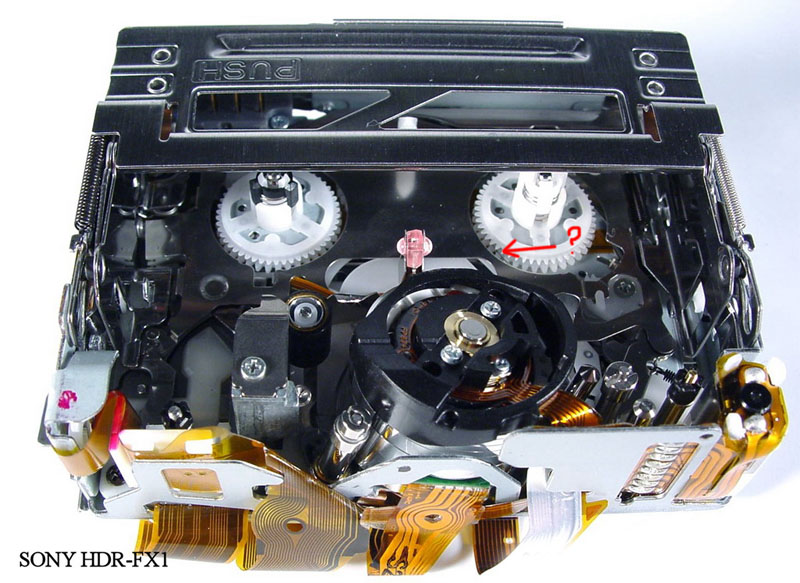
01.jpg
djsin
Mon, 03 Sep 2007 00:12:40 +0000
Thanks to Ahmed Jasim,in IRAQ, I was able to fix my video recorder. Like he said the black rubber wheel had fallen off and I was able to find it after turning the Sony camcorder upside down. Thanks to his diagram, I knew where and how to put it back. I have to admit, I did give it a couple of hits on the side. It made me feel better especially since I missed out on filming the last couple of days when the family was just in Stockholm, Sweden. At least now it is fixed before the twins start their very first day of school. Thanks everyone.
Anita
Mon, 03 Sep 2007 03:07:41 +0000
Okay so, I was sooooooo dubious about all this wacking business!!! I mean, come on you want me to WACK my $4000 camera...okay sure!! So it REALLY DOES WORK!!! After a few light taps and a few heavy open palmed ones, everything appears to be back to normal, no more flashing c:31:23 rubbish. Very grateful for this thread as I didn't really want to pay $400 for another service. I just had one last year. I have a sony DCTRV 900E. Thanks to everyone.
Chad Bennett
Mon, 03 Sep 2007 04:07:06 +0000
guys Waaaoo i dont know wat to say all i can say is belive AKON and really SMACKED THAT LOL IS REALLY WORKING
Nafis
Mon, 03 Sep 2007 18:04:19 +0000
It worked for my TR120 too. Thanks Debbie!
Sean
Mon, 03 Sep 2007 18:33:51 +0000
I didn't have to whack mine very hard at all to fix the C:31:23 problem.
Funny how the error seems to only occur for one tape and not others.
Anyway... I recommend stating with a gentle smack and working up!
Happy smacking!
Dan
Dan
Tue, 04 Sep 2007 20:18:17 +0000
I had the 31:22 error code, and it started right before my son's first bday. I tried EVERYTHING, and nothing worked. Took Debbie's advice, and it worked like a charm. Thanks
Angel
Wed, 05 Sep 2007 03:14:40 +0000
Fantastic YAY it worked on my TRV145E ..... the damn thing nacked up on my hols.... took debs advise and now iv joined the Whack a camcorder club ha ha ha good fun though
chris
Fri, 07 Sep 2007 17:10:06 +0000
Wow....smacking did work for my handycam TRV-480E. I was too scared to send camera to Sony service centre , they seem not to have any clue to problem I had.
Wish I could have come to this site earlier....thank you guys
Keshav
Sat, 08 Sep 2007 14:39:02 +0000
Just did this with my TRV33, and it didn't work after the inital abuse, but then after removing the battery for a few minutes and reattaching, the error code is gone and the cam is fully functional. I missed recording an important milestone family event though. :(
Jeff in Dallas
Sun, 09 Sep 2007 19:38:53 +0000
I am a private investigator and my camera is my living. Sony is our industry standard. I am on my third camera in 6 years. I was headed out for work this morning and checked and set my camera and the c31:23 code and beeping started. Now, I am well know for whacking the hell out of most any electronics. I get a lot of strage looks and few results. I frantic, went to the internet and found this site first. After head cleaning and all of the above; frustrated I decided to try the Whacking method. I should have followed my nature all along. The camera is working fine. Absolutly Perfect, no weird noises or anything. Here is the best part. I pulled out one of the other sony cameras that crapped out and tried this. Again....The camera is working fine. I can not help but imadgine the service department at sony sitting at their stations whacking cameras for $200.00. I am writing to Sony about this. Class action suit anyone? 1/3 to go to Debbie. There must be a thousand entries here it is unbelivable how many have had this problem, how many more are standing at camera counters buying a new one right now, I was almost one. Lets hire a Lawyer!!!!! For Real. Debbie can I refrece this site when I write to sony? [email protected].
David Perreault
Mon, 10 Sep 2007 12:36:02 +0000
Yeah... Here in Cali.. i was desperately looking for a camcorder so I could edit a video... some friend kindly let me borrow their Hi 8 sony video cam.
As I was trying to video my tape... the error kept prompting to the screen again and again...
i came to this site.. thought I should really try smacking, since being a mexican, we always try to fix things that way...
and guess what? the mexican way did work!
now I can view the tape.. amazing...
blessings
humberto
Tue, 11 Sep 2007 05:59:46 +0000
Unbelievable...the "WHACK" worked...i've never laughed so much at the comments people from all around the world made. I'll send you all a video...cheers from Sunny Sydney Australia
Peter Laan
Tue, 11 Sep 2007 10:23:43 +0000
SMACK THAT camera! it works! ... at least it worked for me :)
Lkswe
Thu, 13 Sep 2007 08:06:40 +0000
What can I say, got the camera from my parents to film my daughters birthday and found the errors C:31:30 and C:31:22 the next morning when I tried to play the tapes.
I found this forum and smacked the camera a bit but that only changed the error code.
So I tried it with a tape in it and with and without the battery and suddenly it worked again.
First I had some strange grey bars like a zebra-crossing but after changing the tape and rewinding it to the beginning they were gone.
So for now the camera is working again, lets see if it will last.
Thanks to everyone for the help and don't give up :)
Kai
Thu, 13 Sep 2007 14:31:14 +0000
THANKS IT WORKED FOR ME TOOOOO. THANKS DEBBIE
Gerald Haney
Thu, 13 Sep 2007 20:03:31 +0000
SMACK THAT CAMERA! Worked like a charm...thanks for the advice Debbie!
Josh Kersey
Fri, 14 Sep 2007 14:59:49 +0000
A good slap worked for my trv245 too!
Laura
Sun, 16 Sep 2007 10:13:43 +0000
Yea! Three cheers for Debbie!!! Our dcr-trv250 started giving the code as we were trying to film the homecoming parade last week ... urggg! I got really lucky and found this site on a desperate search and YEA!!! Voila! The camera is working now! If only everything in life were this easy... Hmmm about that mother-in-law of mine... Any suggestions Debbie? LOL
DeAnna-slap happy Mom!!
Wed, 19 Sep 2007 19:20:52 +0000
Thanks Jasim,
Your diagnosis helped me to analyse and solve the problem.
I was facing C:32:23 OR 22 PROBLEM with my handycam (sony). During the self check of DVR mechanism i found the black carbon pulley was loose and was not in a locked condition. I took it out cleaned with cloth and reinserted back by applying a rubber tube /sleave lock for it. The Handy cam is working fine.
Please donot smack the cammera. Sony is intelegent enough, simple smacking is not the permanant solution, please find the route cause of problem and try to rectify it.
Regards
AK Dogra
DOGRA ARUN
Sat, 22 Sep 2007 09:55:16 +0000
Sony DCR-PC9. Kept getting intermittent C:31:23 error codes. Only cleared when I opened the cassette deck and closed it again. Found plastic sleeve/shim had dislodged from the rubber roller assembly. Lubricated roller shaft and reassembled - works like a champ. I'm sure smacking the camera provides some psychological relief but it merely dislodges whatever is binding in the tape path. Locate and repair the real problem and you'll have a more reliable fix.
Don
Sun, 23 Sep 2007 20:24:47 +0000
Thank goodness you guys were out here with this information. My DCR-PC5 just stopped working with the C-31:23 error code. I tried the "technical smack" therapy and it worked! Thanks so much for the heads up! :-D
Joe
Mon, 24 Sep 2007 02:06:16 +0000
I have DCR-TRV310 (digital 8, 1999) and had the same problems for years. At first it helped if I didn't use certain brands of tape, then it helped if turning the power off, but for the last six months nothing helped and I couldn't use it anymore, loosing precious moments of our little children. I was planning to buy new HD camera soon.
But I a couple of days ago I just googled C-31:23 and when reading this site I was sure smacking would help me as well and it DID!!! Now the camerea works perfectly, it even starts to record right away, where before it took at least 5 seconds for the camera to decide whether it would start recording or pop-up the error!
And it looks everything ok inside, nothing is missing, the roller seams fine.
Thank you Debbie!
Rewel
Mon, 24 Sep 2007 08:20:02 +0000
I had the same problem, C-31:23 on my DCR-PC120.
I visited Sony Parts & Accessories Portal and got a parts to fix it.
Now my comcorder is working flawlessly. It cost only $37 including S&H.
No smacking any more.
gen
Mon, 24 Sep 2007 22:14:59 +0000
I gave my Sony dcv-trv 280 [with C:32:22 error] an open hand slap right after I found this site and now it works again.
Thanks Debbie
Rich
Tue, 25 Sep 2007 01:18:27 +0000
The parts I bought is 770 X-3950-359-1 ARM ASSY, PINCH.
gen
Tue, 25 Sep 2007 14:34:43 +0000
Well, count me in as a member of the "Smack Your Camera" club. I've had my TVR-series for a bunch of years, love the thing, use it almost constantly - until I dropped it on my (carpeted) basement floor. In the middle of a taping session. At oh, nine-thirty or so at night. I searched the error code that came up (not immediately after dropping the cam, I might add), and found this fine site. I gave it a couple of taps, but took a run to teh local CC (closes at ten)to get a new camera.
Long sory short - just before I opened the box on the new camera, I decided to get a little more forceful. I removed the tape on my old pal, slammed the camera with an open palm on the LCD side, and then re-inserted the tape.
A couple of seconds of grey bars across the images, but then all ran smoothly. Back in business - and the new camera, still sealed in its box, goes back tomorrow!
It WORKS.
J. Kelly
Sat, 29 Sep 2007 02:19:44 +0000
My wife just told me you can't fix the camera just get over it and go buy a new one!!!! So I smacked it on the side and wouldn't you know it...I am the fix it man!!!! Works like a charm!
jeff
Sat, 29 Sep 2007 02:42:33 +0000
Hahahah...Debbie its still work till this year 2007...i just smack my camera to correct the error
muffinz
Sat, 29 Sep 2007 13:54:59 +0000
I'll be darned! IT DID WORK!!! Until I found your info a few minutes ago, I was beside myself. I missed a parade today my daughter was in. It's over, gone and I am furious!
Have had camera since Easter Sunday 05 which was replaced graciously by Wal-Mart because another Sony failed that morning. Went to film my daughter today in a fall festival parade and got the C:31:23 error. I must have looked like an idiot, in an attempt to get the camera to film but to no avail!!!
Tried to find one......can't.............I have daughters fall soccer videos that need to be taken off, etc. etc. Hope it continues to work until I can arange something else.
THANKS TO ALL! THANKS TO ALL!
Chase/Elkins, WV
Neal Skidmore (Chase)
Mon, 01 Oct 2007 00:07:41 +0000
Hey, I found another way besides smacking! turn the right "turning thingy" (well that thing that turns the tape) by force... it was stuck at my player
worked right after that without problems
Oliver Schneider
Mon, 01 Oct 2007 06:54:53 +0000
I've just joined the "Smack your Sony to make it work Club"
Emmanuel
Mon, 01 Oct 2007 18:23:02 +0000
I TOO, AM THE NEWEST MEMBER OF THE "WHACK IT" CLUB.........AND THE DAMN THING WORKED THE SECOND I TURNED IT ON. AND TO BELIEVE I WAN ON MY WAY TO BEST BUY AND THOUGHT WHY NOT? DEBBIE, YOU JUST SAVED ME $500. THANK YOU!!!!!!!!!
HAPPY SMACKER
Mon, 01 Oct 2007 20:04:27 +0000
Tried this on a PC101 and hey presto: No more error!
M@
Wed, 03 Oct 2007 08:52:49 +0000
I tried the smack, unfortunately didn't work for me. When I opened it and turned it upside down, a small black roller fell out. I have no idea if that was the original problem, or caused by the smack. I also have no idea where the roller goes. Is there a picture of the interior of a dcr trv 19 anywhere, or anyhing similar, that would help me find where this roller belongs? Has anyone organized a class action lawsuit against Sony for this? It certainly looks like it would be a successful one! THANKS!
herb fellows
Wed, 03 Oct 2007 22:04:52 +0000
OK, I admit it.... when I got a 31:40 error on my DCR TRV330 with 6 years of heavy use, I thought I was done and started shopping for a new camera. Then I read this board - I am now another member of the "smack-a-cam" club.
I just hope it works long enough to get all of my tapes transferred to DVD's. :-)
Jeff
Sun, 07 Oct 2007 12:52:10 +0000
That's incredible! I have a TRV118 and it hasn't functioned since one year. I tried again and againt with the manual and nothing! Now I used trge Debbie's method and ready! Thanks again.
Enrique Zavala
Mon, 08 Oct 2007 18:51:03 +0000
I fixed my c:31:23 error with the following for my DCR-TRV310 Sony Camcorder;
Opened the cassette door, and wiggled all the white and black rollers that were visible with a screwdriver... just moved them around, that is all! Put in a tape, and it worked fine... no more error. Thanks to the guy who wrote earlier that it had to do with the rollers. He was DEFINITELY right!!! Cheers,
Jim
Jim
Tue, 09 Oct 2007 22:55:54 +0000
OK ok Ok... I read all of these... n i thought to myself this sh*t is crazy.... but i did whack it... n the damn thing worked.... wow Debb ur the best... so yea... I am the NEWEST Member of the WHACK IT club... and im damn proud cuz i aint gotta buy another cam for another 2 years... if it happens again ill throw it out the window and it will be fine!!!
Cristiano
Wed, 10 Oct 2007 03:49:52 +0000
My Sony Sony_DCR-TRV250 stopped working on me this past May 2007 just as my son's Middle School graduation was about to start. I missed taping this monumental event. I took the advise to smack it a few times, take the tape out, put it back in and it works now. I can't believe it.
Wall
Wed, 10 Oct 2007 04:26:30 +0000
I have joined the smack the camcorder club and agree it works! Before you pay someone else to do this try it yourself.
Thanks Debbie!!!!!!!
eric
Wed, 10 Oct 2007 08:54:05 +0000
Has anyone established a class action lawsuit against Sony for this? Does anyone know how we would go about doing this? Sony denying that this is a manufacturing defect is criminal, in my opinion. They said to me 'we don't take advice from websites, we get our information on mechanical problems from our repair techs'! So, either the repair techs are totally incompetent, or they have said something and Sony has told them to shut up. They should be made to pay for their 'the customer be damned' attitude. If there are any lawyers reading this, please advise regarding the possibiility of a class action lawsuit. Alternatively, could a person bring Sony to Small Claims Court for something like this? It would be worth it to just make them respond with their ridiculous answers in open court.
herb fellows
Wed, 10 Oct 2007 15:56:20 +0000
Thanks for the advice. I have a TRV120, and I have tried everything except sending it to Sony.
I too am a "Wham-a-Cam" club member. I'm not sure it will work for all TRV models, but it did work for mine.
Eddy R.
Thu, 11 Oct 2007 09:16:13 +0000
I 'm glad I found this site. I have a TVR250. I was trying to use my camera professionally and it went int fault mode Error code C31-23 then C31-20 then C31-21.
I following the instructions for the fault code did at least twenty recycles with and without battery and o=power code. Couldn't get the tape out the tape drawer was locked. After another recyle attempt- I whacked the camera a few times and voalla
C31-23 must be the secret whack code Sony won't tell us about. It's a mechanical jam!
Gene
Thu, 11 Oct 2007 13:47:59 +0000
Smack dat!
Thanks Debbie! It worked for me too.
Richard
Fri, 12 Oct 2007 16:40:48 +0000
hi all you camera smackers out there the real reason your cameras are not working may be a well known problem the rubber pinch roller in your cameras bemome displaced due to use. the little plastic retaining insert falls off then the roller becomes loose then falls off how to fix it follows.... ok I have a Sony DCR-TRV18 MINI DV CAMCORDER it had the error codeC31:23 I found out why the rubber pinch roller had indeed fallen of the shaft and was in the back of the cassette tray lucky it stayed in the camera with jewelers needle nose I care fully retrieved it and now for the white pin it was gone but being a prolific tinkerer i soon found a relacement I used the ink tube from a bic pen with a pair of side cutters again small I clipped a suitable piece of ink tube sans the ink I replaced the roller on the capstan and useing the needle nose pressed the piece of ink tube on the capstan to hold the roller nice tight fit the roller spins freely with the side cutter I clipped the excess ink tube and bingo the camera now works great once again MY THANKS TO ALL HERE AND AT OTHER SITES WHO put thier knowledge out there for us to read
Ps why smaking works should be obvious if the roller is simply slid up on the shaft it may simply knock it back into place but eventually it will fall off just wanted to share the fix for all of you who care to try it good luck and happy tinkering
JD
Sat, 13 Oct 2007 18:53:27 +0000
I did try quite a lot of smacking with no success, and am still trying to fix my Cam.
however, I found one manual (for another sony DV cam) that had the two C: errors described as CUSTOMER FIXABLE - remove and replace tape a few times.
If it is so easy to fix (as per that manual) then just WHY does sony say they dont know, please send for repair??
Ah well -looking for bits I can adjust now
Ian
ian
Tue, 16 Oct 2007 06:51:56 +0000
Hey there! I have joined the club of error C31:23 tonight, I was so anxious because no way to remove this damned code. And thanks to this fabulous forum, I smaked my camera twice on the right side and no IT WORKS !!!
Thanks Debbie you help me to save 300� in getting it repaired!!
David.
David N
Thu, 18 Oct 2007 19:10:50 +0000
Just wanted to say I was having a panic on after getting the dreaded C31:23 error, tried everything the manaul said to no avail, googled the error and found this site, and im so glad i did, thank goodness i dont have to spend a fortune sending this in to Sony, all i had to do was give it two slaps to the tape side and hey presto!!!!
Im now a proud member of debbies gang!!!! ;-)
Wan
Sat, 20 Oct 2007 22:52:13 +0000
funny!!! but i slammed my camera at the wall after hours of trying fixing my camera and it finally worked
mpekris
Sun, 21 Oct 2007 14:33:15 +0000
Well the smack did the job!!!! SONY TRV480 Thanks
fred
Sun, 21 Oct 2007 18:47:46 +0000
Oh my god! Two years ive been looking at this thing. Tried everything i finally i bought a new one. So i picked up the ol trv-608 headed for the trash can. I decided to try one more time.30 minutes later no results.I told myself i would at least check on service prices. Ran across this site and said what the hell its broke anyway! SWING AWAY MARALE! MARALE SWING AWAY! It works
LOUIS WALKER
Mon, 22 Oct 2007 05:14:19 +0000
Yup! Smacking worked! Fabulous! Thanks a lot
Mr Me
Mon, 22 Oct 2007 13:04:38 +0000
boy oh boy smacking always works ! thanks a lot.......................
sammy T
Mon, 22 Oct 2007 21:06:35 +0000
I like to fix things, but, my Sony CCD-TRV66 wasn't co-operating. I was getting error codes 31:30 in VTR mode and 31:44 in camera mode. After almost two years of collecting dust, one quick smack and it's back in business. Now, I just need to transfer all of my tapes to DVDs. Debbie THANK YOU VERY MUCH!!!!!
Phil Fix-it
Thu, 25 Oct 2007 03:15:03 +0000
A few months after a chargeable �176.25 Sony repair on my DCR-TRV245E, the flashing eject with code C:31:23 appeared. My suspicion was this was instigated by the Sony repair work, but I don't want to return it to them to investigate as I won't get it back before paying them more money ! So what have I got to lose in trying what many of you since 2005 have done - guess what - the smacking worked and we're in business again !
Robin Johnson
Fri, 26 Oct 2007 17:17:21 +0000
have a sony trv250 took debbies advice and smacked it on the side where tape goes in and i be damned it worked.....THANK YOU DEBBIE...saved me from buying a new camera for now.....
gary hamilton
Sat, 27 Oct 2007 02:37:11 +0000
I Googled, "C:31:42 error", first page said to take apart the whole camera (minus the hard sections), clean it best you can, then put it back together. Now I'll put that section I read at thebottom of all this because I, like you, am not to keen on taking apart a several hundred dollar machine that has given me so many priceless memories. So I skipped to the second Google find, this page. Now keep in mind I bought "expensive" Sony tapes, thinking it would help, cause my other tape were so old, over used with Sony Vega backups (covert to mpg after, saves tons of space). I even grew frustrated and "lightly" smacked it a couple times on different occasions. But I mean LIGHTLY. Didn't work. None of it worked. Read this thread...figured, if this "SMACK TECHNIQUE" didn't work, 1. I'd take it apart and blow/clean, if that didn't work, 2. Pay $50.00 to $150.00 to have a local shop do it, and finally if that didn't work, 3. Mail it in to "Sony" to further the product quaility jail house rape with NO VASALINE. So...I held it in my left hand...and...SMACKED THE SHIT OUT IT! Smacked it like a knuckled headed step child...like it stole something from me...LOL...alright, actually I gave it about the Newton force you see a herion addict gives its arm two to three fold, or the smack a girl would give you up close in your face if you said "I cheated" or if she caught you looking with you mouth open, or better yet, the slap the average woman would get in the rear, before/during/after, some sexual intercourse or forplay. So...SMACK THAT SHIT LIKE 2 OR THREE GOOD TIMES LIKE TERRENCE HOWARD ON HUSLTE N FLOW. If your scared, get the soundtrack and listen to the trailer hit to get you hyped up! The TRV340 has been recording for the past 20 mins, couldn't get more than a second to the most a minute outof it before the blinking error came up, rewinding a playing back/re-recording to double check now...heres the take a part thread, followed by the "Bend the metal little piece that aligns the tape" thread, I think smacking might bend it "just enough", so make sure you have a tape in there when you do it, I did. Bonus: Class action suit below...
Take it apart thread (helped like three people, LOL):
DCR-TRV 725E C:31:42 error - the solution?
Jonathan Gardi - 9th Dec 2005 22:39
Please look in
DCR-TRV 725E C:31:42 error - the solution?
I'm copying what I've wrote there:
I had the same C:31:42 error on my DCR-TRV725E. Suddenly, out of nowhere, it started. On every cassette, sometimes with few seconds disturbed playback or few seconds of rewind/forward. I searched the Internet and found this forum. People here said that the solution was to take the camera apart and put it back together - well, it WORKED !!! I took out all the screws I could see (except the ones near the LCD). Note the two different screws near the button panel opposite the LCD screen. I pulled out the front of the camera, and then separated it into two parts in the middle all the way from the lens to the battery. In the cassette compartment "area" I only took out the plastic cover (didn't touch the screws of the mechanism inside). Be careful on the cables connecting all those parts. The camera was disconnected into 4 parts (lens, left with LCD, right with cassette compartment and battery, the 4th is this small i.Link cover on top aside). The ONLY thing I touched was this small transparent purple stick near the middle of the cassette compartment - just near the drum. I cleaned it a bit with ear cleaner. I don't know if this did the trick, but that was the only thing I can think of. Then, when the camera was all wide open, I connected the battery, inserted a cassette - and it worked. I felt like in terminator 2 when the robot comes back alive. I saw that the tape is rolling and not stopping and beeping, I could not look through the eyepiece since I had to hold all the parts in my hand, so my girlfriend looked. I put all the pieces together and it still worked. I could record and playback. All this disassembling and assembling happened 2 hours ago. God bless the Internet :)
Take apart the tape door and bend the tape aligner straight thred:
www.myspace.com/CideTwiy
Sat, 27 Oct 2007 17:10:18 +0000
Ok, I was very doubtfully about smacking a video camera, but it works. I kept getting the C:31:42 error and was going to use a hairdryer to fix it (ERROR C31:42 SONY CAMERA DRC-TRV17E), but I figured it would try it and it cleared up the error immedetly. I just smacked the bottom of the camera with my palm a few times.
Thanks for the idea.
Jeff West
Sat, 27 Oct 2007 18:34:19 +0000
Amazing that 2 years after Debbie first posted the smack the camera solution, it still works. I have a TRV-480, got the C:31:23 error message, smacked it once on the side, and now it works.
bob
Wed, 31 Oct 2007 01:42:06 +0000
The C:31:23 next generation continues: My son's HDR-FX1 HD camcorder just started to have the same error. It ticks me off that Sony obviously disregards previous problems in developing its next generation of equipment. I hesitate to "Whack" a $2000+ device on the side to temporarily fix a problem that has been around for years. Of course the camera is just out of warranty! Does anyone know if the tape transport mechanism is the same (or similar)as the other camcorders with the same error code?
MJL
Thu, 01 Nov 2007 12:34:13 +0000
Incredible!!! I'm from Germany. Had the C31:42 problem w/ my DCR-HC40E. Tried a lot of things, but unsuccessfully. Found this forum, whacked my cam - and *IT WORKED*
A brilliant trick.
THANKS A LOT!!!
ProfessorX
Fri, 02 Nov 2007 17:30:01 +0000
guess what, i tried that whack-a-cam and now it works! hellz yeah! now i can record stuff! sweet. thanks whoever was twards the top. oh yeah you got to whack it on the bottom where the tape comes out, but it has to be closed up first and also the tape must be out or your SOL.
ThANKS BUB!
kentucky
Sat, 03 Nov 2007 15:34:13 +0000
I had the same problem in my 147E. Gave it a good smack! Amaging...it started working.
Sunandan Baruah
Sun, 04 Nov 2007 11:15:12 +0000
Did the smack trick for a 31:40 and that worked. Further research indicates that the connection between the drum and the main board is faulty. The correct resolution is to clean the connection and reassemble.
Scott
scott
Sun, 04 Nov 2007 16:37:32 +0000
Smacking it worked for me too. Couldn't believe it. Thanks A Bunch!!
Sara
Sun, 04 Nov 2007 20:58:04 +0000
Got that 31:42 error message about a week ago. Like most of the posters here, I couldn't figure out why it kept showing up. Missed out on a bunch of moments to capture. I recently moved and my camcorder has extended warranty. I tore up the house trying to find my warranty papers then my wife says to do a search on this error message. Well, smacked the dang thing and sho' nuff it works! Thanks y'all!!
dtlara
Mon, 05 Nov 2007 04:54:38 +0000
hi all,
i read the suggestions on the discussion board and smacking my cam and it worked. thanks to all. i was pretty tensed about the code error. i tried what sony manual says but of no use. i searched for the error codes but could not get it. but this worked. always old is gold.
V. Anand
Mon, 05 Nov 2007 10:44:02 +0000
i think sony needs to create a vibrator for its cams. without the vibrations it resists to work. it needs some workout maybe getting frigid without having vibration for long time.hahahaha
V. Anand
Mon, 05 Nov 2007 11:43:38 +0000
I tried everything. No good. I read the posts, laughed, and smacked the camcorder on the side and bottom. It works now! Wow!
talman
Thu, 08 Nov 2007 00:44:27 +0000
Tried the idea of smacking camcorder i have a tvr250 and it worked thanks for that info
nigel
Sat, 10 Nov 2007 15:22:14 +0000
Thank you to Debbie. I have the TRV250 and received the error code C:31:23. I tried everything so I tried the whack the hell out of it. IT WORKED!! Thank you thank you thank you DEBBIE
Dandelo
Mon, 12 Nov 2007 01:22:45 +0000
Tiene arreglo.
Si tienes el Error Code C:31:23 en tu c�mara no te servir� de nada limpiar los cabezales ni sacar la bater�a un rato.
En este mismo foro he le�do un consejo que me la ha arreglado:
golpea con la palma de la mano el lateral de la c�mara apagada (yo he golpeado el lateral de la pantalla l�quida). Luego saca la cinta y vuelve a meterla. A m� tambi�n me ha funcionado, ahora puedo usarla sin problemas.
Smack the side of the camera relatively hard with the palm of your hand. Eject the tape and reinsert.
You may need to do this a couple of times. It works!
PABLO
Mon, 12 Nov 2007 20:28:14 +0000
I Have a Sony DCR TRV330 And I've Had The C:23:31 Error Code Ony My Camcorder For Quite Some Time, I've Tried Smacking The Camera, That Didn't Work! It seemed To screw the camcorder Up Even More :-/ Grr!!! What Is Wrong With it!? Sometimes The Cassette Compartment Won't Open Up And I Have To Remove The Battery And Re-insert it! PLEASE HELP ME!!!!
Adam
Mon, 12 Nov 2007 23:54:24 +0000
Sorry, The Error Code Wasn't C:23:31 it was C:31:23, I found the problem, the left thingamajigger that turns the cassette gets stuck when you put a tape in, or even not when you put a tape in! Everything else is normal!! :( HELP!!
Adam
Tue, 13 Nov 2007 02:42:46 +0000
I wish to thank everyone on this site who discussed the "Black roller" solution. Indeed the roller and the white retainer pin came off on my camcorder. My unit would not close because the roller was preventing it from closing. At least the camera was smart enough to reverse track and not grind the gears.
Luckily both the black roller and white retainer pin were not lost, but I like the one guy who used a piece of ink tube from a pen to hold the roller in place.
I think I would only resort to the whacking if the tape would not come out. I am guessing most of the whacking will only temporarily help.
Gary
Tue, 13 Nov 2007 05:40:18 +0000
I am very surprised that a good 'whacking' solved the C:31:2? series of errors !
This Forum has served its purpose -
Thanks and more thanks !
Van
Sat, 17 Nov 2007 20:33:48 +0000
It is sad that one could spend hundreds of dollars to fix a stupid error like that when just smacking it works like a charm! Thanks, you guys.
Russo
Sat, 17 Nov 2007 20:58:09 +0000
i also had this error code come up (c3123) i blew it out with quite a high get of dryed air and prolem went away, it maybe the senser which tells the camera it is damp just needing a cleen.
neo
Sun, 18 Nov 2007 11:52:45 +0000
As an electrical engineer that takes meticulous care of everything, including my DCR TRV520, I read with skeptisism about joining the 'wack a camcorder' club. A few gentle knocks and all is back to functioning.
Thanks Debbie, where ever you are. I suppose she's moved on to tapeless camcorders now!
George
Sun, 18 Nov 2007 13:22:57 +0000
Im using a DV clamshell (sony dsr v10), and a message w/ the error code C:31:22 kept flashing. After dismissing the "whacking" technique and trying other solutions first, nothing would work. But being in a time crunch, I found myself "whacking" it (no laughing) and tilting the clamshell on its side (stop laughing). And PRESTO! It works!
So what did I learn? Never dismiss "whacking" it and turning the clamshell on its side while continuing to "whack" it. Thank you. You can laugh now.
Deck Whacker
Sun, 18 Nov 2007 18:29:16 +0000
Have an old trv950 - sweet 3 chip dv that still looks great; so i get the dreaded 31 23, find this site, and smack the sucker a couple times. Working again. This is what i call communications technology.
Peter
Mon, 19 Nov 2007 18:29:24 +0000
hit it hard and harder!!!
Sony Whacker
Tue, 20 Nov 2007 01:28:53 +0000
C31:42 error code-- a couple of bitch slaps to the tape side and my camcorder stopped its complaining!
C31:42
Tue, 20 Nov 2007 19:44:10 +0000
I hit my dcr trv380 ... it started working again. Thanks Debbie
Luis Gurovich
Wed, 21 Nov 2007 02:27:58 +0000
i have sony camcorder TRV480 ,at first itis flashing (reinsert caset) so i did it, then the error code C:31:23 flashing with the eject indecator .So me tried to fix it according user manual(troubleshooting),but i failed to fix it. now by searching the internet where i found this site , i`ll try again . thanks to all.
mohamed H.2007-nov-21
mohammed hussein
Wed, 21 Nov 2007 13:22:54 +0000
I borrowed my Inlaws camcorder, a Sony DCR Trv-280, it worked great on vacation. We got back and wanted to watch the videos, and I got the same stupid error 32:23. So mad. I unplugged, injected, ejected, cursed it, but never hit it. Well, after reading this forum, I decided to try it. Low and behold! It worked!!!! Thank you very much!
John
Thu, 22 Nov 2007 01:48:03 +0000
I can't believe whacking it worked like a charm. Stupid Sony's.
Tim K
Thu, 22 Nov 2007 02:22:45 +0000
Thank you for the Roller advice! 6 hours of working on it, about 30 smacks, 1 fallen part out later (that I can't figure out where it goes), and I have a working camera!!! Thank you for saving me at least a couple hundies + time & really expensive gas!!!!!!!!!!!!
Maria
Thu, 22 Nov 2007 04:17:18 +0000
My sony camcorder DCR-TRV140 had the c:31:23 error, I tried the suggested fix and smacking it couple times but it still didn;t work. Finally I found there was a gear loose and trapped in the camcoder and i put the gear back there, since then my camcorder work again. Just try to see what else you can do before smack it. Good luck!
mike zeng
Thu, 22 Nov 2007 16:57:51 +0000
Trying to get our Sony CCD-TRV308 working to take some family vids during Thanksgiving. Had the C:32:23 error. We all really enjoyed reading through the comments above. I had already tried putting in a brand new tape and that did not help. Gave it about 4 hits, a couple on both sides. That did not work. Then ejected the new tape and hit it a little harder a few more times. Then put the tape back in and that worked! No error, back in production! Thanks!
md
Fri, 23 Nov 2007 01:43:42 +0000
Have a TRV250 that gave me a C:31:22. Join the club and whacked it.
Works fine now!!
Greg
Fri, 23 Nov 2007 01:46:54 +0000
Happened to me too! Did not get to the "smack the sony" bit, but I let it rest for a while. That's the last sony for me, unless they join hands with microsoft to form a partnership of screwups.
Derek
Fri, 23 Nov 2007 14:42:29 +0000
I slapped my TRV480 around tonight and it finally works. Don't be afraid to whack it every now and then if it needs it.
Randy
Mon, 26 Nov 2007 03:31:36 +0000
Wanted to show a video at the class I teach. Set up the projector, hooked up the TRV-120, turned on the camcorder...and got the C:31:22 error code. First time in the seven years I've owned this camera that I had a problem with it. I was in a panic. Luckily, I had another video transfered to my firewire drive and was able to show that. After class, I googled Sony error codes and found a few sites. Nothing worked...until I found Debbie's advice. I'm a member of the whack-a-cam club now. Unit works fine! Now, I better transfer the hundreds of tapes as soon as I can. Maybe I should buy a backup camera while they are still available. Thanks, Debbie.
Steven
Tue, 27 Nov 2007 06:25:10 +0000
Debbie...will you marry me? You're the best!
Steven
Tue, 27 Nov 2007 06:30:58 +0000
Same error here (Italy) on a Sony DCR-PC5E PAL. Used "Debbie treatment". It works! Thanks.
Mr Oz
Tue, 27 Nov 2007 22:03:29 +0000
thanks everyone, I could not have come up with ides of smacking Sony
natalie
Tue, 27 Nov 2007 22:41:58 +0000
Error code on my DCRTRV250E (C31/23) Tried it by the book no luck.�175 for a service by Sony.Saw the give it a slap repair.Tried it seems to be working.(how long dont know).Saved it from the bin.
DAVE STREETER
Wed, 28 Nov 2007 10:52:33 +0000
I have cured a problem in the past with the pinch roller and slap so thanks for great advice.
I have what is probably a related problem on a TRV18E. Image is perfect on screen or viewfinder direct from lens. No error codes but left hand (about15%-20%) of picture is blank, just a vertical grey bar with pixellated edge on replay. There is a trace of pixellation in two other places across the image and image pixellates a bit with movement in image. This is on replay of known good tapes and on record. Confirmed by swapping tapes with my VX1000E.
Seems very unusual to see head problems as vertical bars, I have only ever seen the problem as horizontal bars so can only conclude this is a different problem. The deck mechanism has seen limited service and is not heavily worn.
Any ideas?
Richard
Richard
Wed, 28 Nov 2007 15:03:49 +0000
I'll be darned if the smack didn't work! Sony wanted me to pay $150 again to get this error msg fixed & now after a couple smacks it's working. Thanks Debbie!
Kim Gray
Wed, 28 Nov 2007 19:41:55 +0000
That�s a real damage to Sony�s image. Thanks Debbie. My DCR-TRV270E works again.
Oldfield
Thu, 29 Nov 2007 18:33:55 +0000
+1 for the whack-a-cam method. I tried the remove-the-battery method and it worked for about two seconds then quit several times in a row, so I whacked it and it's been working for about half an hour now without problem.
fosley
Fri, 30 Nov 2007 01:51:09 +0000
Unbelievable... I have a Sony DCR-TRV27, DROPPED IT the other day (it fell 2 feet off a low table) - got the beeping error message with the eject symbol (the code was 32:23). Nearly had a heart attack. Thought my wife was going to kill me. The extended warranty is, of course, expired (and who knows if they'd fix it after I dropped it). As I had a tape stuck in it, I decided to search the web and see if I could at least get it out... came across this board on my first Google search and VOILA! Gave the sucker a few whacks (it took about 12-15, each getting a little more aggressive, on the tape side & bottom of the unit, with the battery out). Bingo! It's back in business... tape ejects, plays, the whole 9 yards. Don't know how long I will trust it now (sadly), but at least it appears to be okay for the time being. Bravo to all you "smackers", and especially to Debbie, who seems to have discovered this little gem.
Dave
Fri, 30 Nov 2007 04:10:31 +0000
I found the C31:23 fault on a DCR PC-5 would not appear if the unit was powered from
the AC adaptor (ACVF10) which supplies a DC voltage to the unit. The AC adaptor supplies a higher DC voltage with better impedance characteristics than a battery. That is, it can supply more power that can overcome some mechanical locking characteristic. I suspect then the C31:23 fault is due to detection of a stuck mechanical part (gear or something that drives the tape) and banging the unit frees up the stuck part. This "fix" should work until the mechanical sticking gets too bad at which time pulling apart and cleaning may be needed.
(BTW getting a new battery did not help, the only solution was a good bang, thanks to this blog for pointing this out)
Peter Bradley
Sat, 01 Dec 2007 17:17:51 +0000
The reason it works when you smack the side relatively hard is becuase it knocks a round black piece back into place. This black piece is the piece that is used to roll the tape ribbon. My camera had one and i do not know where it went. Does anyone know where to get another one?
James Britton
Sat, 01 Dec 2007 17:27:54 +0000
Error Code C:31:31
Another successful story about how to solve this problem - I just smacked the crap out of the side of my Sony Handycam Vision and it worked. Debbie is famous!
Mike
Mon, 03 Dec 2007 03:56:55 +0000
I have a DCR TRV 345e PAL
Smacking it didn't seem to help but then as I smacked harder and harder I heard something "get loose" - once I smacked/shook it upside down a black roller fell out - it was the one to the right of the tape bay. I have inserted it back in place and - viola - everything works fine! :) (Will probably have to pay attention to the roller, not to loose it etc - I don't know if it had gotten loose in the process of smacking or when I took the cam snowboarding (BAD IDEA!) when it had failed on me but the fact is that the camera works fine now so thanks for help!
RnR
Mon, 03 Dec 2007 19:44:39 +0000
Smacking worked for me 2X. I visited this post last year and smacked = worked. Forgot what I did when I got the same c31:32 error yesterday. Smacked today = worked. Thanks Deb.
Mark
Tue, 04 Dec 2007 15:03:01 +0000
I am with a transnational electronic manufacturer, and I hate to say: "IT REALLY WORKS, THANK YOU!!" a lot of months without my camera ended simple and easily.
Alberto Ch
Wed, 05 Dec 2007 13:47:36 +0000
I thought about it for awhile, only one tape gave me this error. I dropped the tape a few times on the table ( both sides) and it works now:-)
Ron Derkis
Wed, 05 Dec 2007 17:25:43 +0000
I did what the other Debbie said and whacked the side of the camera really hard about 5 times. It actually felt good to release some frustration! It is now working. Yay! I have a used Handycam Vision that I bought off Ebay and had error code 31 23.
Another Debbie
Thu, 06 Dec 2007 03:15:59 +0000
After seeing the error code come up I thought the unit was buggered, so I "Googled" the error message, it sent me here. I read with open gob at the thought of whacking the unit to get it working properly. However, lollolol, guess what, tried it and bugger me it worked.
What I really want to know, if anyone above can tell me, is, how long does the whacking method work? Is it merely temporary, or does it seem to sort it long term?
Working now though, so will be making the most of it for now! Cheers folks
Simon
Thu, 06 Dec 2007 19:52:55 +0000
I had the same problem on my sony camcorder. I smacked it, it worked for a while then it quit working. I cannot get to open the tape tray now.
turbino
Fri, 07 Dec 2007 06:47:46 +0000
Unbelievable - even on a once expensive 3CCD DCR-TRV900E PAL the two quick but firm smackaroos has eliminated C:31:23 but for how long? A $400 service three years ago didn't fix it. Listen here Sony...
graham
Sat, 08 Dec 2007 00:25:35 +0000
Got error messages c3122 on a trv-480 Digital 8. made us nuts only 2.5 years old!! Missed Thanksgiving movies, and Santa breakfast today !! Am worried about upcoming Christmas pageant and Christmas morning!! Recently bought a mini DVD to replace it, but still haven't opened it because really didn't want that format. That is going back tomorrow!
Found this sight after googling in desperation after finding out that YOU HAVE TO BUY A $500.00 Sony player if you want to see your 8mm, hi 8, and digital 8 films again, for viewing purposes only since it is not a camera and does not record!! ON top of buying a new camcorder for ongoing future use !! THEY HAVE ABANDONED THE DIGITAL 8 TECHNOLOGY THAT I BOUGHT LESS THAN 3 YEARS AGO!! I have a ten year collection of 8, hi 8, and digital 8 films, and the trv480 is the only camera that plays all three formats, other than their "Player". And they go and abandon it, while keeping other 8mm cameras on the market that can't play all three types. Great logic! I guess we customers who have all three 8mm formats don't count! They abandoned the more versatile camera, the latest 8mm technology, which is why I had bought it - because it was the most versatile and latest thing... it was the one camera that could play all three formats I had in my collection of home movies.
Cameras are not supposed to crap out after two years! I now consider camcorders disposable items and will never pay more than a few hundred dollars for one ever again.
I thought for sure the camera was gone for good, and was not about to pay to have it fixed. I thought what the heck, it's useless to me this way anyway, so what if I break it even more, at least if I have to send it in to be fixed in desperation at least they'll have something to actually fix for my money! I went and gave it a few good smashes, and to our astonishment, it works again!!!! My husband thought I had fallen for an internet scam or joke, but now we are both very happy! Except that my hand really hurts!!
I just want to get my 10 years worth of various 8mm formats onto DVD, so if it lasts till I can do that, I'll be happy. From now on, I will be making a DVD backup after every tape is finished, as we no longer trust the camera and have no idea how long this fix will last.
Since Sony has basically let go of 8mm, and I don't trust DVD and hard drive formats, I guess I will be getting a mini DV format camera soon.
I think there should be a class action lawsuit. It is obvious from this board (and their abandonment of recent technology) this is a widespread problem they deny. It is not my black rubber wheel or white locking cap - I checked them out. Also had used a cleaning tape to no avail.
Good luck to all. And happy whacking!
I Whacked My Sony Too!
Sun, 09 Dec 2007 07:11:00 +0000
Ironically enough, the first time this happened to me I threw it across the room and it magically worked again. Then, alas, it happened again so I bought a newer camera. WTF? It happened again. Smack that baby, it really works ;).
Italy
Sun, 09 Dec 2007 07:11:01 +0000
Already had this TRV320 since 1994 i think. That's how old the Hi-8 tapes go to. Have about 100 of them. Got this dumb code now 10 years later. Had the unit repaired once years ago. Whacked it a few times. Got it hooked up to Ulead and guess what.....it is friggin working!!!
I just pawed through about 10 pages of these comments. I guess I am a "whacker" too!
Thomas Lynch
Thu, 13 Dec 2007 03:31:41 +0000
TR517 handycam. (c31:11) Wacked till my hand was hurting. wacked on arm of chair ((verry hard)) 10 to 15 times. you guessed it the P.O.S. started working. I went directly to pawn shop and purchased a (nonworking) TR517 for $25.00. Wacked on arm of chair, now I have 2 P.O.S. handy cams that work. AMAZING!!!!!!!!!!!!!!!!!!!!!!!!11
Odessa tx
Sat, 15 Dec 2007 01:57:24 +0000
This is insane!!! Debbie is an electronics wizard. The whacking method worked. I only wish I had tried it before purchasing a new model.
finster057
Sat, 15 Dec 2007 18:01:51 +0000
Incredible! I also had the mysterious c:31:22 and smacking the camera worked! Thanks to everyone who recommended it.
Mike
Sat, 15 Dec 2007 18:48:52 +0000
HI OMG I CANNOT BELIEVE IT WORKED FOR ME DEBBIES METHOD IS JUST GENIUS IT IS LIKE 9 DAYS BEFORE CHRISTMAS AND MY CAMERA BROKE TODAY I STARTED TO PANIC, BECAUSE I HAD TRIED TO PLAY AN OLD TAPE OF THE WRONG THING IN THE CAMERA, IT DIDNT WORK! BUT THEN THE CAMERA APPEARED WITH THAT MESSAGE I PANICED WHAT WOULD I DO, SO I STAYED CALM WENT ON THE INTERNET, LOOKED UP DEBBIES METHOD AND THEN GAVE IT A GOOD OLD SLAP AND GUESS WHAT IT WORKE, THANKS DEBBIE OR ANYONE ELSE WITH THIS SUGGESTION AND FEED BACK I AM NOW OVER THE MOON!!!!!!!!!!!!!!!!!!!!!!!!!!!!!!!!!!!!!!!!!!!!!!!!!!
Bella
Sun, 16 Dec 2007 04:11:58 +0000
Hi Guys,
Please DONOT smash your camera before you try out any tricky solutions.
I got C:31:23 error code on my TRV18E as well. and a mini cassette was stuck inside of the camera. it could automatically pull out but couldn't open by itself as usual. what I did was:
1. let the cassette pull out fully and unplug the power cable asap, so that the cassette container is a bit out of the camera;
2. use a small pin to remove the tape carefully from the two handlers inside the container, those two handlers are holding the tape and pull it out of cassette;
3. plug in the power cable, the error code dispeared.
the tape was very sticky, and i think that is why the camera couldn't load it properly.
try a new cassette before you really want to throw your camera away. :)
Good luck!
Eric
Eric
Tue, 18 Dec 2007 22:49:35 +0000
DCR-TRV250 with C:31:23 error. Applied the Debbie move to it and it now works. Just in time for Christmas too.
Randall
Wed, 19 Dec 2007 01:54:14 +0000
The Debbie wack worked on my TRV138. Only thing was, I needed to hit it 3 times, once on each side and once on the top. I dont know which one did the trick but it works now.
Jerry
Fri, 21 Dec 2007 14:51:15 +0000
The following is a repair tip from Chris:
It seemed to work for him, but I think we all want to give the camera a nice wack!
Chris
Sun, 24 Sep 2006 16:09:38 -0700
(if there is no image scroll up to his original message.)
I also have a Sony TRV250E and have been pissed off for over a year with this error C31-23! I've been using the smack it hard and hope technique for a while but after looking into the problem for a few hours today I really believe I have solved it!!!!!!
When you open the cassette door and eject the tape look at the left hand side reel drive and you will see a small white dog which engages with the gear on the reel drive. On my Cam this was locked into place, if you move the reel driver a little with your finger it will spring away.. Reinsert the cassette and the problem went away!!!!
I reckon that when the cam is smacked that this frees this little dog.
Maybe there is a design fault with this part of the mechanism. I'm not sure..
Anyway this fix has worked for me up to now(fingers crossed) lol
The attached pic shows what I mean. The green arrrow point to the thing which I reckon is causing us all this hassle.
CHRIS (UK)
Let me know how it goes.. Do I become famous for this fix. lol
Attached Image:
SonyTRV250Eforforum.jpg
Chris
Sun, 24 Sep 2006 16:09:38 -0700
jerry
Fri, 21 Dec 2007 15:01:01 +0000
HAHAHAHHAAH IT WORKS!... I smacked that cam up :D....
Raymond
Sat, 22 Dec 2007 18:01:50 +0000
Well, I have a TRV19E and I now have this problem. Smacking it doesn't have result in my case..it even seams worse. C:31:23 keeps flashing. Any suggestions? (what about a short clip smacking a cam?:))
Sam
Sat, 22 Dec 2007 21:20:57 +0000
nice I red down a few mess till I came to the smack it a few time with the palm of you hand and IT WORKRD. I wouldent be to violent but I gave it a few hit and it works fin again. Thank I havent been able to use this for some time and now Im not going to throw it away. The gears musta been jammed togher or something....WOOOOT WHOOOOT !!
thadeus coffin
Sun, 23 Dec 2007 21:36:36 +0000
Sony, what a bunch of bologna. Sane problem, same fix. After looking at this list Sony has to be aware of this problem. I'll never buy sony products again!!!
MQ
Mon, 24 Dec 2007 03:07:49 +0000
Lucky to find this site. Whacking worked!!! Miracle.
Philwalk
Mon, 24 Dec 2007 03:25:54 +0000
i have a sony dcr trv245e, it came up with 32 23 fault, done happt slap ad reset ad it worked. only just b4 this happenned i also got blank screen but after a few days it worked fine? then code came up? got it workin by slappin but after just 1 day blank screen, can anybody help? please?
alfie
Mon, 24 Dec 2007 21:28:05 +0000
Smacking it didnt work for me. I found like several others that the black pinch roller was loose and the white plastic lock was cracked. I used a very fine needle nose pliers and removed the white plastic lock. I used a single razor blade and sliced off the end of ink refill to the exact same size. I replaced the black pinch roller then slide the cut piece of plastic from the refill on the spindle and now the camera works fine every time. I tried all my old tapes and so far no error messages. See photo on this page:
Error Code C:31:xx
Email me if you need more details.
Blade
Mon, 24 Dec 2007 21:41:53 +0000
Fantastic - camcorder (DCR TRV 18 E) fails on Christams eve, not great when my 12 week old daughter will be waking to receive her prezzies in leass than 8 hours! anyway what a fantastic site this is, after reading a few entries I took some comfort that I was not alone (bit of an understatement) and I reached the conclusion that the C:31:23 fault has got something to do with gears, so I stuck a pencil inside the mechanism to turn the reel drives (white platic cogs) a few times and halleluah, we're in buisness!!!!
sean
Mon, 24 Dec 2007 22:34:08 +0000
OH my Gosh!! I have the Sony TRV318 and I too was getting the error message. After losing my daughter's Christmas Recital at school because I thought it was a tape error. I ended up ripping the tape! I had no other choice but to surf the net for this " error message". I knew that I had to get this back running before Christmas which is just hours away and I found this site... IT'S A MIRACLE!! The SMACKING WORKED!!! Thank for this site. I am a official Debbie Wack Member!
Tiffany
Tue, 25 Dec 2007 04:14:19 +0000
Yes! Stayed up until 2 AM on Christmas Eve to try to fix it to no avail. Found this site and yes, my husband whacked it and it worked! I sent an email to Sony support, wonder if they'll respond to whack it too. :) Debbie, you should work for them.
Sue
Tue, 25 Dec 2007 18:44:52 +0000
GREAT.....Smacking really worked....with my Sony TRV330E. TQ Debbie
ACY
Wed, 26 Dec 2007 08:37:21 +0000
GREAT.....Smacking really worked....with my Sony TRV330E. TQ Debbie
ACY
Wed, 26 Dec 2007 08:43:07 +0000
Ha! I dit it with just 1 whack! Pitty it does'nt work on all the electronica, Thanks Debby!
Hanz
Thu, 27 Dec 2007 16:14:10 +0000
I have a DCR-PC9 that started out with a C:31:23 error (while in DISNEY WORLD-AGH!) and so missed out on some great memories. Then on Christmas Day I was fooling around with it and when I put the tape back in it now won't close all the way, the door is open and the part where the tape goes in goes in halfway then pops back out. I wish I found this website while the door would shut so I could have whacked it better. No idea what to do now. Anyone with a DCR-PC9 know if there is a small nickel-sized battery as mentioned above, somewhere on that model? I'm willing to try anything-I have nothing to lose at this point, the extended warranty ended 11 months ago, drats.
thanks.
susan
Thu, 27 Dec 2007 21:49:48 +0000
Thanks for the comment Debbie! My camera is working fine... Thanks for the suggestion
Fatso
Fri, 28 Dec 2007 02:03:55 +0000
Yes, I whacked it on all sides... My camera is now working .... hehehehehe Thanks Debbie!!! Thanks a lot....
Patsy
Fri, 28 Dec 2007 02:05:13 +0000
I too was able to use the wack to correct the C31:22 error code on my Sony.
So why did it work for me and others? The answer may lie at C31:22 Reinsert the cassette error in "Jumpball's" comment. The wacking apparently realigns the tape head, thus correcting the problem. The technician refered to in "Jumpball's" comment also likely used the wack technique.
SC
Sun, 30 Dec 2007 20:33:35 +0000
Whacking worked for me, but how long can I expect that solution to keep working?
Sean
Tue, 01 Jan 2008 13:21:42 +0000
it worked for me to error c30:22 sony 245e handycam.
thanks verry verry much.
ossie
Tue, 01 Jan 2008 15:01:39 +0000
Another Sony DCR-TRV280 owner with the same problem. Got a refurbished model from my brother in late 2005. Worked great until two weeks ago. Brought it to the hospital for the birth of our second child. Took some footage when we first arrived. After our son was born, I started filming in the nursery. And there was the error! Oh man, NOT TODAY!!! I tried several tapes, batteries, NOTHING fixed it. I didn't get a chance to look up anything about the error until today. Took out the battery and tape, gave it a few whacks and SUCCESS! Tried a few different tapes, played, rewound, no problem. Thank you SO much!
Mental Vortex
Tue, 01 Jan 2008 19:17:37 +0000
I have a sony vx2100 camera more pricy than the others mentioned above but sonys designs generally stay the same, the fix for this error is very simple open up the tape deck take out the tape grab a tooth pick and spin the uptake wheel free. If you are looking at the tape deck the big white wheel on the right is the uptake wheel. to get a feel for the movement of a good wheel spin the left wheel in the same fashion to feel how easy and freely it moves the other wheel will be mildly bound up so move it to the left or the right with care. You will feel it spin free and be smooth after that reisert the tape and you should be good to go!
And please buy sony for convinece and price i bought this camera in the states for 1,500 a few years back and i shot a documentry in ecuador south america over the course of a month these cameras a tough enough to be thrown in a back pack and taken where ever...so yes they are excellent cameras given the price and the quality of the image you get back.
good luck and hit my email with any questions
[email protected]
grant
Tue, 01 Jan 2008 22:12:15 +0000
I just fixed my DCR-PC115!
I took a while and I had to buy the Service Manual ($10 online) to figure out it out...
I don't know if we all have the same problem or not since some managed to solve the C:31:23 by reinserting the rubber wheel (I guess that is the S reel).
My problem was that the camera pulled backed the sled immediatly after it ejected it. That led me to believe it was an error with the cassette sensor. By pushing it with a screwdriver the problem resolved.
It can be found on the right in the corner closest to you and looks like a flat black piece of plastic sitting under a tounge of metal. Just look at sharp black piece directed inwards that locks against another black block on the side of the compatment; follow it to the floor of the compartment.
A cut-out from the manual is attached - it it the switch S903 you're looking for. Good luck!
PS! Slapping the camera might hve produced the same effect on this switch??
Magnus
Wed, 02 Jan 2008 01:12:52 +0000
To anyone who has any doubt, Sony is well aware of this website. I brought their attention to it, and I'm sure many others did also. Their response to me was 'we don't take repair advice from websites. The only way we will consider a recall for a faulty product is if our repair people tell us there is a problem that is coming up repeatedly'.
Makes you wonder how many Sony repair people have been fired for bringing this to their attention. You know there is no way that they haven't encountered this on a regular basis, judging from the over 2,000 complaints here alone. I really doubt their repair people are stupid enough not to catch on to this, so that leaves only Sony as the bad guy.
DON'T BUY SONY, THEY REALLY SUCK! Boycott their products, teach them a lesson. YOU can make a difference, there are over 2,000 of you here alone. SPREAD THE WORD! I don't care if you have the best products in the world (which they don't), if you can't admit to your mistakes and make it right, you don't deserve anyones business. I personally hope this spreads and you go out of business.
There's an idea! Let's make Sony the 'poster boy' for what happens when you don't take care of your customers legitimate complaints!!
Herbert Fellows
Wed, 02 Jan 2008 15:54:02 +0000
I smack few timeon my handcam C:30:23 is gone. This problem gone thank you all for the help
vlad
Wed, 02 Jan 2008 19:11:19 +0000
I can't believe it !!! I had the same problem. This is so funny. I followed your advice of hitting my camera with my hand a couple of times and I worked. It's incredible. Thank you very much.
Leonardo Alcala
Wed, 02 Jan 2008 23:26:41 +0000
Hey! You wont believe this one. I found this forum the other day. I have a Sony Steady shot Hi8 Handycam model CCD-TR600 NTSC video cam. Someone gave me a wet cleaning cassette, and I attempted to clean the cam with it. This was about 5 years ago. The cam would not work, after the cleaning. I then read the manual, which expressly states do " do not use a wet cleaning cassette, as this may ruin the head."
OOPS! So Ive had this cam laying around for 5 years, almost threw it away or smashed it out of frustration many times. Tried to get it to work many many times over the 5 years.
So I found this thread here the other day, and i figured, what do I have to lose? So I smacked the damned thing around about 20 times, and I'll be damned if the SOB doesnt work good as new! haha I cant believe it! Just like the headlight on my car! Just like the button on my synthesizer! The Fonz would be proud! So next Im gonna smack my Sony TCD-D7 portable DAT recorder. It wont load tapes! Thanks Debbie! Yer a frickin GENIUS!
Coolscott7
Thu, 03 Jan 2008 15:09:12 +0000
Thanks to all who have posted.
I have a DCR-TRV20 and first saw the C:31:30 and similar messages about 5 years ago. The tape wouldn't fully eject, but yet it sounded like the tape was fast forwarding or rewinding, even with the tape partially ejected. The error messages would appear (not always the same number) and the unit would beep.
After getting a quote of approx $300 to diagnose and "maybe fix it", I thought about just buying a new camcorder, or take the dang thing apart and hope that the problem was a tape that was eaten like an old cassette deck. What do I have to lose? So, I decided to take a few screws out, pressing reset, removing the battery, and few keys pokes around the tape transport mechanism. Can't remember what worked, but it finally started working again.
It operated fine for about 2 more years. Then the error popped up again. Once again, tried the same types of things, and it started working again, though I don't know which thing did the trick. I'm sure a few hand taps were included at the time more out of frustration than hopes that they would be effective. Worked again for a few more years.
Yesterday, the C:31:30 message popped up. Tried removing the battery, pressing reset, opening and closing the tape door, but nothing was working. After searching Google, I found this web page. Whacked the tape door a few times fairly stiffly. The beeping stopped, but the tape still wouldn't fully eject and the camcorder would not play or record. Then, with the tape door open and the tape partially ejected, I pressed on the mechanism that holds the tape and the tape retracted fully back into the unit and the everything works fine. No more error messages. I'm sure that the two or three firm hand slaps played a key role in getting the camera to work again.
Thanks again to others who have posted. Anyone who's had this trick worked has been spared a several hundred dollar repair bill or the expense of buying a new camcorder.
Dave - from Michigan
Sat, 05 Jan 2008 17:39:30 +0000
Hello from Austria, i just found your hints when searching for ideas how to get the C:31:30-problem fixied (Sony DCR-TRV270E). I tried the trick with the hand slaps and it worked! Best greetings from Europe!
Robert
Sun, 06 Jan 2008 11:40:30 +0000
I am so in this whack it club! I have a sony Handycam DCR-TRV480. Same thing happened to me I went to the website it would of cost 141.00 because my warranty ran out... I bought the camera two years ago hardly ever used it and I was pissed when it kept telling me to re-insert the tape. I tryed everything... Then I googled And I whacked! Thank you Debbie my camcorder is working just fine......
missy lawson
Sun, 06 Jan 2008 18:56:32 +0000
To Sam above:
I have the trv19, and my problem was not solved by the smacking either. However, about 6 posts below yours, there is a link that takes you to another place where there are diagrams etc about the black roller coming off. Thiis was my problem. I don't have the white clip mentioned, Sony is a waste of time (totally incompetent, they suggested that I buy the repair manual from them for $27 to find out what the part I needed was!!!). I've tried the pen tube thing, but I haven't found one that works yet, it keeps falling out, pen tubes are different sizes. If you have any luck let me know exactly what pen tube or whatever you used. GOOD LUCK!
herb fellows
Mon, 07 Jan 2008 12:25:21 +0000
Here we are in 2008 and I just got the 31.23 error on my old Sony 330E Digital 8 camcorder when trying to play some old tapes. I looked up thr problem on the net and discovered the whack the camera cure. Lo and behold, it worked, been watching now for 2 hours.
Ray Lee
Tue, 08 Jan 2008 12:34:46 +0000
pd170 give the error c:31:23 plz told me how will solved problem it? my
Faisal chughtai
Wed, 09 Jan 2008 18:28:24 +0000
Blimey!! Who'd have thunk it! a swift slap on the bottom of my Sony Digi 8 and error C31:42 has gone (2 hours of transfers done so far!)
Thanks to everyone who posted and supported Debbie's Slap & Fix cure, I would not have dared tried it if so many others had not had such good results!
Go for it... it works!
Martin
Martin England
Wed, 09 Jan 2008 19:37:43 +0000
Unfreaking-believable! I have the Sony Digital Video Walkman, GV-D800, and had the C:31:23 error code, later followed by the C:32:21 error code. Our engineers shrugged their shoulders when I asked them what to do. I read this thread, remove the battery for 60 seconds, give it a good WHACK WHACK on the left side and... voila! Fixed!
I just did a really embarrassing white boy dance.
Bryan Polcyn
Wed, 09 Jan 2008 22:14:31 +0000
I have bought a used GV-D800 clamshell VCR to transfer Hi8 and Video8 to DVD. C:31:42 code appears when I put in a cassette. Smacked twice and now is working. I wonder how long this 'solution' will last. Let you know. Adviced a friend of Sny Service about this mess and he laughed and said: 'It's a Sony'. Well trained employee. Wish you all the best, Sony slaves.. I meant Sony slavers.
Carlos from SPAIN
Fri, 11 Jan 2008 17:47:18 +0000
GOD bless you Debbie,
I've had a SONY TRV-250 for about 4 years and had not been able to watch any recordings I had for the last 3 since I had the same error code. I had smacked it before but just gently and got it to work for a few minutes and frustrated put it away. I came across the camera today and decided to do some research on this error and the first thing popping up was this portal. I smacked that little thing and it worked the first time. So I really thank everyone, specially Debbie for the advice, otherwise I would have not been able to enjoy the tapes I recorded.
Thanks everyone.
Edgar
Sat, 12 Jan 2008 03:55:52 +0000
I have a SONY DCR-HC40E and I got the 31:42 error just as I was starting up my camera for my daughter's ballet concert : - ( Just tried Debbie's trick and hey presto it worked! Hopefully I'll get the concert on tap next year :)
Ron
Sat, 12 Jan 2008 12:35:17 +0000
WOW!!! I am so opposed to whacking an expensive piece of electronic equipment. But, before shipping it to Sony for service (what would that have cost me!!). I gave it a few whacks..... something I have wanted to do all day since the camera broke when I really needed it to work. Guess what: now it works flawlessly; I agree with who ever said it is probably a "gear jam" that you are whacking loose.
Gordy
Mon, 14 Jan 2008 22:32:23 +0000
Error code c:31:32 appeared the day my son was born!!!!! I have just read this web site and took great pleasure in smacking crap out of my camera! Cant believe it......The flipping thing works now!!! I was quoted a at least 100 pounds just to look at it.Glad I read this first. Thanks all
Paul
Tue, 15 Jan 2008 13:04:07 +0000
Hahahahaha! I don't believe it!
If you've got c:31:22 / C:31:23
Smack it about 3-4 whilst it's off and it works fine!
I f**king love you guys xxxx
[(bRoAdY)]
Broady
Tue, 15 Jan 2008 15:01:53 +0000
thanks debbie !!!!!!!!!!!!!!
I do not believe this !! I was facing reparing costs of several 100 euro's, when I read this.
I had to smack it on both sides all together some 10 times and then it worked. but when I played a cassette I made in Rome last summer, I saw 3 thick lines in the screen. the same for other cassettes. I then recorded a new peace of film and I was able to play this without any problems. and ... also the cassette of Rome.
so, everything works !!
maybe the reason why it stopped working is tied to our vacation in Rome. We rented a scooter and put the camera under the seat. But, as some of you may know, Rome have not so good roads. And maybe the shocks resulted in failure of the camera. So ... the point is : shock it again !!
Luke (belgium/europe)
old sony DCR-TR8000E
luke
Tue, 15 Jan 2008 21:31:42 +0000
I tried whacking my DCRTRV30 and it did not work, but after 3 or 4 whacks, a little roller fell out.
Does anyone have a picture of the inside of the cassette compartment or an idea how to replace this roller? As others have said, I could not get help from Sony, except for sending it in for a $311 repair bill. Anybody know What is a comparable model for a MiniDV DCRTRV30 Sony camcorder? Or any other brand. This camera has worked great for 5 years.
Marjorie P.
Tue, 15 Jan 2008 22:19:17 +0000
I have a DCR TRV140. The black roller came off - found it but not the white lock - used a earring backing - you know, the soft rubber earring backs that keep them in your ear... Worked like a charm!
Kameron
Wed, 16 Jan 2008 07:19:04 +0000
i have a trv 17 and brought it with me to australia. it would work then that stupid code and the triangle of death would pop up. put tape in and out, battery on and off multiple times. would work for while 5 seconds to a day now i am going to smack the hell out of it. i have had 3 sony camcorders in 10 years. all have given me the triangle of death at worst (christmas day) possible times.
I WILL NEVER BUY A SONY AGAIN.
if i break it when i smack it then i toss it out . enough is enough and i wanted to throw it in the indian ocean but i did not want to pollute the ocean with crap.
TOM BUCIOR
Thu, 17 Jan 2008 15:43:05 +0000
Amazing!!!!I HIT it!!!I did not beleive it and was very hesitant to smack it. It has served me well for 8 years very well, original battery too - lasts as long as it did when I got it, yes I do use it more than the average, holidays and now 2 kids now 2 and 4.. Yes, I got it before it was out and payed an arm an a leg for it. The cheapest I have seen the SONY TRV-27E since I purchased it was a quarter of the price.
TURN OFF, UNPLUG ALL CABLES, REMOVE TAPE. I SMACKED the tape side hard three times(don't ask me why I did three times I just did). It worked, I laughed my guts out. You too can laugh when it works.
It is most definitely caused by sand particles or poorly manufactured or damaged cassette. Another theory is the new marketing teams at SONY and haer sister cpmpanies. getting consumers to purchase new cameras by putting on sale cheap sony,Fuji,JVC etc tapes...:-)
Prath
Thu, 17 Jan 2008 23:25:16 +0000
I SMACKED THE SHIT OUT OF IT AND IT WORKED. HOORAY FOR VIOLENCE
dmac
Fri, 18 Jan 2008 15:35:03 +0000
Has anyboby been able to find a substitute for the white lock in a dcr-trv 19,22 or23? I've tried the smallest tubes I can find, including a tube from a hollow q tip and nothing will fit through the hole in the middle of the black tube. I'm thinking maybe some of these cameras come with different sized rollers? I can barely fit a piece of 16 gauge wire through there and then the spindle won't go in! This 'tube' does have to go over the spindle, correct? the rubber roller does not revolve on the tube it is attached to? HELP!
herb fellows
Sun, 20 Jan 2008 14:49:40 +0000
I have PC101e which cost me �1,000 3 years ago. I still remember 3 months after I bought it, the price went down to 700 then after another 2 months, price was 500. This fucking Sony company is a rip off. And theirt camcorders are stupid. My friend who bought a Panasonic same time as me never had any problem like what Im having until now... its year 2008. But me, I have to whack my pricey PC101e everytime I use it.
I wont buy any sony product again! This company sucks! and their products are grossly overpriced.
Attached Image: 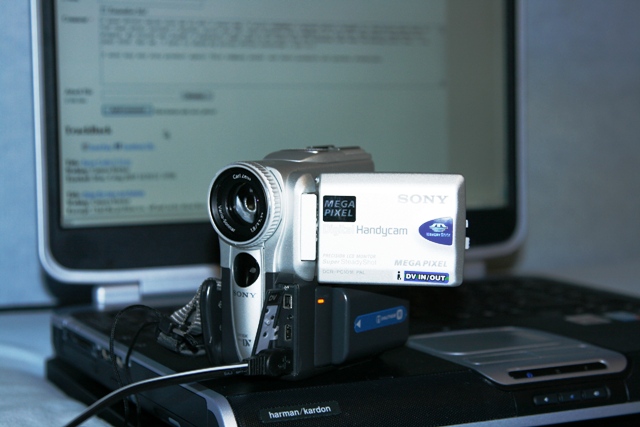
_MG_6466.JPG
richie
Sun, 20 Jan 2008 20:55:08 +0000
grey stripes... just got smacked out :) (Sony DCR-TR7000) THANKS!
Tomaz
Tue, 22 Jan 2008 19:27:19 +0000
I just smacked my DCR-PC101- it worked for a few seconds then started again. So I dropped it on the tape side on my carpet floor from about 4 ft twice. This seems to have fixed it. Thanks Debbie.
I must say I think this camera is defective. I feel sorry for the people who wasted money getting it repaired.
MadWithSony
Thu, 24 Jan 2008 00:18:47 +0000
Does anyone have their email address so we can all email them with this systematic defect?
MadWithSony
Thu, 24 Jan 2008 00:21:51 +0000
The problem with my trv-140 was the issue with the black wheel as illustrated by Ahmed earlier. I, however did not have the white cap piece to put it back together. I tried, as some one else noted, using a piece of the inside of a pen, and that didn't work, it slipped right off. So here's what i did, and it worked like a charm. Radio Shack sells "shrink-wrap tubing" or something like that in various sizes. I bought the variety size pack. I cut a small piece of the smallest diameter and put it on the end of a push pin. I took a lighter to it, and it shrunk right down. I put it on the spindle in my camera, and it fit perfectly I trimmed off the excess. I then, got the next smallest size and put it over a small mini-screwdriver. Took a lighter to it and it shrunk down. I put that over the cap i already put on the spindle in the camer (fit perfectly over it). Then I (after saying a quick prayer to the camcorder gods) VERY quickly took a light to the shrink-wrap tubing on the spindle. It semmed to tighten it up a bit. I pt the door back on the Camera, and it works like new. Well, new-enough to copy my tapes to DVD, then sell it on craigs list, so i can buy a camera that doesn't suck. Good luck!
-Chris in California
Chris
Fri, 25 Jan 2008 04:42:24 +0000
I've been in tech support for ages and nothing beats the old smack a sony move.
Roy
Sat, 26 Jan 2008 15:39:12 +0000
had a lot of problems with my dcr-trv11e over the festive period didnt now what to do
but the smack really worked saved me alot of hassle
graeme
Mon, 28 Jan 2008 18:16:05 +0000
I cannot actually believe I was about to shell out �400 for a new camera, then having stumbled over this and whacking the thing a few times, IT WORKS!! Woop, woop!
btw, mine was the TRV22E
Jason Aslon
Mon, 28 Jan 2008 21:44:02 +0000
I have a UK specification DCR-H19E which started the dreaded 31.22/23 errors last year when 1 month out of the 2 year guarantee. Symptoms are the usual ones, when a tape is more than half way through the recordings become jumpy, rendering them unwatchable. On playback the machine stalls when in search or fast forwarding, the error code comes up and the demanded reject stalls too, requiring manual assistance.
Have tried the whacking method, the rubber capstan seems to be OK, also have tried cleaning the visible works with alcohol and turning the take up wheels manually, nothing really works. Type of tape makes no difference. I've got nothing to lose so will have a root around the mechanism in more depth when I get the time in the hope that there is some muck in there somewhere which I can remove and solve the problem, or maybe I can alter the take up tension - or whatever.
However I have come to the conclusion that the design is basically crap and that Sony certainly don't deserve their reputation for quality. I expect a camcorder to work for a lot more than 2 years, especially if it's been carefully handled.
Sony's cynicism, lack of acknowledgement of a problem and disdain for its customers, as evidenced in this website, means I will never buy one of their products again. I'm considering moving up to HD - it'll be a Panasonic, Canon or a Samsung - anything but a Sony.
Steve Sharpe
Sun, 03 Feb 2008 20:36:15 +0000
Hi Debbie,
It really works. I was facing the same issue C31:42(Reinsert the cassatte) and i went to Sony service station and they told me to replace the drum which would have costed me good amount. I came back and patted the Camera on the cassatte side with the palm and to my surprise , it started working perfectly.
Sunil
Tue, 05 Feb 2008 05:29:32 +0000
Well we tried the "whack" and it didn't work for us, unfortunately - although the code has gone away, however, the camera still says "reinsert tape". Some previously recorded tapes are able to be viewed and some, the thing says "reinsert tape". The tapes that do play are fine, no lines, nice picture, nice audio. Any help would be appreciated. Thanks, Deb Oh, and I forgot to say, its a DCR-TRV460.
Debbie
Fri, 15 Feb 2008 00:16:17 +0000
The smack on the side really works! Wish I could use that technique on my wife....
ed
Fri, 15 Feb 2008 06:41:22 +0000
Wow! I just bought a DCR-TRV250 on ebay, and when I got it, I was
so disappointed to get the 31-21 error message, and was looking around
on the internet for a repair site. I found this sight instead,
and gave my camera a GENTLE TAP on the side, and IT WORKS! Now I
won't have to feel like a fool for buying a bum camera on the internet!
Thanks Debbie!
Melodie
Fri, 15 Feb 2008 10:10:13 +0000
Well thanks Debs. Even in 2008 it still works. Took batt out for a min gave it a few thumps and bingo works fine now. Once I've transferred my tapes though I'm junking this sorry sony...
David N
Sat, 16 Feb 2008 11:13:53 +0000
Thanks to Ahmed's pen ink tube method I've created a HOW-TO article on this as it worked for me on my Sony mini-DV tape deck.
access it here:
Sony Error Code C:31:23 DIY Fix
Jason Katman
Sun, 17 Feb 2008 11:05:01 +0000
Whacking the Sony TRV series camcorders: The reason this works is because sometimes the flexible printed circuit connectors inside oxidize slightly and do not make good contact with their slide-in mating connectors. Whacking temporarily (sometimes) "fixes" this with slight movement of the flexi-connector in its socket thus allowing it to make contact again. The real fix is to disassemble and "clean" each one of these flexible fingers. Don't forget to clean and lightly lubricate (grease, not oil) the gears to the cassette eject mechanism. If you've never taken one of these cameras apart you are in for shock and a real challenge putting it all back together correctly. Don't say I didn't warn ya. Good Luck gang!
Ted Heuser
Mon, 18 Feb 2008 20:40:26 +0000
called sony on c31:23 error. $211 flat rate to fix
cleaned it etc. read the smack club. hasnt worked for 4 months. smack it 5x on the cassette side. loaded a tape and works like new. smack it and whack it.
bigdog
Fri, 22 Feb 2008 01:57:32 +0000
Smacked that bad boy and its working.. Thanks a million
Charlotte
Fri, 22 Feb 2008 22:26:06 +0000
the problem with with the locking pin, most likely cracked, and hence the black rubber roller slides up, hence smacking works, as it forces it back down...try replacing the plastic lock pin with a carefully cut ink pen tube.
Sony Error Code C:31:23 DIY Fix
steven
Sun, 24 Feb 2008 05:57:12 +0000
it worked it worked. debbie you the girl.
i ave dcrip55e. took battery of and basically caned it.
the code c:31:41 never come back.
love the person who told us this.( i think its debbs(
now can retrieve mmv .
anonymous
Mon, 25 Feb 2008 15:21:13 +0000
HAHAHAHAHA
Sony wanted to charge me $212.00 to fix the same error code, that I was able to fix with a good smack. You people are the VERY BEST !!!!! TVR 250. Only thing is, I bought a mini DV player last week, before finding this thread.
THank you all.
P.Off
Tue, 26 Feb 2008 02:54:24 +0000
Have a old trv 310.. ( 1995) Gave it a whack and low and behold the ol
error is gone. This is amazing....Was about to dump it. More importantly it is the pin lever inside that slips down. The whack moves it forward...
Cameron
Wed, 27 Feb 2008 19:20:40 +0000
Worked for my HC42.. after I REALLY WHACKED IT. You need to hit it harder than your comfortable hitting an expensive piece of electronics equipment.
Thanks!
Matt
Thu, 28 Feb 2008 02:16:32 +0000
Problem: reinsert cassette or C:31:23
Called Sony and they said
-Press reset button while camera is off
-remove the AC power and remove the power pack,
-turn on camera and let it drain for 1 minute
-remove cassette for at least one hour (decrease condensation)
It did work.
Turning the camera on & letting the it drain seemed to be the magic.
puzzled too
Thu, 28 Feb 2008 19:00:08 +0000
I have a TRV 350 which showed the 31-23 errror code. Took it to Best Buy and they sent me home and said to take it apart. Got home and searched the internet and Debbie said to whack it. Tried it and it is now working. Thanks
George
Thu, 28 Feb 2008 22:33:39 +0000
Wow. 3 years and what would appear to be thousands of people from around the globe posting to this site, thankful to find the holy smacking grail of getting their expensive sony steaming turds to work.
I know the problem goes back further. I've had my TRV-11 since 2000. Started getting the error code within a few months. Fixed under warranty if I recall correctly. Fixed again for something like $150-200. Problem back again and let it collect dust for a number of years before finding this site, when I fished it out again to try coaxing one more archival to the computer from it, only to be frustrated by the same damned error code.
How many thousands or millions have paid how many millions or even billions of dollars to Sony for defective products, deceptive (I would certainly call it that) customer service, and repairs by sony and other techs for a problem Sony ~must~ have become aware of at some point, and didn't just fix it for the next model and sweep it under the rug. They've continued the defect across many models and I'd guess even generations of their product based on the response generated on this site alone. This looks like an open and shut case to me. Where are the lawyers to pull it together. Imagine if this was a car we were talking about. If nothing else the executives at sony should be lined up and let us all see if we can get our cameras working again by smacking them against some skulls.
Steve
Sun, 02 Mar 2008 11:09:13 +0000
Hi everybody, I live in Paris and I have the Sony Handycam digital 8.
I had a problem for few months, the error code message c 31.23 appeared on my screen.
I tried to remove the battery and turn on/off my camescope, but no success.
I visited this blog, and I'm thanking a lot Miss Debby who advice to smack on the side (message from debby on Sat, 13 Aug 2005 ) "This may seem silly, but it worked for me. I found this on another discussion forum. Try smacking the side of the camera relatively hard with the palm of your hand. Eject the tape and reinsert. You may need to do this a couple of times. Surprisingly it worked for me.. " Thank you debby it works for me!!!!!!!!!!!!!
nadia
Sun, 02 Mar 2008 22:44:34 +0000
The wacking worked great for me; but C31:23 came back, after I wacked it again, I now get c31:40 consistently and waching does not help anymore.....should I dip it in water now.........
Raj
Tue, 04 Mar 2008 00:59:02 +0000
Hey, I have a DCR-HC38, and it is reporting a C:31:23 error and making an obnoxious beeping noise. It eats every tape i put in, causing me to have to re-roll them each time i take them out. I examined the inside, and the white tube thing does not appear to be sticking out from the black roller as others described, so im not sure thats the problem. I too tried to give it a smacking...it had it coming after all...but to no avail, it remains persistent. before that i tried every instruction the manual gives on how to deal with it, and various other combinations of taking out and putting in battery and power cord. I left it both open (tape deck) and closed for hours at a time, also without battery pack and with, but nothing helps! i dont want to send it in for servicing because its so expensive, it would likely be wiser to buy a new camera altogether, but i can't afford that right now either. i need this camera to work urgently! i need it for a special project in a week! the only other problem i've ever had with it was solved through use of a cleaning tape, but i'm afraid of putting a cleaning tape in because all other tapes i've put in come out mangled, and if that happened to the cleaning tape it would surely end up useless.
Does anyone have any ideas that might help me? I know many of you are using different models, but maybe some of the same fixes could work.
fran
Wed, 05 Mar 2008 17:49:08 +0000
oh, you may also email me at [email protected] (don't forget the .ar (argentina) or i will not receive it. thanks!
fran
Wed, 05 Mar 2008 17:52:22 +0000
blast it..thats [email protected] its 3279 not 3278...i confused myself :)
fran
Wed, 05 Mar 2008 17:55:15 +0000
Debbie you are brilliant!!!! I just bought a cheap DV camera off ebay arrived with the dreaded 31:23 code thought I'd been stitched up.... found this forum and it works a treat. Hesitated at first but when you read all of the excellent and amusing contributions you end up thinking well I'll give it a go! IT WORKS Thankyou all the internet is a wonderful thing LOL! Happy whacking!!!!
Matt
Fri, 07 Mar 2008 18:15:00 +0000
I have the TRV480; I thought you were all full of it about the whack-a-cam-club. But after whacking it 10 times (with about 10 pounds of impact) and from different sides. I finally worked.
This is pathetic that sony can't tell you to beat your camera rather than having the official technician get paid $100 plus to whack it for you and you're out an camera for 2-6 weeks.
thanks Debbie, you are an angel.
I use this for work, and I'll be whacking it all day long. :-}
maybe a better choice of words next time. LOL
nat
Sun, 09 Mar 2008 07:56:06 +0000
Omg! It worked! I beat the tar out of it!
Mary longweel
Sun, 09 Mar 2008 18:13:41 +0000
What worked for me was having the camera up right while inserting the tape.
Mitch
Mon, 10 Mar 2008 22:42:47 +0000
I can't stop smiling, slapping my TRV310E on the side worked! The symptoms for me was that only half of the display showed up, in three wide stripes. I sent it away for repairs and when I got it back it worked for a couple of months and then I got the same error again. Thanks!
hank
Mon, 17 Mar 2008 18:38:53 +0000
Sony Error Code C:31:23 on DCR-2000
The camcorder had not been used for a couple years.
One of the sprockets, the forward one, was stuck and would not move. I could see this when I turned it on with the tape door open. The rear one moved, but the front one didn't.
I used a pencil with an eraser on it to move it slightly and the problem solved.
My guess is that after sitting for awhile, the shaft froze up and the motor could not move it. The clue was the slapping - thanks for the clue -
Phillip
Mon, 17 Mar 2008 19:25:59 +0000
I got the error hit it and now its fixed Thanks trv250
Daniel
Thu, 20 Mar 2008 01:48:02 +0000
Yup! It worked on my DCRTRV840. I had a C:31:42 error message which would not allow tape to thread therefore, no record or playback. I tried the "SMACK" technique and then powered up the camcorder and pressed "Eject". The door opened and the pinch roller came tumbling out!!! I cleaned it off with some denatured alcohol and carefully, with a clean pair of needle-nose pliers slid the roller back onto its post. I am back in business! Record, FF, REW, Play all function.
My thoughts: the C:31:42 error message was related to the pinch roller not being properly seated on its post. Had I only knocked the HandyCam from the opposite side (not the side the tape loads into but the side with the screen) I would have whacked it further onto the post. Looking at the tape path and workings, it doesn't even appear as though there was an E clip retainer (see image) on the end of the post to keep the roller from coming loose.
For the record, I run a broadcast/HD rental facility and have this camera as a toy. Basically to dump all my old Hi8 tapes via FireWire. However, a number of my clients have used it for the Super Night Shot effect and as a light-weight VTR with a cigar/pen cam. Some of the footage made it to broadcast.
Attached Image: 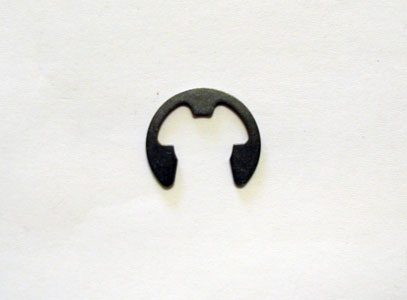
eclip.jpg
Cael
Fri, 21 Mar 2008 01:13:24 +0000
Well i had the same error code i found this site & whacked my camcorder several times, tried it & it still didn't work, so i whacked it again, harder this time, & some peices fell out of the heads so now it is really buggered, thanx a lot guyz
Rick
Sun, 23 Mar 2008 17:04:14 +0000
My Sony DCR-TRV300 gave the same C:31:23 error code. Tried whacking it a couple of times on both sides. It Worked!! Amazing. I can now use it again. Thanks, Debbie - 2 1/2 years after your post, it's still saving cameras.
dcj
Mon, 24 Mar 2008 04:40:38 +0000
Well... I've just gotten the C:31:21 error on a DCR-TRV 140E . Hitting it didn't really work, so I kicked it against the wall!! Blow me, the tape ejected... I look at the tape and it seems to be broken, like when you used to use sellotape to fix your old D90 rave tapes!!!?! Wonder if I can fix it like I used to when recording the charts (haha)!
Anyway, is this a camcorder problem or just your camcorder telling you that your tape is forked?
And I'm unlikely to read back hear so don't ask me to read the 2,000 posts before me or I'll mock you
Bauldrick
Mon, 24 Mar 2008 18:05:22 +0000
I am with everyone that said, "this is the last Sony product I will buy"
I have had two Sony camcorders and gotten those error messages with both of them.
Usually at very inopportun times, like Christmas or vacation in Hawaii...
I have been getting the C:31:23 error and contacted Sony, they wanted to charge me $211 to service it.
I tried whacking my camera. and I broke a piece off the top and it still did not work. I jiggled some stuff in the tape compartment and it works now, but I will always be holding my breath when I turn it on from now on.
Anyway, thanks for the message board.
Perry in Houston
Perry
Tue, 25 Mar 2008 23:12:53 +0000
We are a crew of 6 guys who needed a camera super bad for filming us skateboarding and other random crap.
My friend had one that had been "broken" for a long time...and we got it back out and found that error code.
It's a Sony TRV250 and it gave us the C:31:23 error code.
We read this, and sure enough, we smacked it.
Immediately after we smacked it, it began working.
Sincerely we thank you Debbie. You are amazing.
Now we're goin skatin!
THE CREW WHO NEEDED A CAMERA
Fri, 28 Mar 2008 20:23:51 +0000
Replaced the roller and white cap with the help of you guy's advise (on my DCR pc120-E). Couldnt find at all where the roller was supposed to go, and as the photos posted above are all expired, i managed to find this one.
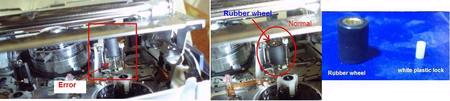
Thanks again
Dan
Mon, 31 Mar 2008 18:49:13 +0000
Hi
Sony DCR TVR25E error code *C:31 Tape not working
I was very doubtful with smacking the pony to resolve this. It didn't work using my hand so I removed the battery and tape and gave the camera a thud and a half on the desk (base down). A miracle appeared and I thought I had just saved a fortune. Thank you thumper or whoever gave this quality Sony solution.Unfortunately after a few mins teh camera fault returned.
Has anyone actually had this fault repaired by Sony and if so what was the problem/solution and cost?
Sony if you are reading this what is the real problem!
SouthernboyUK
Tue, 01 Apr 2008 14:06:27 +0000
I can't believe it! My camcorder (TRV138) had this message and I didn't use it for months. Big events were coming up so I thought I would have it checked out. When I turned it on and played a tape it worked fine! Well, now months after it working fine, the message comes up again (reinsert the cassette). I couldn't believe it. I didn't know what to do because I didn't do anything the first time. After reading this board, I gave it a good "whack" and now it works fine again. The first time I must have had it in a box I dropped while moving or something. Looks like I'll be giving my camera the stepchild treatment - beat the crap out of it anytime it messes up! Just kidding! Don't beat children! LOL!
klink24
Wed, 02 Apr 2008 02:41:52 +0000
Unbelievable! My HC-42 had same problem, although until I read the thread, I never noticed the code. In prep for my Aunt's 80th birthday party, and family vacation, I tried the cam and it didn't work. Now that I am back, I read the thread and smacked the camera. It works. Thanks to everyone.
Eorb
Wed, 02 Apr 2008 19:55:09 +0000
I have a TRV17 and have been receiving this error on the VCR and Camera function. I discovered this post when searching for the error and took a 'whack' [pun intended] at the amck down - It WORKS! Thanks for the help!
Russman13!
Wed, 02 Apr 2008 23:23:49 +0000
it works with the dcr-trv22e too...
in my case, after removing a tape, and inserting another one, i could not get the tray to close, and got the error c:32:11
a few smacks here and there... and its back to working like a dream...
debbie u r a genius!!!!
mayank
Thu, 03 Apr 2008 14:28:27 +0000
I just joined this forum so I could thank you for the wack-a-mole solution for my sony dcr-trv103. It was showing error code 31-43. you just saved me 200 bucks. I was bidding on a newish trv103 on ebay so I could at least recover my kids baby videos. It felt great smacking it around and then having it work.
eric blair
Fri, 04 Apr 2008 14:00:47 +0000
Yes, smacking the camcorder does work. I have two digital 8 camcorders. The first had the same problem, so I up graded to TRV250 and 2 years into it the same thing. I was about to break down and buy a 3rd camcorder when I came accross this "slap" fix and it does work. I had to slap mine pretty hard 3 to 4x's but it WORKED ON BOTH. Now I have two prefectly good camcorders. NICE.....
Robert
Fri, 04 Apr 2008 14:17:24 +0000
hi all ive got one of those sony camcorders TRV218e showing C31:23 error code i tried everything on this forum even cleaned the crap out of it ...but to no success ...then i tried watching an episode of Eastenders it was that dissapointing i decided to beat da hell out of my camcorder thanks to debbies advice ......thanks debs you should work for sony ....they could do with someone who knows how what they are talking about......cheers
jay
Fri, 04 Apr 2008 20:35:47 +0000
Proud to say I'm the newest member of "whack a Cam" club. THANKS DEBBIE.
I HATE SONY and I WILL TRY NEVER BUY AGAIN ANY SONY PRODUCT.
Dimitris
Sat, 05 Apr 2008 17:58:52 +0000
had a dcr-trv 270e, but it gave up, so went to technician, charged 40 euros for diagnosis, but askes for up to 200 euros to fix, so it was cheaper to buy another one of ebay, as i needed to transfer digital8 into my computer.No new digital 8 cameras for sale now these days.So ebay was my only chance for cheap camera. after few month new purchase gave up too- same problem- couldn't insert cassete at all.so, after reading forums, i baked old one in cooker (litteraly)and another one got two easy slaps at the bottom. WORKED!!
Dissapointed that destroyed old one, but SMACK!!! worked for new one.
kes
Sun, 06 Apr 2008 13:27:15 +0000
Great Post
I priced out replacement camera and was ready to buy new camera (about $ 800 for the new HD miniDV type with tapes) for upcoming trip.
Carefully read each post, carefully whacked the camera on the non-tape side
Bam!
The C:31:23 code is gone.
Now the camera does shows digital smear on display and records the same digital smear on tapes
I figure I have nothing to lose, so I got out the eyeglass screwdriver and took everything apart.
Put it back together and
Bam!
Everything works
Get to spend the $800 elsewhere
THANKS FOR THE INFO!!!!
Whack-a-cam-fan
Sun, 06 Apr 2008 16:28:32 +0000
Found a service manual for the DCR-TV8 and DCR-TV10
Error code C:31:23 is a self diagnostic indication problem with the "S reel"
I suspect this means the tape has some slack in it at the head.
Copy of the entire self-diagnosis code schedule attached
Some Sony service manuals can be found at Service manuals, schematics, documentation, programs, electronics, hobby ....
Whack-a-cam-fan
Sun, 06 Apr 2008 17:22:56 +0000
I have always thought that brute force would always work, and what do you know it does, I've got a Sony TRV245e and C:31:23 has been there for weeks until i read Debbies idea, great idea many thanx, must try it on other problems:-)
Stephen
Mon, 07 Apr 2008 18:25:36 +0000
This is the craziest thing....smacking the camera actually works!
PASS THE WORD TO ALL:
DO NOT BUY ANYHING SONY
HIT THEM BACK WHERE IT HURTS, IN THEIR BANK ACCOUNT!
DEATH TO SONY FOR NOT ISSUING A RECALL
marc cohen
Mon, 07 Apr 2008 20:53:57 +0000
Thank you Debbie! 3 years later and , bad enough the problem still exists with Sony, I have a trv330, but your solution still works. I have told repairs could start at $200. All I did was lightly smack it on the side with the viewfinder and voila! I am now watching our cruise tape from July 07. Thank you, thank you, thank you.
John
John
Mon, 07 Apr 2008 23:56:35 +0000
smackin the hell out of it worked for me. At least I was able to get the tape out. Thanks! I'm not putting that tape back in!
kikila50
Tue, 08 Apr 2008 07:00:09 +0000
Well what a saviour this place has been, had sent my camcorder away about 6 times over the last 4 years, thankfully its been under warrenty but Debbie should be made a an iconic figure of history. Your method works a treat Debbie. Long live Queen Debbie!!!
Ian
Thu, 10 Apr 2008 10:01:58 +0000
Very frustrated as my sony camcorder came up wit error c3140 whilst on the 2nd day of my safari hoilday to kenya! Tried all sonys sugggestions but with no luck. I put the camera away for 8 nonths as didnt want to pay service charge. Today i spent 5 mins searchihng the internet for cure and am astounded to say that after whacking the side of it 6 times and the bottem twice it WORKS!! So thank you very much!!
fiona
Sun, 13 Apr 2008 13:57:58 +0000
I have a DCR-PC55E. Bought 2 years ago. Within warranty period the LCD went. It had been sitting around for about a year and when charged and powered up gave moisture indicater (teardrop on LCD) and message to turn off and leave for an hr. I pretty much tried everything - reset, battery out, etc. After reading this post, took battery out for 60 secs and whacked tape side with open palm. No joy.......so repeated, only this time whacking harder. UNBELIEVABLY - all systems go. Thanks guys, this was cheapest (and most satisfying) remedy!!!
Ric
Thu, 17 Apr 2008 18:43:40 +0000
I've only owned the Sony DVX 2100 for 11 months. Ever since the 3 month, not even past 10 hours of usage I started to get the already so "Famous" code C:31 not allowing us to record.
We found this website very useful and followed some of the instructions, but as of today April 18-2008 it's been 1 year from our purchased day of April 24-2008. Many surprises, we just found
out that Sony Limited Warranty only covers parts and not the labor past 90 days, so we just paid $250.00 for getting this camera issue for code: C:31 fixed plus whatever we just paid on shipping it out
to their repair facility. I find this camera model: the DVX 2100 a NOT reliable camera to handle business. We've lost business with this equipment and I've never have had so many weird code problems. We own a multi media company and we own JVC, Canon and Panasonic cameras and our worst purchases have been these Sony DVX or any Sony pro-consumer cameras. We are going to re-sale this camera once we
get it and never ever going to purchase from Sony again.
Josue Rodriguez
Fri, 18 Apr 2008 13:25:53 +0000
Incre�ble. Ante el error "C:31:23" de la Sony PC9E, golpea la parte baja de la c�mara y funciona!!. Seis meses sin c�mara y gracias a este foro, funciona.
Spanish bull
Sat, 19 Apr 2008 10:09:30 +0000
Ah, golpear contundentemente, pero contra algo duro, pj la banqueta de una silla, pero que est� acolchada la superficie para no da�ar la c�mara.
Spanish bull
Sat, 19 Apr 2008 10:15:56 +0000
Just tried this on a customers SonyTRV218E and i cant believe it works, took a few good hits to get it to work, but never the les it does work
Well done
Steve Squiddly
Sat, 19 Apr 2008 22:23:05 +0000
i am traveling thru tokyo and my old faithful DCR-TRV340 decided to give error C31:40. it asked me eject my tape which i did. but when i inspected it there was nothing wrong with it. then i tried to re-insert and it wouldn't take it back it!!
sucked for the whole day i couldn'r record. then i looked this advice about whacking it!! holy crap! it corrected it! and it didn't take a lot of force either. probably only a few pounds of lateral force to the tape side! go figure. hopefully this "fix" is permanent!
Cary
Sun, 20 Apr 2008 03:37:02 +0000
My camera kept saying re-insert cassest, and the c:31:23 error code. I tried everything and no luck. Then I tried what user Ryan said on here about smaking it hard with the pulm of the hand and it worked. I had the tape in the camera, have it 3 good mild smacks on the side, then re-inserted the tape and everyting worked fine after That. Thanks Ryan!!!!!! My camera was a trv-285E, (PAL), it is much like the NTSC trv-280.
Keenan
Sun, 20 Apr 2008 06:26:01 +0000
Thanks so much for this help!
Kieran
Wed, 23 Apr 2008 00:01:00 +0000
I have a DCR-TRV250 and I have a more civilized solution than smacking it. I had error C:31:22 and C:31:23. The problem is in the loading reel. This is the one on the right with the big black rubber on it. It has either become unstable or it is not moving freely. I had to loosen the plastic white tube on the top that holds the black rubber on. Look into this and you'll have a happy camera too!
Doetzel
Thu, 24 Apr 2008 02:15:47 +0000
SONy GV-D1000. Was getting error code C:31:23, tried ejecting and re-inserting tapes without success, tried cleaning the inside, changing the battery, etc. No success, then I started getting error code C:32:30 and the thing wouldn't shoot my tape back out, after changing battery again and several tries to open and close the machine then pry the cassette I got my tape out. Upset and not super impressed I searched online, found this forum. BEAT THE MACHINE FIRMLY ON BOTH SIDES WITH THE PALM OF MY HAND AND SHOOK IT.
No more problems.
It is back to wrokign as normal. Thanks for the advice everyone!
Jay
Fri, 25 Apr 2008 15:06:18 +0000
Wheel trick with the white plastic lock worked as per diagram worked. Error is gone.
Thanks
S
Sun, 27 Apr 2008 03:13:35 +0000
dear. Iam technician repair video cameras .I need a service manual for a video camera sony DCR-PC110 if you can help that would be great. thanks
gh-toutouni
Sun, 27 Apr 2008 12:20:33 +0000
I was of course skeptical of the pound it to make it work method. I read through all the other posts about cleaning the heads and do this or that. I tried all that other stuff on my Sony DCR320, I tried talking to a sony tech over the computer, until finally i realized there really was no other step-either get a new one or pound on this one. I tried it 10 different times, hitting it progressively harder each time. Finally after the 10th time, wallah, everything was fine. My camcorder hasn't worked for 8 months because of this ridiculous error and now it does. I have no idea why this works nor do I care. Never have I felt so good about "fixing" a product. I think one of the other posts said it best about the pounding the crap out of the camera repair method-what is this, a 1950's TV? Sony should be a little embarrassed that THIS is the way to fix their product. Of course the phone tech said-we don't condone that course of action. I said of course you don't condone it, you don't get paid to repair it AND it makes you guys look like you make shoddy equipment.
JasonHomey
Mon, 28 Apr 2008 20:47:59 +0000
My neighbor brough her DCR-TVR530 with the tape stuck. The C:31:30 error code brought me to this site and the numerous suggestions of mechanical shock to correct the problem. A couple of good whacks, power-on, a whirring sound, and the tape ejected.
Many thanks for your help and the confidence to whack the unit.
Bill
Bill W.
Tue, 29 Apr 2008 21:49:22 +0000
Same problem! Unbelivable, but smacking the bottom of my DCR-TRV250e have fixed, and is is still working, like before! Thanks for the tip! :D
afloox
Thu, 01 May 2008 01:23:06 +0000
The latest member of the "Whack-a-Cam" Club.
$100+ for a repair jobbie
- or -
$17 for a rubber mallet
- so -
TRV-27 + Mallet = Working Camcorder
Brandon Strauss
Fri, 02 May 2008 03:56:09 +0000
Debbie rules ! Yasasin Debbie !! Hahahh
Ozgur
Sat, 03 May 2008 08:31:25 +0000
OK,this is the problem as I found it after trawling through all you sonycamwhackers.The pinchroller(black rubber vertical roller),should have a white tube projecting above,friction held in place,which holds it in correct position,otherwise it "wobbles"causing tape transport variation,generating the error "c31-23/c32-23".To me,bad design by Sony,repeated over many models and years.Check out other comments above/below,showing visual,and replace tube or similar piece to perform function--light and tweezers only,necessary.Beating the crap out of your hi-tech kit is probably a short term fix.Good luck--but Sony are total w***kers for not responding to mass ofcomplaints.
niall bracey
Sat, 03 May 2008 19:27:20 +0000
Debbie really rocks. I got the same error, 2 whacks later it started working perfectly fine. Thanks Debbie ur awesome!
CamWhackker
Sun, 04 May 2008 16:36:02 +0000
trv 103 has served me well for years.... 2 smacks and it's back
keep this alivecuz it works!!!!!
George Ortiz
Sun, 04 May 2008 17:38:19 +0000
We Joined the smack club too!! We have a Sony DCR TRV330 camcorder and had the same C31:23 code. Smacked it on the side and WOW it works!! We had to do it a couple of times about 3 so don't give up the 1st time! Thanks saved us a bunch of money!
Christy Edmonds
Wed, 07 May 2008 18:00:19 +0000
Got the C:31:22 on a PD100 only on one specific tape.
Removed the tape, opened the tape protection and wound it a little bit, reinserted it and voila! I also smacked the cam just for the hell of it, but it didn't do the trick.
Kenneth Sortland Myklebust
Wed, 07 May 2008 20:01:16 +0000
YIPPPEEEEEEEEEEEEEEEEEEE - I'm tired out I've just spent 5 minutes whacking my camera and all of a sudden the problem seems to have disappeared (DCR-TRV250E)tip is smack it all over bottom tape side and screen side. Debbie I owe you a drink you've saved me a fortune Thanks alot
Michael Rodger
Wed, 07 May 2008 21:48:16 +0000
help me it does not work for me
jennifer Oficina
Thu, 08 May 2008 05:06:03 +0000
Right. I have a HC 39e and have had this error for months. I give it three hard smacks to the side, and when I turn it on the error is gone. I feel like I have special powers.
WTF I CAN FILM AGAIN
dutchie
Fri, 09 May 2008 09:11:40 +0000
Ladies and gents of the sonywackacam club - although a smack of the camcorder will temporarily fix the problem, I feel that your problem will return eventually. My PC120 has lost its pinch roller and plastic lock ( and gave a c:31:23 / c:31:22 / c:32:11 range of errors ). After totally dismantaling my camcorder ( with the use of the svc manual ), I eventually found the small plastic lock jammed well and truly within the cassette mechanism. As mentioned above, a small pair of tweezers and a light was all that was needed. My concern is that you may have lost the plastic lock ( which seems to be a Sony design fault and the cause of most of these problems ) and that wacking the device will cause other problems or cause it to get jammed even further. i.e. causing other parts to become disloged and also jamming. I know many of you have cured you problems doing this, saving you untold amounts of cash, but just be warned.
Anybody know a part number and supplier for the pinch roller for my PC120E ?
P Barrett
Fri, 09 May 2008 11:47:51 +0000
Hi, I have to agree that whacking a camcorder might help in the short term but I don't think it's going to fix the problem.
I have a Sony DCR-HC38 and tried the battery techniques. Those didn't work. Reading through some of the WHACK, WHACK, WHACK tips I was reluctant to try this. Instead what I did was actually to have a look into the camera to see where the various sensors might be.
Well - guess what? I found it for the DCR-HC38 and I can now eject a tape when it appears to be stuck. It doesn't "fix" the problem but at least I can put tapes in and out and get them out when I need to.
Now this method is a bit fiddly and will require some nailclippers (yes, nailclippers!). Or something small and flat and solid.
Okay - have a look at the image I've uploaded (hope it goes up!). There's a small white button on the inside near the START/STOP. Using your chosen implement, just flick the switch so it goes inside. You may need to do this a couple of times but then the camcorder will respond and *PRESTO* out comes the tape.
I'm guessing there's probably a sensor inside which might be dirty or something. Not really sure but this technique works for me and doesn't involve potentially ruining my camcorder!
I hope this helps someone else out. Email me if it does! Would be great to know what's stopping the little thing from recognising that the door's been opened.... *oh well*.
Cheers,
Zain
Attached Image: 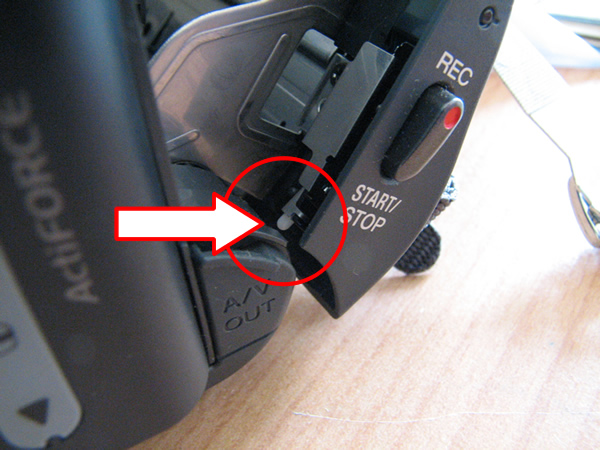
Sony_DCR-H38_Cassette_Eject_Fix.jpg
Zain
Sat, 10 May 2008 13:40:49 +0000
Voila!!! Yes, smacking seemed to work, atleast for now.
Ater 7 months of frustration with this C31:23 error (couldn't shoot any videos in the interim), I found this page and the advice from fellow 'patients'. Thanks
Bhelpuri
Sun, 11 May 2008 19:48:23 +0000
Hi there folks, amazing, we just came from a USA holiday, had constantly the C 31:23 error code. Took the cam to a Sony dealer, sold me a headstead cleaning tape and a UV filter voor 96 $. I wish I read this before, thanks to Debbie IT WORK, IT WORK, yes folks, it WORKS, hit it firmly at the tape side. It works for me, as it did for a lot of people.THANKS THANKS THANKS.
Lucas, Holland.
Lucas
Sun, 11 May 2008 21:41:37 +0000
My Sony GV-D1000 (Portable MiniDV Video Walkman) a work horse for my video downloading and uploading. It was accidently dropped and I got the same error as everyone else. The Eject would not work. After trying many times, I was giving up and figuring that I would have to get it maintained (hmmmm $300? maybe). I checked the internet for any possible solutions......whalla....the "Debbie meth0d".....one wack on each side....the legacy still carries. :)
Steve
Mon, 12 May 2008 00:31:11 +0000
THANKS DEBBIE FOR HELPING ME I FINALLY FOUND A SITE THAT HELPED ME I HAD THIS CAMCORDER SONY TRV480 IVE HAD IT SENT TO SONY 2 TIMES THEN I HAD THE SAME ERROR MESSAGE REINSERT TAPE AGAIN NOW AFTER SENDING 40 DOLLARS TO CHECK IT THEY CHARGED 189 DOLLARS TO FIX IT 12/27/07 GAVE 90 DAYS WARRANTY HER COMES MOTHERS DAY 2008 SAME MESSAGE AGAIN I WAS ABOUT TO TAKE IT BACK BUT IT WOULD COST ME MORE MONEY I DECIDED TO GET ON MY PC CHECK OUT I FOUND THIS SITE I GAVE IT A WACK FEW TIMES SO FAR THE MESSAGE WENT AWAY AFRAID TO RECORD BUT I HAD MY DAUGHTERS HAD SONY CAMCORDERS ONE HAD TWO SHE GAVE UP COULDNT GET TAPE OUT SONY SHE LOST THAT MEMORY IN THE MACHINE THEY WOULDNT EVEN BREAK CAMCORDER TO GET IT OUT THEY HAD HER GET ANOTHER ONE SO WHY KEEP CAMCORDER MY OTHER DAUGHTER HAD 2 TOO SAME PROBLEM I DONT TRUST SONY THEY ARE TERRIBLE COMPANY AFTER SEEING ALL THESE COMPLAINTS I WAS SHOCKED NOW I KNOW I WILL NEVER GET ANOTHER SONY PRODUCT. I HAVE 4 CHILDREN AND 5 1/2 GRANDCHILDREN ALOT OF PICTURES TO TAKE SON COMING TO SEE US IN 2 WEEKS AND THIS THING HAPPENS IT SEEMS EVERY FEW MONTHS SOMETHING HAPPENS AND ALWAYS AROUND SOME SPECIAL TIME WITH FAMILY. SORRY I WROTE A LARGE MESSAGE I FIGURED PEOPLE COULD SEE WHAT I WENT THROUGH TOO BUT ONE THING MY OLDER SON HAD OLDER MODEL SONY HE IS THE ONLY ONE THAT DIDNT MUCH PROBLEM ONLY ZOOM BUTTON. THANKS VERY MUCH FOR EVERYONES STORIES IT HELPED ME THANKS. CONNIE,FLORIDA
CONNIE
Tue, 13 May 2008 06:49:24 +0000
I removed battery for 60 seconds and hit on side - it works. This problem has been there for a year!!!
KM
Fri, 16 May 2008 19:43:55 +0000
HAHAHAH wow i only can say woow... i have a sony DCR-TRV145E it is still a very good camer until i got the message, C:32:23... i read this i thoght well why not i wont work anyway... but suprising it did WOOOOW so dun thank you you have saved my day like a smack hahaha =)
GUYS IT REALY WORKS, you got to hit pretty hard and remove tape and battery it will work so fun..
Metin
Fri, 23 May 2008 14:28:50 +0000
Thanks for the smack-tip :) it helped me too.
Andreas U. H.
Sat, 24 May 2008 16:56:02 +0000
I can't believe it... worked for me too!!!!!
Steve
Mon, 26 May 2008 08:30:28 +0000
after smackin mine several times, it' not workin at all. :(
onur barut
Wed, 28 May 2008 16:20:43 +0000
I got the C:31:23 code too. Try it a lot of things and nothing works till a read Debbie's tip. Very usefull and praticle. Thankx Debbs
God
Thu, 29 May 2008 04:01:58 +0000
Yes, the smack cured mine too! What a trip! Model year 2000 Sony TRV730 code C:31:23. Now if I can only get those video bars stabilized.
Rich
Thu, 29 May 2008 09:10:55 +0000
I just got my Sony video camera (TRV740) back from Precision Camera. I sent it through the Sony website. I turned it on and got the same error! (C31:23)
They took my money ($311) and still did not fix it! I am truly disappointed with Sony.
Tracy
Sat, 31 May 2008 19:25:14 +0000
Yes! The smack works! I have a TRV11 and was getting the 31:23 error code. I tried ejecting but the compartment would not open. Battery off, battery on - still same problem. Then, good ol' Debbie shows up on the web! Just make sure it's a good, hard slap on the side. THANKS, DEBBIE!
Jerry
Sat, 31 May 2008 20:26:31 +0000
I have two of these very troublesome camcorders. One is a Trv280 and the other is a TRV-480. The 280 has the C31:23 error. I was furious yesterday because I missed Graduation with it. I read this today. Hit the camcorder and it works fine. Thanks! My 480 has a different problem. It has never had the error code but sometimes it will act like its recording then when I play back the tape it is blank. I checked the tape in both camcorders and its definitely blank. Sony is garbage. My next camcorder will be a Panasonic or a JVC. Although I hear JVC is owned by Sony.
Victor
Sun, 01 Jun 2008 18:59:19 +0000
Gracias Debbie. Estoy en Mexico D.F. Tengo una Digital 8 Sony DCR-TRV320 que pasea conmigo todo el tiempo. Estaba por hacer unos transfers a DVD, use unas cintas viejas y el error CR:31:23 apareci�. Ya me hab�a pasado con una c�mara Hi8 mas antigua en el Caribe en mi luna de miel. Y con esta en algunos cambios de clima. Me desesper�, intent� todo, inclusive accesar el roller negro y presionarlo. Tal como aparece en otra hoja de tips. Nada. Hasta que hoy desesperado intent� con los golpecitos por todas partes y el error ha desaparecido. Tengo c�mara gracias a ti de nuevo Debbie y al internet! Muchas Gracias.
Thanks Debbie. I am in Mexico City. I owned a D8 Sony DCR-TRV320 for a while. I was about to transfer some old 8 tapes to DVD and the error ocurred. It happened once or twice with another old 8 Sony camera from the TR series I owned. This happens specially at the beach or when you switch from a humid to a dry environment or viceversa. It was on my honeymoon. Very frustrating. Have to wait coupple of days. Now It happened with this one. Five times by now. I tried even the black roller technique, removing the cover and accesing the blackpin roller and press it. But It was only until I disconected everything and smashed it with my hand for a while that It returned to work again. I have my camera back to life thanks to you Debbie and the Internet! Muchas gracias!!!
Hiram Bola�os-Cacho
Sun, 01 Jun 2008 19:24:55 +0000
that's weerd, but the debbie's solution works prety well.
after three light slap on the tape dock of my sony vx 2000, no more error message 31:23.
thanks debbie...thanks the forum, it, took me less then hour to fixe it...
SERGIO
Mon, 02 Jun 2008 02:41:09 +0000
Just smacked my sony digital 8 so hard the battery fell off and now IT WORKS!
Big time save for my footage. Thanks everyone!
pt
Wed, 04 Jun 2008 22:08:24 +0000
I was lazy and I just read the top of this forum and thus Debbie's advice. I hit the tape side of the camera fairly firmly about 5 times with the camera off and the battery attached, no tape inside. It worked right away.
Then I read the rest of the forum and began to be concerned about damaging the camera. I checked the black rubber roller as described in previous posts of others. I reached in and touched a tiny plastic cylindrical piece that was protruding out from the top end of the black rubber roller, a few millimetres. It wobbled and nearly fell off! I panicked, but luckily the piece stayed in place as I did not remove my finger, then I wiggled it around until it fit back into the black roller. The camera still works fine.
I shudder to think: what would have happened if I smacked the camera the next time, and the white plastic piece fell off?
Before smacking your camera, maybe you should take a look inside and check out the state of the rubber roller.
Fonzie
Sun, 08 Jun 2008 04:31:04 +0000
Forgot to say that I have a circa 2002 Sony Handycam OCR-PC101 NTSC.
Fonzie
Sun, 08 Jun 2008 04:32:25 +0000
I tried the Debbie method, but it didn't work for me. I did reach my fingers in and feel the gears. The left one was stuck and would not move. After pushing it and turning it with a small amount of force I could feel lit loosen up and move freely. Its working for now??!!
Rebecca
Mon, 09 Jun 2008 22:30:00 +0000
O_O OMG I was just about to take my camera to a place to get it fixed and I just smacked it on the tape side and VOILA it worked!!!!!!!! :O
Ratifusio Anigunati
Tue, 10 Jun 2008 03:36:57 +0000
OMG too funny! They should change the name of the site to camerawhacker! I just tried the whack-a-sony technique on my old TR7000 that's been dead for two years with a C:21:00 condensation error - works like a charm! I over-amped one of my whacks and put a crack in the display window but at least it works - inconceivable!
Joe
Wed, 11 Jun 2008 21:38:41 +0000
I just had the same problem with my camcorder this evening. It has been sitting in the case all winter. I played the tape that had been in it a min just to see what was on it. But then when I wanted to record something I got the dreaded C:31:23 error. I smacked it (Moderately!) on the side a couple of times. Then I put a tape in and did FF and REW and now seems to be working ok.
I think the cause of the problem is lubrication migrating off of the bearings/gears during prolonged idle time. There is probably some sensor that detects a lag or slowness of the tape mechanism upon startup, and shuts down the camcorder. It is designed to prevent tape eating and spillage. The same safety function can be found in VHS tape players.
I would suggest the best way to fix this is preventative maintenance. Don't leave your camcorder idle for more than 6 weeks. Take it out and run the tape a few minutes--just to keep the lube distributed.
zooeyhall
Thu, 12 Jun 2008 02:01:16 +0000
Have been experiencing the C31:23 problem for a while - frustrating. Just found this forum, tried Debbie's sidewhacker fix and it worked a breeze! Have now joined the Sony DCR-TRV50E SideWhackers Club. Thanks to liberal thinking gone overboard you can't even tap your kids any more these days when they get out of hand, but at least you can still spank your Sony and get the desired result! Thanks Debbie, whoever and wherever you are, you've done your good deed for the decade.
David
Thu, 12 Jun 2008 11:16:07 +0000
Thank god i found this site or my Sony CCD-TR330e (circa 1995) wouldve gone in the bin. I have previously paid up to $200 to repair the same problem with the tape recorder and when it broke again I found this site, smacked the side of it and what do you know IT WORKS!! i really cannot believe it.
Anonymous
Fri, 13 Jun 2008 02:59:29 +0000
I WAS HESITANT TO HIT IT, BUT IT WORKED. I TOOK OUT BATTERY WHILE I READ ALL THE THREADS, TURNED IT ON ITS SIDE, GAVE IT A SMALL WHACK PUT IT ON VCR AND REWIND AND VOILA IT WORKED,
I HAD CODE C:21:32
HITTING IT REALLY WORKS I CANNOT BELEIVE IT EITHER BUT IT WORKED
THANKS
V-
VINCENT
Fri, 13 Jun 2008 20:55:22 +0000
mi problema con la camara dcr-tvr250 me da un error C:31:23 y no se que hacer, me dicen, que es caro el arreglo, $ 300 dolares, casi el costo de la camara. no puedo resolver dicho problemo Help. please.
carlos mora
Fri, 13 Jun 2008 22:23:49 +0000
The whack works for me too on my VX2000!
At first, I was really scared about whacking this machine I paid $2500 for, but then I thought "oh well, if it breaks further that's an excuse for me to get an HD camera".
I whacked it a couple times, it didn't do the trick at first. But then, I did it again, stronger the 2nd time around, and voila. After the whack, I got the error once - ejected the tape, put it in again and it's working.
I have to cover an event tomorrow - I'll let you all know how it went.
alex
Sat, 14 Jun 2008 03:09:23 +0000
Last year I couldn't get the whacking trick to work any more so I sent my camera (DCR-TRV350) to the Sony-recommended Precision for repair. It worked for a while then this error started again but intermittently- we don't use the camcorder very often but it was my daughter's graduation last week and I couldn't get the damn thing to work again. I want to sue freakin' Sony because you know they won't take responsibility. Now, this morning I took out the battery and tape, tightened the tape in the cartridge, whacked the sucker on the tape side of the unit, replaced the battery and tape and, wouldn't you know, it's working again. Ain't it great to have an important (for family memories) piece of recording equipment that you can't rely on? We're going on vacation next week and wonder whether to buy another camcorder (it won't be a Sony). Anybody have recommendations?
Cliff
Sun, 15 Jun 2008 16:29:17 +0000
Just hit my HC42e a good slap or five and it's fine (for now!)
Other than the fact that it is a total piece of crap, obviously.
This was after the pencil eraser and hairdryer treatment failed.
Another big thanks to Debbie! Though I'm sure I would have got round to slapping it soon enough anyway!
Dr Wa
Mon, 16 Jun 2008 21:37:16 +0000
Strangely, Smackin the side firmly did work for me too? If that doesnt work, use a sledgehammer and then go buy a brand new one so you dont have to mess about with tapes!
Andy Loughlin
Fri, 20 Jun 2008 18:05:30 +0000
Too Bad - I only discovered this incredible list today just hours after I submitted my camera to Henry's Cameras, who for $56CDN will assess the "damage".
I was afraid to join the "SONYWeedWhackersAssociation" figuring it must be something like dirt or a stuck mechanism. I will keep you all posted once I hear what the prognosis for my DCR PC101 is.
This is the very first time in 4 or 5 years of owning this camcorder (filmed hundreds of hours in snow, rain, sun and more) with no trouble whatsoever. I must be lucky I guess and disgusted that so many people with the same models keep coming forward with all those issues early on in the camcorder purchase. My camcorder looks so beat up people wonder how it still worked - maybe that is what stopped my camcorder from developing the dreaded C31:23 till now!!!
E Evans
Sat, 21 Jun 2008 22:37:28 +0000
I had this error tried everything in the book, left it open in the A/C for months nothing worked. 13 months later I put a batt on it and it worked. I took it to a wedding for a second cam and it only worked for about 20 min and gave me the warning again. I did smack it a few times but not super hard. I saw this suggestion today so I tried it again, with the tape out and the cam off I smacked it on both sides pretty hard twice on each side.. Now it works again. I want to take the cam apart and remove the sensor and jump or block the circuit. Does anyone know where it is? I figure it will most likely do it again. It's very humid where I live.
Tim
Mon, 23 Jun 2008 11:32:42 +0000
Alrite Debbie. You are a fuckin' gem. A bit of tough love for my trv270e and I'm back on track. M-waa! X
PhillyGeddes4212
Mon, 23 Jun 2008 13:01:48 +0000
OK, I have DCR-TRV245E & out of the blue it started to beep & display the C:31:23.
I tried Debbie's hi tech solution by smacking the camcorder but it didn't work. However, working on the hunch that a sudden jolt might free up the machinery I tried turning all the wheels & cogs. After a few tries I found one of the Tape cogs was tight but freed up after a few twists. Now the camera works fine.
So once again thanks to Debbie because she put me on the right track.
Martin
Thu, 26 Jun 2008 14:21:57 +0000
Have the trv-480, this piece of japanese shit has error codes every second use, it takes a bang or a hairdryer or a week on top the hot water heater to get it to go again. Gave up on it and bought a cheap refurb trv138 to get my tapes onto dvd. Well surprise, screwed by Sony again as it wont play tapes recorded on the 480.... what a perverse and disturbed world electronics has become. Thank god, I found this site. Went in with a pencil and massaged the rollers, released the gear lock on the left roller and moved the driver around, the black roller seems to be tight in place. Gave it a good Sony slap, and by damn it works now.
Lets tie the President of Sony to a frozen tuna and take turns whacking him with our camcorders until they work. May all you Sony crooks feel the sting of the lash across your pitiful shoulders! You lost the war but certainly have gotten even.
Wheres that sleazy lawyer to get us all on the bandwagon to get even?
Richard Raucina
Sat, 28 Jun 2008 05:58:08 +0000
I have a DCR-TRV 480. Slapped it and it did the trick. For you vets who used the M-16 rifle, sort of like hitting the forward assist. Thanks for saving me time and money.
Kevin
Sat, 28 Jun 2008 21:27:06 +0000
Wow! I read Debbies comment b'cause it seemed like what she posted was getting results. (peoples comments) well,...IT DID! But what i did was after i inserted the tape i press the right side slightly hard an pressed rewind. DONE! ty Debbie
Be chemtrail aware
Mon, 30 Jun 2008 23:11:50 +0000
sony dcr pc-350e, error code c:31:22 - - - soft smacking works!!
thomas
Sun, 06 Jul 2008 18:23:44 +0000
well i to am now a sony slaper. it works how long for i dont know but i can use it now so great thanks for the advice
chris
Tue, 08 Jul 2008 19:02:29 +0000
I even had it serviced and it cropped up again. The smacking technique listed below has worked, but I have about had enough. This time smacking it doesn't work. Time to buy a Panasonic.
Dan Munson
Wed, 09 Jul 2008 00:46:43 +0000
Well... Its the second time around for my camera to go crazy... "Smack the Cam" really works, but I'm afraid my camera is like a my cat (9 lives). You just have to really smack it HARD man... I have a DCR-TRV280.
alteringeye
Thu, 10 Jul 2008 11:57:42 +0000
I just joined the whack-a-camera solution group. It worked.
Thanks,
Ty
Tyler
Thu, 10 Jul 2008 19:53:30 +0000
Well Lo and Behold! At this day and age, July 2008 it still works! I have a Sony TRV8 / TRV10 Mini Digital camcorder....about 8 years old. I had not used it in about 6 months. I had charged my camera to film my little 3yr grandson 1st soccor tot game when i got 3123'd.....!! Well needless to say I missed it and was looking on the internet to gage the repairs vs a new one....when i saw this blog. What the heck...it was already about 12:30 am...tired and WHAM, WHAM i hit it about 4-5 times! Plugged it in, put a tape in and IT WORKED!!!! WOW! Saved me either 400.00 in repairs or a the price of a new camera! Thanks eveyone!!!
Amc
Fri, 11 Jul 2008 12:53:31 +0000
SHUT THE F$*K UP!!!! MY CAMERA "DCRPC101" HASNT WORKED IN MONTHS..HAD GOODGUYS TAKE A LOOK, AND MY MONEY, TO TELL ME TO BUY A NEW ONE CAUSE IT COULDNT BE FIXED.....I FOUND THIS SITE, SMACKED THE SHIT OUTTA IT...NOW IT WORKS LIKE NEW.. THIS IS THE COOLEST THING THAT IVE EVER GOT OUTTA PUNCHING SOMETHING!! THANKS
916wigsplitter
Sat, 12 Jul 2008 02:07:41 +0000
I had this same problem with my Sony HDR-HC3 and smacking the camcorder didn't help. Neither did smashing it against a wooden floor. Eventually it stopped working altogether and I had to prise he tape out with a screwdriver leaving the innards all bent and twisted. I binned it.
I'm NEVER buying another Sony camcorder.
Stuart Wright
Sat, 12 Jul 2008 08:33:07 +0000
dont sma`ck it. there all just stupid hackers. secret agents from the company to make u buy more
anonymous
Sun, 13 Jul 2008 19:47:08 +0000
thanks you guys! smacking worked! i was ready to be totally pissed off; your help saved me....
jack
Mon, 14 Jul 2008 13:03:56 +0000
Awesome!!!! Smack it, Flip it, Rub it down... Awe Yeah! Thanks a bunch.. =)
Angelo Perez
Mon, 14 Jul 2008 17:28:43 +0000
had 31-23 fault tried allsorts,problem with new sony tapes ,counter does not rotate and fault arises,tried previous tape and o.k,enough to drive you nuts
alan t
Tue, 15 Jul 2008 21:49:22 +0000
Well I have had this problem for years on my TRV-36. I got cross with it one day and just smacked it through frustration and anger (mush to the amusement of my brother-in-law who was watching me). We both laughed when it began working again!
Little did I know that it was what thousands of folks had been doing for years!
Genius!
David
Fri, 18 Jul 2008 08:44:48 +0000
I have a DCRTRV 330 whit C:31:23 error and... Yes, "Smack the Cam" but hard, one time.
Works for me, amaizing, tanks Debbie
Edgardo Encina
Sat, 19 Jul 2008 18:02:20 +0000
debbie treatment really works. thanks debbie.you are really a godsend.
DR.S.KAMALA
Sun, 20 Jul 2008 09:32:33 +0000
How i love the internet.
The back wheel of my camera got stuck mechanically after 1-2 seconds.
I was able to free it CCW,but the problem kept appearing.
I put in 'Sony Hi8 error code C3123' on google and here is the fix.
Smacking my TRV515E 3 times on each side made the C:31:23 code go away.
Debbie, your an angel!! :D
Lex
Sun, 20 Jul 2008 22:29:58 +0000
SMACK MY B*TCH UP!
thank u debbie. Now i can start putting those old hi-8 tapes on my computer!
bleek
Tue, 22 Jul 2008 06:22:04 +0000
unfriggingbelievable. For month my Sony DCR-TRV350 hasn't worked. We're planning a family trip and I need a videocamera..Since we have a gazillion tapes for the Sony already I'm thinking I've gotta take it in and spend a bundle to get it fixed or try and buy a similar one on ebay, etc. As a last resort I type in the error code and "tape not working" on google and eventually get to this discussion forum. Having now just given the camera about 6 good whacks, it's now working!!! I can't stop laffing. Unbelievable...In a few weeks it'll be three years ago since Debbie left her original "whack it" message...We all own her a debt of gratitude...(Deb, I hope whatever you do that you're a rich woman by now---you've saved everyone here lots and lots of money :-)
dex
Wed, 23 Jul 2008 02:04:53 +0000
I had to smack my TRV-250 about a year and a half ago and then again tonight. Both times it worked for me. I guess i'll keep whacking it until it falls apart which is better than seeing that dreaded 31:32 error code.
Atlanta Ga.
Fri, 25 Jul 2008 23:55:25 +0000
This worked for me too. Joining the chorus of "Thanks to Debbie".
This was a Sony TRV 480 which has been fine for several years. I started getting the C:31:23 along with a "re-insert cassette" box.
Sometimes the tape would eject all the way, sometimes it would just come most of the way out and not eject. Fiddling with the mode switch and plugging and unplugging the adapter would eventually cause it to eject.
Changing the tape didn't help. It would not load the cleaning cassette - same error.
So I tried the "whack". The cleaning cassette then worked fine - gave it 15 seconds on "play". I did notice that when the cleaning cassette inserted that there was a pause as the cassette was drawn into the mechanism that had not been happening previously.
So far everything is fine.
Haven't laughed so hard in a month! Thanks folks.
Bill P.
Sat, 26 Jul 2008 21:13:16 +0000
I tried the whacking method before and it worked great and repaired itself.......for 1 month until i needed it for my daughters dance recital. Now i get the message again no matter how hard i hit it and the tape when inserted, will not go down in to the camera. When it does, i get the stupid 31:23 error again. Any suggestions?
Jason
Sat, 26 Jul 2008 21:56:25 +0000
This is the most incredible fascinating technical solution I ever encountered in my more than 30 years of product development career. I have a TRV138 Handycam having the same problem for a while. After I read the message and slapped the side a couple of times. It worked magically. This invention should deserve a patent. With a PhD and an MBA degree, I would not have been able to come up with such a brilliant idea throughout my life.
It was invented in 2005 and still works in 2008!!
KZH
KZH
Sun, 27 Jul 2008 20:47:12 +0000
People in my office started to wonder what our Sony trv19 had done to me to deserve the wacking I was delivering to it..... until I yelled with excitement: SUCCESS! Normally I would not suggest slapping to wacking electronic devises. But Debbie's advise worked and it seems to have worked for a lot of us. So, if using a tape cleaner doesn't work or other more gentle methods of cleaning the internals of your camcorder don't work, try giving it a few good wacks. If that doesn't work, remove the tape, give it a few more wacks the try the tape again.
Slaaap
Mon, 28 Jul 2008 22:52:12 +0000
Thanks to Ahmed (July 5,2007) for your passive approach to C:31:23 errror.
Roller came off of my DCRTRV240. Especially thanks for ink pen replacement
part suggestion.
Saved from Sony
Tue, 29 Jul 2008 15:44:06 +0000
Thanks for the ideas. Hitting the camera does not seem to be the complete answer, though. I still had an intermittent problem. When I loaded the tape, after smacking it, it did not give the error, but when I FF the tape it only went a short way, stopped, and the error code came up again. I persevered and after a while it continued to FF and after FF for a while I stopped and it played! Great! It does seem that the problem may also be associated with the very beginning of the tape. Since doing a FF on the tape it seems to be recording and playing back.
Hopefully that may be of help - as well as smacking it!
Roscoe
Fri, 01 Aug 2008 03:23:48 +0000
Ladys and Gentlemen - you are great!
After some doubt concerning slapping my camcorder I finally tried to do so - and it worked;
Thanks a lot - I immediately add this forum to my favourites;
regards, Thomas
Whiteman
Fri, 01 Aug 2008 15:18:58 +0000
I also have the TRV-480 and I had the same problem. C:31:40 Please Reinsert the cassette. After going through customer no service with Sony's tech support, the error still remained. However, the famous Debbie's technique of Smack-A-Sony did actually work. I hit the camera two times on the tape side, slide the tape in, and wa-la. Good as new. If only I had this advise one week earlier I would have been able to record our family's vacation.
Sony's Tech support: 45 min.
Sony's repair center: $120.00
Debbie's Smack-a-sony: Priceless
Thanks,
S.midkiff
S.Midkiff
Sat, 02 Aug 2008 05:34:24 +0000
WHEN SMACKING DOES NOT WORK...
Also got the C31:23 problem. Could solve it temporarily by inserting a new tape (less friction??) or by manually turning the tape a bit with my fingertips. Then I could record several minutes (although in the end... seconds). Finally I could not solve it like that anymore, so the last 2 days of our holidays are not on tape. Tried smacking (a lot), but that did not work. Looked through this forum and found the pic posted by Dan (March 31, 2008). The black rubber thing indicated on that photo was missing. When thorouhly looking into my camera I saw that it had fallen off and was stuck at the very bottom of the camera. I took the rubber, placed it on its original position with a pair of pincers... and IT WORKED again!!
Thanks Dan!!
Christophe
Sat, 02 Aug 2008 10:03:09 +0000
Smacking my dcr hc42 which had choppy sound worked. As someone noted using flat hand on underside of tape works. Now I can continue to capture the video on my PC for burning.
Will T
Sat, 02 Aug 2008 15:08:27 +0000
Amazing ... The camera (sony handycam dcr-trv285e) just worked after the missus gave it a proper good slap...
Ive been trawling the internet for technical advice for hours and with no solution...
Thanks so much we can now retrieve all of our old footage and never buy Sony again!!!
Sign me up to the whack a camera club......
Cheers
jim swindells
Sun, 03 Aug 2008 12:48:34 +0000
My word! I was so upset when my Sony trv250 gave that error code c31-23. I only had it for a month or so. I tried everthing on the Internet and in the manual to no avail then I found this site and I was getting much angrier because I saw that it was not just me. I still held on to my christianity and anger management training techiques(LOL)and hoped and prayed that there was a solution here. Then I saw testimonials about everyone smaking their cams. I though to myself it doesn't record, rewind, fast forward , it's trash as it is . So I whacked the devil out of the camcorder. IT WORKED!!! I was very skeptical but it worked. Thank you everyone.
Sis AJ
Mon, 04 Aug 2008 06:28:39 +0000
My TRV30 camcorder did the same beeping & error message thing a few weeks ago. Thankfully I found this site. Smacking the camera did nothing. But I read this following comment from "Jason" from Dec. 2005 here. He wrote: " ... I found out what was causing this problem. If you will open you cam with tape removed you will see a roller on the righthand side toward the lens it is a wide roller with black rubber on it. Inside this roller you will find a small white plastic tube that inserts to hold the roller steady. Mine was cracked. I took a tube from a compressed air can and cut it to the correct size and replaced the broken plastic one. It works now and does not require slapping. You do not have to dismantel the unit to get to this you can do this from the ejection port." When I opened my camera the roller fell out. The plastic piece nowhere to be found. I did exactly as "Jason" described & it worked. Hope it lasts. Thanks Jason!!!
Art
Tue, 05 Aug 2008 07:40:34 +0000
In my previous post, I credited the comment to "Jason" by mistake. It was actually "Meredith" from Dec. 2005.
Art (Again)
Tue, 05 Aug 2008 07:45:19 +0000
I JUST SMACKED THE SHIT OUF MY SONY DCR-PC 101 NTSC.. ON THE TAPE SIDE.. AND ITS WORKING LIKE A CHAMP.. THIS IS THE SECOND ERROR MESSAGE I HAVE FIXED WITH THIS METHOD..
THANKS!!!!!
JUSTIN
Tue, 05 Aug 2008 09:20:15 +0000
I have a sony ccd trv82 has an error code C:32:22. What do i do?
Vito giammarresi
Wed, 06 Aug 2008 01:59:00 +0000
Do This
http://www.mrkatman.com/sony/
Slapping will temporarirly fix the problem - this is the long term solution. I have found that the insulation from lighting cicuit wire (UK) is a good fit and will not come loose
Good luck
Paul
Thu, 07 Aug 2008 14:25:41 +0000
Hi all,
I have Sony DCR-TRV355E and sometimes but rear, the error C31:22. The camera is a good one, and I really take care of it. I just get out the cassette and insert again and the problem is solved. But I'm also curious what this error means, and if you will say that sony is a little bit secretive regarding this, I can't say anything else just that "it could be a software bug", and sony don't want to solve this problem with their costs. Shame to sony to keep in secret code problems!!!!!!!
Antonio1
Mon, 18 Aug 2008 21:09:38 +0000
I wacked the shit out of the cam and whallah the piece of turd is working again!!!!
Smack that biotch!
Wed, 20 Aug 2008 00:06:19 +0000
kicking it works even better... lol thanks works fine now
JV
Wed, 20 Aug 2008 04:33:35 +0000
Oh my god! This is crazy. A few hard slaps and a pinch and it works!
Maryam
Fri, 22 Aug 2008 12:49:19 +0000
Today my 7 years old sony dcr-trv320 started showing 3 gray stripes during playback. I did a little of googeling, found this discussion. I took Debbies advice, smacked it 3 times on the tape side - and it fixed it! Thanks Debbie!
Michael (Czech Republic)
Sat, 23 Aug 2008 18:51:28 +0000
I know theres a thousand and one entries on this page, however i just thought i had to show my appreciation to the " WHACK A CAM " solution. Debbie you should be Knighted. TA Dame Debbie. Worked first time and had a good laugh doing it!!.
Darren T
Tue, 26 Aug 2008 18:32:25 +0000
Dude. GTFO. My trv-280 was acting up the same way. Took the battery out and such, and did all safe attempts to fix my camera first. Got onto here, read a few comments about smacking the camera, and seriously, it totally worked. Just goes to show that you still have to bitch-slap sony around to get your shit fixed.
Donas
Sat, 30 Aug 2008 00:18:23 +0000
I had the C:31:22 error on my Sony DCR-TRV245E some times before. Usually it worked again after some days, but last time it didn't.
The manual sais something about condence and recommended to leave the camara open for some time, but that didn't solve it.
A few flat handed hittings on both sides on an empty camara helped first time! Thanks Ryan
WvE
Tue, 02 Sep 2008 12:20:45 +0000
I would'nt have believed it if I had'nt done it myself...Three swift smacks to the cassette side and it works! I just bought this camera (dcr - trv 280) for cheap and when I got it home it had the C:31:23 code. The cassette would'nt pop out on the first try.. had to close the door twice to get it out. I was reading this site and dropped the camera on my lap and the cassette eject started working right..hmmmmm...maybe there is something to this slap a cam theory. Well, thanks Debbie, it worked on mine. I have been a mechanic for years and slapped many a carburetor...but a camcorder? HA HA Thanks!Happy member of the "WHACK A CAM" club.
Glenn4357
Wed, 03 Sep 2008 16:32:03 +0000
I bought a sony DCR-TRV-280 from craigslist. Because there is no charger, I could not test it on site. After arriving home, I connected AC charger and tested it and I am disappointed because of the error code C:31:23. Tried to google it and find this site. After read some successful experiences, I smacked the cassette side hard twice with my paml. Tested to play the digital-8 tape, it works! Really a miracle. We should send comments to Sony to put it in their manual. Now I can transfer my old digital8 tapes to computer and DVD.
Thanks Debbie and everybody who put comments later to increase my confidence to try this smacking method.
Elly
Thu, 04 Sep 2008 04:46:05 +0000
Ok, ok...my camera quit in the middle of my husbands concert. I had the tape, I was trying to review. I spent 3 hours trying to figure it out. Finally, I am like...ok...I'll try whacking. I am a normal suburban housewife, lo and behold out pops the little black rubber thing, the hole was small, I got out tweezers found the only prong inside of the tape area it would fit and unbelievably to me the camera worked! I had to put the rubber thing on 3 times to find the right way so that it wouldn't come off again. Never in my wildest dreams. I just slammed it on my hands like 3 times? Crazy but thank you thank you
Maggy
Fri, 05 Sep 2008 01:44:43 +0000
Sony TRV 330 with the 31:23 code.....Hell Ya! A good ol smack, smack, on the tape side and the damn thing works great!! When all else fails, use a hammer. I think if everyone sent Deb a dollar she deserves it. (That would be about what...2000.00 dollars?)
Scott
Fri, 05 Sep 2008 23:58:03 +0000
OMG.....my computer quit on me at our Labor Day cookout. I didn't think too much of it. Tonight I was trying to record some old tapes to DVD and kept getting the error code. I tried all the things mentioned in the manual and nothing worked. So I went to my handy dandy internet. This is the first site I came across. Low & behold....after reading everyone's success with whacking I thought why not.....I whacked it 3 times on the side with the tape and it is now working. I've recorded two tapes to DVD....I don't know how long it will continue working since it's about 6 years old but hopefully the whacking tip will help me get a few more years in or at the very least let me finish transfering my old tapes to DVD.....Thanks Debbie....
Carolyn
Sat, 06 Sep 2008 00:20:21 +0000
I have a Sony HVR-Z1U. Upon putting a tape into the camera for capturing, i get an error code C:31:22. I have tried everything from taking the tape out, battery changing, master reset, you name it. Well i smacked the living shit out of my camera today, and it fixed it, i have 70 more tapes to import, so hopefully it fixed it. I will eventually get it cleaned and repair in the next 6 months, but in the meantime when you get this error code, get a phone book and slam it down on the phone book firmly. Then smack the hell out of it on both sides of the rear of the camera where the tape is inserted. I know this sounds crazy, i spent $5,500 on the camera but it works. One thing to mention i was out filming in 90+ degree weather. If i film in extreme conditions again, i will get some type of bag to cover the camera from dust, and maybe get some type of cooler to help keep the parts from getting hot and maybe warping.
John Taylor Cook
Mon, 08 Sep 2008 16:54:06 +0000
I have a Sony DCR-TRV18E from 01/11/2002, error code C:31:22.
Many thanks for councils from Ahmed Jasim (Iraq) and Jason Katman http://www.mrkatman.com/sony/
Breakage have repaired!
Regards
Alexandr
Korolev
Moscow Region
Alex
Tue, 09 Sep 2008 10:00:08 +0000
i hit a camcorder and it worked
anonymous
Wed, 10 Sep 2008 14:29:52 +0000
I used the tip and it worked. I also used pressurized air just to be sure. Thank you for the tip.
Jorgen Gullestrup
Thu, 11 Sep 2008 12:48:54 +0000
Doesn't Sony wanna help their frustrating customers?
James
Mon, 15 Sep 2008 09:18:38 +0000
I have the same problem everyone been having. My model # is DCR-TRV285E what can i do. Shall i smack it as well?
James
Mon, 15 Sep 2008 09:42:09 +0000
Heyyyy amigos realmente estoy sorprendido esto si funciona, desesperado por mi camara que no funcionaba comence a investigar con respecto a maldito codigo
c:31:23 y llegue a esta pagina gracias San Debbie por solucion concebida unos cuantos golpes con gran fe y listo, sorprendente mente la camara fuciona, pues esos buitres de los servicios tecnicos me hubiesen sacado un ojo espero que esta solucion no llegue a estos tecnicos(no todos)porque se imaginan la sinverguensura y despues te dicen que le cambiaron varias piezas. Estoy muy contento tengo de nuevo mi camarita. Despues de leer esto he llegado a la conclusion de que casi todas las camaras de esta marca Sony tienen ese problema, jajaja comida o trabajo para buitres rapiñas. Moraleja la marca en muchas ocasiones no supera la calidad, en otras palabras no compren camaras sony, nisiquiera lleva el merito de escribir el nombre con mayuscula.
Una vez mas agradecido
Patricio Rosales Ortiz
Fri, 19 Sep 2008 05:03:49 +0000
This is hillarious. I had the tape problem as well and Fonzied it and now it works fine. lol
Andy
Thu, 25 Sep 2008 02:12:02 +0000
Thank you, Ryan, for your solution with the smack to the cam!
It is very crazy, but it works fine!
Trashkid2000
Thu, 25 Sep 2008 19:26:32 +0000
Great Forum... so glad I found it! I gave my DCR-PC120E a few hard smacks and now the mysterious C31:23 has been fixed... amazing! I love these cameras!
Giles
Mon, 29 Sep 2008 17:11:52 +0000
PERFECT, Smack that thing from the side works :|
No joke!
Patrick Mantizz
Thu, 02 Oct 2008 02:00:22 +0000
I have an older model (TRV240) that I bought quite a few years ago when I was in the military. I used it a whopping 3 or 4 times and then packed it away in storage a few years ago when I got deployed. I recently dug it out for the first time in years to use at my sisters wedding this weekend. It work fine the last time I used it but when I turned it on I got the same C:31:23. I looked in the manual and tried the whole battery/tape removal thing about 30 times. Then I decided to google it and found this forum. I tried the smack method and gave it 3 decent tapes. When I opend it to take the tape out to reinsert it, a piece of my camera fell out. It looks like a little rubber gromet with a brass insert; possibly something that guides the tape? Im pretty handy, but I can't figure out how where the hell it came from. I am still getting the same error code too...I seem to be the only one that broke the camera using the smack method, but I really didnt hit it very hard at all. Just thought I would throw that out there.
[email protected]
Thu, 02 Oct 2008 07:18:58 +0000
IT WORKED for my 9 year old TRV-10!!! I can�t believe it!!!
I could solve this problem in 5 minutes with just one click on google thanks only to you. I wouldn�t have done this to my camera in one million years if you didn�t tell...
THANK YOU VERY MUCH!!!
Gus.
Gus Weckesser
Thu, 02 Oct 2008 23:41:55 +0000
Yeah. It worked really well by hitting the tape compartment side with the palm about five times. It worked for me. Thank you.
Sam T
Fri, 03 Oct 2008 13:21:51 +0000
I'm happy for those people who had their cams fixed by hitting their units. It doesn't work for me. I did it a couple of times nothing worked. I'm not sure if I should hit it harder though. I wonder if Sony is aware of this mechanical flaw. How come it happened to a lot of models??
Bry
Sat, 04 Oct 2008 14:35:07 +0000
aloha from maui just joined the smackem club it really works
bo
Tue, 07 Oct 2008 09:11:45 +0000
I have a Sony TRV270E and have also suffered from the dreaded C:31:23 error. The manual was of little use, leaving the impression that condensation was the problem, gentle heat applied to the innards appeared to cure it, but this was only good once. I tried various manufacturers tapes but that made no difference. I was of the impression that there was an overzealous sensor that needing adjustment but didn't know where to start. I then found your forum and was staggered to see how many people had the same problem.
Having looked at various solutions suggested, I first checked the roller wasn't binding or coming off, the white securing pin looked O.K. I then with trepidation gave the camera 2 firm whacks as suggested by Debbie and lo and behold it now works fine again. ( But for how long ? )
I can appreciate what one of your contributors has said about cameras using a hard drive rather than tape, but my own experience with identical hard drive JVC cameras owned by a friend and my daughter is that these seem to cause all sorts of problems when you're trying to edit the video, clips out of order etc. Selecting a particular
piece of video is difficult, as you have to work out what is in any downloaded file, it's much simpler to download from a tape, which I'll stay with as long as I can.
Thanks to all of your contributors, no thanks to Sony, they should be taken to task over an inherent problem in so many types of their cameras.
Tony
tony kelly
Tue, 07 Oct 2008 10:24:54 +0000
Debbie, first i laughed at your solution but when i just tried, it worked.
Ur a god damn genious... xD
Max
Tue, 07 Oct 2008 15:22:29 +0000
I have a Sony TRV318. camra quit working after a few seconds. Code 31:22 came up.
Found your site, and joined the "Whack it" club. Everything works fine now. Thanks a million.
Bop
Fri, 10 Oct 2008 03:06:01 +0000
I have a TRV250 with the C31:23 problem and one short, sharp slap did the trick. Told the missus about it and she said the same thing works on husbands.
Vince
Sat, 11 Oct 2008 16:43:18 +0000
Thanks deb trv250e workin fine now.
Kerry
Tue, 14 Oct 2008 08:15:18 +0000
BEAT YOUR CAMERA... it works... i had a c:31:23 error and now its all better
Tim
Tue, 14 Oct 2008 17:32:38 +0000
Debbie -- You're great! It works fine -- with a semi-professional camera too -- My Sony PD-150 has workied perfectly for almost 7 years, never any problem, but after sittibng unused for a few months got the 31:23 error -- Smacked it as you suggested and WOW -- It works! Thanks a million! -- Dimitri
Dimitri Devyatkin
Thu, 16 Oct 2008 14:31:45 +0000
I had the C:31:23 problem with my Sony DCR-7000E. No chance to make it work again until I had beaten on to the side of the camera hardly. Now it works again like the last 9 years. Thank you very much for this great hint! Regards Peter from germany
Peter
Sat, 18 Oct 2008 22:29:22 +0000
Wow it saved me lot of money and time. Thanks a lot, Debbie, It works you are a Genius! Thankyou Debbie.
Aj
Sun, 19 Oct 2008 15:55:45 +0000
for the last 3 months I have been fighting the 31:23 error quite severely
I think I have found the answer to what is causing this
www.twisted-bedlam.darktech.org theres a link to handycam fix
did mine 7 days ago and have had no problems since
instructions for Sony DCR-TRV 480E but should give you an idea where the problem lies
good luck
Mick
Wed, 22 Oct 2008 12:01:49 +0000
Oh My Gosh! I missed taping my son's band night when they performed their competition number. I could not get the tape to load into the camera. It would close with the tape out. I read all of these comments and decided to give it a try. IT REALLY WORKS!!! Now what is sad is that I had a JVC that did the same thing. Took it to the service center in Atlanta. They took it apart and didn't put it back together because it would cost 300 dollars. I chose to buy another camera. Wish I had stayed home and beat the camera.!!
Thanks.
MM
marilyn
Thu, 23 Oct 2008 15:34:23 +0000
I had this C:31,23 problem earlier and forgot what i did to fix it. after reading these posts i recalled that i wacked the tape side. so i did the same and guess what, IT WORKED!!!! :)
Zeeshan
Fri, 24 Oct 2008 09:44:23 +0000
Worked for me as well c31.22 on tvr19e - �150 sevice prob came back - whacked it and stopped (forever hopefully)
Rob
Fri, 24 Oct 2008 18:09:30 +0000
whacked a ccd-trv218e worked like a charm!
skit
Fri, 24 Oct 2008 19:29:14 +0000
I smacked my DCR-TRV22 and it works!, the 31:22 error disapeared! thanks Debbie!!!
In spanish... le met� unos putazos a mi c�mara DCR-TRV22 y jal�, el error 31:22 desapareci�, Gracias Debbie!!!
Juan Angel
Sat, 25 Oct 2008 18:29:04 +0000
I have my DCR-trv27 camera in the shop now with a C:31:23 errror, and they are telling me that it is a circuit board that needs to be replaced, and that it would be $134.00 to fix it. I called Sony and they said that they fix them for a flat rate of about $340.00. I luckily found this thread -- probably the funniest thread on the net. some of the comments are so funny: "I smacked it like it owed me 75 bucks...".
I can't wait to get this camera and smack it right in front of the repairman and have it turn on!
Prediction: This thread will be going on for another 10 years and will one day come up on the top 10 searches for "Sony camcorder repair".
Another prediction: It will probably come up as "True" under www.snopes.com as an "Urban Legend" for the question: "Is it true that for years Sony made camcorders with an inherent design problem that they charged hundreds of dollars to repair, yet all that the Sony repair guys did was have a crew of Japanese karate brown belts smack them a few times in order to get the camcordersrunning again?"
Dan
Sat, 25 Oct 2008 20:10:56 +0000
Thanks for the fix. After reading this I discovered that the rubber pinch roller was completely missing. I ordered the pinch arm assembly from Sony, took the roller and white lock pin off the new one and put on the existing one. Only took a couple days to get the part - about $35 including shipping and tax.
Mark
Sun, 26 Oct 2008 00:00:20 +0000
geloof 't of niet maar the smakking theorie heeft gewerkt, had een C:31:23 foutmelding en een paar keer op een tafel tikken en tada het werkte.......
Jindra
Wed, 29 Oct 2008 19:14:18 +0000
Great site - info!
I have the dreaded c:31:23 error - but cannot resolve via the popular whcaking method...
Where can I get the rubber roller? It shot out of my camera and is lost. No sign of the white pin.
Michael
Wed, 29 Oct 2008 20:48:04 +0000
I noticed the c31.22 problem after 8 years of use. i wacked the tape side. it didnt work initially.
i removed the tape then tried various function liking taping without the tape. i put the tape back on gave it another good wack. It worked!!!!!
rohid
Sat, 01 Nov 2008 01:09:29 +0000
haha, that's interesting. I have a sony camera dsc t10 and it had a different error. Whacking it made it work. Now my sony camcorder is giving his c:31:23 error. I'm definitely going to whack the thing.
blue
Sat, 01 Nov 2008 04:06:07 +0000
Thanks for the advise Debbie. I missed my son's state playoff football game because of the C:31:23. I took my frustation's out on my DCR-TRV320. It now works like new. Who would have guessed that losing my temper would pay off afterall. Whacking my camera sure beats getting whacked for a repair bill.
Dave
Sat, 01 Nov 2008 19:50:48 +0000
Oh Gawd I just Smacked the living crap out of $400 worth of Video camera and it Saved me $200 How unbelivable....My husband just sat and watched in awe as I took out some Electronic Theraphy on my Video camera and Turned it on and it worked. We got the camera 5 years ago for our wedding used it a few times checked it out two days before the birth of our twin boys...and i turned in on before going to the hospital and it wouldn't acept the FRICKEN tape....My boys are now a month old and after beating the the life out of my DCR-HC42 I am able to start recording those precious memories I have been missing for a month....Thanks Sony!!!If Only I had a camera to reccord my memories of me taking out some well deserved justice on my camera!!! HA
Twin Momma
Sat, 01 Nov 2008 21:17:42 +0000
this whacking business has provided me with not only a solution to my problem, but a great deal of entertainment. 3 years of people smacking their cameras into submission is gold. thanks to the advice here, i'm all set to document the election tomorrow!
ashley
Tue, 04 Nov 2008 05:19:07 +0000
i guess im a bit of a pansy...i smacked it about 20 times to no avail. then i stumbled on a comment above, that said you gotta "all out" give it a whack. i removed the velcro strap, raised my hand, and smacked it palm to plastic..held my breath because the last 20 times it didnt work, and, viola! it works! i recorded my girlfriend and i's reaction. pretty happy cuz im going to biltmore estate tomorrow. WOOOOOO THANKS DEBBIE!!!!!
note: my successful attempt came after: 1) i removed the tape, 2) i removed the battery, 3) i removed the charger, 4) closed the tape "door" and 5) powered off. then the smack heard round the world. replace battery and tape, and power up!
-chris
chris
Thu, 06 Nov 2008 21:02:12 +0000
Well, with reluctance, I gave my Sony a few single-handed whacks- with no result. The next step was a few double-handed whacks with more vigor-still got the C:31:23 Error. Then, I removed and replaced the battery- EUREKA- it now works fine!!! Be careful with this solution- my wrist is now a little sore.
Steve
Sat, 08 Nov 2008 13:23:55 +0000
Well....... what can I say, I bet Sony are laughing their backsides of at this, just like me.....N1
I stumbled across this site as I too was looking for this #error code. I only looked it up as my cam DCR-TRV340E gave up about 2 years ago and was placed in the attic amongst other electrical eqpmt that have given up their life span. The wife got the cam out of the attic & placed it on my desk as if to say "Honey that camera needs to go" So I thought NO WAY..... Dont give her up just yet(I mean the cam).........
So after reading some of this stuff on this site, which made me laugh my backside off I thought I would try it out
after taking the velcro strap off the cam I raised my hand, and smacked it palm to plastic..held my breath because the last 20 times it didnt work & whacked it from here to kingdom come.....
Alas I have now got a cut to my hand and is aching, the camera is looking no worse than before, however it did play a bit of my film from my holiday when I was in Ireland, so I spose I will whack it again once my hand is better but at least my cam played a bit of the film that I had taped. I will probably use a different tape before I start this good ol trick of whacking, what was it the said before? "If at first you dont succeed, try, try again" Yes........ this I will do & I will keep you informed.
Highlander
Sat, 08 Nov 2008 21:39:31 +0000
I didnt believe it, that whaking the thing would work. But it did. I was so embarrased when my camera was not working, and I was filming our esteemed rabbi give an important speech. I felt like whaking it on the spot.
After reading some of this webpage, I tried taking out the battery and then wacking it a few times - not so hard either - on the sides and bottom. Baruch Hashem it worked .....
Thanks camerahacker.com.
And please see my blog at baruchatta.blogspot.com
Thanks!
Baruch Atta
Sun, 09 Nov 2008 03:06:00 +0000
Just whaked my handycam. Now it works. THANKS DEBBIE!!!
Hugh
Sun, 09 Nov 2008 16:09:32 +0000
This trick worked so well, I tried it on my two adult children who refused to get jobs and support themselves. A few whacks and both of them are working now. So I tried it on my wife and instantly her constant error codes (not tonight, I have a headache; stop drinking so much beer; are you going fishing again?) suddenly stopped. I can't wait to try this on my boss! Thanks Deb.
michael hunt
Sun, 09 Nov 2008 23:44:28 +0000
I'm now officially a member of the whack-a-cam club! Thanks Debbie!
Brian J
Tue, 11 Nov 2008 17:54:33 +0000
YEA BOYEEEE worked on my SONY HDR-HC3 HDV 1080i
clesrock
Wed, 12 Nov 2008 22:24:58 +0000
C:31:23 Problem. I had the same problem with my DCR-TRV480. My 9 year old son told me to give it a good
wack to fix it. Come to find out the fix, (which did work by the way), was to wack the camera as
he originally suggested. I will apologize to my son for not listening to him in the first place. Goes to show,
you can never discount any suggestion.
Michael Poole
Thu, 13 Nov 2008 14:19:25 +0000
My 7 year old DCR-TRV (could not remember what the numbers are) had this problem and I am excited after finding this site. Sony asked me $270 flat rate to service it. No way!I am going to beat my camcorder tonight to see if Debbie's trick works. I have almost a hundred taps waiting to be transferred so I do not want the machine to die before it finishes its job!!!
Lisa
Thu, 13 Nov 2008 18:57:04 +0000
Performed a Debbiewackindectomy on the trv17 (and turned the tape the right way! (d'oh!) and that did the trick!
Bill
Sat, 15 Nov 2008 17:14:24 +0000
I haven't been able to use my hanydcam for months cos of this error. Missed fab shots of my boys growing up. Have been on Sony web site but nothing. I then came upon this site, read the reviews, took out the battery, whacked it about, put the battery back in and hey presto - it worked. FABAROONEY!!
Jill Collier
Sun, 16 Nov 2008 08:33:44 +0000
smack the cam worked for me too! And to think i was just about to throw it over my balcony because it has been driving me crazy.
michael
Tue, 18 Nov 2008 23:09:11 +0000
I'm on my third Sony digital-8 TRV, the latest, a TRV-480 I got on clearance. I had to replace the first two due to c:32:xx errors I couldn't fix without sending in to Sony. SO, when my latest one came up with the c:32:22 error that I couldn't get to go away, I was just about to cry. But a couple of good whacks on the tape side, and it's fine! I'm gonna try it on the older cameras tomorrow!
mweed
Sun, 23 Nov 2008 05:57:47 +0000
I have a 6 year old Sony Camera which had been working trouble free for so long ...till recently when I got this error message. I tried the Sony recommended steps and things seem to be working fine for now .....Thanks to the forum and the comments posted by the members ...they are really useful
Raj
Sun, 23 Nov 2008 11:07:03 +0000
A few weeks ago I went away in the country for a quiet weekend and planned to upload my old camcorder tapes to my Macbook with the intention of creating wonderful DVDs of our kids for the Grandparents as Xmas presents. Wouldn't you know it the stupid camera TRV480 wouldn't play the tape and kept saying, "please reinsert the tape". i was so mad because it ruined my plans for the weekend and my idea for holiday gifts! Tonight I got online with the intention of searching for a new camera that would perform the same task of playing my analogue tapes and converting them to digital. The problem is exacerbated by the fact that I live in the US but I need a PAL format camera to play UK tapes. Anyway, before searching I decided to search out possible solutions to the problem and HEY Presto! The WHACKING worked!!! I am SO happy. I'll let my camera run for the next few days now, constantly playing tapes into the computer. I am going to have a blast!! Thankyou to everyone on this site for their WHACKING great ideas!! Twerly
Twerly
Wed, 26 Nov 2008 07:26:46 +0000
I have my 2nd Sony Handycam CCD-TRV 138 with the 31:22 code, read this website and whacked it a few times and now it's fixed! Now I don't need to buy a new one tomorrow on Black Friday. To the best of my memory this is the same code that my last one had, maybe I should go whack it a few times and see if I can resurrect it too! I agree that this must be some defect since my last one broke the same way.
Grace
Fri, 28 Nov 2008 05:18:00 +0000
Add me to the Whack-A-Cam club.... took out some much needed frustration too! Had my cam sitting in the cabinet almost a year, and trying to get my Hi8 vids on my new Imac. Wow, it worked instantly. In this, the star trek age, we are reduced to WHACKING the supertech stuff... Maybe I'll try it on my VCR.... lol
Joni
Sat, 29 Nov 2008 19:30:08 +0000
I read the comments. I really gave the camera a nice hit - a few times in all different areas of the camera. It worked after about 10 hits! I am amazed. Thanks for the good info.
Alan Schwartz
Sun, 30 Nov 2008 02:18:34 +0000
Guys, don't go hitting your camcorder :)....there is a small black tube in front of the heads of the camera. It appears to unseat; all you have to do is take a pair of tweezers and reseat (push it back in place). You can actually pull it off quite easily. if it has not come off, try just pressing it down. That should take care of the problem.
lonnie
Sun, 30 Nov 2008 09:26:45 +0000
The smacking did not work after I beat the camcorder this way and that but it did give me the idea of mechanic fix. I ended up correct the small pin beside the tap winder and the camera is working again!!!
It did give me a lot of fun reading this forum.
BTW, my camera is TRV 740
lisa
Sun, 30 Nov 2008 10:46:22 +0000
I have Sony camera Model CCD-Trv 87 E. All this time it was working properly. One day I wanted to play my old cassetts and it starting giving Error code 3131/3132 . I tied to remove the tape & reinserting it again . The loading mechanism got stuck in the middle. I tried all the tricks but the cassette was stuck inside and the nothing would work . So smacked it and the cassette section opened atleast smacking workerd only to retrive the cassette. But still the cassette loading mechanism is stuck half way & the Error code 3131/3132. Can any one help me .
Tomas
Mon, 01 Dec 2008 18:12:59 +0000
Anyone know the part # or where to get a replacement pinch roller? Mine is missing...somewhere in the lawn when I pulled the tape out..
It is a DCR-TRV18
Thanks!
Davis
davis
Mon, 01 Dec 2008 20:49:27 +0000
Thanks Debbie , a good smack in time saves bucks
Fellow sufferer
Tue, 02 Dec 2008 08:36:20 +0000
thanks debbie, i'm w/you smack club. from now on before i consider to buy another sony camcorder i need to think harder about smack club.
her cha
Tue, 02 Dec 2008 19:03:12 +0000
FRICKING UNBELIEVABLE!! Of course, I did not believe this. Whacked it once. VCR functionality died. Shook it. VCR functionality came back. Whacked it again. nothing. Whacked it. VCR functionality died. Whacked it both sides of the camera a couple of times since I was getting pissed by now. and VOILA!!! C 31:32 error is gone. Managed to rewind a whole tape which I could not ever do for the past 3 years. Playing the tape now. Good so far. I am still sceptical how long this will work, but this is just totally unbelievable.
HawaiiMan
Tue, 02 Dec 2008 22:03:02 +0000
Second time Cam-Smacker here!I had found this site 1.5 years ago when it first happened on my DCR-trv480, worked then and worked now. Only thing was I had forgotten and ripped the house apart looking for the extended warranty which had of course expired 2 weeks ago! Now I am happily transfering the last 25 of my dig-8 tapes to my PC. (50 hours to transfer and 3 months to edit!)Girlfriend not happy but time is of the essense. Stay tuned.
Michael E Moran
Fri, 05 Dec 2008 03:29:07 +0000
Actually, the smacking thing didn't work, but taking a Q-tip and gently cleaning all the gears that process the tape did, GL
aruna
Sat, 06 Dec 2008 05:51:29 +0000
I have the dcr-trv27
I took out the tape and closed the tape door
Turned off the camera
Gave the camera a good smack on the right had side (next to the hand strap)
Powered on
Instered tape
PRESTO! ERROR GONE!! Thanks Debbie!!
marcus
Sat, 06 Dec 2008 19:09:23 +0000
I had the 31:23 error too, and was about to spend $70 on a new battery, thinking that might work... Anyway, I came across this website, and boy am I glad.. Add me to the Wack-a-cam Club too.. It took about 5 hits each time getting a little harder, then viola! Thanks Debbie.. Now I won't miss anymore of my son.. He's almost 20 months old, and I've missed the last 6 months over something SOOOOOO dumb.... THANK YOU!!!
DeAnna
Wed, 10 Dec 2008 00:40:03 +0000
WHACKING WORKED!! And you saved my daughter from flunking her Spanish video project, this is awesome!
Liz and Ann
Wed, 10 Dec 2008 03:55:43 +0000
Taped the kids' school christmas program and turned camera off--teachers came out for surprise encore, camera tells me the tape needs to be reinserted?! gave up and took some grainy cellphone video, came home, read this and gave it a smack or two and back in business. Thanks!!
Happy Smacker
Sat, 13 Dec 2008 03:29:05 +0000
Hitting it on the side of your palm a few times also worked for me. I was getting error code C:31:23 as well. I had tried powering it off and on again several different times prior to this with no results.
connecticut sony user
Sat, 13 Dec 2008 18:46:41 +0000
What the hell, smacking it works very good! No sony stuff for me anymore though....
Smack that!
Sun, 14 Dec 2008 14:53:41 +0000
Debbie for President !!!
Thank you so much for the smacking tip !
The Man from Amsterdam
Mon, 15 Dec 2008 18:55:49 +0000
I MUST ADMIT THE OLD TRADITION HAS COME TO MY RESCUE....SMAKED THE SHIT OUT OF IT AND PUM!!!!!! WORKS PERFECT NOW JAJAJAJAJAAJAJA SAVED ME A GOOD AMOUNT OF $$$$$$$$
MRDJMB
Tue, 16 Dec 2008 21:59:41 +0000
Hi all, I had the same error code on a DCR-PC101E and by slapping I made things worse, as after opening it a small white roller fell off. This acts as a lock for the rubber roller. By looking in this website I was able to see a detailed explanation by Ahmed Jasim from IRAQ so my heartfelt thanks go to him, because I was able to reinstall the rubber roller, the white lock and now the camera works perfect. THANK YOU !!!!
santi - barcelona (spain)
Thu, 18 Dec 2008 17:10:25 +0000
Sony DCR PC-110 Error Code C31:23
Smack worked, but check the roller inside first. Also read the post from Jan 9 2007 from Ahmed Jasim and look at the photos.
Smacking can make things worse too. Scroll thru the posts.
Best to see if you can re-lock the white tube or make a new one from a ball point pen tube first. Also check your black roller to see if it slides up and down (it shouldn't)
iceman
Fri, 19 Dec 2008 05:35:26 +0000
I already haven't useed my TRV310E for more than 2 years because of this problem. Was already looking for an alternative to save my digital tapes to DVD during Christmas holidays (Yes; I finally have time to do so). ONE try at the www and directly found this site and Debbies solution. It works!!
Thanx Debbie. Merry Christmas from the Netherlands.
Albert
Tue, 23 Dec 2008 13:15:43 +0000
Had this same problem 2 years ago, worked then, worked again today! Just in time for Christmas!
Melody
Tue, 23 Dec 2008 14:49:41 +0000
SMACKING IT WORKS Try it I think anyone should do it
Solanki
Wed, 24 Dec 2008 01:37:45 +0000
Smack from Norway. A few bangs and a little poking, and Christmas Eve will be remembered by our 3-year old daughter Filippa. Thank you Debbie, and Merry Christmas.
Nils
Wed, 24 Dec 2008 09:18:56 +0000
Haven't used the camera since probably Easter. Wanted to film some of this Christmas. Charged the camera last night, inserted a new tape, and oh no! The famous C:31:22 message! We went to Sears and the associate told me to google the code. I bought a battery just in case....came home and googled....then found Debbie's suggestion. WOW! It worked! Thank you so much Debbie!
Kay
Wed, 24 Dec 2008 23:31:24 +0000
OMG It's Christmas morning and I had the same error. I decided after problem solving to check Google and found this discussion board. I hit it a few times and IT WORKED! Thank you all... we had a great Christmas!
Neicy
Thu, 25 Dec 2008 17:00:25 +0000
Wow! I couldn't believe it. When I turned on my Sony camera at 1AM December 25th, I received the C31:23 error. So I found this website, turned it off, removed the battery and that did not work. So I went to the last resort, I turned off the camera and then...WHACKED IT! ...a couple of times, and it started working again. Thanks everyone, and have a Merry Christmas.
Jim
Thu, 25 Dec 2008 17:38:30 +0000
Thank you Debbie. Smacked the thing and it worked. I pulled this thing out of the garage after many years with this code error and read Debbie instructions and smacked it.
Cecil Green
Fri, 26 Dec 2008 06:33:42 +0000
Thank you Debbie !@!!!! Your advice to "whack" the Sony definitely worked for me. Whack both sides for good measure. I have an 8 year old TRV120 and I'm back to recording again. Wow !!!!
Paul
Fri, 26 Dec 2008 22:24:45 +0000
I've also had this problem on my TRV230E error message C31-24,tried everything gave up and bought a minidv camera,but this christmas wanted to playback tapes from previous years(Hi8),Tried Debbys trick and amazingly works fine,just had to hit reset to lose 3 bars on screen,my son has been out recording with it and playing back on our toshiba 42" still looks great!! Many many thanks for this forum.
David Bryan
Sat, 27 Dec 2008 15:21:22 +0000
DCR-HC42E PAL camera
Error code c:31:42
Before service i decided to try smacking, it worked, just 2 times it takes.
Found it from other forums too.
Thanks Debbie.
y
Sun, 28 Dec 2008 16:16:34 +0000
I have the same error code 31:23. However I open the camera and removed the tape and can see the pinch roller. A small rubber wheel that feeds the tape is missing a locking nut.
By using a small knife I'm able to slide the wheel back into its proper position. This makes the video work for a while until it slips out of position. Does anyone where I
can get a replacement nut.
Attached Image: 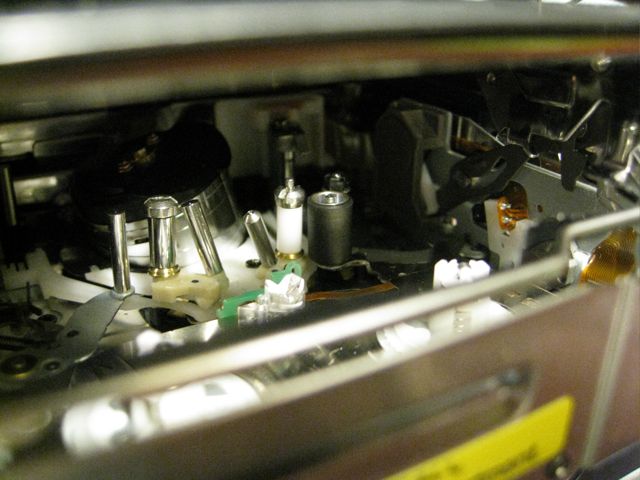
TRV-27 pinch wheel missing nut.jpg
grace rider
Fri, 02 Jan 2009 01:54:47 +0000
I had the same problem c:31:23... did everything recommended by Sony to no avail. Tried Debbie's suggestion to smack it with the palm of my hand and the picture returned but still not perfect. So, I slapped the camera hard again on both sides (after removing the tape) with only my fingers and this time it WORKED!!!! I have perfect audio and video now. Like others on this site, I intend to transfer all tapes to digital format and move on with my life!!
Thanks, Debbie. You saved us all a lot of money and aggravation!
Edward
Fri, 02 Jan 2009 07:00:47 +0000
It works! I also smacked my Sony PD-150 which was saying the same error and now it works again! Thanx Debbie!
Johanna
Fri, 02 Jan 2009 14:24:28 +0000
OMG, my coworkers and I are cracking up, this solution worked. Thanks Debbie! I also did a hard reset on my TRV17.
Ilene
Fri, 02 Jan 2009 16:45:38 +0000
Had the same trouble over Christmas 2008 C:31:23 ErrorCode and gave it 3 or 4 whacks and it worked on VCR playback
Many Thanks to who discovered the trick? Debbie Shame on Sony! Obviously an inherent fault.
Tom Brown
Sun, 04 Jan 2009 11:55:51 +0000
I bought a DCR-HC40E two years back. now its showing an error code C 31:22 "Reinsert cassette". Please let me know what exactly is the problem as the service center is going to charge $75 to see the problem
Sam
Tue, 06 Jan 2009 06:27:45 +0000
I too was getting intermittent C:31:22 and C:31:23 error codes. I tried spanking the camera only to find that the rubber roller had dislodged and was missing it's retaining nut. I had some difficulty finding a correctly sized sleeve to slip over the spindle to hold the rubber roller in place. I cut a small section of the straw that comes with a can WD-40 spay. I used a small drill bit (1/16") to enlarge the hole to snugly fit over the spindle. Camera is back up and running just fine thanks to all these helpful postings. SEE PICS
Attached Image: 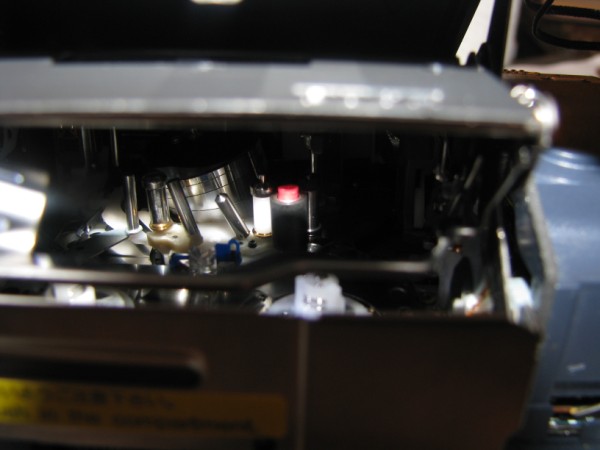
IMG_1106.jpg
Mymojo
Thu, 08 Jan 2009 00:52:38 +0000
I have a dcr-trv 330e
I found that my battery was faulty and that was why it was giving me a C:31:23
But the problem came back with the new battery and I have to say that two goods slaps on the side of the camera worked wonders!
Nicola Redmond
Fri, 09 Jan 2009 20:39:47 +0000
This is hilarious. I had that code. I read some of these posts to my husband. He had no qualms whatsoever about whacking it hard. Debbie is a celebrity! Hats off to you, Debbie!
Kelly
Sat, 10 Jan 2009 23:58:17 +0000
My mom's camera had the same error code as everyone else, etc. etc.
Figured I'd give the wacking a go since everyone else seemed please..
tried to eject the tape and reinsert only to find the tape unraveled and stuck inside the camcorder after the wacking :(
sorry mom!
Sarah
Mon, 12 Jan 2009 03:43:28 +0000
Hi! I'm looking for the part number for the roller and the lock so that I might get my camera up and running. My camera is sony dcr-pc 120e. My roller has been lost and can't find it.
martin
Tue, 13 Jan 2009 21:35:37 +0000
found the part number. (X-3950-359-1) had to buy the service manual. The part cost $30. This would be the arm witch comes with roller and lock, my camera is the dcr pc 120e. good luck everyone.
martin
Wed, 14 Jan 2009 06:25:21 +0000
Same problem. DCR-TRV280 suddenly started giving RE-INSERT TAPE, NO TAPE, TAPE LOCKED faults with code C31:23. Tried Sony recommended "fix" without joy. I read Debbie's "smack the tape side of the camera" and voila! It worked fine. Sony has a problem and they need to fix it. In the meantime, they should post the "smack the camera" fix.
Thanks Debbie!
Lugh Lampfhota
Fri, 16 Jan 2009 08:29:03 +0000
Well Ive had the c31:23 om ny sony trv250 for about a month and read about the hard whack on the side and figured what have I got to lose. It worked! I have never submitted advice to any forums before, but this fix had me laughing so hard I had to submit.
Al Gambardella
Sat, 17 Jan 2009 23:40:19 +0000
SONY DCR-HC90 tape won't eject
I was about to scrap this camcorder since it would cost so much to send it to Sony to service.
I held the top of it in my left hand. I then hit the bottom of it once. The tape then ejected. I won't ever use that tape again.
I am thinking about getting it cleaned or purchasing a cleaning cassette. I am not sure if that will help. Perhaps something mechanical has run out of lubrication or become worn out.
Don Harter
Thu, 22 Jan 2009 14:46:48 +0000
Danke sch�n f�r diese L�sung! Ich habe meine Kamera ganz kr�ftig geschlagen, und das hat geklappt! Jetzt funktioniert sie ganz normal. Thank you, this really work!
Przemek
Fri, 23 Jan 2009 16:22:08 +0000
Debby solution works. Thank you
DEREK
Mon, 26 Jan 2009 03:22:51 +0000
Debbie is a genius. The whack totally worked.
Aderocks
Wed, 28 Jan 2009 01:32:05 +0000
Betreffende foutcode 31.23 het volgende: Het lijkt mij niet zo gezond om electronica te lijf te gaan met harde klappen etc.
Ik had dezelfde fout in een DCR-PC6E en kwam tot de ontdekking dat het borghulsje verdwenen was, zodat tijdens het transport het rubber aandrijfwieltje uit positie ging ,de camera fout vertoonde en het af liet weten. Hard slaan heeft misschien even succes maar de fout blijft dan toch komen. Ik heb een stukje van een ballpointvulling ( plastic) op maat gesneden en dat ging er met een beetje druk in, en blijftna vaak proberen en controleren keurig zitten. Overweeg om er nog een druppeltje locktide op te doen, maar aarzel daarmee aangezien dat ook gemakkelijk ergens anders kan komen waar het niet moet. In ieder geval werkt de camera weer voortreffelijk en neem een reserve stukje met pincet mee als ik op reis ga.
Piet Kraaijeveld
Thu, 29 Jan 2009 20:55:43 +0000
Grazie Debbie! la mia Sony DCR-TRV16E � nuovamente funzionante seguendo le tue istruzioni e con dei colpetti nemmeno troppo forti.
Andrea
Sun, 01 Feb 2009 08:45:43 +0000
Sony DCR-HC38 . C:31:11 Re-Attach Power Source. Tape Door open and would not close. Tried all other means to no avail. SMACKED IT ON TAPE DOOR SIDE, CLOSED!!! TLC works after all...
Dick Dynomite
Tue, 03 Feb 2009 10:22:50 +0000
���� ������ DCR-TRV145E ������� �� � ���� �� � ���� ������ ���������� ������ �:31:23 (�� ���� ������ ������ ����� ��������) ��������� ����������� ������ ����� � �������� �� ��� ������� �� �����.
Voronezh sity
��������� ���������
Wed, 04 Feb 2009 13:14:05 +0000
Laugh if you want , but I too was getting frustrated I have a TRV245 with error code 31.23 tried everything
Gave it a smack on the right hand side and put in the tape , just before I throw it away I pressed play and it worked , and so it has kept on workingsince . Maybe sony should supply a small rubber mallet for its fine adjustmenton cameras .
Jim Gillmon
Thu, 05 Feb 2009 11:14:50 +0000
I have a DCR-PC9 with the same pich roller problem. My pinch roller came off completely and I never found it. I had to order the pich roller assembly from Sony. It's part # X39516801, the cost was $30.34 delivered. Thanks to the contributors to this fourm it was an easy repair. I just carefully removed the roller from the new part assembly I ordered and pressed it on the shaft in my camcorder, you just need a small jewelers screwdriver to pry the plastic retainer off the shaft and the pich roller comes right off. Needle nose pliers to drop the pich roller in place and your finger to press the plastic retainer on the shaft. $30 repair vs a new HD Mini DV camera @ $800. I'm very happy. Thanks for the help here.
JD
Thu, 05 Feb 2009 19:19:43 +0000
just got out my trv245e. not been used for 2 years, got the old c31:23, so removed the tape closed it up then tried a different tape hey presto. didd'nt have to smack it once.
gary organ
Sat, 07 Feb 2009 11:15:47 +0000
HA HA HA HA HA HA HA HA HA!
I am laughing like a drain......!
Who'd have thought a clenched fist hit on the base of a PD 150 would have such a jolly effect on a worrying C32.10 code!
Thank you so so much all the posters who suggested the whack approach.
Now, to see whether my shots of a moody beach are all in focus!!!!!
All the best
Stephen Wisdom
Mon, 09 Feb 2009 19:40:57 +0000
The slap on the side does work thanks
NATE
Thu, 12 Feb 2009 22:06:22 +0000
Sony CCD-TRV118 trouble with flashing underlined arrow and C:31:22
If I take the tape out & put it back in it works for 2 seconds & I can keep repeating this procedure forever . . . but I can't fix it.
Please - Can anyone tell me how to fix this Sony love of mine.
Thanks,
Billy
Billy
Sat, 14 Feb 2009 03:24:30 +0000
Just did a search for suggestions to fix my Sony TRV250 and came accross this fix........I'll be damned! ! ! It worked the first time! ! !
Smokepole
Tue, 17 Feb 2009 04:32:00 +0000
Now then you whackers! There are so many postings I haven't read the all so apologies to those who have already suggested it. Joel Rowbottom made a smart deduction, maybe it's the type of tape? (maybe Sony have a built in non Sony tape gremlin). I have a TDK tape with some footage of the first year of my daughter on it. Anyhow... all you whackers out there have proved It's clearly mechanical, but I think it's the tape you're all whacking not the camera. Here's what I did (after an unsuccessful whack), took out the tape and had a look at it. I opened up the tape cover hatch on the top edge by pushing the wee leaver down, there was a very minor twist on one edge of teh tape. I turned it over so it was laying bottom towards me, took a thin pen/pencil and poked it into the small square hole in the middle between the cogs and push towards me, so unlocking the cogs. I then took a pencil with a rubber (eraser) on the end and held in the right hand cog and turned clockwise. Basically I move on teh tape so the wee twist was away from the play head when it loaded up.... hows them apples?
Gavin Turnbull
Tue, 17 Feb 2009 17:18:15 +0000
Debbie you got yourself a new friend.My camera works again.I combined several smacks plus removing the battery for 60 seconds.Everything good now.
mike c
Thu, 19 Feb 2009 01:45:40 +0000
I just bought a DCR-TRV19E for NZ$13, advertised as broken, touch screen and viewfinder not working. When I saw this thread I couldnt resist, few good smacks later and now the viewfinder works! I have opened the cover on the tape and it looks a bit wonky down one edge, so i'll get a new tape and try that, it also says cleaning tape when I am recording, wouldnt mind betting it works with a new tape. Cheers
Adam
Adam
Fri, 20 Feb 2009 12:42:17 +0000
It seems crazy.. But reading the comment on slapping the camcorder 3-4 times solved the problem. Was struggling for 2 hrs with different tapes. Thanks a lot..
Sony should note this point..
santosh
Sat, 21 Feb 2009 15:09:28 +0000
Hitting the camera not the solution refer to picture 1106 see Sam's video it fixed my camera
Gina
Sun, 22 Feb 2009 19:11:27 +0000
DCR-PC105, was getting same error, my pinch roller had also come off. I would suggest that if someone is getting the error, they look at their pinch roller to see if it's not sitting properly anymore, or if it has come off. I put mine back on and the problem went away. Thanks to those who talked about that. Perhaps smacking the side of the camera puts the pinch roller back in place?
Linda Petrucci
Wed, 25 Feb 2009 04:23:45 +0000
When I read I could not believe but I tried and SURPRISE! IT WORKS! Thanks Debbie!
Renato Calvo
Wed, 25 Feb 2009 20:15:32 +0000
I smacked my DV and I liked it, this trick is really something (sung to the tune of I kissed a girl).
The smacking works, but my husband insists that you DO NOT HIT electronics. I realize that it does something mechanical to slap it, but the technical explanations of what to do and how to fix that missing nut might as well be open heart surgery for as much as I'll be able to follow them.
Maria Gebhardt
Mon, 02 Mar 2009 18:38:13 +0000
I have a trv-950, I kept geting the 32:23 code. it means something mechanical is out of place. I tried smacking it a few times and one of the rollers fell out of the camera. I was able to put it back in place and used I tiny clip off a wd-40 straw as a makeshift nut to hold it in place. you'll have to open up the hole just a little so it will slip on. so far so good, will repeat the process when it happens again. As a professional Cameraman I don't suggest getting brutal on your camera. check the roller first, see if you can push it down in place yourself. if you scroll up you'l see a picture of what I'm talking about. Thanks for the picture, thanks for this forum, and thank you Debbie!
Attached Image: 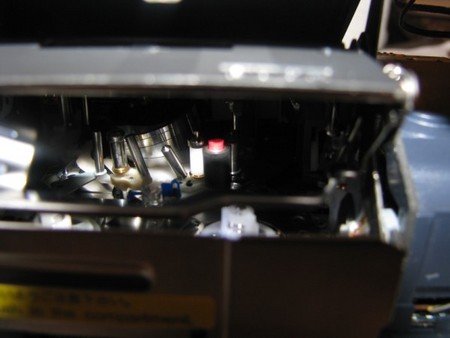
1 - small_IMG_1106.jpg
jediphunk
Tue, 03 Mar 2009 06:29:32 +0000
Thank you so much i have a sony ccd-trv228e and gave it a moderate hit on the tape side and it works..!!! THANKS.!!
Grant
Wed, 04 Mar 2009 12:20:32 +0000
Smacking my TRV16 did not help. It turns out that a rubber roller had fallen out. Putting it back in solved the problem, but I now have to keep the camera on its side when changing tapes...Great, I just lost it again!
Tim Prince
Sun, 08 Mar 2009 04:37:36 +0000
Behold!! I have found an even better solution for the C:31:23 Sony HandyCam!!. The black roller on my DCR-TVR250 I had suspected was causing me problems, as it wasn't wanting to roll counterclockwise.
1. I then have removed the roller and the plastic lock, but have lost the plastic retainer inside of it. I took the advice from previous posts and got a straw from a WD-40/Starter Fluid spray can.
2. I cut a little more than 1/8 of an inch off the end with a razor.
3. Next, I took a "BiC" standard black pen, pulled out the ink/ballpoint out of it. This tube is slightly smaller than the large diameter of the lower section of the roller pin. I cut about 1/16 of an inch off, then stretched it out slightly over the sharp end of a compass (the drawing type).
4. After that, I carefully placed the ink tube onto the roller, making sure is was down all the way.
5. Finally, I placed the spray tube I cut earlier inside of the black roller, then placed them both over the rolling pin. The spray can tube was slightly smaller than the roller pin so it took a little effort to get it on. I put a tape back in and low and behold! It has began working again flawlessly!!!
Email me if you have questions regarding the C:31:23 Error!
Steve P
Tue, 10 Mar 2009 03:46:45 +0000
So I was a bit weary of smacking my camera...did it anyway and it works fine now...thats funny
Sundi
Thu, 12 Mar 2009 02:10:12 +0000
I can't believe it! The smack worked. Thanks Debbie.
Vanessa
Thu, 12 Mar 2009 18:22:02 +0000
YEAH SPANKING IS STILL THE BEST DISCIPLINE!
anonymous
Wed, 18 Mar 2009 15:38:47 +0000
Roller-fix fan!
We tried whacking it a lot, but did not work. Then I read Meredith's post here and read a few more posts about the roller issue. My husband had saved a little black roller that we did not know what to do with, and after reading the posts here we took out the casset, looked around for where to put the thing, and then put it on the white roller closest to the lense. You have to push down hard to make sure it fits securely. IT WORKS!!!! We had given up for a couple of YEARS on this thing after learning that it would cost $300 to repair. We missed our second child's first everything and now that my dad is sick and we want to make sure we video him we finally got serious about this and found this thread. THANK YOU EVERYONE HERE!! Now we won't miss our 3rd child's firsts and will catch my dad before he gets worse.
Stop whacking the camera and look for this black roller. If you don't have a black roller on the white roller nearest the lense, read Meredith's post about how she fixed it (do a search and find on this page for Meredith or roller)
Thank you!!
Shara
Wed, 18 Mar 2009 15:52:11 +0000
Some really amusing posts!! Also the amount of people that had success at fixing the C31 error by smacking their camcorder is astonishing! If you were to print out the thread it is over 200 pages long, and people with all different types of Sony Camcorders from all over the world and the thread has been going for about 4 years so it's not just a bad batch of cameras with the problem!
This story should be on the news, seriously it should...it has the potential to save many people hundreds of dollars...TV news may have a conflict of interest as they may use Sony cameras and so may not want to say anything bad about Sony...but it is clearly something which is fixable at home and people that don't realise are needlessly handing Sony their hard earned money.
I have had a Sony DCR-TRV355E PAL Digital 8 Camcorder since 2003...I first got those error messages in 2007 which cost me $200 Australian dollars to fix...I had the C31:23 and C31:30 errors at different times this week and almost handed my camera in again for service, but stumbled upon that thread just in time!
Today I did the following with my camera...I opened the cassette deck door at the bottom of the camera which allowed the mechanism to slide out and pop up the tape deck...I then checked the 2 white spoolers on the left and right front of inside the camera and tried spinning them around with my fingers...the right one did, but the left one was rigid so I spun it in both directions until it sort of freed itself and spun properly...then I got a new tape and so it wasn't right at the head of the tape with my left pinky finger I manually spooled the tape about 10 times on left and right spool going to the left or anticlockwise direction as you look at the tape with it in upright position...put in the tape and pushed the tape deck down for it to slide in but it stopped halfway into doing this...so I smacked the other side(LCD screen side) with my palm about 10 times...it then all of a sudden continued moving the cassette deck fully into place...no error message came up this time and I used the camera today fine!
So I saved myself $200!
Seriously any past, present or potential future owner of a Sony Camcorder must read this thread, just incredible! For me it wasn't just smacking the camera that fixed it...it was getting both white spoolers to be spooling properly and the smacking seemed to solve the problem of the tape deck jamming! Manually winding the tape a few seconds off the head was just a trial and error thing and I think it was a good idea because I've had tapes snap right at the head of the tape as the tape is very weak at that point.
I wonder what Sony will make of this...any professional cameramen out there please give us all your opinions, and try to explain why smacking the side of the camcorder could solve getting rid of these C31 error codes.
I look forward to hearing from you.
All the best.
IKEEP200DOLLARS-SONYGETZERODOLLARS
Thu, 19 Mar 2009 18:49:26 +0000
DCR-TRV 725E C:31:42 error - the solution!
Abdul Jalil
- 12th Jan 2006 3:05
hi. I had the same problem on my trv 340e C:31:42. I tried many things. I thought it is the condensation but after some time found out that it is the assembly.
first, i tried to remove battery and isert back. then load the tape. it works. Then after some time, it just refused to do so.
second. I tried to open the casing etc and fixed back. put the whole thing in a air tight container with fresh silica gell. fixed back and it's ok.
third. after some time, nothing seems to work. I sent it to Sony and they changed the assembly chasis. I misplaced the resit so i cannot recall the exact part no. It has worked since. It comes with a 3 month warranty. They also replace a cable and one small part. All in comes to about RM400 which is around USD120.
I was thinking to buy a new panasonic 3ccd which is very very much cheaper than the sony 3ccd. Also I heard that it is quite durable.
One word of advice. When loading or removing the tape, please make sure you tae great care and caution. Do it gently and avoid putting unnecessary pressure on the casing that receives the tape. Else, your assembly will misaligned or something and it will just lead to this similar error.
Reply
Re[2]: DCR-TRV 460E C:31:42 error - the solution?
Mike
- 21st Mar 2009 16:55
I wanted to thank you for the advice. Even old posts find their way to today's solution. I had the same 31:42 error with my Sony Handycam DCR-TRV 460. I thought it was due to use in the winter snow. Weeks went by and what I thought was condensation did not fix the error. I found these posts and first attempted to use the blow dryer around the openings; however, no luck. After reading your post, I decided to take the camcorder apart. Sounds complicated/scary but it really was easy. 4 tiny screws at the bottom, 3 at the back by the battery and 3 at the top (where my fingers rest). Anyone doing this be aware that the top of the casing (where silver&black meet) there is a plastic clip. You must slide the top black cover back and up to separate NOT pull apart (the clip can break trust me I know). Anyhow once separated, I easily saw the wires/mechanics. Don't know if it helped but I used a can of air to blow away dust and tried the blow dryer (cool) for a minute or so. IT WORKED! I thought no coverage, 4yr old cam and estimates would run me a lot of $$$ The separation of the camcorder may have triggered the sensor and eliminated the re-insert tape error. Thank you for sharing your experience and advice. It made a big difference! :-)
Mike
Sat, 21 Mar 2009 16:03:50 +0000
Thank you Debbie, I received this "error code" a few days ago. I tried unscrewing the camera and cleaning it, but did not work.
I tried removing the power and reconnecting, and it did work, but only for 3 seconds !! Then I read this thread and figured, since I have no money to repair it, I'll give it a try.
I smacked my camera from all sides about 4 times relatively hard, ejected the cassette, put it pack and... voila it works.
Helps relieve stress over the issue, and helps it work too. Haha !
I love the power to google your every issue on the internet ! Love it !!
Victor
Sat, 21 Mar 2009 18:24:15 +0000
I have a Sony VX2000E and encountered the C:21:23 error code. I tried the smacking of the camcorder however it didn't fix the camcorder. I then read another post to say that maybe it is to do with the DV tape type (i.e Sony or not). I checked and I was using a Panasonic Tape. I switched it to a Sony Tape which I have and 'Hey Presto' the error code doesn't appear.
Cheers
Alan
Sun, 22 Mar 2009 07:07:04 +0000
Thanks alot... it worked... I gave my camcorder big smack and it's amazingly worked out ... thanks guys
Ali
Thu, 26 Mar 2009 18:13:26 +0000
Whacking off and loving it! Thanks for the tip.
Joshua Wolf
Tue, 31 Mar 2009 03:40:27 +0000
My trv-103 was acting up while playing back tapes. I'd purchased a couple of new hard drives so I could transfer my 30+ Hi8 tapes in raw dv format. the first tape transferred without a problem, then on the 2nd the playback started to have problems. I was searching to buy a new unit and came across this site. Using Debbie's 'fix', I smacked the side of the camera a couple of times and - presto - works like new!!
Dave
Wed, 01 Apr 2009 00:22:17 +0000
Have a DCR-TRV17 (had it for awhile). It was collecting dust as I could no longer get it to work and i just didn't have the time/money to get it fixed. Well - I slapped the crap out of it... finally got a c32:10 error - Plugged it in, turned it on to "Camera" mode, removed the battery and put the battery back in. Got the C32:23 error back...
So... then I took a small screwdriver with plastic handle and began digging around inside... I moved "EVERY" piece of plastic I could see, without forcing anything and being very careful of any cylinders that might be "readers". I figured it had to be a plastic piece stuck on something in there. That worked!
I'm sure if I slapped it hard enough to jar whichever piece was stuck loose - it probably would have worked. Either way... happy to have my Camcorder back!!
Tim F
Thu, 02 Apr 2009 01:03:19 +0000
I missed by boys 3rd birthday when I got the C31:23 code, I resigned myself to having to buy a new camcorder but was really upset that I wouldn't be able to transfer all the tapes I had onto DVD
for some reason I thought today "I'll see if those numbers and letters mean anything" and came across this site I tried the smack and tried ejecting and the tape door wouldn't open. So I switched off, disconnected the battery and waited for a couple of minutes when I switched it on the tape went back in, I gave it a real good pummeling and hey presto! it's working again.
Brilliant
I wonder if someone added up how much it would have cost to repair every single camcorder mentioned on here, how much it would come to - thousands and thousand of pounds I wouldn't wonder.
Dave - in South coast England
Thu, 02 Apr 2009 17:10:02 +0000
yes it worked!! only smacking was not the solution. taking out the battery, reinsert it and smacking worked! thanks JACKSON for the help. i just do not trust the spring anymore and hesitate to close it again. i need some courage to close it...tomorrow
rolfkitty holland
Sat, 04 Apr 2009 14:54:22 +0000
Holy crap! I cant believe that whacking the damn camera worked but it did!!! For months i couldnt use my camera because of the " reinsert cassette" thing. I called SONY and they wanted to charge me 90 bucks to fix the thing but that wouldnt have made sense as i only paid 170 for it brand new. I got fed up and finally whacked the sucker twice and it works!!! FONSII LIVES!!!!! LOLOL!!
teresa
Sat, 04 Apr 2009 23:32:24 +0000
i have sony trv245 and i did not use for few months and after that tryed to use and a error message c:31:23 apear on lcd.
troyed to take cassette out and open half way then stuck. give good kick and and opens.
put in a new cassette and play for 10mins then put back recorded tape and works... hoppe for long.
good luck to you all
alexis75
Wed, 08 Apr 2009 16:47:37 +0000
I'm in Bangkok and it looks like we're about to have a civil war. Picked up my TRV285E to go shoot some news and the same problem as everyone else C:31:22 error. WTF? Civil wars wait for no one. Thanks Debbie. If you ever come to Bangkok I owe you big time. Tried lots of other things like resetting, disconnecting all power, etc.
A fairly firm whack and it was golden. Could it be sticking capstan drives or spindles?
Anyone, thanks Debbie. A good smack often fixes many things.
Off to the frontline now.
Cheers,
John
John Le Fevre
Thu, 09 Apr 2009 14:19:52 +0000
I found the white plastic tube that goes inside the rubber roller and replaced it as described by Jason Dec. 2005. His comment fixed my machine. For now anyway. . .
Deborah
Sat, 11 Apr 2009 02:38:40 +0000
After reading all the comments about error codes and "whacking the camera" I tried hitting it on the side but this didn't work. I then tried hitting it on the top with a rolled-up magazine, and surprise, surprise, it worked!!
Roy
Tue, 28 Apr 2009 14:58:59 +0000
I was getting the C:31:22 message used Debbies suggestion and smacked in all four corners about 3 times on all four sides, turned on the camera got the same error message. Repeated the above smacking procedure 2 more times and it worked. Be patient with it.
Fernando
Wed, 29 Apr 2009 03:35:37 +0000
ohhhh my god, don't know if this really works smacked it 4-6 times as Debie suggested but is now working, i think is time to continue with my backups of this tapes before this Virus attack me again trying to execute the vaccine (smack) again!!
Hermann
Fri, 01 May 2009 03:18:50 +0000
Thanks for this advice...my TRV11e stopped working on my birthday over a year ago with a c:31:30. The tape was stuck inside and couldn't be played or removed. I stumbled on this site by accident and decided to try the whack technique. After a couple of whacks the camcorder began working again!! Thanks, everyone.
E.
Fri, 01 May 2009 22:35:05 +0000
No way! I googled this problem and found this... Our Sony TRV350 would eject but the "door" would not open to allow you to insert a casset.. A few DEBB-OWHACKS and it works fine now! Oh that black tape roller is still in place, nut and all!
krh2
Sat, 02 May 2009 23:03:18 +0000
Hola tengp un filmadora sony DCR-TRV380 y al introducir el casete y cerrar la tapa el mecanismo baja el casete y luego me dice que lo vuelva a introducir el casete y dale el error, C:31:23, que clase de error es este y como se soluciona??
Aunque paresca brutal... La verdad solamente hay que darle un par de golpes en la parte de la casetera, vuelves a prender la filfadora y listo.. solucionado el problema...
espero les sirva, a mi me funciono perfectamente.
Luis Puican
Sun, 03 May 2009 22:03:14 +0000
I have The Sony HDR-FX1, paid 3K in 2004 when it was new, same problem, and sure enough it fixed it.
Kyle Gentz
Thu, 07 May 2009 06:58:06 +0000
deb we owe you bigtime thanks now my mother in law likes me :D
richie
Thu, 07 May 2009 21:12:30 +0000
deb we owe you bigtime thanks now my mother in law likes me :D
richie
Thu, 07 May 2009 21:14:46 +0000
I've got a DCR-TRV530. The error code was C:31:23. Tried the 3 solid whacks on the tape side while camera was shut off. Waited about 10 seconds, took a deep breath, then I tried putting it in record mode but the error code did not go away. I put the selector back in the off position, then removed the battery and waited for just over 1 minute. Put the battery back in, put it into record mode and PRESTO! the god of electronic gadgetry returned to me an operable, functioning camera.
Stevie
Thu, 07 May 2009 22:09:38 +0000
I've got an DCR-TRV625 an begun to smack it. After 4-5 times the camera is ok no more C31:22
SirNeo
Sun, 10 May 2009 15:44:15 +0000
Congratulations, Debbie and Frank.
After your "smacking solution" it doesn't close anymore ... and now, do you have another great idea like that one?
I dont know how to tnx you.
Sergio
Mon, 11 May 2009 15:41:34 +0000
hey all,
i have a problem with my SONY DCR-PC6E PAL!!! now it just appear me the error C:31:23 on the display-.- please at all, give me an tips. what i can do to correct my problem? of course i have to do that 4 points:
-Turn off the camcorder.
-Remove the battery or disconnect the AC power adapter for 60 seconds.
-Insert the battery or reconnect the AC adapter.
-Turn on the camcorder.
but nothing helped... can anyone help me?
cadeffi
Wed, 13 May 2009 20:06:40 +0000
Well, 4 years after the first post and it's still a valid thread. I have joined legions of Cam Whackers (thanks,Debbie). However, I think I'll be looking at the roller. Thanks to Ahmed Jasmin for his pictures and posts dated:
Tue, 09 Jan 2007 12:24:32 -0800
Wed, 06 Jun 2007 10:27:52 -0700
Heidi
Wed, 20 May 2009 20:49:09 +0000
+1 on camera *magic* slap... worked for me also, thanks :)
Stanimir
Fri, 22 May 2009 17:02:39 +0000
I own the Sony Handycam (DCR-HC42). Never had a problem with it in four years until today. Kept getting the "reinsert cassette" message and the cassette housing would not move the cassette into place (though it would move in if a cassette was not inserted). Followed Debbie's advice....and it works now! How wonderful!
Cindy
Mon, 25 May 2009 14:13:06 +0000
I have a 10 year old sony DCR-TRV110E showing a C31:42 error, costing �90 for comet just to look at it I give it a good slap, just one on the cassette side with a cassette in, and now it's working fine thanks.
paul
Wed, 27 May 2009 11:44:46 +0000
I have a trv-140. I am going to try this when I get home (smacking it). I would never have guessed that since there are so many little parts in the thing but it's worth a try. Will post back here to update.
todd
Fri, 29 May 2009 07:43:34 +0000
THE REAL SOLUTION for several Sony tape errors!
Greetings from the Netherlands. Dear people, however I understand (and used myself) the whacking method: Don't!
Please use the method of Ahmed Jasim, which he posted twice, with pictures.
This is THE ONLY REAL AND LONG TERM SOLUTION. This really works! Thanks Ahmed
Scroll back to
- Tue, 09 Jan 2007 12:24:32 -0800
- Wed, 06 Jun 2007 10:27:52 -0700
Harry
Sat, 30 May 2009 09:05:39 +0000
Absolutely phenomenal! Debbies method worked, I was more than amazed. My broken Sony worked again but error kept coming back and soon my hand started to hurt :)
After reading the postings further I followed Ahmeds repair advice. I firstly removed the plastic roller to reveal the axel where the locking piece should go in. I then experimented a while with different ball point pens to find matching tube sizes. When one that fits nicely was found, I cut a piece which went into plastic roller and then pushed it into place.
Battery in, player on, and WOW I had a fully functioning camcorder. What's best in all this is that we'll fly to holiday trip day after tomorrow and I planning to go and buy a new camcorder tomorrow.
Thanks Debbie and Ahmed. This my best Internet story to tell!
Regards
Juha
Juha
Sun, 31 May 2009 18:08:51 +0000
Really smacking of side of the DCR TRV250E worked for me and error msg has gone... So good luck you can try
H. PALEJA
Thu, 04 Jun 2009 13:24:02 +0000
I CAN'T BELIEVE IT! I had had this problem with my camera (DCR-TRV250E) for almost two years now! I tried everything to fix it: I brought it to the assistance center, I read the instruction several times, removed the battery, let the camera opened for hours, and then I just gave up. Today I decided to look for help on the internet, I read yours comments even though I have to admit that I was quite sceptical about this method, but I tried and GOSH... IT FINALLY WORKS! I still can't believe it... THANKS SO MUCH!!!
Alice
Mon, 08 Jun 2009 13:08:27 +0000
i have same problem im my camera dcr-trv330 digital8
and smacking worked cant believe thank you
guillermo
Tue, 16 Jun 2009 02:13:47 +0000
Unfortunately, not SONY, not "smacking solution" helped me. SONY "solution" just erases error code that comes back soon after start playing, "smacking" does much more effect but just brings all different kind of codes/problems for me (not closing, stuck tape). Now back to original C31:23. It plays for 3 seconds than stops with this code. Everything inside appears to be in good working condition including that black roller with white insert. No idea what to fix :(
I should have transfer my cassettes earlier. I see no reason to pay for fixing hundreds of $, it is cheaper to buy a new one. To bad it happened to me when I am low on $
yarki
Thu, 18 Jun 2009 02:49:36 +0000
Incredible, whacking the camera worked !!!! Thanks
Andrei Joghiu
Thu, 18 Jun 2009 17:04:03 +0000
The smashing method works for my (year 2000) TRV 125 camera!
Thanks!
FilmPloeg
Sat, 20 Jun 2009 10:48:36 +0000
the Debbie smack did the trick !!! thanks for all the good advise. I checked the roller first , but it was ok. dcr-trv27
William Preston
Sun, 21 Jun 2009 08:18:25 +0000
TRV-318 with a C:31:23, performed the abuse as suggested and worked just fine! Can't believe I didn't try that first myself...
Dave
Sun, 21 Jun 2009 23:12:33 +0000
My daughter and I were histerically laughing and did not believe the Debbie Smackdown would work! True to this forum, it worked! This should be on the news! Most fun we have had all day!
Julie
Mon, 22 Jun 2009 01:39:39 +0000
DCR-TRV530. Debbie's trick (whacking it hard) worked. I'm glad I found this. But I should really get a new modern camera.
Geyck
Mon, 22 Jun 2009 04:09:33 +0000
Hi--just experienced the C:31:23 code and when I used the Sony 8mm Head Cleaner tape for about 10 seconds the problem went away.
Rick St. Charles
Tue, 23 Jun 2009 00:45:38 +0000
Sony DCR-HC17E: It works! Thanks Debbie :-)
M. Heeren
Tue, 23 Jun 2009 20:45:38 +0000
I did the smack..and bang method..for the C31:22 code didnt work.. read down alittle further saw the roller message and pic...looked inside my cam the Black roller was siiting in the bottom..slid it back on the pin with tweezers..put the WD straw on to lock it in place..works like a champ....Check the BLACK ROLLER>>>
Tray
Wed, 24 Jun 2009 06:00:17 +0000
I have an old dcr-trv120 that kept giving me this error message so I placed it in a box. Today I found the recommended adjustment (Hit the side of the device hard) and magically it started working again, with no error message.
Nick
Wed, 24 Jun 2009 17:22:24 +0000
Thanks a ton That was a great tip debbie
Sameer
Fri, 26 Jun 2009 06:44:51 +0000
Hello people. I think i�ve found the problem. You see, what happens is that the gears that are used to rewind and, well, wind, get stuck easily (crappy parts, sony is to blame) So whatever you Do do NOT HIT YOUR CAMCORDER! here�s what you do, it�s simmple and doesn�t put it in danger. take out the cassette, locate the little pin things that make it rewind, and se if they spin correctly (that�s all the way as if they were loose) if not, force them a little untill they do spin. Voil�! I have a DCR-TRV250 with C:31:22 and C:31:23. It worked peachy, and if it happens again you know how to fix it!
Alain Bengoa
Sun, 28 Jun 2009 14:50:41 +0000
Alain, you may be correct that the subtle twist of one of the mysterious entrails of your Sony is all that is required, but for me with a TRV245e the Debbie thump has just saved the family tape archive and a repair bill. Future investment in recording technology will not include Sony.
Hugh
Sun, 28 Jun 2009 16:46:28 +0000
I lost the "rubber black roller" described above. Does anyone know what this part is called and how you go about ordering a new one?
Maher
Sun, 28 Jun 2009 16:50:56 +0000
That C:3123 Message almost made me cuss! That is until I took the tape out, banged it gently on each of it's four sides on my desk, placed it back inside my DCR-VX2000 and the error message was gone. Then I hit rewind, then play, and it worked!!!!
DeWayne
Mon, 29 Jun 2009 22:09:06 +0000
yes, yes!!! After all those years the 'debbie trick' is the best i've ever had ;-). I have a DCR-PC8E. Smacking the camera hurt my hand, but banging the tape on the four sides worked!
Patricia
Tue, 30 Jun 2009 20:01:03 +0000
GIVE IT HIT ! After reading some of the comments I gave my camera a good thump and it started working right away !
ronnie
Fri, 03 Jul 2009 17:36:29 +0000
I have a Sony DCR-TRV120E Camcorder, bought in 2002. During the summer of 2008 the camcorder started showing the C:31:23 error occasionally.
During 2009 this error message has appeared more often - with the same symptoms as those encountered by many other people.
I discovered this site when trying to find a solution to the problem.
I investigated the tape-drive mechanism but could see nothing missing, nor was there anything loose in the tape-carrier area.
I could not believe that HITTING the cam-corder is an acceptable method of solving the error message - so decided to see what else I could find that may be relevant.
I discovered that, when looking into the open tape-carrier there are to the right hand side, three spindles, one with a white sleeve, one with black rubber surface and one chromium plated.
I applied slight pressure to the tops of these spindles and was surprised to discover a small amount of downward movement which then appeared to lock into position.
I replaced the tape, shut the carrier and turned on the power. NO error message !
I would suggest that this MAY be the reason why hitting the cam-corder sometimes clears the error message, as the external force may be enough to move the spindle assembly back to its correct position.
Anyway, MY camcorder is now working correctly again WITHOUT me having to hit it !
I hope that my solution may be helpful to others.
John Perthen
Mon, 06 Jul 2009 00:50:12 +0000
What the Frenchtoast!!!! I can not believe this?? I smacked camera and it worked. This may be the one time in Life where smacking something solves the problem. Enjoy this people I have now officially joined the "smack the sony handy cam club" I feel so privileged and special. :)
John Quigley
Fri, 10 Jul 2009 08:49:19 +0000
Further to my message dated 3rd July 2009, I decided that whilst my cam-corder was working again, I would attempt to retrieve the data stored on my 48 tapes.
Working in reverse order from No.48, I have now retrieved ALL data back to Tape No.7 and fully expect to be able to retrieve the data from those remaining.
All that I can add is that HITTING the cam-corder is patently NOT the correct approach to solving this error message !
My solution of slight downward pressure onto the tape spindle assembly seems to be a much more elegant solution !
Regards
John Perthen
John Perthen
Mon, 13 Jul 2009 20:57:21 +0000
I smacked the fella.. it worked like a charm. Smack that!
Spunkie
Tue, 14 Jul 2009 08:01:23 +0000
Thanks Debbie, my Sony DCR TRV18 was working fine. then i leave it idle for about a month. when i played it last night, it won't rewind and play. Then C : 31 23 appeared with a beeping sound. i got alarmed, when i get into this site, tried whacking it for few number of times and finally it worked. mine worked gradually, with gray lines, then smaller gray pixels until it was clear. tnx.
I got another problem thought with my Pc 100, i noticed that the last time I used it, the shot was dark, then sony service said the lens have to be replaced worth 12 thousand pesos. anybody who knows the trick here. tnx
connie
Fri, 17 Jul 2009 06:02:59 +0000
Thanks for the tips on repairing the C:31:23 issue. However, after buying the part and replacing the black pinch roller and white lock pin, the tapes will play back and record but I have a new problem. After recording or play back of an old tape, I have 5 thick gray horizontal lines consistently interrupting the image. Did I permanently damage the tape playback head or is there a way to try to clean the head? Any suggestions or solutions would be greatly appreciated.
Trevor
Fri, 17 Jul 2009 18:59:06 +0000
There's no way I'm gonna slap this camera. NO WAY.
I ran out of ideas and it seems to be getting good press here so
I try it.
This is what happens. Nothing. Well, it appears nothing.
After some more determined slaps I notice a sound of something rattling around
inside the camera. A few shakes reveal that roller mentioned above.
And snap me down, a tiny piece of the ink tube of a ball point pen a drop of
super glue and it's on and working fine.
Thank you!!!
Attached Image: 
roller.gif
Fixed Sony Camera Debacle
Sat, 25 Jul 2009 02:44:17 +0000
I have TRV40E , damn it works by smacking !!!!
alireza
Tue, 28 Jul 2009 09:20:45 +0000
I was ready to give up on my Sony DCR-TRV740
(even put an ebay bid on a different camera)
thought, why not try Debbie's "smack-a-cam" method- after two hits-
the misplaced black roller fell out- (which thanks to other replies,
I had noticed mine was missing-) I put it on the thin rod that it
looked like it might fit on-located in front on the right hand side
and low and behold-my camera is working!!
Thanks- I wouldn't have paid the quoted repair fee of $271.00,
but I also wouldn't have a working camera. :-)
TheMeTooGirl
Fri, 31 Jul 2009 03:34:46 +0000
I just have to say that this site has made my day! Not only did smacking my camera get it to start working... but I was laughing so hard I was crying and my secretary came in to see what was wrong! I tried to tell her but literally couldn't talk, so I just pointed to the screen and let her read a few for herself. Hilarious!!!! Thanks for turning a boring Friday at work into a little fun!! :)
Jacqui Harshey
Fri, 31 Jul 2009 15:39:02 +0000
I put another cassette whose tape wasn't at the beginning and the error didn't show up
then I reinserted the first cassette, whose tape was at the beginning, and the error disappeared.
It seems the problem is when the tape is rewound to the beginning.
hidran
Sun, 02 Aug 2009 20:25:00 +0000
Well, guys, the wacking method works. I've just tried it and yes, it works.Thanks for the info.
Melissa
Mon, 03 Aug 2009 16:56:36 +0000
Sony TRV 330 now belongs to waxk a camera club. I tried cleaning and changing tapes no help. Wack A Camera Club.
The best solution to a repair shop.
Tony
Sat, 08 Aug 2009 18:39:55 +0000
I don't believe it. These posts are two years old. I was just about to send my DCR-HC42 to the camera shop. Considering it's only be used about 5 times and how much I paid for it, it was killing me to pay MORE for a repair. A couple of wacks, it's working like a charm. Debbie, pure genius! Thanks!
Hearsawho
Sun, 09 Aug 2009 03:36:31 +0000
Yeah it worked AND we had to fix this before a long time ago.
deep in side is a little white roller...about 1/2 the size that you use for a filer on a blaze (rolling weed) and you can push that back in with a tweezer or q tip.
it sometimes slides off and forward. So you have to push it back on. It's hard to see but if you use a flashlight you will see it.
Good luck
Smacking it atleast opened the jammed tape.
Good one Dave.
Sher and Black
Tue, 11 Aug 2009 21:47:57 +0000
THANK YOU WHACK A CAMERA CLUB! :) It is a Sony TRV 318. Whacked it hard a couple of times and it worked. Remember, whack like you mean it!! And yelling helps :) Thank you very much. The camera "broke" Three years ago and now it works!
Because of that annoying little code, C:31:23, I thought my camera was broken and got a new one for my birthday. It was painful and heartbreaking because suddenly all of my memories were gone and irretrievable. Then my friend recommended we google the problem, and it led to this glorious forum. Now, for the first time in 3 years, I can watch memories from up to 8 years ago which have since been lying in the dust in the back of my closet. Thank you, thank you SO much. LOL thanks to a little whack, my past has come back to me. it is such a tremendous feeling....i couldnt be more grateful :)
THANKS SOOOOOO MUCH will report back if further issues come up, but right now it's totally fine. Now all I have to do is find a cord that will enable me to dl the footage onto my computer, any info/good brands would be MUCH appreciated. THANK YOU THANK YOU THANK YOU
-E & M
E & M
Wed, 12 Aug 2009 01:17:33 +0000
Thanks for whacking info. Was doubtful, but persistent. With progressive fury, it finally worked! Excellent!
Whackalicious
Sat, 15 Aug 2009 20:54:14 +0000
Whacikng worked! I gave up on my cam 4 years ago.
But today I decided to dust this puppy out.Bought it on 2000
SMACK SMACK and it works like a charm
kogutc
Sun, 16 Aug 2009 22:23:49 +0000
My DV tape was stuck in my camera and wouldn't eject. It was giving me the C31:23 error code. I read that some people had luck smacking the side of the camera, so I tried it. Amazingly, it worked right away. Thanks for the suggestion!
Amanda
Fri, 21 Aug 2009 17:00:49 +0000
Had the dreaded heart stopping C 31:23 error on a DCR HC-96 after I cleaned the head with a Q tip and head cleaner. It took multiple slaps on all sides and removing and inserting the tape (45 minutes) but finally the camcorder started playing the tape. After awhile the blue screen went away and turned to grey horizontal stripes with video. Then the sound came back on and the stripes disappeared. Thanks everyone for that excellent info. I was getting ready to shell out some bills to get that paperweight fixed. Curse you Sony!
Video guy
Sat, 22 Aug 2009 01:29:06 +0000
I have a Sony DCR-trv250. Tried everything then found this thread. I hit it, and now it works!
Thanks for the info, beats spending $140 sending in for repair. I guess even in our modern times you can still get by with a little "Fonzerelli" bump.
Cheers
elliott
Mon, 24 Aug 2009 05:06:48 +0000
Thanks a million Ahmed Jasim!!(Y)
Thank you all!! you saved me couple of hundred euros.:))
Tauno from Estonia
Wed, 26 Aug 2009 09:31:57 +0000
I have a Sony 8mm TRV480 with same problem. Won't play tapes and says reinsert cassette. THE WHACK A WILLIE SOLUTION REALLY WORKS. I had nothing to lose. Just bought an old camcorder off craigslist so I could continue to transfer my 8mm to DVD.
Try it. You have nothing to lose and it may work.
Duane
Thu, 27 Aug 2009 02:07:05 +0000
THE WHACKING WORKS!! oh my. im about to cry. i was so afraid my tape content would be lost. THANKS FOR THIS!!!
secret
Thu, 27 Aug 2009 08:27:18 +0000
i did the smacking but it doesn't seem to work...any other suggestions, thanks a lot
eb
Sat, 29 Aug 2009 19:47:16 +0000
I had the same error code 31:23 on my PC5 tried to rest it, dry it but what really worked out was Debby's advice to hit it gently on the side of it !!!
Tks Debby!!!
Louren�o
Mon, 31 Aug 2009 13:30:12 +0000
Have had my TRV-318 for almost six years and just got the c:31:23 error code, we were going to go and buy a new sony camcorder but I did not want to spend the money. I am greatful I found this site, the smacking work and relieve some frustration too. Thanks Debbie.
Courtney
Mon, 31 Aug 2009 15:49:47 +0000
Hilarious - I have a VTR145E which is quite similar to a number of Hi8/Digi8 models and did not use it for a while but needed it a few days ago. It came up nerving me with C31:22 errors and did not play or wind at all. Battery removal did not solve neither other official advice. I tried the smack - and it solved the problem, unbelievable. Just a few whacks on the tape side, not too hard to torn it into pieces but considerably serious smacks, and here we go again. Seems like I should finally copy all tapes to the computer before the camera is on strike again....
Ren�
Tue, 01 Sep 2009 06:51:09 +0000
My camera has had c31:22 on it for almost two years. I finally got the idea to search this problem, and two firm smacks did the trick. An old vid of my now 4 year old daughter was in it. I started to well up seeing it. Oh how many good times I haven't recorded. And now 4 years after the 2005 posts, I now know what you knew. Thank you for sharing and many blessing's for you and yours.
TERI
Tue, 01 Sep 2009 19:14:05 +0000
AMAZINGGG SMACK THAT BITCH!!!! SHE LIKES SOME SLAPS
pedro
Thu, 03 Sep 2009 19:38:20 +0000
OMG! The SMACKING WORKS!!!!!
I was getting mad at my mother for breaking the camera after I had been away at college for a while, and happened to come across this post in a google search. AMAZING!!! I smacked my Sony handycam DCR-TRV250 on the side with the LCD screen (closed, of course) while holding it in the usual operating positon. Three smacks while having the battery out for about a minute, and it was good as new! Yay!
Tiffany
Tue, 08 Sep 2009 01:32:51 +0000
Damn- nothing worked! my tape with the record tape off was stuck in my DCR HC42E... Finally had to break the damn tape in the head and pull tape out! :-((( Effing lost my footage but I am gonna hope what worked with the old mag audio and video casettes is gonna work with this! will post u!
JKD
Fri, 11 Sep 2009 08:52:13 +0000
I got my smack on with my TRV280 and voila!!!! It works!! Excellent posts.
Nelson
Sat, 12 Sep 2009 01:08:53 +0000
my dcr pc110e has a problem too! the scroll dial is not functioning well i cleaned it but still not working anyone here knows any solution?
tracer1
Sat, 12 Sep 2009 04:22:28 +0000
Amazing! Trying to get the 20 year old 8mm tapes to play on a Sony TRV 460 and no sound..terrible lines..visions of repair bills..maybe those tapes of the children are gone forever..then I come upon this forum, get the message about a few slaps on the side of the camera...could it be? Yep! A couple of slaps on the side, the picture cleared up into perfect beauty. Thank you so much for the tip..can't belive this was the solution.
Bob Hamilton
Fri, 18 Sep 2009 20:59:44 +0000
I do not believe the C:31:32 error code is a camera problem, I think it is a problem with the tape.
I get the error on my DVX 2100, remove the tape and place it in my smaller DCR-TRV33 and get the same code. It happens with both cameras with certain tapes. Other tapes work fine. . . The chances of both cameras having the same mechanical problems is not very likely.
Carmine
Sat, 19 Sep 2009 00:05:09 +0000
Addition to my last post: C 31:23
I just called the video department at SAMYS Camera, these guys know their stuff. I was told IT IS NOT A CAMERA PROBLEM.
IT IS TAPE RELATED. Don't buy your tapes from a store that has a low turn over in stock resulting in tapes sitting around in the warehouse too long.
I would suggest you all stop slapping your cameras around.
Carmine
Sat, 19 Sep 2009 00:15:13 +0000
I have a TRV280 and the whacking solution did not work for me. I guess I have a camcorder with a more profound problem than the ones where the whacking worked. I am going to open up the camera and poke around(since there is no point in spending $300.00 to fix it) Anyone know what I should be looking for?
D
Dominic
Sat, 19 Sep 2009 15:48:11 +0000
Sprayed out the tape housing with a keyboard compressed air can, problem solved! Dust can be a son-of-a-bitch!
Nobody
Sun, 20 Sep 2009 18:04:34 +0000
Thanks, Debbie. I have joined the smack-club too today after 4 yrs of the first post on top of this page. Its just amazing. Tried Jack Scotty's suggestion of hitting on both sides after closing the cam.
Sanjeev
Sun, 20 Sep 2009 19:31:34 +0000
http://www.youtube.com/watch?v=VUIN-ygjN_g
FOR THE BRAVE HEARTED
Justin
Thu, 24 Sep 2009 16:04:57 +0000
I'm no stranger to giving electronic equipment a smack here and there if it's misbehaving, so I had no problem giving my little Sony DCRHC48 a good whack when the 'reinsert cassette' error message started rearing it's ugly head. It works, but only intermittently - eventually the error comes back. I have tried different cassette tapes, tried resetting the camera, inserted a new battery, cleaned the damn thing... to no avail...
This is the second video camera I have had that has begun failing after only approx 2 1/2 years... they aren't built to last and the cost of repairing them is more than buying a new one. Same for digital cameras. Guess this one is destined for the scrap heap just like it's predecessor.
A Roper
Fri, 25 Sep 2009 05:09:45 +0000
WOW!!! I had error code c31:41. After banging this on the floor a couple times it actually went off and I can record!!! GREAT SITE! THANKS!
April Ebey
Tue, 29 Sep 2009 14:29:41 +0000
Oh My Gosh!!!!! I was pulling my hair out over this!!! Started right after the warranty on my DCR-HC38 expired (of course). I whacked it and at first it didn't work, then I took the tape out, turned the cam on, put the tape back in and the error is gone!!!! Debbie for President!!!!!!!! Woo Hooooo!!! Now I'm going to give my old DCR-HC20 a few whacks!
Mimi
Sat, 03 Oct 2009 01:27:38 +0000
HAHA. Unbelievable! After a few hours of trying to get this thing to work, I resorted to the less-civilized smack-it approach. I unplugged the power, then reconnected. While it was starting up, I gave it an open hand smack (hard enough to think I might break the thing) on the LCD screen side while holding it with the other hand. All of the sudden, the timecode came up with actual track times and my camera is now fully-functional. Thanks!!!
Ryan W
Mon, 05 Oct 2009 18:22:01 +0000
Debbie, I pledge my eternal gratitude and subservience, and your honor I submit this haiku:
In August '05
You said it sounded silly . . .
Ah! -- No service fee!
jamie
Tue, 06 Oct 2009 13:48:18 +0000
Very nice! The "smack it" method cleared up the problem on my Sony DCR-TRV22. Also, I took the battery out for the recommended 60 seconds before I smacked it firmly once on each side. Another thank you to the illustrious Debbie for the original tip. Peace.
Dorothy
Tue, 13 Oct 2009 02:58:26 +0000
i cant believe it.i whacked my camera and it worked.i repair all kinds of electronics and never heard this one.thanks to the deb.
tracker9
Thu, 15 Oct 2009 20:08:22 +0000
my pc120 experienced the C:31: 23 error code and after "whacking" is now giving error 31:40. Any suggestions?
e hansell
Sat, 17 Oct 2009 01:30:02 +0000
Yep - turns out the pinch roller had fallen off my DCR-TRV39. I put it back on - the error code disappeared - but I now had no colour and the image was smeared. I whacked my cam and sure enough it sprang back into life. (Internal IC connection problem?). However, it no longer recorded or played back. I played with the assembly that the pinch roller sat on and found that it would interlock with the next pin over - presumably when the film case was closed. Suddenly, next timeI tried using it, it sprang back into life.
The Bic pen trick to hold the pinch roller in place worked well for me. I had noted that upon examining the pinch roller there was a small black o-ring glued to one end. I suspect tis might have been what was keeping the pinch roller on before - but it was so impossibly small and fragile - the moment I tried to use it - it fell off in the camera and hasn't been seen since.
The maintenance manual for the DCR-TRV39 is online - so presumably other models are online as well. I found mine as a PDF at:
http://www.scribd.com/doc/19811417/Sony-Digital-Video-Camera . . .
You can also buy them for under $15 at http://www.user-manuals.com/advanced_search_result.php?keywo . . .
Cheers...Hugh
[Check out progress on latest documentary at http://DanielDaverne.com]
Hugh Chatfield
Tue, 20 Oct 2009 01:05:52 +0000
DO WHAT DEBB SAYS AND SAVE YOUR MONEY...SMACK THE SIDE OF THE CAMERA A COUPLE OF TIMES. DON'T GIVE UP IT WILL WORK.
Amie
Thu, 22 Oct 2009 00:46:06 +0000
The method of friend Zain worked perfectly! A sensor near the REC / STOP. I pressed it a few times and went back to normal! Thanks buddy! heheheheh
Abel Gomes
Thu, 22 Oct 2009 03:13:31 +0000
Thanks Debbie. I gave mine a smack and it worked. that wasnt asilly idea though i had dismissed it at first.
Tony
Thu, 22 Oct 2009 14:37:06 +0000
TRV250 C:32:20 C:31:22, smacked it as Debbie said, WORKED! LOL
only thing is lost half of vacation's memory on tape.
larry
Sat, 24 Oct 2009 01:45:00 +0000
Had the same problem (C:31:23) on DCR-HC23E. Smacking did not help. It is definitly mechanical problem that I manage to solve by disassemble, cleaning and lubricating all wheels in camera. It works :-) (for now), I manage to transfer all of my tapes on PC. Official Sony sevice was asking for 120 Euros to fix this problem. Sorry for my english, it is not my native language.
igor
Wed, 28 Oct 2009 07:12:45 +0000
Wacking the unit probably has to do with magnetism on the S-reel causing the tape to stick to it and bunch up. Try this: Take an old screwdriver and rub it a few times with a magnet...it becomes magnetized and picks up screws. Now tap the screwdriver blade on your garage floor a few times and ...it is no longer able to pick up the screws! I think the same whacking principle is at work here. Cheers!
JoeR
Thu, 29 Oct 2009 19:14:43 +0000
Smacked my camera today. Camera works now, does this trick work for teenages too?
thatsright
Sat, 31 Oct 2009 19:27:42 +0000
I whacked mine. It worked. Always remember:
"If in doubt, whack it about"
Thanks for the great advice guys!
Phil
Sun, 01 Nov 2009 02:11:35 +0000
I tried to Whack it and it didnt work and i want it to work SO bad
Anna
Sun, 01 Nov 2009 19:53:29 +0000
Debbie. I gave up on my sony trv147 about 2 years ago due to this infuriating error message. Spent $60 in Australia getting it 'fixed' a couple of years before that, and it worked for 2 days. I've just tried your method, and gave it a good old Basil Fawlty-like thrashing. It now works perfectly. THANKYOU! P.S. Does this method work on Apple Macs, as the edited movie that I want to export to the camera has now decided to be 'unco-operative'. Bloody typical!
Nick in London
Mon, 02 Nov 2009 21:56:41 +0000
I have a Sony HVR-A1E which stated giving the dreaded C:31:22 error when fast-forwarding the tape, and would always bring the error up near the end of the tape.
Smacking the camera didn't help, but what did help was use a small philips screwdriver to adjust the tension regulator near the S-reel shaft (the left hand side when looking in).
You can identify it by a small white plastic adjustable tensioner that pushes against a thin metallic looking strip. Just turn it VERY SLIGHTLY in a clockwise direction to tighten up the slack. If it doesn't work, try again until you find the tension sweet spot. It worked for me!
Just be careful not to add too much tension, otherwise you'll strain the fragile transport mechanism.
You'll probably have to remove the tape compartment hatch cover to be able to get the screw driver in.
This is a temporary fix, but I suggest you send the camera in for a service anyway.
I eventually sent my camera into Sony (South Africa) for a service. Sony charged me R760 (about US$100) to service it which isn't bad considering it's a R30,000 camera.
Good luck!
Attached Image: 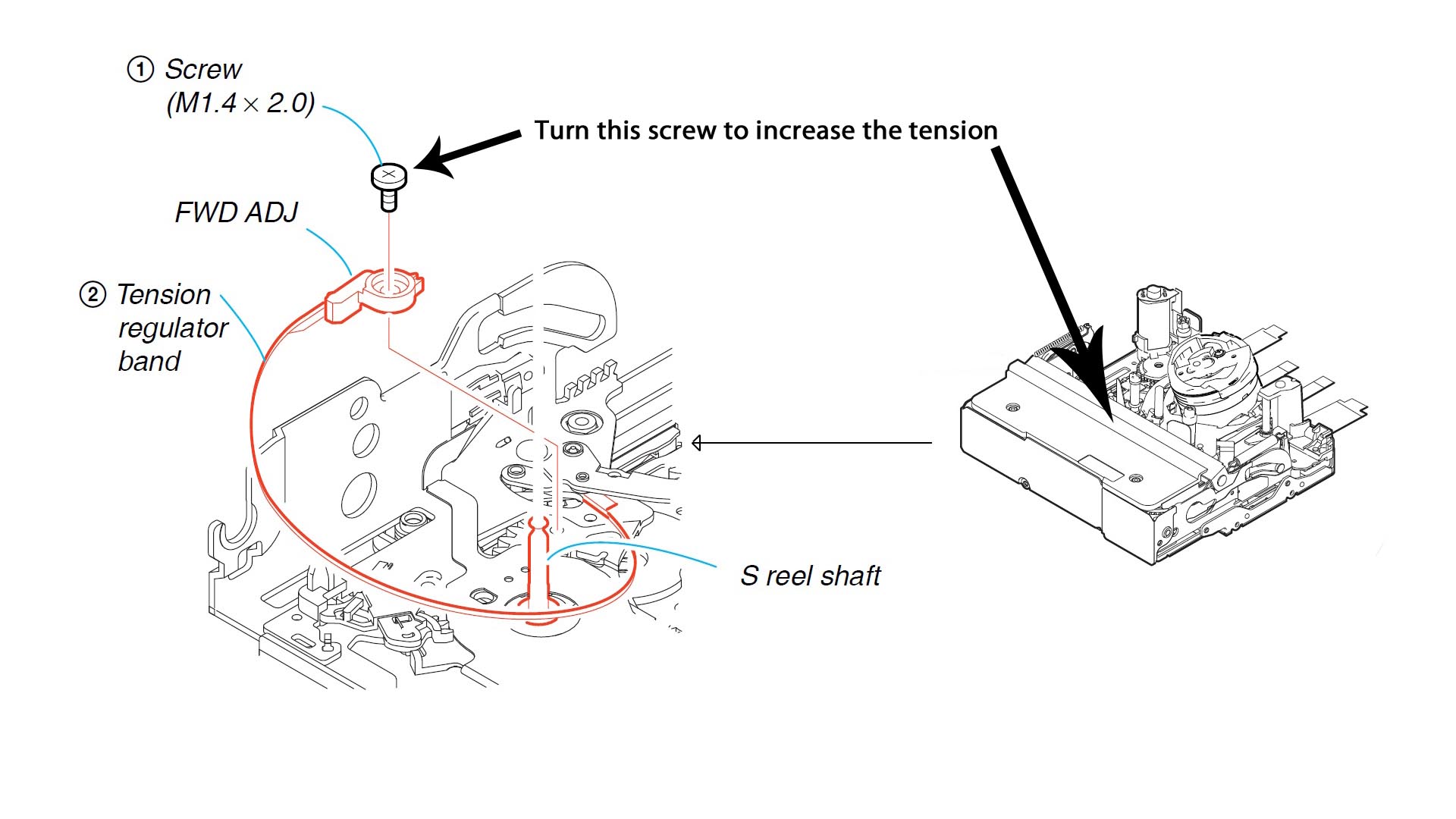
tensionregulator.jpg
Robert
Fri, 06 Nov 2009 13:41:52 +0000
I have a camcorder DCR-TRV355E. I bought it in 2003 with about 700$ from Asia. I can say a good camera but it is Sony. My experience with Sony is not so good so I was expected to some technology problems. In my past I had a cassette car player. With that one in less than one year there was time when the sound cuts, sometimes coming back without any shake or drop down. After trying a service to Sony, they recomanded my to buy another one because that one had a problem with microcontroler, and that service part could be more expansive than a new one. That's Sony.
About my camcorder, after 3-4 years of use a dead little pixel onto my sensor appeared as dead. That is almost in the middle of the screen. Zooming onto a face, or something in detail it appears disturbing the viewing. Same Sony shit. I continued to use it, trying no too much zoom. But last time, in the middle of the wedding, with unique moments, the error code appear C:31:30. In trying to get out the tape, the body part with the tape stopped to move to out at the middle. The battery was full. Unbelievable. Next moves was like, shaking, battery off, switch off than on again. Trying many times, the camera also was in trying to get out the tape. Finally I got out the tape after other shakes. I had other errors as C:32:30, and also C:30:22 beside C:30:23. This was first time with this stupid behavior. I let the camera off for about 20 min then trying again, it works. During all the wedding I had again 2-3 times some errors, I had good luck because one of my friend helped me with a backup camcorder, a smaller one.
The idea is, even if you shake or smack the camera, that not a good sign that you can use safety your camera for future. That's not a solution, and Sony has to give some explanation for their shit products. I hope in future to try to not buy any sony devices it there is something else better.
antonio1
Mon, 09 Nov 2009 16:32:18 +0000
cant believe it, but the smack worked... guess im qualified to fix electronics after all.
rick
Wed, 11 Nov 2009 14:31:27 +0000
My PC100 dv camera came up with the 31:22 error code and I read on here that I should just smack it relatively hard on the side. So I did. And it work!!! I think the gears were getting tired - hadn't used the camera for years.
Cheers
Jake Velvet
Wed, 11 Nov 2009 18:10:57 +0000
I just beat my camcorder and it now works how stupid!!!!
Jack
Tue, 17 Nov 2009 00:56:13 +0000
Ive had my DCR-TRV140 for seven years now. Never had any problems. A couple of weeks ago I started getting the 31:22 error code. I tried everything. BUt nothing helped. I was on line looking to by a new camera, but cutiosity got the bst of me and I decided to find out what the heck this code meant. I typed the code in and the first site that comes up is this forum! Wow!! I thought I was the only one!! lol I was ready to read msgs. saying all was lost and that I should just toss my camera. Then I read Debbies post and thought," yeah right...smack it and its fixed".Seriously.
But after a few mins of hesitation and since I didnt have anything to lose I tried. Did it twice...OMG!! IT works just like it did before the evil code!!! Debbie,four years later,youre still saving cameras!!! Thank you so much!!!
Daniel Vergara
Wed, 18 Nov 2009 01:11:28 +0000
I got solution myself comparing two same model cameras, and fix 4 out 5 of them with this problem, came to share my experience and even got the solution for the 5th (I had no more plastic lock for this), thanks guys...
Smacking could get a temporal solution, but can make another problems since this movement puts the roller in place but for a while. Check comments with photos attached and fix the roller trouble, it's easy. Look for a comment with a youtube link, this has a step by step video. Good luck
Yunior
Wed, 18 Nov 2009 11:40:14 +0000
ok i dont no wat kind of sony buut i had the same problem and i tried to join the wack a mole club and it turned the other direction now i have that problem and my thing were the tape goes in wont open FML!
dalton
Thu, 19 Nov 2009 00:14:19 +0000
It�s Incredible the solution of Debbie works, really amazing, my camera still work..
Thanks a lot.
Jack Bravo
Thu, 19 Nov 2009 20:59:52 +0000
The slapping trick work.. Very good info .. saved me couple of hundreds..
Todd
Fri, 20 Nov 2009 22:41:37 +0000
The solution of Debbie works !!
"This may seem silly, but it worked for me. I found this on another discussion forum. Try smacking the side of the camera relatively hard with the palm of your hand. Eject the tape and reinsert. You may need to do this a couple of times. Surprisingly it worked for me.. "
Thank you debby it works for me!!!!!!!!!!!!!
Stephane
Sun, 22 Nov 2009 11:17:11 +0000
I never use this acronym but OMG hitting it on the side really works.
mawkak
Mon, 23 Nov 2009 18:06:42 +0000
WOW! I freaked out - saw this code, after I had not used the camera for more than 6 months. WHACKED it openhanded twice (softly) and TADAA!!!! It works! SUPER! That saves me some stress... Now quickly transferring my tapes to the harddrive and ditch this old thing!
Jeroen Bots
Fri, 27 Nov 2009 02:43:02 +0000
Gracias por su ayuda pude solucionar problema c:31:30 y me ahorre $ 600.00 = $40 us dls.aprox.
Sergio Delgado L�pez
Fri, 27 Nov 2009 04:53:46 +0000
Sony TRV-18. Whacking side of unit worked. C:31:23 code and beeping. Thanks everyone.
Craneboy
Sat, 28 Nov 2009 16:42:09 +0000
Holy crap it worked. I was for an hour hitting it with my fingers. Then finally Hit the camcorder with the palm of my hand 3 to 5 times and it WORKED, i did it on the side of the LCD display closed with a casette inside and the battery out. Great, never thought it would work. I was getting the C:31:22 with my Sony Digital Handycam DCR-TRV 250 NTSC Digital 8. Who ever did this. THANK YOU. SMACK IT. I hope people with the same issue with the same camera can give this a try
Jorge
Sun, 29 Nov 2009 05:47:53 +0000
Would you Addam & Eve it, it worked for me . TVR20E C:31:23 code .Couple of increasinly heavy taps, I did also give it a good blow out with the tape out. Cheers eveyone. Have a cool yule.
Gary
Fri, 04 Dec 2009 22:58:28 +0000
I got the c 31:23 code, followed recommended steps (removing and replacing battery), tried different tapes, and nothing worked. Then I tried a solid smack on the side on the camcorder. PROBLEM SOLVED! Thanks everybody.
Russell
Sun, 06 Dec 2009 04:30:39 +0000
I came across this web site while looking for error codes for my Sony TRV720. Like everyone, I was having the C:32:XX error code coming up, which made the camera inoperable. In fact I was totally prepared to send it to the repair shop, which I know was $100 just to take it in to be checked out. After reading everyones comments, I made an attempt to fix it myself. Taking the advice of many of the anti-violence readers, I first attempted to use a Sony brand tape, that didn't work. Next, I un-plugged the camera, plugged it in, and hit the re-set, that also did not work. I used compressed air to blow out the dust, that didn't work.
Finally, even though it went against my grain (for many years I handled this camera like a baby) I held the camera secure in my hand, with the tape side down, and gave the camera one firm smack and saved myself $100 which I would have paid to service the camera. Needless to say, it is working fine. In fact, the noise it was making before the error codes appeared is also gone.
Larry
Tue, 08 Dec 2009 20:13:15 +0000
Strange thing here, same problem as a lot of the above posts, I tried a different tape stock and WaALA!
Not a problem since
brad
Tue, 08 Dec 2009 21:46:54 +0000
1) Had the C:31:23 error on my Sony Handycam HDV.
2) Whacked it.
3) Problem solved. I'll post back if it recurs. Thanks, Debbie!
peter
Wed, 09 Dec 2009 21:14:09 +0000
thank god got the code c:31 23 on by drc- trv145e give a smack or to fix it kids first play tomorrow
frank
Wed, 09 Dec 2009 21:37:31 +0000
I just had my boss come in with his sony handycam with the error code c:31:23. After after several attempts including resets, removing battery, etc. I took out the tape and lo and behold inside one of the reels was a piece of plastic tape. ...Removed the piece of tape that was hung on one of the reels and all is well again.
Martin
Thu, 10 Dec 2009 15:12:28 +0000
Amazing!
I had grey lines on my screen, bought new tapes then after reading this, whacked it a couple of times and hey presto, works perfectly!
Perhaps rubbing my the 5 year batteries in my remote control will give them new life.
Good old sony!
Gareth
Thu, 10 Dec 2009 16:02:05 +0000
Again I have a Wow... it worked. I have a TRV-750 (at least I think it's a 750) - I had the C:31:23 error and didn't know what to do. I took the battery out cleaned the contacts and smacked the unit and poofed ... it worked.
Bill
Fri, 11 Dec 2009 17:48:16 +0000
The whacking a couple of times worked! Wow, who woulda thought? This after 15-20 minutes of on-line technical support, which resulted in a referral for service.
Stacy
Sun, 13 Dec 2009 23:16:45 +0000
this post is from 2005, but it still works, today i fixed my SONY 115, it was one year with this fails, jajajaja its amazing how the google helps, debbie you have a lot of fans, regards, Joel. Monterey, Mexico.
Joel
Tue, 15 Dec 2009 17:50:24 +0000
You have got to be kidding me. My Sony DCR-TRV11 will play (VCR) and take digital images, but wouldn't turn on in the Video Recording mode.
After hours of powering up, removing the battery, charging batteries, doing online research, etc... nothing was working.
Then I read the posting's here and said "what the heck!" I gave it a polite bump on the side (not a whack) and we're back in business! I couldn't believe it. Thanks guys!
Sony Dad
Mon, 21 Dec 2009 03:10:36 +0000
Well done, Ahmid Jasim in Iraq! The roller had indeed fallen out as you described. Excellent pictures of your repair etc.Many thanks for posting this it has done the trick. My camera is the Sony DCR TRV25E.
Used long nosed pliers and gently replaced black roller onto the thin spindle as depicted in your picture sequence.That may well have saved me a small fortune. Obviously the C32.23 flashing has stopped and the camera is now fully operational again. This is a brilliant site for information of this type.
Steve, United Kingdom.
STEVE
Tue, 22 Dec 2009 14:06:36 +0000
Debbie, I'd like to give YOU a little love smack. After having a new camera in my shopping cart on Amazon all day ready to rush here in time for my baby's first Christmas, I made one last ditch effort search for a fix to this same "reinsert cassette" issue I'm having with my Sony DCR PC350. Works like a charm you little mistress of handheld electronics. Thanks so much, now I gotta go find all my other broken stuff and beat it senseless.
Special Greg
Wed, 23 Dec 2009 06:04:39 +0000
Hello Together,
Yesterday on Christmas I got this message with my Sony PC8E. Today I read this and it is amazing. It works. THANKS
Lutz, Germany
Fri, 25 Dec 2009 10:30:07 +0000
hi
pues tengo el mismo problema que todosss por lo que puedo ver tengo una handycam sony y me aparece el error c:3123 al insertar un cassette siempre sale el mismo bep bep cada vez q la enciendo que mal de la compa�ia de sony que no tenga la solucion para estre tipo de problemas he investigado como solucionarlo pero pues aqui solo me dicen que tengo que golpear mi camara loa he golpeado le quite la bateria y no funciona estoy desepcionadisima d mi camara :(
Diana Gonzalez
Sat, 26 Dec 2009 03:47:37 +0000
It is amazing. For last one year I was desparate to fix same problem of C:31:23. I was about to throw away my TVR 250E. My son advice me to look at net for any probable solution before throwing. Smacking did a miracle. THanks, thanks a lot Debbi.
Pradip Chanda
Sun, 27 Dec 2009 07:11:25 +0000
thanks I wanted to drop kick my DCR-TRV250 sony no help. wacked it few times then droped it on desk works great now thanks again.
mike
Sun, 27 Dec 2009 19:44:04 +0000
i had the same problem, and i just followed your advice and hit it once. and it worked heheh. thanks!
sarah
Mon, 28 Dec 2009 21:42:04 +0000
I have a TRV 138. Kept getting the dreaded C31:23 code. I took the advice and wacked it a couple of times. The second time it started working perfectly. Thanks all of you for the info.
Ron J
Mon, 28 Dec 2009 22:28:08 +0000
My God! I tried the "smack" fix on my TRV138 and it actually works! Is this what the Sony Tech does in the back room.
I love the internet -- thanks Debbie
Jim
Tue, 29 Dec 2009 18:26:46 +0000
I have a TRV22E, and had the C31:23 error. The complete solution for me was Ahmed Jasim's troubleshooting (Jan07 and Jun07) - indeed both the black rubber roller and white retainer pin were completely dislodged off the pole, and these 2 parts were lodged inside the tape mechanism somewhere: the black roller firmly stuck at the bottom corner of the tape deck , and the white retainer was running around loosely. I was lucky both parts were still inside the tape deck, and once i put them back in place they worked.
Just a note: i tried the smacking method in the beginning, and it worked a couple of times (i was transferring my tape collection to hard disk). but eventually the error just won't go away. I suspect all the smacking eventually dislodged the roller and retainer pin.
Good luck!
S.B. Koh
Wed, 30 Dec 2009 03:37:12 +0000
I just joined the smack it club and the camera works like a charm now! I had to hit it pretty hard and without the tape in it. I have the Sony Handycam Vision TRV318.
roger
Wed, 30 Dec 2009 23:37:21 +0000
I have the DCR-PC100. Holy God. Camera is easily ten years on the trot. Great camera been around the world and back and has had a good life.Just a few mins decided to check if it still works. turned it on and in middle of tape view battery died. powering it back up with charger it gave the bad bad message we all know as c31:23 or there abouts. after reading how to fix and not too bothered with smacking the thing i deicded to turn the cogs with my fingers witht the tape out. and guess what same result problem fixed. SO YOU DONT HAVE TO BEAT IT....unless your Michael Jackson RIP.
give it a go. Sony do make decent cameras.
Alan Joyce
Thu, 31 Dec 2009 16:15:32 +0000
Great!
Actually, in my case (I have a TRV140) the black rubber cylinder had just dropped out on the bottom of the cassette desk. I just put the cam upside down and shaked it to have the little item come out of the deck. Then just put it back on its place and now it all works fine!
Thank you so much!!!
Pierpaolo Caricato
Mon, 04 Jan 2010 17:56:02 +0000
Debbie - you are a genious!
I just smacked the ever living sh*t outta my trv250 sony camcorder and it now works!
Thanks for the information - even though it was posted over 4 years a go!
Kevin
Thu, 07 Jan 2010 20:54:57 +0000
people, the smack thing works, that should be in the user manual, i tried everything as many in this forum and it really works
Romel
Fri, 08 Jan 2010 17:43:42 +0000
FOR ANYONE WITH THE even more dreaded C:31:11 on a Sony HDR FX1: I noticed it occurred after I opened the transport door and as it was raising up the tape slot I clumsily pushed the door shut, very gently, but it was enough to confuse the internal trigger device at just the right time so as to disable the tape slot before it could open. Then the Error Message arrived. Technical Taps wouldn't solve the problem here. I imagined a trigger on at least one side of the transport the the outer door must be touching when it is nearly closed. Luckily, I was able to close the door enough to touch the trigger. However, if this happens to somebody and they can't close the door, I suspect once again that the wonderful toothpick will solve the problem. Examine the door workings and you should see some metal parts that want to touch a trigger inside. Do not push down on the transport. If this helps anyone please let me know.
RENGACORP
Sat, 09 Jan 2010 05:08:03 +0000
I just joined the smack it club and the camera (DCR-TRV50E) works again.
Thanks Debbie
Mathias
Sun, 10 Jan 2010 14:49:55 +0000
Thanks to everyone... I have a Sony DCR-TRV 240 and had the dreaded C:31:23 code.....after reading everyone's solutions and looking at their pictures, I had realized I had the black roller missing... That brought back a memory of removing a tape after mountain biking to digitize the footage, I had found a roller a couple of days later on the floor in my studio..... anyway it was the missing roller from my camera... I has used everyone's tricks and fixed it.
I really thank everyone for this site and the help...... AJ
AJ
Mon, 11 Jan 2010 08:47:40 +0000
Thanks to everyone... I have a Sony DCR-TRV 240 and had the dreaded C:31:23 code.....after reading everyone's solutions and looking at their pictures, I had realized I had the black roller missing... That brought back a memory of removing a tape after mountain biking to digitize the footage, I had found a roller a couple of days later on the floor in my studio..... anyway it was the missing roller from my camera... I has used everyone's tricks and fixed it.
I really thank everyone for this site and the help...... AJ
AJ
Mon, 11 Jan 2010 08:59:49 +0000
SONY TRV20, smacked it a couple of times and it works now.
Thanks
Mike Tilley of PDHSC INC.
Tue, 12 Jan 2010 15:14:11 +0000
Smacking the side of camera worked for me. Thank you for saving the cost of repair or buying a new camera.
I've had this camera for years, and this never happened before.
For the other user w/ lines on their screen. Take your tape out, and run a cleaning cassette for 10 - 20 seconds (check tape instructions for exact time). That clears it up for me every time.
On JVC cams, when cleaning didn't fix that, it meant the head needed repair, which was $150 or more (not worth it at that point).
My guess is it's still time for a new camera at this point, but at least I can salvage this tape to VHS for this purpose.
D
Thu, 14 Jan 2010 18:30:58 +0000
Service Manual for all camcorders (i have sony camcorder i have same problem but have solution)
this is real page for service manual i want to help to any 1
http://www.givemefile.net/
Blagojce
Sun, 17 Jan 2010 23:28:25 +0000
Smacking it on the side doesn't work until you get mad at when you smack it. It took about 50 or more smacks from one side to the other over an hour of time, but as soon as I got pissed off and smacked it it worked. Be Persistent. I swapped tapes, turned if on and off, recorded & played back without a problem. I just can't believe this worked. God do I feel good now! Hope it lasts.
Rod Soule
Sun, 17 Jan 2010 23:52:01 +0000
I am an experienced tech guy ..... from guitar amps to broadcast television gear, and it just goes to show you .... it's all the same. I whacked the VX2100 with my hand, a rubber hammer and even sent mental rays into the thing .... all the while remembering that the old Sony TR65 ( Hi 8 camcorder) exhibited a similar problem. After a half dozen open handed slaps in various directions (mostly on the under-side), I fired it up and WHAMMO! all is well. Who knows how long it will last, but this is a price point I can work with. Thanks to all you geeky types who infest the web with usefull and heartfelt information.....keep on keeping on ...... and THANKS to you all!
Gary Hampton
Tue, 19 Jan 2010 07:53:18 +0000
I am really grateful for the smacking suggestions posted here. I have a Sony DCR-TRV 103 that I had not used for about 2 years.
yep, you guessed it, when I turned it on and pressed the play button I got error code C31-23. After looking on this forum I gave it
a sharp smack with the palm of my hand and the error code went away and everything worked fine. Thanks for posting.
Kenneth Cates
Wed, 27 Jan 2010 05:32:38 +0000
I'm the newest member of the "Whack the camera" club; but fixed a different problem After not using my TRV 240 for a long time, today I tried and the cassette holder wouldn't retract.. Tried several different cassettes w/o luck then gave up. Tried the internet and got directed to here. Figgered I might as well try it 'cause I couldn't hurt it anymore. IT WORKED!! Cassettes now load and records.
Thanks everybody here.
Jack Thomas
Wed, 27 Jan 2010 22:05:34 +0000
I called Sony and asked about replacements kit for the roller(s) in my TRV25 (in my case both rollers are falling out).
They stated that they do not have repair parts but I can send it in for service (out of warrenty) for a small sum of $291 US !!! (For that I could buy a nice JVC or Canon. ;o)
I will pursue other avenues in Sony... but has anyone had any better luck?
-Beui
Beui
Mon, 01 Feb 2010 00:49:50 +0000
http://www.tekmg.com/Sony/Camcorder/DSRPD150-170.aspx
Here's a list of error codes for Sony camcorders.
Dave Rossi
Mon, 01 Feb 2010 18:51:13 +0000
I remedied the problem by removing the battery, unplugging the power cord, waiting several minutes and pressing the reset button. I then replaced the battery and power cord. The error code disappeared and the camera works. I like my Sony camcorder and I will be careful not to drop it again! Good Luck!
sally
Tue, 02 Feb 2010 00:12:33 +0000
The whacking of the camera has worked for us!!!thank you very much, we were just gonna buy a new one , and we read this posting...just saved us some $$$..thanks again...THIS REALLY WORKS
L peacock
Sun, 07 Feb 2010 03:09:33 +0000
You can add me to the list of satisfied browsers looking for the key to the C:31:23 mystery code. Slapping the side of the camera DOES work. I just got mine going again. I woudl also add that I tried to advance the tape manually and it seemed as though the tape may have been hung up a little since I hadn't played it in a while.
I know Sony woudl never recommend slapping the side of their camcorders, but this is a LEGITIMATE fix. Thanks everyone for the help.
Kevin
Sun, 07 Feb 2010 21:46:10 +0000
In Regards to the dreaded D31:23 error.
DO NOT SMACK YOUR SONY CAMERA!!!! It might deserve it for giving you the error but this will not solve the problem in the long run. This error relates to the velocity of the spindle and is probably there to stop the tape fouling in the mechanism. Most of the time the problem is mechanical and can usually be fixed by this method.
1. Open the tape door
2. Remove tape
3. Look at the white spindle on your right as you look in at the transport mechanism.
4. Directly underneath the spindle you will see an odd shaped silver plate.
5. Through the small niche in the silver plate you can see a nylon triangle shaped part
6. On a TVR series the fouling is usually here. I imaging it is the same for models using a similar transport.
7. Lift up the silver plate GENTLY with tweezers so it clears the nylon part. Only a SMALL amount of distortion of the plate is needed.
8. If your camera is under warranty DO NOT TRY THIS.
9. If you get to the stage it is going to cost you $$$ then give it a try. It usually works.
10 I will post a .jpg if there is interest in this post.
Dave the tech.
Tue, 09 Feb 2010 06:54:56 +0000
So yeah, thought I'd add to the C31:42 code error forum and proclaim I'm a believer... I've a HC42e. I didn't have to smack it too hard to get it working.
Rachel
Sat, 13 Feb 2010 06:26:31 +0000
WOW! My problem was somewhat different than most of these posts - With mine, the tape load mechanism would not pull the tape into the unit. Originally, it had said to reinsert the tape (I can't remember if I ever got the C:31 error message). After ejecting the tape, it would not pull it back in. Tried several tapes, to no avail. set it aside for several weeks, picked it up again today, and it pulled the tape in once. I captured that tape into my PC, ejected and loaded another tape - wouldn't pull it in. Tried 2 or 3 times, and it finally did. Captured that tape to the PC, ejected, tried a 3rd tape, wouldn't pull it in - fiddled around with it for about 30 minutes, trying various positions, jiggling the door and tape mechanism, tried the power cord/battery "fix" to no avail, tried "Dave The Tech"s tweezer trick, no dice, finally tried the "whack-on-the-side" trick, and voila! pulled the tape right in. Ejected and tried again, pulled it in first time. I didn't whack it really very hard, not as hard as I thought I'd have had to. BTW,I don't know if it makes any difference, but I whacked it on the LCD viewer side (with the viewer closed!) Obviously, I couldn't whack the tape compartment side, since it was open.
I'll try to come back here with an update after a half-dozen or more tapes, to let y'all know if the fix holds. I've got a bunch of tapes to capture and burn to DVD while this thing is still working.
BTW, I checked on eBay, and these things are going for $300+. Don't know about other Digital-8 camcorders, but I bet people are scrambling to get a working machine to read in and convert all their old 8mm tapes - I know I am!
Robert M.
Sun, 14 Feb 2010 04:32:04 +0000
THE WACKING METHOD RELEASES A STUCK/JAMMED GEAR. INSTEAD OF WACKING IT, OPEN THE DOOR AND TURN THE GEARS USING YOUR FINGER AND IT WILL RELEASE,
DAVID SF47
Mon, 15 Feb 2010 02:01:34 +0000
Smacking worked. Hurray ! Checked SONY website. No mention of error or solution.
Looking at the number or people with the same problem, one would think SONY would have the courtesy to write the solution of the gear fixing on their website. Maybe a legal notice would help change their habits
BGP
Sat, 20 Feb 2010 01:42:02 +0000
Whack it! whack it! whack it!
BRILIANT! Thank you
Martin
Sat, 20 Feb 2010 12:17:05 +0000
I had a PCR-115,got same error..first whacked it nothing happend..then removed the tape and whacked it real hard. I was mentally prepared for next flip type camcorder.
wow it worked.
Chandra sekhar
Sat, 20 Feb 2010 21:12:15 +0000
great it also works for trv-318 thanks
siddique
Tue, 23 Feb 2010 15:33:03 +0000
It really works, a few open handed slaps and you will be back in business. I have a HDR HC-1 and it is worth $1000.00 at the time of purchase. So do not be afraid and whack the crap out of it, I did!!
jr1819
Sun, 28 Feb 2010 17:40:05 +0000
I just smacked it around, sony 250, and now it workes!!!!
almost threw it away....
Jeff
Mon, 01 Mar 2010 15:29:58 +0000
After half a century, people are still praising Debby :P
But shit, smacking the camera works.
Albert Dominguez
Wed, 03 Mar 2010 04:59:17 +0000
I SMACKED MY VX2000 AND IT WORKED. THANK YOU SO MUCH.
dan
Fri, 05 Mar 2010 22:14:11 +0000
Wow, how funny is this... my error was C:31:42 then smacked it on the tape side 2 times and it worked! You have nothing to lose just give it a try (BTW i'm using TRV230)
Mike
Sun, 07 Mar 2010 21:11:56 +0000
Well, does the smacking club gives away member club tickets? im in! :)))
thanx a lot! "hit the camera worked" the smacking was on the metal part which comes out with the tape, not too hard smack not to light :))
again thanx a lot!
My camera is the dcr-trv40e
Edy
Tue, 09 Mar 2010 10:38:17 +0000
A whack worked for me! Many thanks
Stiltskin
Thu, 11 Mar 2010 18:04:21 +0000
What can I say, works in England too. Not used the camera for a long time, few hard smacks and there she goes!!
Debbie is a genius!!
Roger Smith
Fri, 19 Mar 2010 23:44:48 +0000
Can't believe it. Got this cam used from my pa, to chronicle my baby's adventures. 18 months in the C:31:23 error caused me to shelf recording. Now, 18 months later, thinking of throwing the TRV350 in the recycle bin, decided to give google another go.
I read Debbie's 2005 suggestion and laughed at how ludicrous it sounded....until the next 1100 people said it worked.
I left the tape in and kept the door shut to prevent little black rollers from popping out, and gave it a camera friendly palm smack on the left, then the right, then the bottom just to make sure. Holy good crap...it WORKED! No lie.
Steve O
Wed, 31 Mar 2010 03:42:08 +0000
I just found this page from google search, slap seemed very sorry but my camera is almost 10 years old, so I gave it a try.
I WORKED!
Thank you guys!
B.S.
Fri, 02 Apr 2010 14:34:43 +0000
Smacking it did nothing for me in regards to the C:31:22 error message with a Sony HDR-HC3 handycam. Instead of sending it back to Sony to repair for $500; I stumbled on Dave the Tech's solution on Feb 09,2010 listed above. I took a small pair of pliers and gently pulled the two silver plates that the tape rests against on the bottom slightly out to the side. It worked!
James
Sat, 03 Apr 2010 14:52:02 +0000
The wacking was alot of fun and it worked!!! Thanks Debbie lol...I was about to give up and buy a new camcorder
Shantel
Sun, 04 Apr 2010 22:46:29 +0000
OOOOOOOOOOOOOOOOOOOOOOOOOOOOOOOOOOOHHHHHHHHHHH
WOW
I HAVE A HC32E WITH THIS PROBLEM.
AND IT'S WORK.
THANK'S ALOT.
SHLOMIS1Z
Sat, 10 Apr 2010 12:31:36 +0000
My mum has a Sony Handycam 355 (or 356 - can't remember) with a C 31:22 error that wouldn't let her playback or record. She was ready to give up on it - or fork out $$$ on a repair. I search the web, found Debbie's somewhat unusual advice of whacking it and I told my Mum to 'slap it better'. She wouldn't saying, "I'm not risking breaking the machine." I said, "Just give it a firm tap on both sides and the bottom for good measure. Trust me - it won't break - all of these people on the web can't be wrong." And they weren't - fixed it straight away :-) AWESOME!!! If only Debbie was getting a $1 for every person she's helped! Not sure where you've from Debbie but this works in Australia for the other Aussies reading this.
Lil Kel
Tue, 13 Apr 2010 01:55:51 +0000
Whauw, smash/hit, great solution - also for my PC101 video camera!
For the engeneers of Sony: ADD THIS ERRORCODE AND SOLUTION TO THE MANUALS!
My thanks to all the contributors!
Willy L
Tue, 13 Apr 2010 09:29:20 +0000
As the error message appears when I`ve tried to record my wife and my dog, I wacked the cam, my wife and also the dog. The dog is hidden now, also my wife, but the camera is working good now. Thank you.
Can I do it every day for prevent message error ?
Thank you again, I`ve enjoyed it.
Mike Tyson
Tue, 13 Apr 2010 16:40:39 +0000
I`ve tried on a SONY TRV 530 and it worked fine for me. Thank you. I love to wack the camera.
Mike Tyson
Tue, 13 Apr 2010 16:43:07 +0000
WOW five years after the first post took, my broke trv230 out of its hiding place gave it a wack and it worked. its a strange world
steve
Fri, 16 Apr 2010 06:58:41 +0000
Sony digital handycam Error code 31:23 Thank you internet, thank you fellow users, f*** y** Sony, I slapped the camera on both sides and it did work perfectly
andres carlos
Sat, 17 Apr 2010 18:02:00 +0000
Yo! Debbie you have the answer! I was getting this problem code too. (for several months intermittently, and now permanently). I gave it a strong debbie-smack-down, and presto, it is working. (and a small, white roller piece of plastic fell out... dunno if perhaps I smacked a bit hard... @@)
Cheers from New Zealand
Dave Clark
Dave Clark
Fri, 23 Apr 2010 19:40:48 +0000
TWO FIRM SLAPS DID THE TRICK FOR ME. fANTASTIC
JOSEPH
Mon, 26 Apr 2010 09:33:18 +0000
het werkt echt, zowel mijn DCR PC 120 als de DCR PC 6E van mijn vriendin hadden beiden dezelfde foutmelding
klap erop en hij doet het weer
af en toe komt de fout weer terug, even het bandje eruit klap erop en klaar is kees hhaha
dit is geen grap, maar echt waar!
marion
Wed, 28 Apr 2010 12:02:04 +0000
My thanks to Debbie for looking on that Sony forum back in 2005!
I have a Sony DCR-TRV245E that 10 months ago developed this same fault, just after my little son was born, which was really frustrating as i haven't been able to film hardly any of him growing up.
Only recently I have become the owner of a computer (been living in the dark ages until now!) and I am still trying to find my way around the system.
For the last couple of nights I have been looking on numerous Sony forums and have decided (albeit very risky!), before deciding to try the smack a camera approach!
After 4 or 5 light (ish!) smacks the error message appears to have gone and the camera is working just fine!!!!!!!!!
Many thanks Debbie, much appreciated!
Nick.
Nick Weeks
Wed, 28 Apr 2010 21:55:43 +0000
Im a technician working inan electronic service company in Romania, and one of these days someone bring a Sony CCD TRV418E cam wich had the following trouble:
play for 10 to 15 sec sharp time or fast forwarding or rewinding same..(10 to 15 sec) after that stopped and displayed "c:31:23"..after many kind of investigation..i have to say that this method of slaping worked just fine..thanks Debbie..
My question is what is happening to Sony products ?? lower quality at higher price...
technician
Thu, 29 Apr 2010 12:01:15 +0000
I follow the directions given by Ahmed Jasim to solve the issue with c31:32 error.. I used a tweezer to put back on the black ruber "cilinder" and the white plastic lock..
sample link here :
http://www.camerahacker.com/Forums/Video%20Camera/Sony/Sony_ . . .
along with this photo sample that posted on :
Ahmed Jasim
Wed, 06 Jun 2007 10:27:52 -0700
Thanks a lot to Debbie and Ahmed Jasim
Beto
Fri, 30 Apr 2010 10:26:33 +0000
I had a DCR-TRV140 and this started happening. The whacking worked for awhile. Then it stopped working. I gave up on it and bought a used DCR-TRV140 from ebay to finish archivng my hi8s to DVD. This worked for a while then I got this error again. So I started whacking it tonight and it did not help. But I noticed a small rattling sound when I was whacking it. I opened it up and shook it and out came the little black rubber bushing that a few people have mentioned above. I used some pliers to stick it back into the middle spindle that looks like it would fit. The others don't look like it will fit. It goes on but doesn't snap in place or anything. It could easily slip back off. But now it seems to be working again. Isn't there something weird about such a complicated mechanism that when you shake it a little bushing comes out and slips back on and makes the whole thing work again? And why do these same problems come up over and over again on all these generations of camcorders? Shouldn't they have fixed these problems in subsequent models? Geesh!
So check to see if there are any loose pieces that have come off before whacking.
SWANG
Sat, 08 May 2010 06:51:59 +0000
Hi!
I have the TRV11E, and since a few weeks i have the error code 32:11 and 32:23 and 31:23 (yes...really). Now i have found this very old thread and must say : THANK YOU DEBBIE.
i don't want to buy a new one, cause the TRV11 is very fine and i thought it was now already broken. But Debbie rescued it :-)
Greetings to all :-)
Stefan
Sat, 15 May 2010 15:39:48 +0000
I have a Sony DRC-TRV480 that began having the C:31:23 "Reinsert tape" error. It would occur when attempting to play or record. I removed the battery, pressed reset button, and tried different tapes with no relief. I found the "whack" solution and gave it, well, a whack. Voila! The error is gone, at least for now. Thanks for recommending and confirming this fix. It worked on my unit.
Doug
Wed, 26 May 2010 06:08:43 +0000
hard to believe a 13 yr old camera, older then my marriage can be fixed with a few whacks upside it. wish all of lifes problems were that easy to fix...
christine
Thu, 27 May 2010 23:53:22 +0000
Incredible, even after 5 years people (like me) find use in this old thread. I have a 270E with the cassette reinsert problem. Whacking it 3 times fixed the problem for me too... THANK YOU DeBBIE
Hugo
Hugo
Sun, 06 Jun 2010 11:16:42 +0000
I just slam the tape side of the camera and it worked! Thanks
Carlos Rojas
Tue, 08 Jun 2010 15:36:04 +0000
i have a vx2000 and i tryed wacking it and this stupid peice of crap wont work i hate my life and im not spending money to repair it so im off to kill my self
jesse
Sat, 12 Jun 2010 05:59:43 +0000
My DCR--HC42 kept giving Error code 31:42 regardless of whether there was a Sony or TDK tape. Whacked it twice on the tape side, now it works fine!
Domhnall
Sun, 13 Jun 2010 02:01:23 +0000
Hi All
I have a Sony HRD-SR1 which suddenly stopped focusing, both auto and manual, and throwing a C:32:60 error.
I tried the 'nice' approach to fixing this from a post about a DCR DVD505 Error C:32:60 here:
http://www.agoraquest.com/viewtopic.php?topic=36825&forum=31
But the lens cover removal instructions did not work for my SR1.
SO I found this blog and tried Debbie's 'Whack a Cam' solution - and it worked 100% first time :o)
Thank you Debbie - and don't forget all you folk out there "The old fixes are still the best fixes" :o)
Cheers - Stuart
Stuart Mail
Tue, 15 Jun 2010 19:22:14 +0000
Well I got the dcr-trv240 model. dang c:31:23 blinking crap. I whacked off first and the cam still doesnt work. so i tried to whack the CAMCORDER instead and I have hit this thing tape side all over to no avail. Heck, I need to upgrade anyway. Some type that reords to memory. Ive had this old thing since 2003 (wedding gift). Now the thing is transferring the 100's of hi8 tape to dvd or pc. grrrrrr. :)
RJ
Thu, 17 Jun 2010 22:44:53 +0000
1st slam didn't work
2nd slam didn't work
3th slam with brute force realy worked!!!
Amazing!!!!!
Thanks
Richi
Fri, 18 Jun 2010 19:25:40 +0000
Add me to the Wack a Mole solution. I have a Sony Digital 8 and I get the C31:23 from time to time.
Power it down - wack it on the side - up and running again - weird.
Followthebits
followthebits
Sat, 19 Jun 2010 22:34:26 +0000
You can add me to the smack the camera club as well! Unbelievable!!!
Derrell Stanfield
Sun, 27 Jun 2010 06:42:05 +0000
Smack the Camera who Knew thanks for that it worked?
Andre
Wed, 30 Jun 2010 19:23:09 +0000
Ha ha it works! c31:23 message. Camera house quoted $300 to 'retension the transport reels'. What a load of s#*t!
Gave it a good whack like I meant it...voila! Fixed! Online forums are great! Thanks Deb.
Baz
Fri, 02 Jul 2010 05:28:42 +0000
I own a SONY DCR-TRV19 and just got the error C:31:23 and C:31:22 mentioned here. I was looking forward to my problem getting fixed by the Whack-A-Camcorder club but to no avail. I don't see a rubber roller pictured here so I'm out of luck I guess.
Its a 10 yr old camcorder, guess its time to turn it in.
Manny
Mon, 12 Jul 2010 06:00:50 +0000
My TRV 250 is 7 years old. I just started getting the 31:23 error. I followed the manual suggestions (worthless!) I arrived here and whacked it pretty good a few times on the side and it works again. Maybe Toyota should try kicking the tires on their recalled vehicles.
Member of the Whack Crew
Fri, 16 Jul 2010 20:22:21 +0000
I too SMACKED it with the palm of my hand and the problem went away!!!!!! HA HA, my dad and I were laughing so hard to see that it actually worked, thanks Debbie!
Cherie
Sat, 17 Jul 2010 19:21:54 +0000
Hola caballeros soy tecnico electronico me trajeron una filmadora sony tvr 250 con el famoso codigo 31:23, lo puse a limpiar secar y demas el mecanismo, lo tengo 2 meses y nada, no se como entre a este bueno y positivo sitio, hice de los golpe y nada, saque el casette y por ese lado abierto le di unas nalgadas,osea golpes sueves medios y se arreglo, vino el milagro, realmente me quede sorprendido, gracias Debbie que creo que lo propuso, gracias y realmente me funciona bien no se cual es la explicacion tencica pero se va bien, gracias.
Miguel Alejandro Martinez
Sun, 18 Jul 2010 00:52:51 +0000
It took a few rounds of smacking, but I got my PC 101 to work!!
Thanks Deb!!
Pelle
Mon, 02 Aug 2010 20:23:51 +0000
Wow today after a long time, your suggestion worked for me to. Thanks a lot Debbie, you are great........
Gustavo
Wed, 04 Aug 2010 17:41:57 +0000
de tener 4 videocamaras sony serie trv's guardadas en el armario "pendiente de reparar" me topé con este post web y wallaa ya funcionan las 4 despues de 4 rounds de madrasotes en los lados del cuerpo de cada artefacto y ahora ninguno de los 4 clientes quiere recoger su chingada camara, asi que decid� regalarselas a 4 parejas de recien casados para que se filmaran mientras platicaban conociendose uno al otro ya sea por la ma�ana o de preferencia de noche y que al saturar los videocassettes me lois mandaran por y es asi como aparte de arreglar aparatos ahora produsco videos de recien casados amateur, muy instructivos por cierto los videos, gracias a debbie por su tip, en hora buena 1000 gracias.
TECNICO DESECHABLE
Mon, 09 Aug 2010 09:20:20 +0000
Back in February 2008 I posted an entry regarding the usual tape take up problem with my Sony camcorder. Not wanting to throw good money after bad I tried the "abuse" cure, which was only a temporary fix. Bought a fully solid state Toshiba HD camcorder, but this has no viewfinder, dreadful autofocus and no useful features, plus the LCD screen is unusable in bright sunlight, so is of limited use. Resurrected the Sony for a recent vacation, knowing the limitations and probable length of available tape recording before the "problem" rears its ugly head. Now the LCD screen is blank, although the touchscreen function works, so you have to use the braille method to replay the tapes. I believe a camcorder should work for more than 2 years without a major fault and at least 5 years before it's rendered completely useless by a terminal failure, for goodness sake I have a 1975 colour TV (National Panasonic) which still works! I know I'm preaching to the converted as to the pathetic quality of Sony camcorders if you're on this website, but I urge you to go on consumer review sites to pillory Sony for their lacklustre products and cynical disregard for their customers. Above all DO NOT BUY ANYTHING SONY AGAIN!!!!!
PS I've just bought a secondhand Panasonic camcorder to try to retrieve my tapes - I'll let you know if it's any better, it couldn't be much worse!
Steve Sharpe
Thu, 12 Aug 2010 19:21:39 +0000
the smack fix worked for me. try it. whats the alternative? the sony fix will cost nearly as much as a new camcorder anyway.
ross Koller
Fri, 13 Aug 2010 22:50:17 +0000
worked with a different tape, seems to be from a bad tape that was jammed, I took the footage and put it in a new shell. It would rewind after that.
P
duce
Sun, 22 Aug 2010 19:50:44 +0000
Several hits on every side of my HC7 made the tape move again, hope it keeps goning.
Tanks for this valuable infomation.
Norbert Muck
Mon, 23 Aug 2010 13:42:31 +0000
I thought this is a fool's joke. But it works. My dad's camera is Sony DCR-HC42. I thought it was due to the moisture since he used it in a rainy day. I followed the instruction from the manual to dry for one day and night, the error is still there. Finally I smacked it. Surprisingly, it works. Now I know it is not a joke.
Did not believe
Tue, 24 Aug 2010 01:45:17 +0000
I found that a combination of putting in a new tape and an occasional smack seems to work for me. I've also found that mine prefers Sony tape. For whatever reason I just seem to have a lot more problems with non-Sony, but now that Costco sells Sony it's not a problem.
Clarkl23
Wed, 15 Sep 2010 13:43:41 +0000
Listent to Dave The Tech before you bitch-slap your electronics. The latter may be satisfying but really, it's a credit to Sony that you aren't knocking your cameras out of alignment. (Other than that they deserve nothing but great mounds of steaming contempt for their refusal to acknowledge the design fault.)
Anyone who's played around with a reel-to-reel tape recorder knows exactly what a "supply reel emergency" is. It means the supply spindle isn't turning. Several things could cause this.
1) The tape isn't moving. That's what's happening to all of you whose pinch roller is riding its way off the spindle. The smack probably temporarily jars it back into position, but the "surgery" of earlier posts is the best bet. Get that roller back in place and keep it there! Other things, like a dirty capstan or pinch roller, or dirt anywhere else in the tape path, could cause this too - cleanliness is next to godliness. Finally, the loading mechanism itself could just be buggered, such that the tape is not getting strung around the right way, and so it will hang up on something. You folks in the last situation should pack it in; a loader gone bad has probably destroyed itself.
2) The supply reel is stuck. Sony went to some lengths to insure that the tape remains under tension at all times, including a ratchet or dog that locks down the supply reel when it's not supposed to move. It appears that sometimes this mechanism gets stuck and doesn't unlock even when the supply reel is supposed to turn. The smack jars it loose, but the less-violent approach of simply turning the supply spindle a bit will do it too. This is what I did to my TRV138. (My pinch roller was fine and the transport was sparkling clean.) Note: I can't tell the difference between a jammed ratchet and a working one - in BOTH cases, when the cassette's out, the supply spindle is locked, and forcing it frees it exactly the same way. But it's still the secret for this type of failure, because forcing it clears the problem. If mine fails again, I'll take it apart and try to figure out exactly what is fouling the ratchet. There's also a tensioner, a friction band, which if too tight will obviously stop things. There's a drawing of this in an earlier post, but I don't have anything to contribute.
HTH,
Dave Wise
Dave Wise
Fri, 24 Sep 2010 17:36:17 +0000
I have a 12 year old DCR-TRV10E which was in storage for last 5 years. It showed the infamous C:31:23 error message and the smack worked. Wonders of the internet !!!
Anand Patil
Sat, 02 Oct 2010 17:47:40 +0000
I have a DSR PD 150. I got the error code from a Panasonic cassette. I pulled the power for 1 minute, replaced the Panasonic with a Sony DVCAM cassette (Error code disappeared) Then loaded the Panasonic again (it had the footage I was looking for) and it worked fine. No wacking!
Jim Westberry
Mon, 04 Oct 2010 22:31:26 +0000
MY DCR-TRV350 Wouldn't let me play eject etc. 31:30 error got a little rough with the camera and now it works
Thanks
DAN
Sat, 16 Oct 2010 10:58:51 +0000
My camera hasn't worked all summer and got this error message. I just now read the comment about smacking the camera 3 or 4 times on the side where the tape is and I took the ejected the tape and put it back in and low and behold it WORKED !!!! I am so excited because I had a tape in there with my little grandson and could not get it out or view it on the camera. I smacked the sucker pretty hard too because I had nothing to lose. Thank you so much whoever posted that. You saved the day!
Nancy
Mon, 18 Oct 2010 16:02:47 +0000
well done debbie from 2005.....it worked for me too......hahahahahah
Francois
Sun, 24 Oct 2010 07:40:38 +0000
Thanks from a smacking camera guy from the Netherlands.
It worked right away
Toine
Sun, 24 Oct 2010 14:24:28 +0000
if u really want to fix it than when you insert the casset than smack it on the side a couple of time HARD and insshallah it will work dont worry i have tried it and it worked
murtaza
Tue, 09 Nov 2010 16:01:03 +0000
Hi there, i have this problem with my dcr-trv350 just the same as above... with a tape on it it flashes the cr:31:23 inmediatly.... dont know what to do... i tought it was a tape problem... but i tried with others one's and is the same issue... help plz HELP!
Chuck
Thu, 11 Nov 2010 09:45:16 +0000
Wow! I gave it one very timid smack, and I can't believe it, it worked like a charm. Thanks guys.
Ben Boden
Mon, 15 Nov 2010 21:00:41 +0000
la neta que a mi también me paso y lo he intentando con golpes y en ocasiones jala soy un miembro m�s de los golpeadores de sony, esperomos y alg�n d�a soluciones ese problema o es parte de la estrategia de sony para que compremos equipos nuevos...
Denis Galaviz
Wed, 17 Nov 2010 18:29:07 +0000
Just knocked my Handycam DCR-HC21 into next week and voila . . . it works (at least for now).
stephan.s30
Fri, 26 Nov 2010 02:28:57 +0000
Hi i have sony Hi8 camera and having this error and i switched off the camcorder and removed the battery when i fixed again after 1 minute i was free from that problem
Ch Irfan Ahmad
Sat, 27 Nov 2010 05:44:15 +0000
Smacking gently did the trick. I am no longer seeing C:31:23 error message. I am now able to playback and record this. Thanks a ton for the suggestion.
Srikanth
srikdfreak
Sun, 28 Nov 2010 14:38:17 +0000
My DCR-HC21 stopped working, displaying C:31:23 while playing prerecorded tapes (transferring to DVD). One tape had given a little trouble just before the camera began not accepting any cassetts. It seems to bind as the tape is pulled in, then stops giving error message. I borrowed my daughters DCR-HC26 to finish transferring movies but when I inserted the suspect cassett it did saomething to the Camera so now I have two cameras that don't work. Hitting didn't help either. Sony doesn't want to listen to my concern that it was their tape that damaged both cameras.
Gary
Mon, 29 Nov 2010 13:20:21 +0000
Gary,
Check earlier posts, 2 persons posted pics on how to check the roller. This is the problem is almost all the mentioned cases. Try to open the tape door, turn the camera upside down and shake. The roller should fall out, if it is not already lost. Follow the instructions earlier on how to reattach.
After all these years, still the same problem!
Do I hear class action?
MyTrueTech
Fri, 03 Dec 2010 18:27:28 +0000
I just had to add that the slap method did work! I've had my Sony DCR-TRV330 for about 10 years and this is the first time I've had an issue. Having been 10 years and I went to use it a little over a month ago, I got the C:31:23 error, and was so super sad but was almost expecting this day to come. Yet, I'm about to have a new baby and having nearly no money whatsoever I knew there was no way to afford a new camera. I had such a hoot reading all the comments on here. I did the tech guy Dave's fix but I think the models are different since I couldn't figure out what he was talking about in his decription. So I went for the slap method. I tried 2 slaps with the tape in, but that didn't work. Then I tried 3 slaps on opposite sides with the tape out. That didn't work. Then I tried about five slaps all over the thing... and then it worked. I'm a happy happy woman!
Leah
Fri, 03 Dec 2010 22:49:03 +0000
Derby I lup You Pul !!! I smack my DCR-TRV285E and it work again. Thanks for this forum...
MAhendra
Sat, 04 Dec 2010 15:40:05 +0000
Muchas gracias Debbie esta solucion me ha servido muchisimo
Fernely
Fri, 10 Dec 2010 16:10:25 +0000
Wow---i had this problem-nothing worked until i actually smacked it on the side a few times-ejected the tape-reinserted the tape--it now records with no problems
awesome-
darren weidlein
Wed, 15 Dec 2010 22:38:10 +0000
The advice still works! I tried several times cycling through opening and closing the door, trying, usually unsuccessfully, to eject the cassette, and attaching and detaching the battery.
Finally, I disconnected the battery for a few minutes. Gave the handycam a few gentle whacks on the top, attached the battery, and closed the cassette door. I could only smile when the cassette loaded properly, the error message went away, and the tape played back fine.
(I'm using a severely obsolescent D8 DCR-TRV280 that we bought years ago, but still works.)
Joe
Fri, 17 Dec 2010 23:19:18 +0000
DCR-TRV250. I put another brand of tape in it and it gave me the C:31:23 error code and refused to work. i followed the manual instructions ejected, removed battery tried power supply etc. nothing worked until... I read this thread about smacking it... I am an electronics tech and know that it is not a good thing to smack electronics items, but I have also worked on some very old computers with relays and film processing equipment with gears, so I gave it a try... I slapped in the middle of the right then left side of my camera twice with force which was just under what would cause a tingle of pain if you slapped your own arm, i.e. not much. I figured I could increase the force if nothing happened the first time. To my delight it worked!!! I believe there had to be a stuck gear or lever binding. There are so many points in these that require lubrication and have such tight tolerances that taking one apart and finding the binding was not something I was looking forward too. It didn't take much force so I wouldn't hesitate to try it if yours gives you the same error code.
ZorroXtreme20101218
Sat, 18 Dec 2010 06:34:51 +0000
Just got the error C31-23 on my old PC-5, and after smacking it a few times, and it works again. Thanks for the advice. Though this is a unique problem, but the camera has lasted me many years, and that speaks of the quality of Sony product. :)
Anyway, I would like to thank Debbie for her advice. CHeers!
Ang
Sun, 19 Dec 2010 15:35:08 +0000
I have the Sony TRV250 also n 2 years ago i got the C32 error code also i was at a friends college graduation n got so mad i smaked the heck outta of it n it worked just like Debbie did, before i ever read this thread!! Christmas of 2009 it did it again but my husband would not let me smack it...so itx sat in the closet for the last yr.. Well i just pulled it out n once again..received the message!!! So i decided to get on here n see if i could find out the problem.. i see its am S Reel problem... but since hubby is sleeping. i gave it about 10 smacks n now itz working again!! I'll tell him n the morning i have the majic touch!!!
Terrie
Tue, 21 Dec 2010 05:41:47 +0000
Well I know these posts are old but I just tried smacking my camera that showed the same error code as everyone else and I hit the side of the camera twice and low and behold it worked, lmao this camera was not working since last year and now that I hit it it works again, I'm happy thanks for the posts everyone.
Amanda
Tue, 21 Dec 2010 17:56:01 +0000
After using my Sony Camcorder TRV 480 for a few years without any problems I started getting this error code over the past few days. Needless to say I dreaded sending this away for repair. Then I read the previous comments and I must admit I was very hesitant to start whacking the camcorder. But after 3 whacks the error message went away and the camcorder is working perfectly now. We all owe Deb a big THANK YOU for her suggestion and she has saved all of us hundreds of dollars in repair costs. HEY DEB, THANK YOU!!! Gary D.
Gary D
Thu, 23 Dec 2010 07:03:02 +0000
thanks Debbie the smacking worked on my sony DCR-TRV245E you've saved my christmas
ese
Fri, 24 Dec 2010 17:51:05 +0000
Hey Everyone. I have a Sony HDR-FX1 got froze in the car during the day. Of course as soon as I took it inside of a warm room I was hit by the code C:21:00. I wasn't reading my tapes and when I tried a footage for a film I'm shooting it got stuck in the tray middway and closed. I couldn't remove the tape. I smacked it so many times, I warmed it up and nothing solved it. About to spend $100's of dollars fixing it, and it was very simple. I'm happy that many smack they're camera and worked, but for those it didn't don't worry. Try resetting to factory standards. You can always reset everything the way you had it. You'll need a very sharp pen or needle to put down that button. The camera resets, erase the Moisture code and restarts the tape tray. I saved my film footage and camera works fine. Sony cameras are great products. This doesn't happened to them only. I threw away a mini JVC camcorder with the same problem. I probably would have had reset it the same way.
See your manuel of Instructions to find your RESET button. On the HDV-FX1 is right beside the control panel on the upper left corner.
Hope this hint was helpful to some.
Jorge Silva
Sat, 25 Dec 2010 07:57:56 +0000
Beat tour sony it Works!!I did it on my pc101e !!!
Tomtomson0815
Fri, 31 Dec 2010 15:48:55 +0000
Thanks Debbie !!! Add me to the Wack-My-TRV club !! This trick worked on a eight year TRV118...why give $200 for servicing.
sako
Sat, 01 Jan 2011 19:18:10 +0000
About to get rid of my DCR-TRV11 to old to repair, I tried whacking it it worked.
You have to remove the tape first tried with tape in didn't work, 1st whack after removing the tape
Problem fixed
TJ Croth
Tue, 04 Jan 2011 23:08:15 +0000
I scanned through a lot of these messages, and I noticed so many people talking about smacking it, but I tried another way you may want to try, because I think it goes more to the heart of the problem. Take the tape out and look down into the empty tape slot. You'll see two little spinning reels. Reach your finger down inside and spin the first one. If it rotates freely, try spinning the second one. When I tried this, the first one rotated freely, but the second one did not. So I applied a little pressure with my finger to turn it and it snapped free and then freely rotated. I put the tape back in, turned everything on, and it worked. I can see why the smacking thing works, too, since maybe it frees that stuck reel. I apologize if someone already posted this. There are an awful lot of messages here and I didn't read them all. I can't believe Sony charges $hundreds to fix this.
Bryan
Fri, 07 Jan 2011 23:15:24 +0000
I just wanted to add my solution here.
I have an aging Handycam DCR-HC42. I began receiving these problems while using a spliced tape; playback with grey bars, or no play back at all.
The tapping worked occasionally, but at one point it stopped working for me.
However, I realized that while I fast forwarded or rewound over the spliced portion of the tape, it would gradually restore functionality.
The first time over, the bars disappeared, and I was left with pixelated play back. The next time, everything was perfect. If I needed to get to the other side of the cassette, I would FF/RW to that portion, and if the problems started up again, begin FF/RWing over the spliced portion.
It seemed to be acting as a virtual "cleaner" for the camera, perhaps there were some imperfections in the camera, and those were moved out with the rough splicing.
I really hope this helps someone, I nearly lost a project due to this.
TGP1994
Mon, 17 Jan 2011 05:36:32 +0000
Slapping my DCR-TRV730 briskly on the tape side did indeed get rid of the C:31:42 error message. Thanks!
Brian Rogers
Thu, 20 Jan 2011 01:56:55 +0000
Deb in August 2005 sure has solved this problem for a lot of people with expensive cameras. I've fixed my TRV 330E camera using the same method!. I was getting a C:31:30 error which means the capstan doesnt start spinning. Same fix though. Hats off to Ahmed Jasim from Iraq who posted on Tue 9th Jan 2007 for his excellent diagnosis and fix with pictures. There must be thousands of posts here - truely amazing. I have been trying to find a fix for this for 4 years. Camera cost about $1600 in 2001. Gave up hope and bought a replacement TRV355E off eBAy for $350 last week. Now I have two cameras. anyone want to buy one?
Drago Brelih
Thu, 20 Jan 2011 08:44:14 +0000
My Sony DCR-TRV33E failed to work with C:31:23 error code. Hitting the camera did not work for me, neither removing battery, ejecting and loading casettes. According to Sony TRV33E Service Manual C:31:23 is "S reel fault" you can dowload service manual from here: http://elektrotanya.com/sony_dcr-trv33-level2-v1.4.pdf/downl . . . which contains other error codes and detailed disassembly instructions and part numbers as well. Actually my problem was that the rubber wheel (arm assay, pinch part#768) was loose and one time came out with the casette. I put back the rubber wheel and now, my camera is working. This article http://d.hatena.ne.jp/tomo_snowbug/20090207/1233989258 illustrates with photos, what to do, however in japanese.
kteleki
Sun, 23 Jan 2011 14:36:29 +0000
I tried Debbie's method, and it still doesn't work. I guess smacking the side of a camcorder IS useless. Thanks a bunch Debbie, I know have a stubbornly dead camera and an ache in my palm. Worth it!! :-@
Unbelievable
Sun, 30 Jan 2011 10:22:54 +0000
Well, the "smack method" wasn't going to work for me, as I had lost the complete roller assembly. But then I started thinking about it, and I thought, hmm.. I bet a bunch of cameras use similar parts.. Sure enough, I was able to pop a roller out of anold $200 RCA miniDV camera, and get my FX1 back up to speed. Something to consider if you're like me, and lost the whole piece somewhere.
Ryan
Thu, 03 Feb 2011 17:09:03 +0000
Thought about a gentle smack on my DCR-P55e to get rid of the grey lines. Searched the www to see if the problem was happening to anyone else and found this discussion forum.
So I tried a gentle tap to get rid of the lines and YEEEHAA!!!.
Thanks
daviddi
Sun, 06 Feb 2011 01:03:57 +0000
Gave it one hell of a thump and VOILA!! Thanks for the tips :-)
Pip Mc
Sun, 06 Feb 2011 22:32:51 +0000
Thank�s all, smacked and worked..... obrigado a todos, batendo na camara funcionou perfeitamente.
Luis Martins
Fri, 18 Feb 2011 18:26:37 +0000
The Sony TRV-140 is prone to have its black rubber drive wheel get dislodged, causing the C31:23 error code.
See if the tall black rubber wheel is missing, its in the left center of the tape drive, surrounded by other metal guides, if its missing you will a shiny bare metal spindle instead.
Try to shake or tap camera upside down with the cassette door open, to get it freed from its incorrect location.
ChrisM
Sun, 20 Feb 2011 23:30:17 +0000
I cannot believe it but I just did the side whack fix and it worked! I was at my wit's end and was about throw the freakin' thing out the window!!
DJ
Wed, 23 Feb 2011 18:14:28 +0000
I laughed my you know what off when I tried this on my TRV280. Thank you all for the funny and candid advice.
Adam Andersen
Wed, 23 Feb 2011 20:14:36 +0000
As they say OMG I smacked the thing good (hard enough to hurt the heel of my hand) and after all these years the thing is working again! They provide a rubber mallet with the camera. I know it is old and an outdated mode of recording but I just need it to work long enough to transfer a bunch of tape to dvd. Does anyone know, do the beatings need to continue until moral improves?
Thanks for the suggestion.
octagon88
Thu, 03 Mar 2011 21:18:46 +0000
I have a Sony DCR-TRV280. I started receiving the "Reinsert the cassett" message. Tried different cassettes and new cassettes. Still received the message. Tried Debbies smack on the side several times. It worked. Thanks Debbie.
JCA
Sun, 13 Mar 2011 22:00:49 +0000
my god it worked.
thanks debbie
will
Thu, 24 Mar 2011 18:37:07 +0000
I have Sony DCRTRV340. After receiving C:31:23, I researched and consensus was the whack-a-sony technique. However, after acquiring the service manual (for free, don't need to pay a fee; just scour the internet), I have come to realize the rubber roller on the pinch arm assy is missing! So, smacking away didn't cure anything. I do know that I need to purchase the entire assy (P/N X-3951-303-1), so I have been looking for quotes. Cheapest I received from repair store was $65 plus shipping and minimum 5 day turnaround in shop. Well, I have found various sites that offer the assembly for ~$22.00, so I am going to keep looking.
Maybe it's time to invest that money into the latest and greatest non-Sony, non-analog digital recorders. I just have so many tapes that need to be uploaded to .avi/.mpeg, so it seems for less than $30, I can do this with the POS Sony.
My advice for anyone with any C:31:xx code is to visually inspect your camera (having the service guide and pics from here helped!) and see if all the parts are there before smacking camera.
The attached schematics are for that assembly, as far as I can tell.
I'll report back soon...
Attached Image: 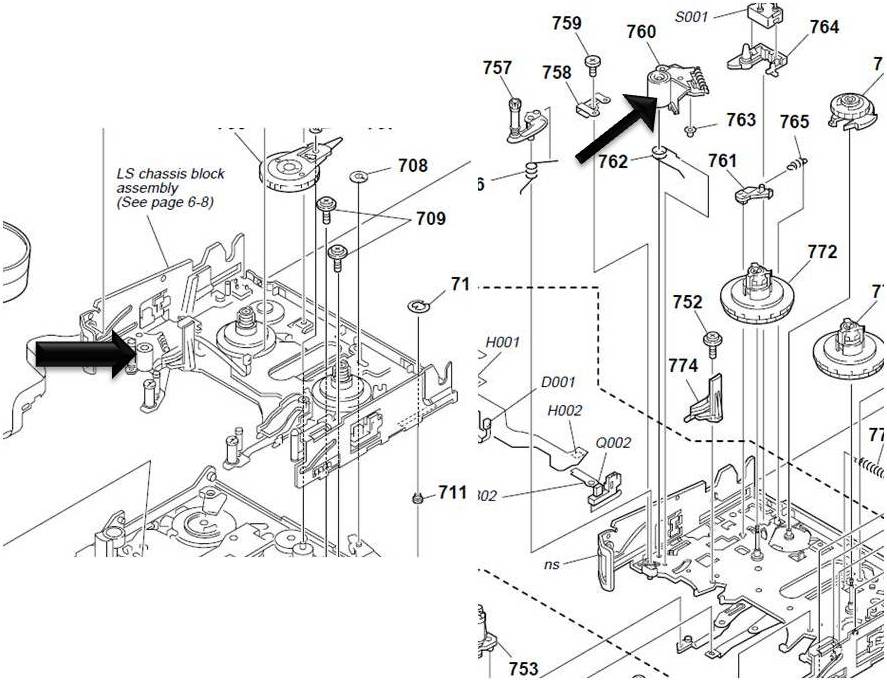
Picture3.jpg
Robert Lightfoot
Sun, 27 Mar 2011 16:14:36 +0000
Sony trv280 hasnt worked in YEARS! I just got done beating it like it owed me money andholy crap it worked like a charm - went about 7 rounds toe to toe with the camera before it submitted - thank you!
Diddy
Mon, 28 Mar 2011 23:06:52 +0000
Whack, I wanted to take a sledge hammer to my Handycam TRV-480! My Sony Stopped working last summer with the C31:23 error code shown on the screen. As a result I missed taking video of my vacation, last days of my mom, my kids birthday and xmas. Desperate to shoot my kids talent show tommorow I ffound this posting and gave the camera a good WHACK (with the video in) and nothing.... Then I took the video out, and turned it off and gave it another WHACK@@@@ and IT WORK'S!!! Hard to beleive such fine tuning COULD work on complex camera?
AlBee
Thu, 31 Mar 2011 21:19:00 +0000
Thanks everyone -- same error here -- urgently needed to get the recorded movie off the tape and onto the Mac - and yes - a bit of BFAI saves the day (BFAI- Brute force and ignorance)- a good whack or three on the tape side and the 31-23 is gone and we have our footage.
Cheers
Andrew
Andrew
Tue, 12 Apr 2011 06:49:24 +0000
this is supply reel fault needs 10$ and 40 minuts only for servicing the camera in my shop
SHEKH
Sun, 17 Apr 2011 08:14:25 +0000
Debbie thanks c:31:23 it worked for me , but i have to confess i wack every thing that does not work!
inventorbobs
Mon, 18 Apr 2011 02:36:28 +0000
increible pero cierto, un par de golpes y we'r back on businnes.
new member of the WHACK club
Luis Plata
Wed, 27 Apr 2011 20:03:43 +0000
I am joining the Debbie fan club! One good slap upside the tape door side, C:31:23 has gone away. Man, I have not done that successfully since the '70s on one of the old TVs that would not stop rolling (V Sync). Thanks for the wonderful tip!!
Rick
Mon, 09 May 2011 23:52:44 +0000
Oh my gosh!
I stayed up ALL night, never went to bed, because I had a video project due for a final project in my schol, and I had this problem. Now it's like, 6 in the morning, I'm about to get dressed for school, and hitting the camera solved it!
Grace
Wed, 18 May 2011 10:52:03 +0000
Wack-a-Sony worked for me. I have a TRV480. Bumped it twice on the left (oriented as you would use it). Turned it on. Same error code C:31:23 Reinsert the Cassette. I then hit it twice on the right. Removed the battery for about 10 secs, long enough to clear/reset the error codes I assume. Replaced the battery and turned it on. Fixed!!! Recorded a performance for an hour that night. I have to assume something is loose or worn, and that this won't continue to worked indefinitely but who knows, I never figured hitting an expensive camera would work. Thanks Debbie and to all who posted.
John
Sat, 21 May 2011 13:45:47 +0000
You saved my bacon with the "slap the camera" trick. We hadn't used the camera (Sony DCR-TRV280) for a few years, and when we brought it out for one of our kids who needed to do a school project, we got the C:31:23 error. After trying everything else, I gave the unit five firm slaps (about the pressure of a non-enthusiastic round of applause), and it worked. I forgot about the old "American way" to fix things (like my father's old Zenith TV).
YouSavedMyBacon
Sun, 29 May 2011 01:44:29 +0000
I have a TRV250 and the smack worked for me. I did it about three times and works like a charm now!
Betty
Sun, 29 May 2011 19:05:50 +0000
So I'm reading all these threads and I can\t believe that a solution to this problem is to smack the camera around! seriously...someone should send thsi whole thread to Sony!
I have the same problem actually..I thought it was my cassette until I realised it doesn't play any..
Did the first steps...remove battery, power cord and all that put everything back and still the same.
.....smacking the camera right now. just a couple of shots.
Result?
It's working now!
Wow....I'm at a loss for words.
thanks for the suggestions!
Losing it!
Mon, 30 May 2011 02:29:07 +0000
Tenia exactamente el mismo error (C:31:23) y bastaron solamente unas palmaditas sin amor para que la vieja DCR-TRV280 empezara a funcionar como nueva. Despues de consultar el manual y seguir todos los tontos pasos que segun te ayudaran, pero al final te dicen que es hora de visitar a Sony, una reparacion al estilo del siglo pasado fue mas que suficiente. Thanks Debbie for this valuable advice, you are awesome...................
Rub�n Vel�squez.
Mon, 30 May 2011 07:41:56 +0000
Got this error message in the middle of filming my daughter's dance recital; infuriating!! Missed all her performance BUT saw this post and tried smacking my camera and amazingly it worked!
Angela Godfrey
Mon, 13 Jun 2011 20:11:18 +0000
I tried the whacking a few times but it didn't work for me - maybe I wasn't desperate enough. I then took a small pait of tweezers and moved each of the tape drive heads. The white plastic bits that turn the spindles in the tape cassette. One of them felt a little tight and then ran smoothly. I suspect that the whacking frees the spindles.... if the spindle moving doesn't work the next step is a drop-kick....
Pastor james
Tue, 21 Jun 2011 13:02:50 +0000
I have read the comments in fits of laughter. I too was a little nervous about slapping my camera! I thought I might need to do it a few times but no, just the one slap, took the tape out, re inserted
and Bob truely is your uncle on this one. hoo ray for Debbie!
Anna
Wed, 22 Jun 2011 08:31:43 +0000
Unbelievable! Was afraid to try this on a trv250 but didn't know what else to try. Gave it a couple whacks, and it works!! Thanks!!!
MMM
Wed, 20 Jul 2011 17:49:11 +0000
Smacker wacker did nt work for me,but you know what,I am gonna smack hm some more,read to many success stories.
BBB
Sun, 31 Jul 2011 03:01:06 +0000
got the c31:23 error on my old pc9E, I discovered that the rubber wheel was loose, found the service manual, the j mechanism schema on the net, then the part number X-3950-359-1, I was about to buy a ne part and replace it and I found the post with the pen tube hack
thanks !
LTH
Sat, 06 Aug 2011 09:51:30 +0000
Did not work for me. I hit that thing till my hand was bruised. Finally I threw it as hard as I could at the floor. That pretty much broke it for good. Piece of junk.
Tami
Thu, 11 Aug 2011 02:02:04 +0000
I have a 12 year old DCR TRV 330. I kept it in good shape but haven't used in 6 years.
I got the error and after founding this thread I smack the cam.
I actually works. I couldn't believe it. Not sure for how long this works but it's time to backup old movies.
Good luck,
Hugo
Thu, 18 Aug 2011 16:57:10 +0000
Cave-man approach works. I have most of my tapes digitized but have a few more to go. Got the dreaded error. Read the posts and gave it two smacks. The tape ejected. Put in a new tape and we have a solid recording. Not sure how long this will last, but hopefully long enough to get the rest of my tapes off and migrate to a newer camera. The camera is over ten years old...
Chris
Wed, 24 Aug 2011 03:57:05 +0000
CRAIG A POST IS CORRECT LOOSE WHEEL MIDDLE STEM TOOK 3 MIN AND WORKING TKS CRAIG A
CHRIS
Fri, 26 Aug 2011 01:42:43 +0000
Just Smashed the tape side and worked!...It�s funny, out of logic and it sucks because you pay good money for a "quality brand" like Sony and is not suposed to be this way!...It�s acceptable for a cheap Chinese camcoder, not for a "Japanese Hitech expensive device". :(
Armando
Sat, 27 Aug 2011 14:35:16 +0000
worked for me too!!!!! SIMPLY UNBELIEVABLY SIMPLE
who needs the manual
slap on the tape side
try 2 3 times softly not to do any other damage
gabidi
gabidi
Sun, 28 Aug 2011 06:19:28 +0000
i got TRV 250 with code 31:23. i was about to buy a camera from craigslist for 150 dls. so i check online for the code and found this web site. and saw Debbie smake tech so i try it a my god it work. i cant believe it she save me some money. now i can transfer my movies to DVD. thanks Debbie
johnny boy
Sat, 03 Sep 2011 05:53:03 +0000
I own a Sony DCR-TV33. I found the problem and fixed. There is a black transport roller on a pin inside. Holding this roller onto the pin is a white (very tiny) plastic tube the slips onto the end. This plastic tube can move its way up leaving the roller loose. All you need to do is push down on the top of the roller and white pin (probably hidden from view. I used a tiny screwdriver. This is the only black roller inside the mechanism and helps to move the tape through the device.
To fix: Open the tape door. Remove any tape you have inserted. Look inside through the open tape cage (the roller in my model is just to the right of a flashy piece of bent metal (SEE ATTACHED PHOTO). Simply take an object like an eyeglass flat screwdriver an push down on top of the roller. The reason "slapping" has worked is because you are jarring this roller back down in place (sometimes). Good luck!
Attached Image: 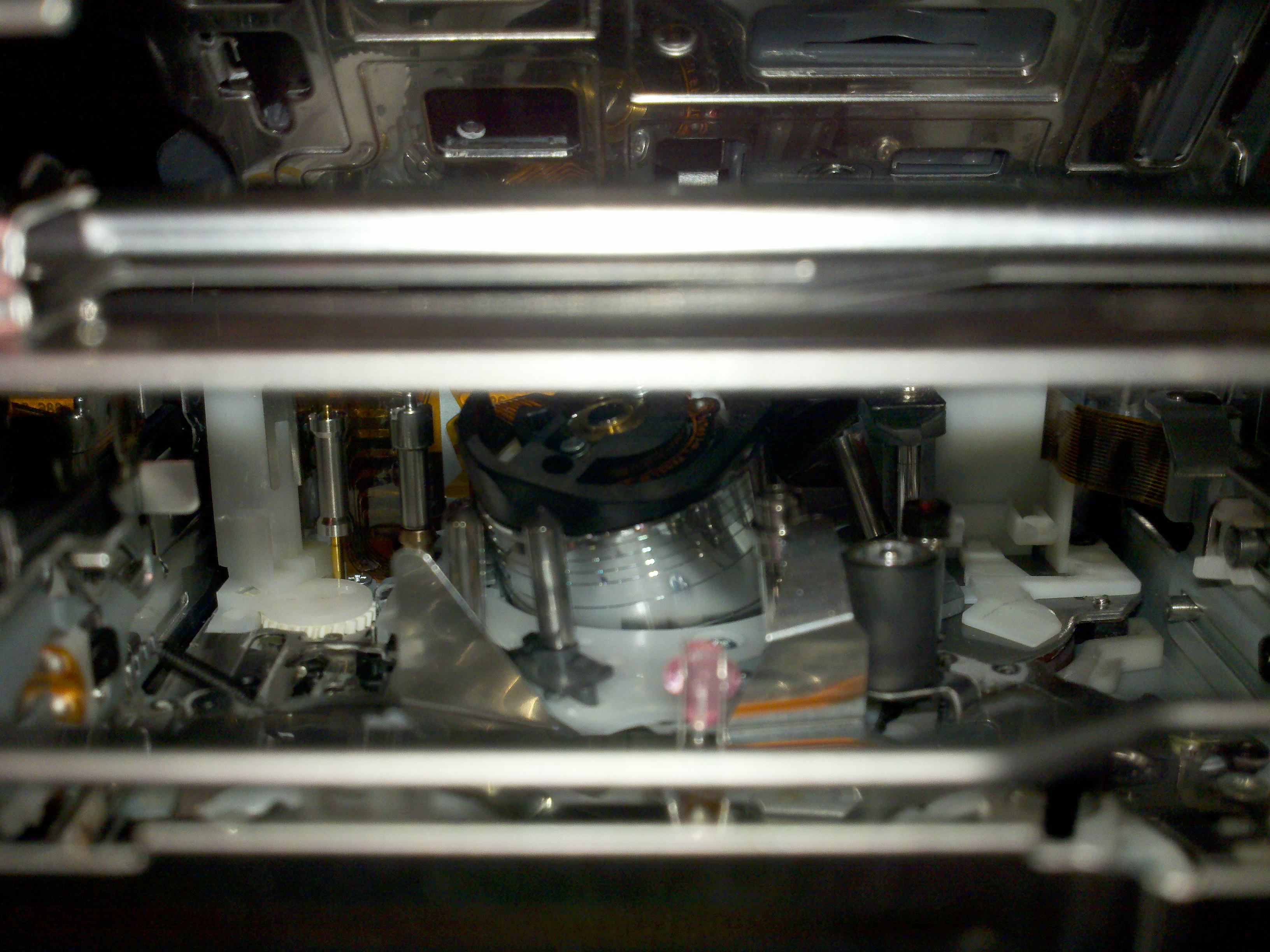
2011-09-10_15-04-19_397.jpg
Sony Owner
Sat, 10 Sep 2011 19:15:34 +0000
Try using a cleaning cassette. That solved the problem for me.
Per Karred Larsen
Mon, 19 Sep 2011 07:09:37 +0000
Okay I've actually had training on tape devices like these and I had the C 31:23 Error on our Sony DSR-PDX10 Camcorder provided by NavMedia.
So I was curious what the 23 problem was. I was able to find the answer in this thread and have a solution other then smacking it. Also I see why it would work.
Get the actual compartment that holds the tape open. Remove the tape if it's inside. Once you can see all the gears inside remove power so you can work without shocking yourself. There is a gear with a black cylinder wrapping itself around it on the right side of the center. You can use a small flathead to push it back down. Basically it has came loose. I tried it right after and it worked. Smacking it would knock it back in place but I don't want to knock any other gears out as well. Hope this is safer for some of us who don't want to beat the hell out of it.
ICFN Pacheco USS Lassen
Sun, 25 Sep 2011 04:17:38 +0000
I found a new trick for error C 31 .... reinsert the cassette,...... so before smash the camera ...... press eject... when the tape is half ejected ... get the battery out put the battery in and reinsert the cassette ...it worked for me I have an handy cam 3ccd !!
Ks Beats
Sun, 25 Sep 2011 23:31:51 +0000
Secretive about the :23 code? It's written in all their service manuals.
31:23 is an S reel fault. That is the supply reel. This could be that the tape isn't moving at the correct speed and a sensor noticed it. Sometimes I find the pinch roller missing or it's loose. If it's loose, you can slide the pinch roller off the shaft with your finger.
I fixed the pinch roller one time using a pen tube to act as the stopper to prevent the pinch roller from sliding off.
You can see my fix here: dtforum.net/index.php?topic=110738
me
Thu, 29 Sep 2011 11:43:28 +0000
well i would never have believed it. today PC8e had the code error and i took the tape out and whacked the tape side and WHOHOO!
nice work and thanks for sharing
Gra
Sun, 02 Oct 2011 21:38:31 +0000
I tried giving a few hard slaps but it only worked for a few minutes. Even after fity or more thumping there was no success.Then I came across the well-explained article complete with illustrations by Jason Katman. I realised two parts were missing from my Sony model: the tiny white tube and the black rubber roller. Leaving the camera open and inverted over the table I gave a few thumps and out fell the two missing parts. I positioned the roller on its spindle and used the tiny white plastic tube ( yes, even this piece had a crack down its side) to act as a stopper. However to make sure the tiny tube did not dropout again, I added a tiny bit of rubber glue on the top and inside.
The Sony Model that the Sony Centre guy told me is beyond repair now works perfectly.
Thanks Mr.Jason Katman!
Sony Error Code C:31:23 DIY Fix
created by Jason Katman 2.17.08
[email protected]
--------------------------------------------------------------------------------
Paul
Mon, 10 Oct 2011 12:17:58 +0000
Check: http://www.youtube.com/watch?v=VUIN-ygjN_g
it made my day and I didn't have to smack my camera :-)
Tobi
Mon, 17 Oct 2011 13:01:15 +0000
Sony HDV-HC5 just got the 'reinsert' and code warning but after finding out another tape works and with a clue found here about that spring locking mechanism on the tapes I found the problem. The tape which doesn't work has a stronger locking mechanism spring than the other tape which I tried and works. I also realized I had left a tape in the camcorder since our last trip( 4 months ) and I will bet that spring tension on that little arm for all that time has weakened the arm or changed its position slightly. And these are all Sony brand miniDV MVM60PRR tapes.
Now that I know a cause what is the solution?
1) call Sony and try to get replacement tapes?
2) cut a pin to size, get it red hot and insert it into the plastic while holding the lock open and then placing tape over the head so it won't come back out?
3) hold the lock open and use some kind of glue to keep it open? what glue?
4) ? What else could we do to hold that lock open without also causing damage to the part inside the camera doing the job on other tapes?
Doug
Sun, 23 Oct 2011 21:56:09 +0000
it worked! Amazing tips to us. This is funny but it works. Thanks....
kristel
Wed, 26 Oct 2011 00:07:22 +0000
ya! mine tape got stuck, can eject out! 1st you have take out the battery, whack the side of the vcr get something losen in yr tape or machanism, then insert back the battery, try eject, if you can get the tape out, it work!! haha..
aaron malaysia penang
Mon, 31 Oct 2011 01:41:16 +0000
I wacked it a couple of times and it didn't work. The beeping kept going so I thought, all these claims of whacking it is BS!..but after wacking another 10 times it worked!! thanks debbie!!!!!!
SOnia
Thu, 03 Nov 2011 05:18:28 +0000
me ha funcionado perfectamente el golpeteo con la palma de la mano en los costados de la video camara sony tvr118 me he ahorrado un dinero, haz la prueba antes de un gasto, y muchas gracias por la ayuda
joelinychoco
Thu, 03 Nov 2011 05:45:57 +0000
I have a VX2000 that cost an arm and a leg a few years back. Not used for 8 months . Battery wasn't left in, Sony tape was. When I fitted the battery i got a repeating ping(x8)noise and the afforementioned c:31:22 error code. Gave it a good slapping on all sides and was amazed to find it works! Thanks to all for maintaining this thread. I'll now try this technique on the Mrs. Steve
steve neal
Wed, 16 Nov 2011 08:34:35 +0000
I had the C:31:23 error on my Sony CCD-TRV138. After reading this thread, I tried 4-5 light hits to the side of the camera. . . . It worked for me - the camera now works just fine. Thank you!
J. Jordan
Mon, 21 Nov 2011 04:19:59 +0000
It didn't work for my sony DCR-PC330 and error 31:22 keeps on repeating! HELP
Dex
Wed, 23 Nov 2011 02:46:24 +0000
Sign me up as another satisfied member of the 'whack-a-cam' club! I did have a look at the little rubber roller/white tube first and they looked OK and I was manually able to roll/turn them but after 5 good whacks on each side of the cam (TRV-245E), all worked as new again! Clearly this Digital 8 format isn't going to be around for all that much longer, so whilst my cam's still working, I'm now going to transfer all my 30+ hours of video to my laptop. Anyway hats off once again to Debbie and good luck to the countless future suffers of this design flaw!
Nick
Wed, 23 Nov 2011 12:48:50 +0000
Holy Cow!!! I have had an error code C:31:40 nightmare with the Sony DCR-TRV350 for the last 8 years or longer. I just took out the tape, turned off the power, slapped the side of the camera the cassette goes into about 6 times with an open palm and PRESTO!!!!! The dam thing actually works now. Amazing. I am never one to recommend slapping your sensitive electronic components but after i searched for hours over the years on how to fix this error code without paying I decided what the hell since the technology is getting older the worst that could happen is I would end up buying a newer camera if this did not work. But it did! Thanks for the tip. I am now going to suck every bit of life out of this handycam before buying a new camcorder.
DCR-TRV350
Mon, 28 Nov 2011 16:45:34 +0000
The Hitting method does work for a while well after i went to sonys instant chat and it went like that
8:09 PM Connecting...
8:09 PM Connected. A support representative will be with you shortly.
8:09 PM Support session established with Kaleb.
8:10 PM Kaleb:
Hi. Welcome to Sony Online Support. I'm Kaleb. Please allow me a moment to review your concern.
8:10 PM Kaleb:
Thanks for waiting. I'm sorry that the error message is appearing on the Camcorder. I'll be glad to assist you with this.
8:10 PM Kaleb:
When did this first start occurring?
8:11 PM Customer:
A few days ago after i finished with a recording i did.. try to turn it on and put my tape in and the error popped up
8:12 PM Kaleb:
Thanks for the information.
8:13 PM Kaleb:
Please confirm the error message that is appearing on the camcorder.
8:13 PM Customer:
yes im looking at it right now.. in the top right had corner of my LCD screen it shows C:31:22
8:14 PM Kaleb:
Thanks for the confirmation.
8:14 PM Kaleb:
Please wait while I search this information for you.
8:15 PM Customer:
thank you.. for what i read in the manual it said "a problem you can service" and gave me directions but did not work.. if that helps at all
8:16 PM Kaleb:
Thanks for waiting.
8:18 PM Kaleb:
I suggest that you power reset the camcorder and check if that works.
8:18 PM Kaleb:
To Power Reset the Camcorder, please remove the Battery Pack from it and then set the Power Switch to ON for 15 seconds.
8:18 PM Kaleb:
Then, reinsert the Battery Pack after 1 minute and check if that helps.
8:19 PM Customer:
okay..
8:20 PM Customer:
okay.. it looks as tho the message dissappeared.
8:20 PM Kaleb:
Okay.
8:20 PM Kaleb:
I am glad to know that the issue is resolved.
8:20 PM Customer:
thank you so much Kaleb..
8:21 PM Kaleb:
You are welcome.
8:21 PM Kaleb:
Based on our conversation, this is the help you were looking for.
8:21 PM Kaleb:
If you need any additional information feel free to stop by our chat room again using the same email address.
8:21 PM Kaleb:
Goodbye and thank you for contacting Sony Online Support.
8:21 PM Customer:
okay thank you so much have a good night.
8:21 PM Kaleb:
You are welcome.
Try and power resetting. then it should go away.
OneSecondProduction
Wed, 07 Dec 2011 01:25:11 +0000
After slapping the camera around for a while, I found the pinch roller laying in the bottom of the tape compartment (something I saw on another post). I put the roller back in place (on the center post of a group of three near the back of the tape compartment) and tried the camera again, holding it horizontally so the roller would stay in place. The camera worked. After being unable to find a source for parts (no parts breakdowns) if cut a short piece of 16 ga. wire and removed the insulation. This fit nicely over the post for the roller and I trimmed it off flush with the top of the roller. We'll see how long this lasts.
Bill Burris
Sun, 11 Dec 2011 16:31:03 +0000
Wow, I took the majority ruled fix and hit the side of my camcorder twice and now it works! Try it before you get it serviced and it costs you! Nothing beats "free"!
Carrie
Tue, 13 Dec 2011 20:10:56 +0000
No effin way! Had the C:31:23 error. Smacking it worked! 5 times on the tape side, hard. Mine has been sitting idle for about 4 years. I just have to transfer 5 tapes and then move on to my newer camera. All hail Debbie and the Net! Screw Sony!
Joe
Thu, 22 Dec 2011 07:03:51 +0300
Debbie! your are the goddess of sony cameras! wacking the tape side on the DCR-PC101E very old tiny model worked! Thanks a million!
batikha betinjene
Tue, 27 Dec 2011 04:26:00 +0300
Well. I'm 62 and thought I heard it all. Prior poster said whack the tape side and BOOM. Another "it worked". Bought on e-Bay for 35 bucks so had nothing to loose. Glad I didn't send it to Sony. $233.54. Online repair guy wanted $141.00. Palm of hand $00.00. THANK YOU.
Dale Lewis
Wed, 04 Jan 2012 22:23:37 +0300
My Sony TRV 17 E, had the error C:31:40, found on the other page of this site which says to smack it's bottom, I get C:31:23 after smacking it. Then found this page, which says smack it too. Now it's working!!! Remind me of those black and white CRT TVs in the 70s..
Patrick
Sat, 07 Jan 2012 00:34:57 +0300
I was a little scared to smack it but after a few min. i gave it some wacks on each face and now it is fine... Thanks
dave
Sat, 14 Jan 2012 18:29:32 +0300
THANK YOU INTERENT !! :)
I never tought you can fix a camcorder with you force and not using your brain.
Thank you guys for all your posts.Sorry my english I am from Europe.
Thank you again and wish you all the best.
Robert Klasse
Sun, 22 Jan 2012 00:58:37 +0300
I have a DCR-TRV103 camcorder.
I have the camera apart and looking at the 3 roller side...the black roller is not moving but there is not white locking nut. Is that important to have?
On the other side where the 2 silver rollers are, is the bigger roller supposed to have a black roller around it? Also at the top of this roller (nearest the control panel (Play, FF, RW, etc) is there supposed to be a screw in the black part? I have a screw that fell out when I opened it up. It is very wiggly.
Does anyone have a good picture of the interior of this camcorder?
I just need to transfer MANY 8MM tapes to DVD.
Thanks!
Karen
Sun, 22 Jan 2012 07:51:20 +0300
Have had same error message but removing tape and replacing with another used tape cured the problem. When replaced problem tape it was miraculously cured
Johnts
Wed, 25 Jan 2012 19:35:46 +0300
Well, i have this damn error in my Digital HDV VCR and i found this place, and well at first i was afrain i will damage my VCR slaping it, but what the hell, i do it, and WOW!!! the error is gone and working like a charm again. Thank you very much for this info guys =)
Audiokiller
Mon, 30 Jan 2012 21:48:14 +0300
I stopped using my TRV-138 back in 2006/7 because of the "reinsert cassette" error. I completely disassembled and reassembled it to no avail. I have a bunch of tapes I need to copy over. I'll try the whack-a-cam approach tonight.
Glen
Wed, 15 Feb 2012 20:55:30 +0300
Thank you Debbie! This really worked. My camera hadn't been working Error C:31:23 and my baby is about to start walking so I needed it fixed quick. Was thinking of getting a new camera but I'm having an opperation done in a few weeks and really cant afford it right now. Looked on line for head cleaners..they dont sell them for hi8 videos anywhere. Then i found this site. I hit it like you sugested.I was already not working so why not give it a try. IT WORKED!!! Thank you because of this I will have my babies first steps on video forever :)
Forever greatfull
Fri, 17 Feb 2012 03:37:57 +0300
2012 and giving it a good crack on side worked for me as well not bad for a 7 year old thread cheers deb .
graham
Tue, 28 Feb 2012 00:26:21 +0300
Wow... March 9, 2012 and am now a member of the "Whack-a-cam" Club. Hard to believe that this thread is this old and people are still finding it. Thanks Deb for your insight.
Henry
Sat, 10 Mar 2012 05:40:51 +0300
I can't believe this actually worked!!! My husband and I spent a whole day trying to fix our Sony HandyCam DVR - TRW480 camcorder error issue of "Reinsert Cassette" to no avail, even following the manual which was of NO help. Then as a last ditch effort I ran into this forum and did what Debbie said to do, and I whacked mine a few times on the sides, and reinserted the tape and I can't believe it worked immediately. All I could keep saying and repeating to myself is: "You got to be kidding??? I can't believe this!". Thanks so much you just saved me a bundle of money. A $400 whack is much easier to do (LOL).
Cory
Sat, 10 Mar 2012 11:56:27 +0300
I just got the C:31:23 on my Sony DCR-v2100 video camera.
I had left a tape in the camra for about 2 weeks, so many that caused the problem.
I took the tape out and put another tape in. Attempted to forward and rewind only for the tape to be mashed up.
Then I tried putting in a cleaner tape for 10 seconds. I then replaced that with a new tape, and all appears to be fine again. I can only assume leaving a tape in the camera caused the problem.
Shaun
Sun, 11 Mar 2012 00:11:20 +0300
Just bought a SONY TRV-318 today at a moving sale for $20! I knew it had a problem, but thought "What the heck?" as I have been looking for one to play old tapes. Took it home did some research, found this thread, beat the living heck out of it.... (including the use of a mallet) and nothing!!! Doh! I was so excited that might be all it took. However! After another hour or so of tinkering, beating, and looking out popped a roller from one of the pins that was not previously on! I reattached it where I figured it belonged and voila! Perfect. $20 for a camera and two hours of my time. I'll take it. Thanks for all the posts! Some helped my voyage!
Mark
Sun, 11 Mar 2012 07:20:46 +0300
simple request---- will future owners look at the black roller pin prior to whacking? Let's see if the whacking is re-seating the roller
whack something other than my camera
Fri, 16 Mar 2012 09:46:43 +0300
March 2012 and im officially part of the "whack-a-cam" club :P Unfortunately i missed my lil girls birthday party due to the error on the camera! Which only started the day of her birthday party (typical) Oh well, they'll be plenty more for me to record, lol! Thank you Debbie, ya advice has become sacred, lol! Bet you didnt expect your answer to be helping hundreds of people for many years, did you! Haha!!
Lil83
Mon, 26 Mar 2012 01:59:51 +0400
Try smacking the side of the camera relatively hard with the palm of your hand. Eject the tape and insert the finger put the finger inside and move right and left and reinsert the tape.
csaba petru
Sat, 31 Mar 2012 19:44:37 +0400
Debbie you are the Best!! I was so sad when my camcorder stopped working and kept giving me the error. I can say, happily, I was watching my daughters baby videos last night. I can't believe it was as simple as smacking it! :) Thanks for posting that!!!
Life SAVER!!
Erica
Tue, 03 Apr 2012 20:55:13 +0400
Sony UK today quoted �180:00 to repair DCR-TRV144E error code 31:23 Gave it a whack works fine Thanks everybody Glad Sony have earned nothing.
graham poore
Thu, 05 Apr 2012 01:38:21 +0400
Same here! I smached the tape side of te camera and it works again! thx debbie!
Thomas
Sun, 29 Apr 2012 14:42:03 +0400
Well....i was about to buy a head cleaner but discovered this site. I was getting the c 31 23 error code. Humerously I smacked my camera with a few surprisingly solid hits with open palm...Can't believe it...it actually worked! No joke. I have a sony DCR-HC38 that hasn't worked for 10 months. Thought I'd give the smacking a try. I will see if it still works in a few hours...I am quite shocked...:)
bsnyder
Fri, 25 May 2012 08:07:06 +0400
I thought when I googled sony handycam dcr trv 480 reinsert cassette error code c:31:22 AND C:32:20, and read the replies about error code C:31:23 and others related; I seen the post to whack the camcorder to get it to work properly. I have to be totally honest, I thought people had lost their minds, until I seen it was posted many, many times, so thought; I might as well have give it a try, since I could not afford to send it to a shop to be repaired. I am so freaking amazed at the results: it actually fixed the problem, and I only whacked it once with the palm of my hand. THANK YOU SO MUCH DEBBIE FOR POSTING THIS 7 YEARS AGO!!!!
Darlinda Snell
Thu, 31 May 2012 06:38:04 +0400
Well, after much fiddling, i finally resorted to trying a previously mentioned fix. I whacked the crap out of it, worked ever since.
Jimbo
Thu, 14 Jun 2012 23:43:05 +0400
Smacking the camera around worked for me! Thanks! (Sony DCR-TRV330)
JS
Wed, 20 Jun 2012 21:16:29 +0400
LOL! I have a Sony DCR-TRV250 and the hand smack worked, hahahaha!
Abigail
Mon, 25 Jun 2012 17:12:26 +0400
Thank you so much for the suggestion to disconnect and then reconnect the battery. Worked like a charm! I thought I was going to have to make the repair/replace decision, and you saved me from that!!!!
Christie
Thu, 28 Jun 2012 00:25:19 +0400
The slapping works !!!! Thank you :)
jacob
Wed, 04 Jul 2012 22:43:25 +0400
hi thanks smacking did wonders and cured my handycam error c31:23 also
vandana
Fri, 31 Aug 2012 23:20:25 +0400
hittin' the cammera worked!, wow!, also i found this.. http://www.youtube.com/watch?v=VUIN-ygjN_g
Mario V.
Wed, 05 Sep 2012 08:52:25 +0400
That link mentioned above REALLY WORKS!!!
Rude Dog
Fri, 07 Sep 2012 02:00:36 +0400
Debbie thanks, the slapping works, and know my cam working at 100%....
Wil Brooklyn NY
Sun, 16 Sep 2012 20:23:08 +0400
Thank you Debbie, I SMACKED my Sony camcorder after the message of c21-32... It WORKS! Thanks again for the tip!
breezy
Mon, 17 Sep 2012 03:31:03 +0400
debbie was right smake the side of of it three time it worked!!!
linda
Fri, 12 Oct 2012 02:56:50 +0400
I was getting the C31:23 error and the only thing that has changed was that I used a Maxell tape instead of a Sony tape. I put a Sony tape back in and the problem stopped. On the bottom of the tape where the cartridge spindles are, you will see a small rectangle slot that must be depressed a certain depth for the spindles to turn. It seems that slot on the Maxell tape needs to be depressed further than the Sony tapes. I had to fold some paper and tape it to the top side of the cartridge so when the cartridge bay shuts, it presses the tape further down so that the slot get the appropriate depth. This solved my issue. Will only buy Sony tapes from now on. Camcorder still works great even though it is 10 years old.
TRV25 guy
Sat, 13 Oct 2012 21:06:34 +0400
Yep, hadn't used my Sony TRV25e for around 5 years, it'd been in its case all that time.
Got the code, gave it a few smacks, didn't do it, kept changing tapes, and smacking also, and eventually it worked !!!!!!
Thanks :)
Jez EMIN
Thu, 25 Oct 2012 23:11:52 +0400
It works!
My TRV 245E sony digital 8 camera signalled the same error code and I just followed the "smacking the side of the camera" rule.
and it works! and its free! Thanks a lot!!!!!
Peter
Tue, 30 Oct 2012 22:33:11 +0300
Whacking and creatively dropping my elderly DCR-PC101 the error would not die. I thought if i cant dislodge this thing by dropping it, maybe a more direct approach would work. I took the tape out and stuck my finger in . I moved all that could or should move, replaced the tape and it was fixed.
YOU DON'T HAVE TO WHACK YOUR CAM!
Which is surely the oddest sentence I have written on a forum.
Paul Hannah
Wed, 31 Oct 2012 15:06:51 +0300
Have had my camera about 6yrs and until today never had a problem.The reinsert tape and that c code popped up.I did look and feel inside and nothing appears loose or broken or rattles.the black roller is in place. Luckily I found this thread on google and I have now joined the whack a cam club.Im sure its a temporary fix but I will take it.going to transfer my old tapes while i can and use it till its dead for good.Im glad being as the holidays are approaching and fixing it would cost more than replacing it. No wonder our landfills are full. THANKS DEB
Melissa Swindell
Thu, 15 Nov 2012 23:10:17 +0300
Thanks to this forum my TRV11 is back. Tried some whacking but no luck. Reading more posts, I looked inside further to see what I could with eyes that had been educated a bit. I saw what appeared to be the infamous black roller lodged in a back corner. Just happened to have some surgical forceps handy and was able to extract the culprit. Figured out where it belonged and got the needed bit of wire insulation to replace the keeper that had come off and we are back in business. Good thing I didn't get carried away with the whacking as it would have done no good for this project.
Bob S.
Sat, 08 Dec 2012 01:51:33 +0300
Its helping I smash camera thank every one here
George
Wed, 19 Dec 2012 02:16:28 +0300
7 years later and the smacking solution still works... what a joke Sony! Haven't used my camera in years, and got it out today and had this error. A couple of solid whacks agaisnt the tape side and voila.
Willy
Fri, 21 Dec 2012 01:34:29 +0300
I joined the club. I was getting my camera ready for Christmas when I got the 31:23 error. I found this site and gave it several whacks. It is working now. This is the first problem I've had in the 9 years I've had my trv250 Sony Camcorder.
Bill J.
Sun, 23 Dec 2012 06:35:25 +0300
Seriously...just smacked it and it worked. Thats crazy.
Kelly H
Mon, 14 Jan 2013 17:26:38 +0300
I've just smacked my TRV22 that was showing C:31:23 error code and it worked! Spanked it only once too, so thanks Debbie, you rule.
Webster Webski
Wed, 30 Jan 2013 05:21:14 +0300
wow - one quick small whack on the side of the camera and voila! Amazing! The best tip ever.
Monique
Sat, 09 Mar 2013 23:07:28 +0300
The height is that the 2005 medicine stills works in 2013.
I have a DCR TRV250 which was giving me the same error. Was frustrated and was planning to take it to the service center. Decided to check on the Internet if others faced the same issue. I read Debbies suggestion . Felt stupid initially to do it, but then went i went though the entire trail..realised that this was the ONLY solution. Smacked it and WOW it worked absolutely fine. Hope SONY starts paying Debbie some royalty for the solution
prakash
Mon, 22 Apr 2013 14:55:46 +0400
Brilliant - smacking on the side worked for me. Thanks for sharing.
Ash
Sat, 27 Apr 2013 13:29:52 +0400
I just tried this smacking trick and it worked. I am absolutely amazed. I just wonder how long it will last!
LMR
Tue, 21 May 2013 21:52:49 +0400
Couldn't believe it...8 yrs later this method still DID save my sister's dinosaur TRV218E camcorder from being totally useless.Moreover,not just one...but TWO TIMES!!
Hope that it will help keeping this camcorder functioning long enough to let me finish converting my sister's (the camcorder's previous owner) tape collection to DVDs.Then that won't matter anymore.
Mr.Nantawat
Tue, 11 Jun 2013 11:54:43 +0400
Després de 2 anys de problemes he pogut arreglar el problema del codi 31:23 de la meua SONY Handycam DCR PC101E. Després dhaver canviat el pivot blanc sobre el cilindre negre que va permetre que funcionara un temps, després de provar el sistema d'apallissar-li el costat, a la fi tot era un problema mec�nic. El cilindre blanc sobre el que llisca la cinta i el de color negre que es troba a la seua dreta (causa de tot el problema)han d'estar a la mateixa altura. La soluci� és fer una suau palanca amb un tornav�s a la base de l'eix del cilindre negre i/o pressionar-lo des de dalt per tal d'alinir-los tots dos. De moment funciona i espere que dure
Miquel
Fri, 19 Jul 2013 22:03:14 +0400
I would like to be a new member of Debbie�s church, I was praying to smack my camera and see it working and can be part of it... but not. As in december 2005 "needle nosed pliers" mention, I found a SMALL BLACK CYLINDER rolling by the cassette�s compartment. Luckily I fund it, and follow the "needle nosed pliers" instructions, but without pliers, I just found the thin pin at the right side, between a silver-black roller and a white roller, unplugged the camera and took out the battery, then push down the top of the cassette's case, and then I had enough space to put with my fingers the black cylinder in the thin pin.
Thank you guys! this is agreat forum. Keep it alive!
newfan
Sun, 28 Jul 2013 03:46:50 +0400
The error C 32:23 happened in only one tape. As I wanted to watch the movie, I ejected the tape and moved the tape a little bit forward using a tool (a pencil, for example). NOTE: to release the tape, there is a small rectangle at the back of the tape and inside it there is a swtching piece that you hold while moving the tape forward. Insert again the tape and it works.
Alberto
Sun, 03 Nov 2013 01:37:02 +0300
Just spanked my TRV230 (12+ years old) like the naughty little bastard it was and it's currently rewinding and respecting authority again
Adam
Sun, 24 Nov 2013 00:15:57 +0300
I was really skeptical that how could one treat the electronic thing with manhandling and thought many a times, kept ejecting and putting in the tape, removing the battery, cleaning the inside and demoisturing and what not and got convinced that this cam isnt going to work anymore so i lost my cool and gave it a gold solid slaps on the tape side. and you know what IT WORKED.......
Shauky
Wed, 27 Nov 2013 17:07:04 +0300
Whacking it works on the DCR-TRV380. So glad it worked! What a crazy fix.
Kevin
Mon, 30 Dec 2013 21:08:09 +0300
My camera has not worked for years. I read the comments about hitting the camera, I had nothing to loose the camera did not work, so I had my husband give it a few hits- it worked. I am amazed, hope it is not just a fluke and it continues working.
Thank
Joan
Fri, 03 Jan 2014 06:10:12 +0300
Had the same C31:22 problem with a 10 year old DCR TRV250E. After a few slaps its working again. I will keep my eye on the rollers if it happens again. Quoted �50 to �100 plus VAT for repair, so well worth the slap. Glad to be a member of the cam slappers club.
Graham
Mon, 20 Jan 2014 23:59:18 +0300
My Handycam stopped with code C.31:22. Expecting to have to replace it as it is old (but takes perfect video), I googled fault code and found this forum.
Three sharp slaps later and......Fixed!
Thanks guys. Really pleased.
Nigel
Wed, 05 Feb 2014 17:45:30 +0300
BLAME THE ATMOSPHERE.
THESE FAULT CODES IN SONY CAMCORDERS ARE USUALLY CAUSED BY THREE THINGS: A DIRTY DEW SENSOR; WHICH CAN BE CLEANED WITH ALCOHOL AND A Q-TIP; A SYSCON CRASH WHICH CAN BE SOLVED BY A PIN RESET ON THE CAMERA HOUSING; OR AN OXYDIZED TAPE TRANSPORT SPINDLE WHICH USUALLY COSTS $130 BUCKS TO FIX (USA CAMERA).
THESE CONSUMER CAMCORDERS ARE PRECISE, TRICKY AND CANNOT BE FIXED BY ANY NOVICE. I KNOW. BANGING THEM ABOUT SELDOM WORKS AND IS NOT ADVISED. BE SURE THE HEAD DRUM IS SHINY AND NOT CLOUDED AS THEY DO OXYDIZE.
MY c31:23 CODES ALWAYS COME WHEN THE SONY CAMERA HAS BEEN SITTING IN THE CLOSET FOR A LONG TIME, AS THE COMPONENTS BECOME UNSTABLE DUE TO AGE.
TROPICAL REGIONS DESTROY THESE DELICATE CAMERAS DUE TO HIGH HUMIDITY AND SUDDEN EXPOSURE TO AIR-CONDIDIONING. ONCE CCD FOGGING AND COMPONENT OXYGENATION SETS IN THE CAMERA IS ON THE WAY OUT.
SO SMACK AWAY! BETTER STILL; GET A NEW CAMERA.
TONY FIX-IT
Sun, 16 Feb 2014 10:14:58 +0300
I fixed by smacking it too!!!!
araceli
Sun, 16 Feb 2014 22:21:35 +0300
http://www.dtforum.net/index.php?topic=110738.0
xx
Wed, 26 Feb 2014 16:29:49 +0300
I tried all the suggestions and none work. I have the DCR_TRV 350. First trouble came up when I was going to review footage I had shot in Galveston with my kids., rewound and hit play before I should have hit stop first. First I had error 31:23, then after trying all suggestions I could , then I got 32:11. Now what I have is a wonderful cassette of memories stuck in my camcorder with no funds to fix it and still unemployed after 9 months now..Maybe if all of you pray at once, I will spontaneously explode and then my problems are over. So now I have an inoperable SONY HI-8 and inoperable Samsung Mini-DV with a lot of memories that will never be seen :(. Somebody kill me. My hobby for 42 years is now a memory. I give up
Robert Schwarz
Tue, 11 Mar 2014 21:23:21 +0300
I have TR480. This code comes up with some frequency. Smacking seems to have worked for me now. Glad I didn't spend for a new camera! Thanks everyone who contributed.
Alex
Sat, 22 Mar 2014 20:52:43 +0300
Whacking worked as well... Unbelievable!
Thanks Debbie
Matt
Tue, 29 Apr 2014 01:30:05 +0400
Hi guys n girls, 9 years on and still whacking away or its correct term "physical persuasion" is the only option. i)Whack ii)remove mains and battery iii)Replace and it works :)
neil wilkins
Mon, 12 May 2014 01:39:05 +0400
Hello,everybody -English is not my first language, sorry-, I just fix this problem in my camera, I just swap the battery with other from a different camera (same model), I just change the battery, turned on the camera and the error code just disappearance (went away), probably the error code is about the age of the battery. Im happy my camera is working again, i will put the original batery later and tell you what happen. I hope Im helping.
Rob
Sun, 18 May 2014 11:02:23 +0400
Had the c 31:23 error on the TRV-250. You may be hesitant to try oddball fixes as I was, but the "smacking the side of the camera" fix actually worked for me too. I searched the web for days trying to figure out what to do other than sending in for a costly repair. Tried removing power cable/battery several times, tried different tapes, nothing worked. then just decided to give the smack test a go and BAM! working like a charm. Just wanted to get it to work to convert our old tapes, and it did the trick.
Mark
Sat, 24 May 2014 23:27:19 +0400
Your hack with the ink tube helped me to fix the loose pinch roller on my Canon XH-A1. Thank you! Canon service told me that they can not repair only the pinch roller, so they advised me to pay 315 euro to replace the whole mechanism. Therefore, you helped me a lot!
Dan Turcu
Wed, 11 Jun 2014 19:45:42 +0400
What a happy day! The C:31:42 error is gone and my DCR-PC53E works again after giving it this hard treatment.
Henrik
Tue, 08 Jul 2014 12:07:35 +0400
I think im gonna have to try beating the bejeesus out of my camera. ill update you on this as ive not been able to use this for some time
Gerard Duffield
Thu, 25 Sep 2014 04:14:27 +0400
All these posts over all these years and nobody has ever fingered what the real cause is? Amazing, until now. :) Folks, its NOT just a Sony thing. The cameras a fine. Even better than some. The problem is the sensor that goes into the center hole of the cassette. Since ALL cassettes have a hole, then ALL cameras have the sensor. Then there are 2 detectors on each side of the camera looking for the sensor in the middle of the cassette. They see the sensor by looking thru a TINY hole in each side of the cassette thats only visible when the cassette door is open. SO, the door has to be open, the cassette has to be precicely in place, the sensor in the middle has to be clean to give off light in BOTH directions, the sensors on EACH SIDE have to be clean to SEE the light, the 3 sensors have to be functional, and the sensors have to be in alignment to see strait. SO, if ANY of that stuff above crops up, you get from SONY C:31:23. Another maker like JVC has their own dreaded code for the exact same problem. Because ALL miniDV camcorders have the exact same sensor setup. So those SMACKING the cameras, thats a hard thing they do. It could actually break the camera, or cause something else to come out of alignment. But if it works, you knocked off dust in the way, or poped the cassette into required alignment, or unstuck the cassette door, or banged dislodged sensors back into alignment. But now that you KNOW the problem, you can more intelligently try your fix. Like alcohol and a Q-tip to clean the 3 sensors. Just look at the holes on a cassette and you can determine where the sensors in the camera will be. BUT, if the center sensor is NOT giving off enough infrared light, cleaning and banging will do no good. Thats why shops quote $300 for that fix. Because thats about wht it takes to replace those sensors. They do go blind over time. Thats the way those sensors are. So they will get intermitent with age and a smack may move them to a tiny bit more favorable viewing position. But smack at your own risk. Because the drive belt might pop off. :O
stts
Tue, 14 Oct 2014 22:15:04 +0400
And since my post of this problem is so long, heres the rest of it. Those miniDV cassettes have a clear plastic window inside the center hole. If the clear plastic is blocked up with dust, the infrared cant get to the sesors on either side. Thats why for some people one particular tape is the problem. Clean the dust out of the cassette fixes that cassette. To be sure I placed a tiny piece of masking tape over the hole under the door on each side of the cassette. In a perfectly good Sony, I got the error C:31:23 each time I put that cassette in In a perfectly good camera. No error when I put another cassette in. So there you go. The mystery of this error is those 3 sensors seeing properly. Make them see and no more error. Thank you very much for allowing me to be a genius. :D
stts
Tue, 14 Oct 2014 22:38:30 +0400
And for those that say Sony camcorders are crap, they dont know what crap is. I have a JVC miniDV and that is the picture of crap. The plastic drive hubs were molded over a metal core and over time the plastic shrinks. So all those geared drive hubs crack over time. Then you hear it go tap-tap-tap when it fast forwards and reversed. Thats because the gears are cracked. And in play the picture skips as it runs over a crack. And finally when the cracks get bad enough it just stops working. Now thats a piece of crap camcorder. I have the DCRHC26 and its got well made plastic parts that dont crack. Except for one tiny part. The tiny plastic retainer pressed on top of the rubber capstan roller cracks. Then the roller wants to wander up and eat tapes. A simple fix is a tiny drop of super glue gell on the plastic retainer piece so it keeps capstan in place. A good quality camera is easy to fix. Because no camera is ever perfect, especially over time.
stts
Tue, 14 Oct 2014 23:05:56 +0400
Slapped the side 2 times and tape worked beautifully. It ejects, plays and records.
Michelle Rosario
Thu, 18 Dec 2014 21:43:02 +0300
The first post here was 2005, and here we are 10 years on. At which point I've just read this, and whacked my old DCR-PC9E, which hasn't worked for more than two years, instead flashing up the C:31:23 error. And goodness me, it's now working! I love that camera, and I can now enjoy using it again, and transfer my old tapes. So thank you! Thank you! Thank you!. C
Curtis B
Tue, 10 Feb 2015 23:21:31 +0300
Smacking it totally works! laughed at the thought but tried it anyway lol. WORKS ! SMACK YOUR CAMCORDER
LA14
Tue, 24 Feb 2015 21:15:08 +0300
Smacked it hard on the side as suggested by Debbie and its a miracle :)
Tachyon
Sun, 08 Mar 2015 06:43:19 +0300
stts makes a lot of sense - try cleaning the sensors before you whack it!
Smacking did not work for me - instead, when I heard that it was the wheels not turning I turned them by hand - for my DCR-PC5E this meant gently turning them using a paperclip - nothing harsh. I put the tape back in and it worked - so, there you have it two things to try before you beat your camera to death.
TinkerPhil
Mon, 18 May 2015 11:30:55 +0400
Slapping the camcorder might make you happy (:
The problem with the Sony camera is the pinch roller. This is a black rubber drum about the diameter of a pencil. It pulls the tape through the mechanism and drives the reel capstans. It either fell off or is dirty. There is a YouTube video about the nut so see that if it fell off. My problem was that the roller got slick from age. To fix it eject any tape, take the two screws out of the side panel, remove the side panel. You will find the pinch roller on the left side. Put something in the cavity to catch the debris. Roll some fine sandpaper around the erasure end of a pencil. Lightly roughen the rubber drum on all sides. try it before you put the side back on Walla, the error code is gone.
Namaste
Dean
Sat, 30 May 2015 06:12:19 +0400
Slapping the Cam a few times worked! Just bought off E-bay and have hundreds of tapes of the Adventures of the #REAL #Negotiator in #Miami & #Cartagena, #Colombia.
Thanks again whover came up with this simple solution. Saved my ass-big time.
Attached Image: 
d55964bf-7693-4b83-b40f-6ad2e9d85737.jpg
MARK ARMSTRONG
Mon, 06 Jul 2015 02:24:50 +0400
the camera broke 6 years ago after a trip to the beach. Smacked it couple of times, and now it is working. Trying to get all the tapes converted before it breaks again, baby videos and all:) Thanks camerahacker!
Meme
Fri, 02 Oct 2015 18:55:03 +0400
Hi, Can't belive it but it works gave my Sony TRV245E a serious whack to the door side after constant C31:23 error and it's now working fine! Trouble is I now have a seriously bruised thumb! Anyway happy to be a member of Debbie's "WACK A SONY CAM CLUB"!
Nigel G
Tue, 13 Oct 2015 20:20:59 +0400
Almost 11 years late, but I simply swapped the tape. It was quite exciting pulling out the old family camera 👌
Ray
Mon, 28 Dec 2015 23:46:20 +0300
I have a Sony Handicam DCR-PC3E showing error code C:31:23. I tried the banging method, and removing the battery methods....these did not work....but pushing the 'Reset' button did.
Adrian Loska
Wed, 16 Mar 2016 13:54:19 +0300
Smacking it works!
My Sony DCR-TRV130 aka 560 Digital 8 was used to record 4 hours of a wedding in Oct '15 then sat on a shelf until March of '16. Then it started up with the 31:23 error. AS an electronics technician in the US Navy I have worked on all kinds of equipment and I found this web site looking for any "take it apart" knowledge I could find. Since this is a tiny electronic / mechanical VCR with lots of delicate parts giving it a smack was not one of the first steps I would have taken.
Undo the strap over the cassette and take off any tripod shoe on the bottom. Disconnect the power cord and remove the battery. Take out the cassette if it comes out easily other wise just leave it in. Hold the left side in your left hand with the cassette down and bring the heel of your right hand up to give it a good whack or three like you were trying to pop the cork out a wine bottle. Don't be gentle but don't knock it out of your other hand either.
I don't know if it caused the problem but it was probably a better idea to NOT leave a cassette tape in the thing longer than a day when I put it on the shelf.
Good luck.
Phill E
Tue, 29 Mar 2016 14:26:34 +0400
I wacked it & sprayed of all over. It worked! I'm so embarrassed. 😳
I'm part of the sacking crew now �…
Davey
Wed, 30 Mar 2016 09:17:31 +0400
So I used my camera last night to record my daughters ice skating recital and went to watch it and got the same code. Checked out a few forums and tried all of the other options before I tried the whack-the-cam trick. It took about 5 times but it worked!! This is my second exact camera to have this code. I have liked this camera a lot and was hoping I would need to go out a purchase another one. I tried the reset button, I tried the remove the battery and wait, I tried located the pin things with nothing working. I had to whack it about 5 times fairly hard and then YES!! Success!!
Whack-the-cam club
Sat, 30 Apr 2016 19:52:30 +0400
I tried all of the above methods and nothing worked. Then I noticed a small reset button. pressed it and voila everthing works
Graham
Tue, 31 May 2016 23:18:32 +0400
I smacked it around, a piece dislodged and fell out. Camera still didn't work. Thankfully I found the piece on the floor because I needed it! Here's the true fix. http://www.ff-squad.com/sony/
Tammy
Fri, 03 Jun 2016 19:31:52 +0400
my old TRV120E was put sway in 2006 with the dreaded C30 23 fault. Got it out today for one last check before throwing. But checked the internet first, found this thread, and gave it the Debbie slap..Amazing,,,it's fixed.
rogerj
Sun, 07 Aug 2016 22:28:23 +0400
WOW! I didn't believe all this "whacking" nonsense, BUT IT WORKED!! i can't believe it still..
Salik Awan
Sat, 29 Oct 2016 16:32:35 +0400
I have a Sony PD170.I recently bought in Gumtree as a second hand, at the time of purchase everything was working fine, a week later when I wanted to use it, I got a C:31:23 code and The Camera was not allowing me to do anything. After some couple googling I came across the blog, and I thought this is NONSENSE .... yesterday I took the usermanual and said one or two mean words...and smacked the hell out my PD170,...and behold it's worked....it worked.....I'm so amaized...
Ayanda
Tue, 01 Nov 2016 09:28:29 +0300
I have a TRV140E. There was a C3122 error. It was beeping and not playing the casette. Then I started to look for a solution. I removed the battery for 60 seconds and then hit the camera with the palm of my hand several times. But you have to do it a little firmly. There is a C3323 error now but I think I can fix it with that way. Thank you very much :)
eiu75
Sat, 26 Nov 2016 02:54:40 +0300
I have a Sony DCR-TRV18. A damn expensive camera when it was new. I had transported it in a backpack and when I used it after that, it gave me the C:31:23 code. At first removing the battery was sufficent but later on, the problem grew. It seems that it's stuck like this now, after trying many things like smacking it ect. (Comment from 2005) I'm sure now, because this camera is 13 years old it would cost an arm and a leg, maybe a liver too, to get it fixed.
Jacob
Fri, 02 Dec 2016 02:26:04 +0300
Holy Shit it worked! After trying for hours and watching videos, I smacked it and the error code went away.. unbelievable.
DONNA
Mon, 20 Mar 2017 15:30:29 -0700
I have a Sony Handycam Vision Hi8 TRV318 with the flashing eject symbol and error code C:31:22. I was going to take it to a repair shop until I found this thread. I decided to give the good old-fashioned Debbie Smack� a try. I can't believe it worked! Smack Club for life! Thanks Debbie!
Red
Wed, 26 Apr 2017 11:18:33 -0700
I smacked my Sony today after sitting in the closet for almost 8 years. It worked!!! Debbie is the best!!!
Daddy G
Thu, 03 Aug 2017 15:03:53 -0700
OMGoodness! I have a Sony dcr-trv480 camcorder we bought brand new in 2002. It worked great up until a month ago. All of a sudden, it gave me a prompt saying "reinsert cassette." Then, I noticed the code "C:31:23," and found this thread. I too took Debbie's advice and wacked it on the tape side of it, a couple of times kinda hard, took the tape out, put it back in and PRESTO!! It works again like a charm! There must be some gears that get outta wack and all they need is a good wacking back into place! Thanks so much Debbie! Who knew???
Rozzie
Mon, 07 Aug 2017 11:45:14 -0700
2017.. bought a TRV318 from ebay so I can finally digitally backup all my old tapes. Despaired when I started this 15 year old camera and found this error. Then to find that a good spanking fixed it! Delighted and relieved.
Heidi Good
Sat, 12 Aug 2017 15:00:34 -0700
Sony Handycam DCR-TRV280, nothing else worked, including pushing the little white "straw" piece in the middle of the rubber roller bushing thing in with a flat-head screwdriver, I figured I had nothing left to loose if I couldn't get that C31:23 error to clear, so yeah I whacked the side of it (where the hand strap is) one time good and hard, and yep, it worked! I've had this camera since 2003, it stopped working with this error in 2014 (the day of my wedding) and this fixed the problem, I'm so thrilled, thank you! -Cat from RI, USA.
cat
Mon, 02 Oct 2017 18:17:52 -0700
I have that c:31:23 code and I record the video but it skips in playback or the audio is choppy
Desmond
Sat, 21 Oct 2017 07:13:56 -0700
I've joined the Smack-A-Sony club too! Brilliant - my DCR-TR8000E works again!
Many many thanks
Jerry
Fri, 17 Nov 2017 15:58:17 -0800
I have a Sony PC9 E cassette that did not work properly and had the C: 31: 23 error. It was stopped almost 6 years ago. I followed the advice of the strong slaps on the side for about 20 seconds and believe me, admirably it already WORKS. Thanks to all the advisers.
Jo�o Carrico
Wed, 10 Jan 2018 09:57:49 -0800
Damn, whacking it made it worse for me.
Barnstorm
Thu, 25 Jan 2018 14:52:45 -0800
Just want to add that I had a c:31:40 error code on my sony minidv casette player/recorder and smacking does the trick for these as well! Thank you!
Michael
Fri, 09 Mar 2018 11:32:16 -0800
Still works the whacking! Trying to move the videos into external disk. Did that once already but the external disk was dropped and did not work anymore. It would have cost 700$ to save the data... and my camcorser showed c3132. I whacked it and it works.. pretty old camcorder, though.
Crustiek
Mon, 02 Apr 2018 07:09:51 -0700
For me no results, I beat it, first gently, then I beat it to dead, always the same Code C31:23
christian lazar
Sat, 07 Apr 2018 16:35:00 -0700
II have both analog and digital tapes that can only be played on the Sony DCR TRV 350. and now I get the code C 31 -23 . I smacked the tape side and it worked .Don't know for how long but hopefully long enough for me to put my videos on a dvd.
anonymous
Fri, 15 Jun 2018 13:53:17 -0700
ITS THE GEAR THAT THE CASSETTE RIDES ON. ONE OF THE GEARS ARE STUCK. IF YOU CAREFULLY TWIST THE GEAR AND MAKE SURE THEY ARENT STUCK THEN EVERYTHING SHOULD WORK :)
Jack
Tue, 29 Jan 2019 13:59:28 -0800
Hi Guys, I found this website while trying to sort out a Sony VCR which would not play back the tape. I had watched a few sections of one or two tapes and then it ate one of the tapes. When I inserted the next tape and about 10 others it would not play back... just a blue screen. I had hit it yesterday before finding this website, but no luck. Today I turned up the heat with the smack and what do you know. I really thought this was a load of nonsense and that everybody commenting was just playing along, but this is no hoax. I live in South Africa and to find someone to fix this camera in our little town would be impossible. The camera has not been used for many many years and I am trying to transfer the old footage so I am so glad it is working. Thanks to everyone.
Merl Leenstra
Sun, 23 Jun 2019 21:53:49 -0700
i see i am about 15 years late to the ߵwack a cam' club, does anyone have any other advice on how to fix it, ive tried and i can't seem to shift the C:31:23 error code. tried all in the manual. i'm swear it's quite an old camera anyone have any advice?
regards Aaron
aaron
Sun, 17 May 2020 06:53:05 -0700
by the way it's around a 20 year old sony handycam dcr hc 14e
aaron
Sun, 17 May 2020 06:55:50 -0700
hello, I have a hdr-fx1 and have the same error message when loading a tape. It seems to be a tape feeding error. I have to lay the camcorder on its side (non-loading side of course) and as the tape loads gently tape the tape mechanism and that seems to work 95% of the time on the first try 99 on the second. My next move is to try disassembling the tape loading mechanism and giving it a thorough cleaning. But thats a lot of work. Hope this helps.
Al junco
Wed, 02 Sep 2020 17:52:30 -0700
Hi all! Smacking the camcorder was not working for me... the trick I used to finally get it to work involved:
1) Opening the tape deck & removing the tape
2) Take out the battery
3) Turn it upside down an SHAKE SHAKE SHAKE! Fairly aggressively for 5-10 seconds.
Then I put the battery back in, and tried the tape again. Success!
JJJJJJJJJJ
Mon, 09 Nov 2020 13:43:15 -0800
Ok, in 2021 the smacking trick still helps. Unbelievable. Thanks!
Michal
Fri, 26 Mar 2021 18:30:10 -0700
Just tried the "smack" approach with a DCR-TRV480 after cleaning the play head several times to no avail. It actually worked!
Wayne W
Sat, 27 Mar 2021 12:16:40 -0700
Debbie's 'smack' approach still does the trick in 2021.
Zach M
Fri, 24 Sep 2021 06:20:54 -0700
Hi all,
With great thanks to debbie I dont think she realised the impact she would have.
Anyway, I have a sony 250p that i bought new in 2005 and recently in 2022 mini dvcam tapes are getting stuck, When eject button pressed the camera tries to eject the tape but the camera then takes the tape back into the into cradle.
I am thinking about doing the smack the camera to repair the fault - thats probably what the sony technical services guys do and charge you a couple of hundred pounds for doing it - mind you they are professionals so you wont see the bruises !!!
My solution to date is to take off the camera panel that covers the tape mechanism and then press eject, then when the cradle ejects the tape forward i grab the tape stopping the tape being taken back into the cradle. I then wiggle the tape until i can pull it out of the device. I do tend to snap the tapes but the machine then is able to reset itself. this only happens with mini Dvcam tapes and not the full size tapes.
hey debbie, get a job as a sony technician or better still advertise yourself as a professional tape unjamer.
cheers its been great reading years and years of hillarious stories
will
Fri, 17 Jun 2022 07:32:27 -0700
still 2022 and debby solved my problem it three little whack�s im new it club wack thx 4 all u funny storys take care all
3VoLution
Fri, 12 Aug 2022 09:01:45 -0700
I was at a loss with my Sony PC120E and did as Debbie instructed and gave it a firm whack and it's working again :) 17 years on - thank you Debbie and to this very funny read.
Kristina
Wed, 14 Dec 2022 12:30:48 -0800
Ryan, wherever you are right now, thank you!
New member of camera slammers groups here
I have a Sony TR818 8mm Handycam with C:31:23 error and was desperate, tried to fix the pinch roller and still nothing until I close it up and give it a couple slaps with the palm and worked like a charm. Now I can move on with my projects that I had to stop them halfway ;)
Rob
Mon, 22 May 2023 15:08:09 -0700
Add Comment
|
Related Links
|
TrackBack
Related Content
Did your message disappear? Read the Forums FAQ.
TrackBack
TrackBack only accepted from WebSite-X Suite web sites. Do not submit TrackBacks from other sites.
Send Ping |
Spam Control
Title: Sony HVRM10U - C:31:23 Error Code
Weblog: Camera Hacker
Excerpt: I have a Sony HVRM10U Deck. I bought it on EBAY 2 years ago and the Company I got it from said it had been tested and everything worked. When I got it I turned it on and tested it and it really did work like the owner said it would. I never got a chance to use it for about a year and when I was goin . . .
Tracked: Mon, 23 Mar 2015 07:51:30 +0300
Related Links
Add Comment
Messages, files, and images copyright by respective owners.
425 Users Online
|
Get Our
$10000-above 
$5000-$9999
$2000-$4999
$1000-$1999
$500-$999
$200-$499
$100-$199
$50-$99
$25-$49
$0-$24
Gift Certificate

|
|