

 Add Comment
|
Add Comment
|
 Related Links
|
Related Links
|
 TrackBack
 Related Content
LCD Lightbox
It's been a long time since I touched film. Ever since I started using digital photographic equipment, I deal with film only when I need to digitize one of my slides or negatives. But recently, I moved. While sorting out my boxes, a negative fell out of the pile of stuff I was sorting. I wanted to make head or tail out of the negative, but it's always hard to see what's the content without a light box.
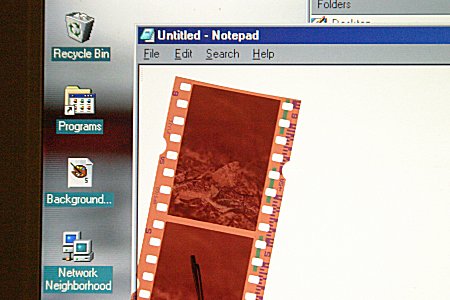
During my years of working with film, I have thought of a neat trick. Instead of buying a light box, or taking it out of your closet (if you already have one), you can open up a copy of Notepad in Microsoft Windows. The white text area of the Notepad is backlit, just like a light box. Put your slide or negative onto the screen (see attached picture) and you will instantly see the content of your film.
I just want to share this old trick with you this morning. If you have any light box tricks or tips, let us know.
Attached Image:
LCD Light Box.jpg
Chieh Cheng
Sun, 9 Oct 2005 08:58:45 -0700
While working on my Linux computer today, I realized that not everyone have access to Notepad. Sometimes, just finding a quick blank editor on an operating system is no quick and easy task. For example, X Emacs opens with an "about" screen. After clicking past the "about" screen, the editing area is divided into two with bunch of junk information in the window. VIM on the other hand brings up a window with a gray background, hardly a good color for viewing slides or negatives.
To make it easy on you, I have attached a file. Click on this file opens up the LCD Lightbox in your browser. You can also right click on it to open it in a new window or a new tab (Mozilla/Firefox). This link will work on any browser on any operating system. Now you can get a LCD Lightbox quick and easy.
Attached File: LCD Lightbox.html
Chieh Cheng
Tue, 10 Jan 2006 17:41:41 -0800
It works!!!!
Jack Yeager
Sat, 1 Apr 2006 15:33:56 -0800
You can use the url about:blank to open a blank page in any webbrowser.
about:blank is also my default homepage because it makes the browser open faster
Christian
Sun, 23 Apr 2006 16:29:22 -0700
MSPAINT Method:
-Open MSPAINT
-Press PRINTSCREEN (or PrtSc etc.)
-Press Ctrl+V
-Press Delete
-Press Ctrl+F
click your mouse to exit.
Steve
Fri, 16 Jun 2006 23:31:37 -0700
Virtual ScreenLightbox it's a litte flash movie that I made, to check your film strips on the computer screen. This application simply displays a blank(white) window to verify your film strips. Also, you can use the arrow keys and buttons that are in the bottom of the window to change to red, green and blue colors, if you are looking for a better contrast.
you are free to donwload at:
http://www.sinvertigo.com/blog/?p=1382
;)
Sinvertigo
Thu, 03 Dec 2009 16:54:24 +0000
THANK YOU! You saved me a bunch of cash and it is such a great solution.
Franni Tourtellot
Sun, 31 Oct 2010 02:40:19 +0000
Add Comment
|
Related Links
|
TrackBack
Related Content
Did your message disappear? Read the Forums FAQ.
TrackBack
TrackBack only accepted from WebSite-X Suite web sites. Do not submit TrackBacks from other sites.
Send Ping |
Spam Control
Title: LCD Soft Light
Weblog: Camera Hacker
Excerpt: I am on the road a lot. There are three things that are always with me: a cell phone, a camera, and a notebook computer. While on the road, I use the notebook computer to process my photos, keep in touch with folks, and update this web site. One day I found a new photography use for my notebook c . . .
Tracked: Mon, 27 Nov 2006 02:39:17 -0800
Add Comment
Messages, files, and images copyright by respective owners.
627 Users Online

$10000-above 
$5000-$9999
$2000-$4999
$1000-$1999
$500-$999
$200-$499
$100-$199
$50-$99
$25-$49
$0-$24
Gift Certificate

|
|